Window AVG
Introduction
The AVG window function calculates the average (arithmetic mean) of values within a window while keeping all rows visible. It's essential for comparing individual values to group averages and calculating moving averages.
In this lesson, you will learn:
- How to use AVG as a window function
- Compare individual values to averages
- Calculate moving averages for trend analysis
- Handle NULL values in average calculations
Basic Syntax
The window AVG function follows this pattern:
AVG(column) OVER (
    [PARTITION BY column(s)]
    [ORDER BY column(s)]
    [frame_clause]
)
Key Behaviors
| OVER() Contents | Result |
|---|---|
Empty OVER() | Average of all rows in result set |
PARTITION BY | Average within each partition |
ORDER BY | Running (cumulative) average |
| Both | Running average within each partition |
NULL Handling
AVG ignores NULL values in calculations. If all values are NULL, AVG returns NULL.
Visualization
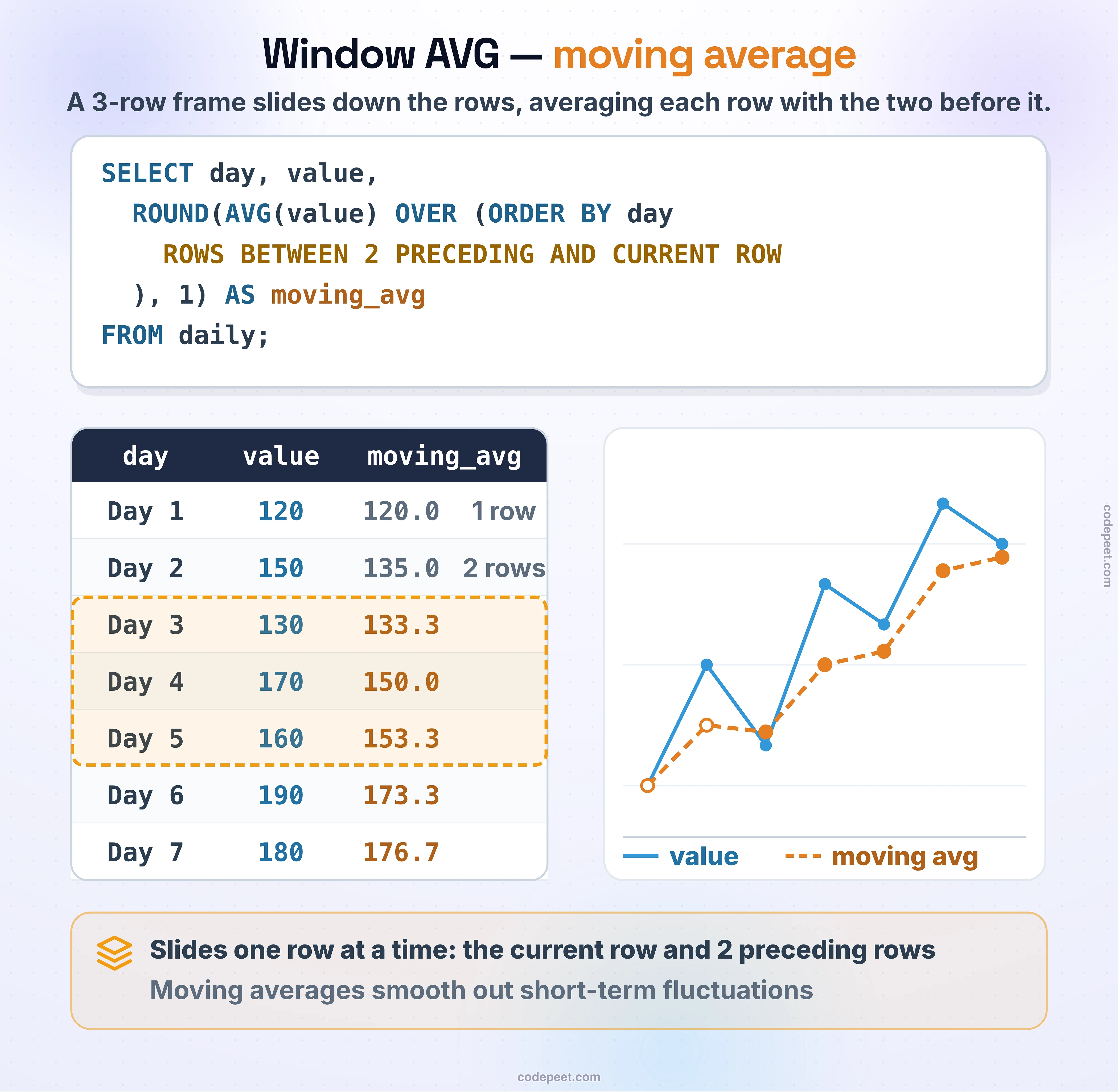
Window AVG -- Moving Averages
AVG with PARTITION BY
PARTITION BY divides your data into groups and calculates a separate average for each group.
Average Price per Seller
-- Average price per seller, shown on every item row
SELECT
    seller_id,
    order_id,
    price,
    ROUND(AVG(price) OVER (PARTITION BY seller_id), 2) AS seller_avg_price
FROM olist_order_items_dataset
LIMIT 20;
Each row shows the individual item price alongside the seller's average price.
Average Review Score per Product Category
-- Average review score per product category
SELECT
    p.product_category_name,
    r.order_id,
    r.review_score,
    ROUND(AVG(r.review_score) OVER (PARTITION BY p.product_category_name), 2) AS category_avg_score
FROM olist_order_reviews_dataset r
JOIN olist_orders_dataset o ON r.order_id = o.order_id
JOIN olist_order_items_dataset i ON o.order_id = i.order_id
JOIN olist_products_dataset p ON i.product_id = p.product_id
WHERE p.product_category_name IS NOT NULL
LIMIT 20;
AVG with Empty OVER()
When OVER() is empty, AVG calculates the average across all rows in the result set.
Global Average on Every Row
-- Show global average on every row
SELECT
    order_id,
    price,
    ROUND(AVG(price) OVER (), 2) AS overall_avg_price
FROM olist_order_items_dataset
LIMIT 15;
Every row displays the same overall average price.
Comparing Values to Averages
One of the most powerful uses of window AVG is comparing individual values to group or overall averages.
Difference from Average
-- Compare each price to seller average
SELECT
    seller_id,
    order_id,
    price,
    ROUND(AVG(price) OVER (PARTITION BY seller_id), 2) AS seller_avg,
    ROUND(price - AVG(price) OVER (PARTITION BY seller_id), 2) AS diff_from_avg
FROM olist_order_items_dataset
LIMIT 20;
A positive diff_from_avg means the item is priced above the seller's average; negative means below.
Percentage Difference from Average
-- Percentage difference from average
SELECT
    seller_id,
    order_id,
    price,
    ROUND(AVG(price) OVER (PARTITION BY seller_id), 2) AS seller_avg,
    ROUND(100.0 * (price - AVG(price) OVER (PARTITION BY seller_id)) / AVG(price) OVER (PARTITION BY seller_id), 2) AS pct_diff_from_avg
FROM olist_order_items_dataset
LIMIT 20;
Above or Below Average Classification
-- Classify items as above or below average
SELECT
    seller_id,
    order_id,
    price,
    ROUND(AVG(price) OVER (PARTITION BY seller_id), 2) AS seller_avg,
    CASE
        WHEN price > AVG(price) OVER (PARTITION BY seller_id) THEN 'Above Average'
        WHEN price < AVG(price) OVER (PARTITION BY seller_id) THEN 'Below Average'
        ELSE 'At Average'
    END AS price_category
FROM olist_order_items_dataset
LIMIT 20;
Running Average (Cumulative Average)
Adding ORDER BY creates a running average that updates as you move through the ordered rows.
Basic Running Average
-- Running average of prices
SELECT
    order_id,
    price,
    ROUND(AVG(price) OVER (ORDER BY order_id), 2) AS running_avg
FROM olist_order_items_dataset
LIMIT 15;
How Running Average Works
Row 1: price = 100 → avg = 100 / 1 = 100.00
Row 2: price = 50  → avg = (100 + 50) / 2 = 75.00
Row 3: price = 75  → avg = (100 + 50 + 75) / 3 = 75.00
Row 4: price = 200 → avg = (100 + 50 + 75 + 200) / 4 = 106.25
The average recalculates as more rows are included.
Running Average Within Partitions
-- Running average per seller
SELECT
    seller_id,
    order_id,
    price,
    ROUND(AVG(price) OVER (
        PARTITION BY seller_id
        ORDER BY order_id
    ), 2) AS seller_running_avg
FROM olist_order_items_dataset
LIMIT 20;
The running average resets at the start of each new seller partition.
Multiple Averages in One Query
You can calculate multiple different averages in a single query for comprehensive analysis.
-- Multiple averages for comparison
SELECT
    seller_id,
    order_id,
    price,
    ROUND(AVG(price) OVER (), 2) AS overall_avg,
    ROUND(AVG(price) OVER (PARTITION BY seller_id), 2) AS seller_avg,
    ROUND(price - AVG(price) OVER (), 2) AS diff_from_overall,
    ROUND(price - AVG(price) OVER (PARTITION BY seller_id), 2) AS diff_from_seller
FROM olist_order_items_dataset
LIMIT 20;
This shows how each item compares to both the overall average and its seller's average.
Practical Use Cases
Use Case 1: Review Score Analysis
Compare each review to the average score:
-- Review score comparison
SELECT
    order_id,
    review_score,
    ROUND(AVG(review_score) OVER (), 2) AS overall_avg_score,
    review_score - ROUND(AVG(review_score) OVER (), 0) AS diff_from_avg,
    CASE
        WHEN review_score >= 4 THEN 'Positive'
        WHEN review_score = 3 THEN 'Neutral'
        ELSE 'Negative'
    END AS sentiment
FROM olist_order_reviews_dataset
LIMIT 20;
Use Case 2: Payment Value Analysis
Identify payments that are significantly above or below average:
-- Payment value analysis
SELECT
    order_id,
    payment_type,
    payment_value,
    ROUND(AVG(payment_value) OVER (PARTITION BY payment_type), 2) AS avg_for_type,
    ROUND(100.0 * (payment_value - AVG(payment_value) OVER (PARTITION BY payment_type)) /
        AVG(payment_value) OVER (PARTITION BY payment_type), 2) AS pct_diff,
    CASE
        WHEN payment_value > 2 * AVG(payment_value) OVER (PARTITION BY payment_type) THEN 'High Value'
        WHEN payment_value < 0.5 * AVG(payment_value) OVER (PARTITION BY payment_type) THEN 'Low Value'
        ELSE 'Normal'
    END AS value_category
FROM olist_order_payments_dataset
LIMIT 20;
Use Case 3: Seller Performance Comparison
Compare each seller's average to the overall average:
-- Seller performance analysis
SELECT
    seller_id,
    COUNT(*) AS items_sold,
    ROUND(AVG(price), 2) AS seller_avg_price,
    ROUND(AVG(AVG(price)) OVER (), 2) AS overall_avg_price,
    ROUND(AVG(price) - AVG(AVG(price)) OVER (), 2) AS diff_from_overall,
    CASE
        WHEN AVG(price) > AVG(AVG(price)) OVER () THEN 'Premium Seller'
        ELSE 'Value Seller'
    END AS seller_tier
FROM olist_order_items_dataset
GROUP BY seller_id
ORDER BY seller_avg_price DESC
LIMIT 20;
Practice
Practice using window AVG with these exercises.
Exercise 1: Compare to Average
Show each payment value compared to the average for its payment type:
-- Compare payment to type average

SELECT
    order_id,
    payment_type,
    payment_value,
    ROUND(AVG(payment_value) OVER (PARTITION BY payment_type), 2) AS type_avg,
    ROUND(payment_value - AVG(payment_value) OVER (PARTITION BY payment_type), 2) AS diff_from_avg
FROM olist_order_payments_dataset
LIMIT 20;
Exercise 2: Running Average
Calculate a running average of prices ordered by order_id:
-- Running average of prices

SELECT
    order_id,
    price,
    ROUND(AVG(price) OVER (ORDER BY order_id), 2) AS running_avg
FROM olist_order_items_dataset
LIMIT 20;
Exercise 3: Multiple Comparisons
Show each item with both the seller average and overall average, plus the difference from each:
-- Multiple average comparisons

SELECT
    seller_id,
    order_id,
    price,
    ROUND(AVG(price) OVER (), 2) AS overall_avg,
    ROUND(AVG(price) OVER (PARTITION BY seller_id), 2) AS seller_avg,
    ROUND(price - AVG(price) OVER (), 2) AS diff_overall,
    ROUND(price - AVG(price) OVER (PARTITION BY seller_id), 2) AS diff_seller
FROM olist_order_items_dataset
LIMIT 20;
Key Takeaways
Here's what you've learned about window AVG:
- Partition Average:
AVG(col) OVER (PARTITION BY group)for group averages - Global Average:
AVG(col) OVER ()for overall average - Running Average: Add
ORDER BYfor cumulative average - Comparisons: Subtract AVG to find differences from average
- Classifications: Use CASE with AVG to categorize values
Common Patterns
| Pattern | Purpose |
|---|---|
AVG(col) OVER (PARTITION BY group) | Group average |
AVG(col) OVER () | Global average |
price - AVG(price) OVER () | Difference from average |
100 * (price - AVG(price) OVER ()) / AVG(price) OVER () | Percentage difference |
CASE WHEN val > AVG(val) OVER () THEN 'Above' ELSE 'Below' END | Above/below classification |