Window Order By
Introduction
The ORDER BY clause within a window function is crucial for many calculations. It determines the order in which rows are processed and enables powerful features like running totals and rankings.
In this lesson, you will learn:
- How ORDER BY works inside window functions
- The difference between window ORDER BY and query ORDER BY
- How ORDER BY enables running calculations
- Required ORDER BY for ranking functions
What Does ORDER BY Do in Windows?
ORDER BY inside a window function serves two purposes:
1. Defines the Order of Rows
It specifies how rows should be arranged within each partition for the calculation.
2. Defines the Frame for Aggregate Functions
With ORDER BY, aggregate functions like SUM become cumulative by default—they include all rows from the start of the partition up to the current row.
Visual Example
Without ORDER BY:
| Row | Value | SUM() OVER () |
|---|---|---|
| 1 | 10 | 60 |
| 2 | 20 | 60 |
| 3 | 30 | 60 |
All rows show the same total (60).
With ORDER BY:
| Row | Value | SUM() OVER (ORDER BY row) |
|---|---|---|
| 1 | 10 | 10 |
| 2 | 20 | 30 |
| 3 | 30 | 60 |
The sum accumulates row by row!
Visualization
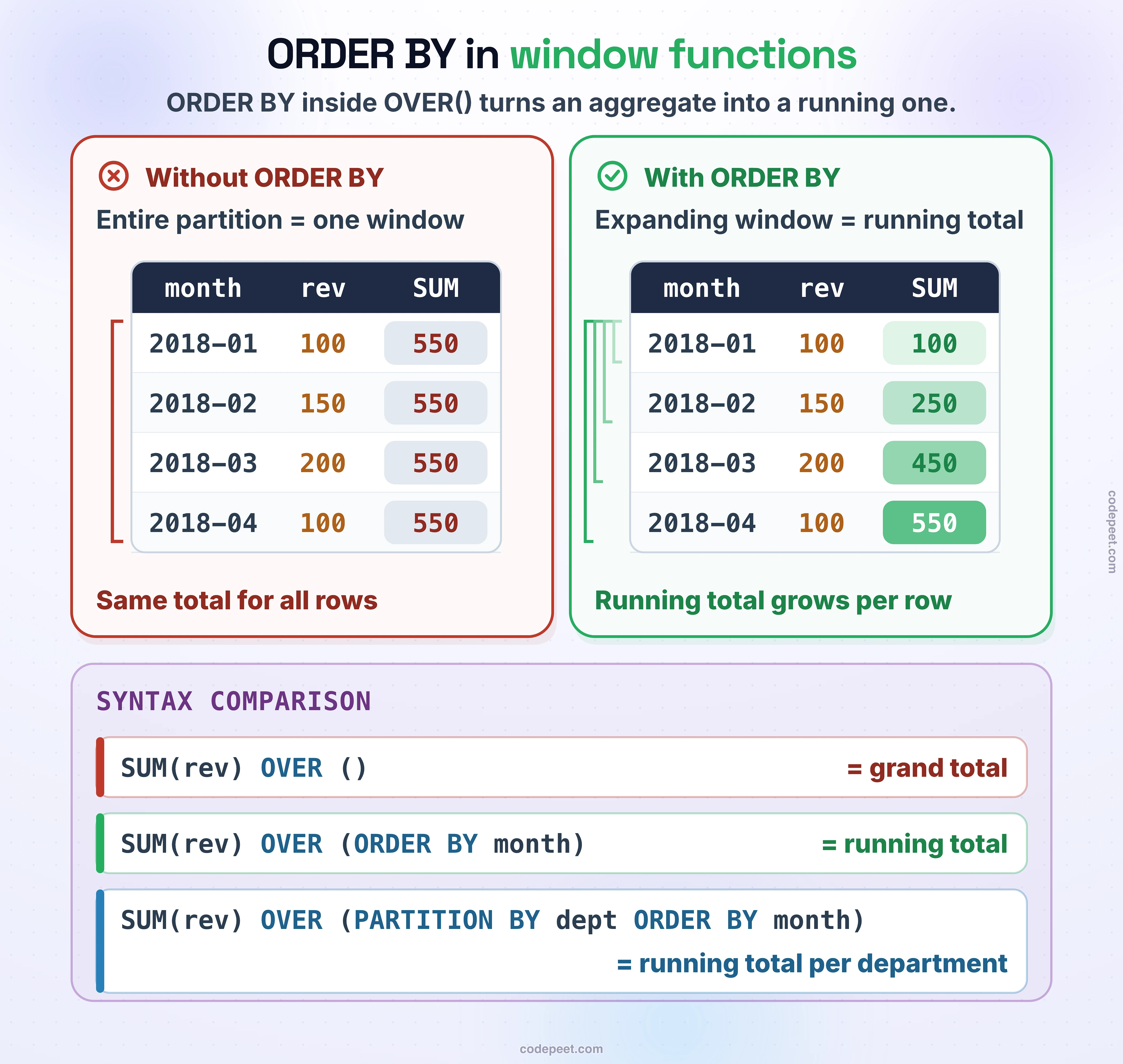
Window ORDER BY -- Ordering Within Partitions
Window ORDER BY vs Query ORDER BY
These are two different things:
Window ORDER BY
- Goes inside the
OVER()clause - Determines how the window function calculates
- Does NOT affect the final output order
Query ORDER BY
- Goes at the end of the query
- Determines how results are displayed
- Does NOT affect window calculations
Example: Both in One Query
SELECT
    order_id,
    price,
    -- Window ORDER BY: affects the running total calculation
    SUM(price) OVER (ORDER BY order_id) AS running_total
FROM olist_order_items_dataset
-- Query ORDER BY: affects how results are displayed
ORDER BY price DESC
LIMIT 15;
Notice:
- The running_total is calculated in order_id order
- But the results are displayed in price descending order
- These are independent operations!
Running Totals with ORDER BY
One of the most powerful uses of ORDER BY is creating running (cumulative) totals.
Basic Running Total
-- Running total of payment values
SELECT
    order_id,
    payment_value,
    SUM(payment_value) OVER (ORDER BY order_id) AS running_total
FROM olist_order_payments_dataset
LIMIT 15;
Running Total Within Partitions
Combine PARTITION BY and ORDER BY for running totals that reset per group:
-- Running total per payment type
SELECT
    payment_type,
    order_id,
    payment_value,
    SUM(payment_value) OVER (
        PARTITION BY payment_type
        ORDER BY order_id
    ) AS running_type_total
FROM olist_order_payments_dataset
LIMIT 20;
The running total resets to 0 at the start of each payment_type partition.
Running Count and Running Average
ORDER BY works with all aggregate functions to create running calculations.
Running Count
-- Running count of orders
SELECT
    order_id,
    order_purchase_timestamp,
    COUNT(*) OVER (ORDER BY order_purchase_timestamp) AS orders_so_far
FROM olist_orders_dataset
LIMIT 15;
Running Average
-- Running average of prices
SELECT
    order_id,
    price,
    AVG(price) OVER (ORDER BY order_id) AS running_avg
FROM olist_order_items_dataset
LIMIT 15;
Running Min and Max
-- Running min and max
SELECT
    order_id,
    price,
    MIN(price) OVER (ORDER BY order_id) AS min_so_far,
    MAX(price) OVER (ORDER BY order_id) AS max_so_far
FROM olist_order_items_dataset
LIMIT 15;
ORDER BY for Ranking Functions
Ranking functions require ORDER BY because they need to know how to assign ranks.
ROW_NUMBER with ORDER BY
-- Assign row numbers by purchase time
SELECT
    order_id,
    order_purchase_timestamp,
    ROW_NUMBER() OVER (ORDER BY order_purchase_timestamp) AS row_num
FROM olist_orders_dataset
LIMIT 15;
RANK with ORDER BY
-- Rank items by price (highest first)
SELECT
    order_id,
    price,
    RANK() OVER (ORDER BY price DESC) AS price_rank
FROM olist_order_items_dataset
LIMIT 15;
Ranking Within Partitions
-- Rank items within each seller (by price)
SELECT
    seller_id,
    order_id,
    price,
    RANK() OVER (
        PARTITION BY seller_id
        ORDER BY price DESC
    ) AS seller_price_rank
FROM olist_order_items_dataset
LIMIT 20;
ASC and DESC in Window ORDER BY
You can specify ascending (ASC) or descending (DESC) order:
Ascending Order (Default)
-- Ascending order (default, lowest first)
SELECT
    order_id,
    price,
    ROW_NUMBER() OVER (ORDER BY price ASC) AS rank_low_to_high
FROM olist_order_items_dataset
LIMIT 10;
Descending Order
-- Descending order (highest first)
SELECT
    order_id,
    price,
    ROW_NUMBER() OVER (ORDER BY price DESC) AS rank_high_to_low
FROM olist_order_items_dataset
LIMIT 10;
Both in Same Query
-- Compare ASC and DESC rankings
SELECT
    order_id,
    price,
    ROW_NUMBER() OVER (ORDER BY price ASC) AS rank_asc,
    ROW_NUMBER() OVER (ORDER BY price DESC) AS rank_desc
FROM olist_order_items_dataset
LIMIT 15;
Multiple Column ORDER BY
You can order by multiple columns for tie-breaking:
Syntax
ORDER BY column1 [ASC|DESC], column2 [ASC|DESC], ...
Example: Order by Status, Then by Date
-- Order by status first, then by date
SELECT
    order_id,
    order_status,
    order_purchase_timestamp,
    ROW_NUMBER() OVER (
        ORDER BY order_status, order_purchase_timestamp
    ) AS row_num
FROM olist_orders_dataset
LIMIT 20;
Example: Price DESC, then Order ID ASC
-- Multiple column ordering with different directions
SELECT
    order_id,
    seller_id,
    price,
    ROW_NUMBER() OVER (
        PARTITION BY seller_id
        ORDER BY price DESC, order_id ASC
    ) AS rank_within_seller
FROM olist_order_items_dataset
LIMIT 20;
LAG and LEAD with ORDER BY
LAG and LEAD functions require ORDER BY to know which row is "previous" or "next".
LAG: Access Previous Row
-- Get the previous order's timestamp
SELECT
    order_id,
    order_purchase_timestamp AS current_order,
    LAG(order_purchase_timestamp, 1) OVER (
        ORDER BY order_purchase_timestamp
    ) AS previous_order
FROM olist_orders_dataset
LIMIT 15;
LEAD: Access Next Row
-- Get the next order's timestamp
SELECT
    order_id,
    order_purchase_timestamp AS current_order,
    LEAD(order_purchase_timestamp, 1) OVER (
        ORDER BY order_purchase_timestamp
    ) AS next_order
FROM olist_orders_dataset
LIMIT 15;
Calculate Difference from Previous Row
-- Calculate price difference from previous item
SELECT
    order_id,
    price AS current_price,
    LAG(price, 1) OVER (ORDER BY order_id) AS previous_price,
    price - LAG(price, 1) OVER (ORDER BY order_id) AS price_diff
FROM olist_order_items_dataset
LIMIT 15;
Practice
Practice using ORDER BY in window functions.
Exercise 1: Running Total
Create a running total of prices:
-- Running total of prices

SELECT
    order_id,
    price,
    SUM(price) OVER (ORDER BY order_id) AS running_total
FROM olist_order_items_dataset
LIMIT 15;
Exercise 2: Partitioned Running Total
Running total per payment type:
-- Running total per payment type

SELECT
    payment_type,
    order_id,
    payment_value,
    SUM(payment_value) OVER (
        PARTITION BY payment_type
        ORDER BY order_id
    ) AS running_type_total
FROM olist_order_payments_dataset
LIMIT 20;
Exercise 3: Ranking
Rank items by price within each seller:
-- Rank by price within seller

SELECT
    seller_id,
    order_id,
    price,
    RANK() OVER (
        PARTITION BY seller_id
        ORDER BY price DESC
    ) AS price_rank
FROM olist_order_items_dataset
LIMIT 20;
Exercise 4: LAG for Previous Value
Compare current payment to previous payment:
-- Compare to previous payment

SELECT
    order_id,
    payment_value,
    LAG(payment_value, 1) OVER (ORDER BY order_id) AS prev_payment,
    payment_value - LAG(payment_value, 1) OVER (ORDER BY order_id) AS diff
FROM olist_order_payments_dataset
LIMIT 15;
Summary
Key Takeaways
-
ORDER BY in windows defines row processing order for calculations
-
Window ORDER BY ≠ Query ORDER BY - They are independent
-
With ORDER BY, aggregate functions become cumulative (running totals)
-
Without ORDER BY, aggregate functions compute over the entire partition
-
Ranking functions require ORDER BY - They need to know how to rank
-
LAG/LEAD require ORDER BY - They need to know previous/next
ORDER BY Effects on Aggregates
| Aggregate | Without ORDER BY | With ORDER BY |
|---|---|---|
| SUM | Total of partition | Running total |
| COUNT | Count of partition | Running count |
| AVG | Average of partition | Running average |
| MIN | Min of partition | Running min |
| MAX | Max of partition | Running max |
Coming Up Next
In the next lesson, we'll learn about Window Frames - how to precisely control which rows are included in the calculation beyond just ORDER BY.