Recursive CTE
Introduction
Recursive CTEs are the most powerful type of CTE. They can reference themselves, enabling you to traverse hierarchies, generate sequences, and solve problems that would otherwise require procedural code.
In this tutorial, you will learn:
- What makes a CTE recursive
- The structure of recursive CTEs (anchor + recursive member)
- How recursive CTEs execute
- Common use cases and patterns
- Preventing infinite loops
What is a Recursive CTE?
Definition
A recursive CTE is a CTE that references itself in its own definition. This self-reference allows the query to iterate, building results step by step.
Key Difference from Regular CTEs
| Regular CTE | Recursive CTE |
|---|---|
| Cannot reference itself | References itself |
| Executes once | Executes repeatedly until done |
| Static result | Builds result iteratively |
| No special keyword | Uses RECURSIVE keyword |
When You Need Recursion
- Hierarchical data: Organization charts, category trees, folder structures
- Network/graph data: Friend connections, route finding
- Sequences: Generate numbers, dates, series
- Bill of materials: Product components and sub-components
- Path finding: All routes between two points
Visualization
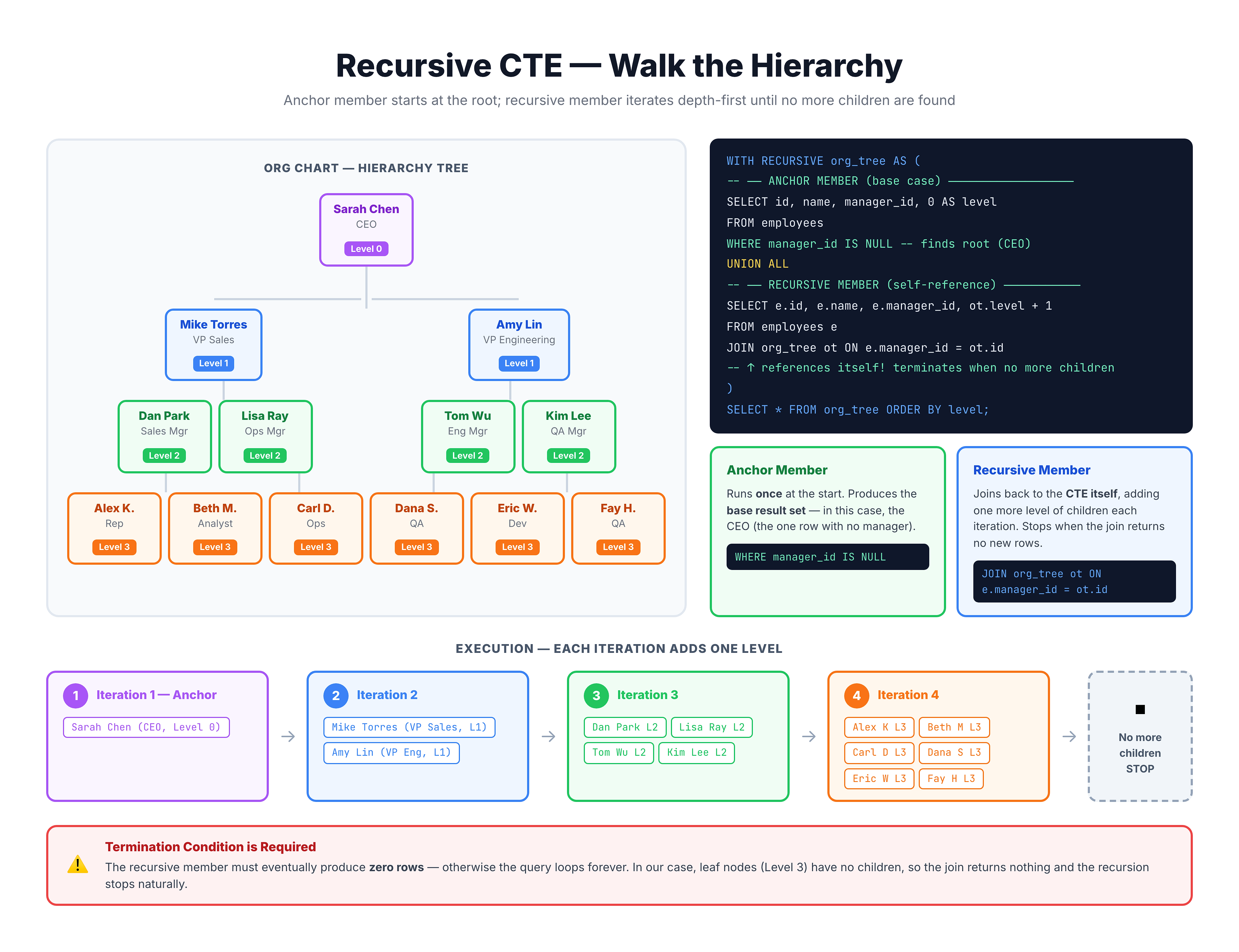
Recursive CTE -- Iterative Self-Referencing Queries
Basic Structure
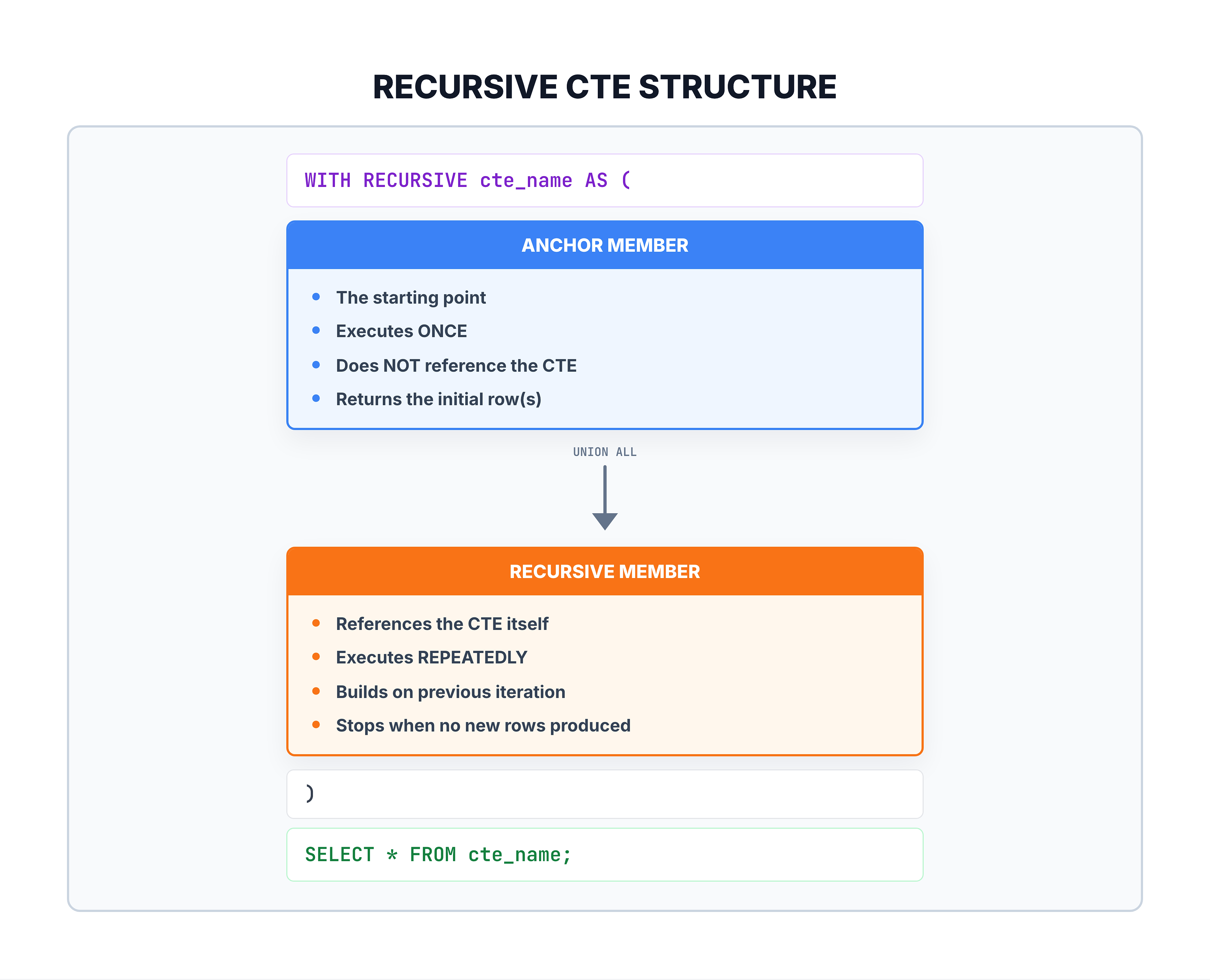
Recursive CTE Anatomy
WITH RECURSIVE cte_name AS (
    -- ANCHOR MEMBER: Starting point (non-recursive)
    SELECT initial_columns
    FROM base_table
    WHERE starting_condition

    UNION ALL

    -- RECURSIVE MEMBER: Self-referencing part
    SELECT derived_columns
    FROM cte_name            -- References itself!
    JOIN base_table ON ...   -- Usually joins to get next level
    WHERE termination_condition
)
SELECT * FROM cte_name;
Visual Breakdown
Important Notes
- RECURSIVE keyword: Required in most databases (PostgreSQL, SQLite). SQL Server doesn't require it.
- UNION ALL: Must use
UNION ALLbetween anchor and recursive member - Termination: Recursive member must eventually return no rows, or query runs forever
How Recursive CTEs Execute
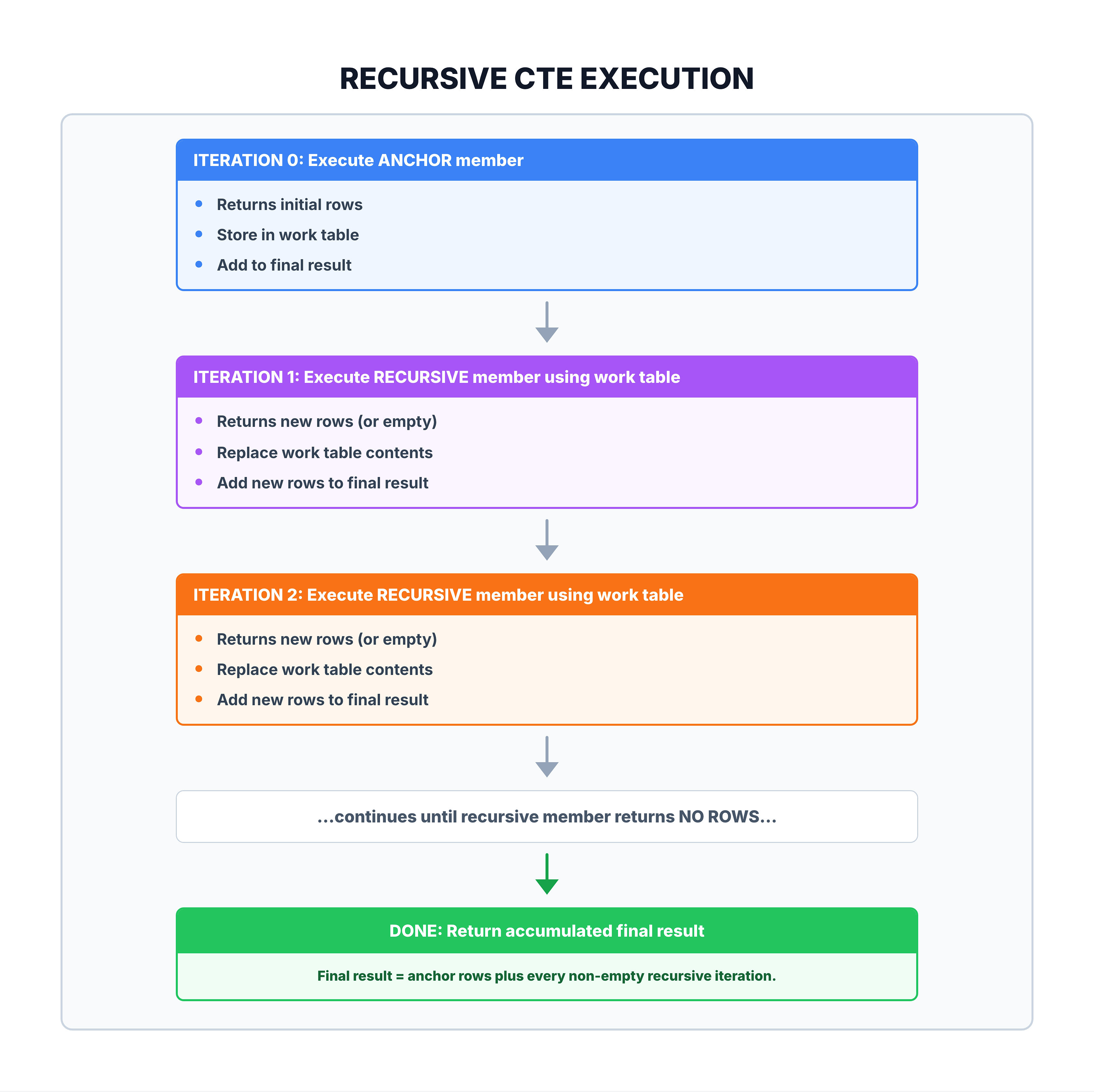
Execution Flow
Simple Example: Counting to 5
WITH RECURSIVE counter AS (
    -- Anchor: Start at 1
    SELECT 1 AS n

    UNION ALL

    -- Recursive: Add 1 each iteration
    SELECT n + 1
    FROM counter
    WHERE n < 5  -- Stop condition
)
SELECT n FROM counter;
Execution trace:
- Iteration 0 (anchor): n=1 → work table: [1]
- Iteration 1: 1+1=2, 2<5 ✓ → work table: [2]
- Iteration 2: 2+1=3, 3<5 ✓ → work table: [3]
- Iteration 3: 3+1=4, 4<5 ✓ → work table: [4]
- Iteration 4: 4+1=5, 5<5 ✗ → work table: [] → STOP
Result: 1, 2, 3, 4, 5
Common Patterns
Pattern 1: Number Sequence Generation
WITH RECURSIVE numbers AS (
    SELECT 1 AS n
    UNION ALL
    SELECT n + 1 FROM numbers WHERE n < 100
)
SELECT n FROM numbers;
-- Produces: 1, 2, 3, ..., 100
Pattern 2: Date Range Generation
WITH RECURSIVE dates AS (
    SELECT DATE('2023-01-01') AS dt
    UNION ALL
    SELECT DATE(dt, '+1 day')
    FROM dates
    WHERE dt < DATE('2023-01-31')
)
SELECT dt FROM dates;
-- Produces all dates in January 2023
Pattern 3: Hierarchy Traversal
-- Employee hierarchy (manager -> reports)
WITH RECURSIVE org_chart AS (
    -- Anchor: Start with CEO (no manager)
    SELECT id, name, manager_id, 0 AS level
    FROM employees
    WHERE manager_id IS NULL

    UNION ALL

    -- Recursive: Find employees who report to current level
    SELECT e.id, e.name, e.manager_id, o.level + 1
    FROM employees e
    JOIN org_chart o ON e.manager_id = o.id
)
SELECT * FROM org_chart ORDER BY level;
Pattern 4: Path Building
-- Build path from root to each node
WITH RECURSIVE category_path AS (
    SELECT id, name, parent_id, name AS path
    FROM categories
    WHERE parent_id IS NULL

    UNION ALL

    SELECT c.id, c.name, c.parent_id,
           cp.path || ' > ' || c.name
    FROM categories c
    JOIN category_path cp ON c.parent_id = cp.id
)
SELECT * FROM category_path;
-- Result: "Electronics > Computers > Laptops"
Preventing Infinite Loops
The Danger of Infinite Recursion
If the recursive member never stops producing rows, the query runs forever (or until the database stops it).
❌ Infinite loop example:
WITH RECURSIVE infinite AS (
    SELECT 1 AS n
    UNION ALL
    SELECT n + 1 FROM infinite  -- No WHERE clause = never stops!
)
SELECT * FROM infinite;
Prevention Strategies
1. WHERE clause with termination condition:
WITH RECURSIVE cte AS (
    SELECT 1 AS n
    UNION ALL
    SELECT n + 1 FROM cte
    WHERE n < 100  -- ✅ Stops at 100
)
2. LIMIT in main query:
WITH RECURSIVE cte AS (...)
SELECT * FROM cte
LIMIT 100;  -- ✅ Safety net
3. Track visited nodes (for graphs):
WITH RECURSIVE paths AS (
    SELECT id, name, id AS visited
    FROM nodes WHERE id = 1

    UNION ALL

    SELECT n.id, n.name, p.visited || ',' || n.id
    FROM nodes n
    JOIN paths p ON n.parent_id = p.id
    WHERE INSTR(p.visited, n.id) = 0  -- ✅ Don't revisit
)
4. Maximum depth limit:
WITH RECURSIVE hierarchy AS (
    SELECT id, name, 0 AS depth
    FROM org WHERE manager_id IS NULL

    UNION ALL

    SELECT o.id, o.name, h.depth + 1
    FROM org o
    JOIN hierarchy h ON o.manager_id = h.id
    WHERE h.depth < 10  -- ✅ Max 10 levels
)
Practice
Let's practice writing recursive CTEs. Note: Some examples use simulated data since our e-commerce dataset doesn't have natural hierarchies.
Exercise 1: Generate Number Sequence
Generate a sequence of numbers from 1 to 10:
-- Generate numbers 1 to 10
WITH RECURSIVE number_sequence AS (
    -- Anchor: Start at 1
    SELECT 1 AS n

    UNION ALL

    -- Recursive: Increment until 10
    SELECT n + 1
    FROM number_sequence
    WHERE n < 10
)
SELECT
    n,
    n * n AS square,
    n * n * n AS cube
FROM number_sequence;
Exercise 2: Generate Multiplication Table
Use recursive CTE to generate a multiplication table:
-- Multiplication table for 7
WITH RECURSIVE mult_table AS (
    SELECT 1 AS multiplier

    UNION ALL

    SELECT multiplier + 1
    FROM mult_table
    WHERE multiplier < 12
)
SELECT
    '7 x ' || multiplier || ' = ' || (7 * multiplier) AS equation
FROM mult_table;
Exercise 3: Fibonacci Sequence
Generate Fibonacci numbers using recursion:
-- Fibonacci sequence (first 15 numbers)
WITH RECURSIVE fibonacci AS (
    -- Anchor: First two Fibonacci numbers
    SELECT
        1 AS n,
        0 AS fib_n,
        1 AS fib_n_plus_1

    UNION ALL

    -- Recursive: Calculate next Fibonacci
    SELECT
        n + 1,
        fib_n_plus_1,
        fib_n + fib_n_plus_1
    FROM fibonacci
    WHERE n < 15
)
SELECT
    n AS position,
    fib_n AS fibonacci_number
FROM fibonacci;
Exercise 4: Simulated Hierarchy
Create and traverse a simulated category hierarchy:
-- Create a simulated category hierarchy and traverse it
WITH
-- First, create a simulated hierarchy table
category_data AS (
    SELECT 1 AS id, 'All Products' AS name, NULL AS parent_id
    UNION ALL SELECT 2, 'Electronics', 1
    UNION ALL SELECT 3, 'Clothing', 1
    UNION ALL SELECT 4, 'Computers', 2
    UNION ALL SELECT 5, 'Phones', 2
    UNION ALL SELECT 6, 'Men', 3
    UNION ALL SELECT 7, 'Women', 3
    UNION ALL SELECT 8, 'Laptops', 4
    UNION ALL SELECT 9, 'Desktops', 4
    UNION ALL SELECT 10, 'Gaming Laptops', 8
),

-- Now traverse the hierarchy with a recursive CTE
RECURSIVE category_tree AS (
    -- Anchor: Start with root category
    SELECT
        id,
        name,
        parent_id,
        0 AS level,
        name AS path
    FROM category_data
    WHERE parent_id IS NULL

    UNION ALL

    -- Recursive: Find children of current level
    SELECT
        c.id,
        c.name,
        c.parent_id,
        ct.level + 1,
        ct.path || ' > ' || c.name
    FROM category_data c
    JOIN category_tree ct ON c.parent_id = ct.id
)

-- Display the hierarchy with indentation
SELECT
    SUBSTR('          ', 1, level * 2) || name AS category,
    level,
    path
FROM category_tree
ORDER BY path;
Exercise 5: Running Total Simulation
Use recursive CTE to calculate running totals:
-- Simulate monthly revenue with running totals
WITH RECURSIVE months AS (
    SELECT
        1 AS month_num,
        'January' AS month_name,
        1000 AS revenue
    UNION ALL SELECT 2, 'February', 1200
    UNION ALL SELECT 3, 'March', 1500
    UNION ALL SELECT 4, 'April', 1100
    UNION ALL SELECT 5, 'May', 1800
    UNION ALL SELECT 6, 'June', 2000
),

running_totals AS (
    -- Anchor: First month
    SELECT
        month_num,
        month_name,
        revenue,
        revenue AS running_total
    FROM months
    WHERE month_num = 1

    UNION ALL

    -- Recursive: Add each subsequent month
    SELECT
        m.month_num,
        m.month_name,
        m.revenue,
        rt.running_total + m.revenue
    FROM months m
    JOIN running_totals rt ON m.month_num = rt.month_num + 1
)

SELECT
    month_name,
    revenue,
    running_total,
    ROUND(revenue * 100.0 / running_total, 1) || '%' AS pct_of_ytd
FROM running_totals
ORDER BY month_num;
Limitations and Considerations
What You Cannot Do in Recursive Member
Most databases restrict what can appear in the recursive part:
| Feature | Allowed in Recursive Member? |
|---|---|
| Aggregate functions (SUM, COUNT) | ❌ No |
| GROUP BY | ❌ No |
| DISTINCT | ❌ No (use UNION instead of UNION ALL) |
| Subqueries referencing CTE | ❌ No |
| LIMIT/TOP | ❌ No |
| LEFT/RIGHT OUTER JOIN | ❌ No (use INNER JOIN) |
Performance Considerations
| Factor | Impact |
|---|---|
| Recursion depth | More iterations = more work |
| Rows per iteration | Large working sets slow execution |
| Join complexity | Simple joins are faster |
| Termination clarity | Clear conditions prevent runaway queries |
SQLite-Specific Notes
- SQLite uses
WITH RECURSIVEsyntax - Default recursion limit is 1000 iterations
- Can be changed with
PRAGMA recursive_triggers
Summary
Key Takeaways
-
Structure:
WITH RECURSIVE cte AS (...)- Anchor member (starting point)
UNION ALL- Recursive member (self-referencing)
-
Execution:
- Anchor executes once
- Recursive member executes repeatedly
- Stops when recursive member returns no rows
-
Use Cases:
- Number/date sequences
- Hierarchical data traversal
- Path building
- Graph navigation
-
Safety:
- Always have a termination condition
- Use LIMIT as a safety net
- Track visited nodes for graphs
Quick Reference
WITH RECURSIVE cte_name AS (
    -- Anchor: Starting rows
    SELECT columns FROM table WHERE starting_condition

    UNION ALL

    -- Recursive: Build on previous iteration
    SELECT columns
    FROM table
    JOIN cte_name ON relationship
    WHERE termination_condition
)
SELECT * FROM cte_name;
What's Next?
Finally, we'll wrap up with the CTE Summary – a comprehensive review of everything you've learned about Common Table Expressions.