Window DENSE_RANK
Introduction
The DENSE_RANK() function assigns ranks to rows based on the specified order, similar to RANK. However, DENSE_RANK differs in one crucial way: it never skips ranks, even when there are ties.
In this lesson, you will learn:
- How DENSE_RANK() works and handles tied values
- The key difference between DENSE_RANK and RANK
- When to use DENSE_RANK over other ranking functions
- Practical examples and use cases
Basic Syntax
The DENSE_RANK function follows this pattern:
DENSE_RANK() OVER (
    [PARTITION BY column(s)]
    ORDER BY column(s) [ASC|DESC]
)
Key Characteristics
- Same Value = Same Rank: Like RANK, tied values get the same rank
- No Gaps: Unlike RANK, the next rank is always the next consecutive number
- Dense Sequence: Ranks form a continuous sequence (1, 2, 3, ...) regardless of ties
Visualization
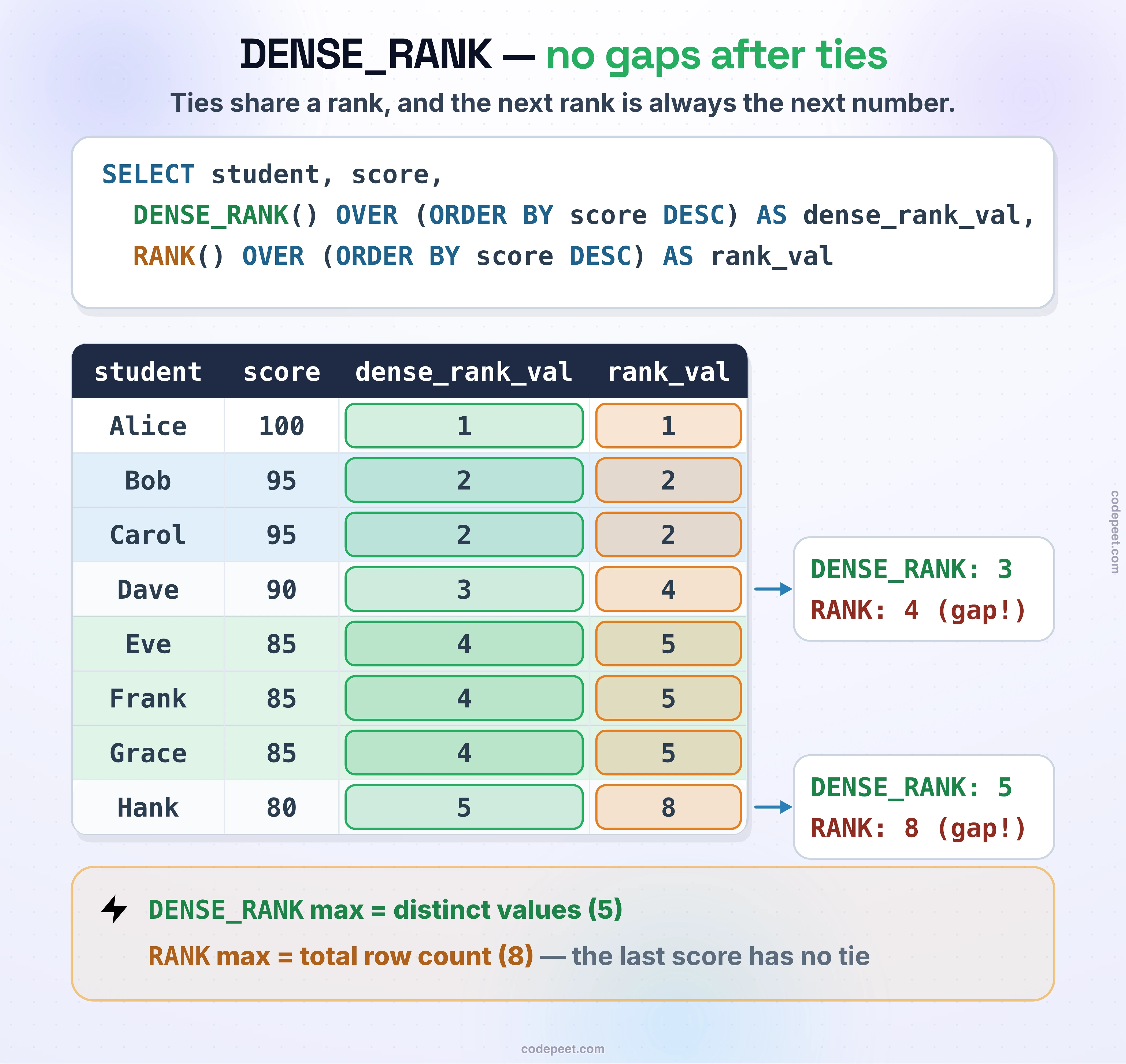
DENSE_RANK -- Consecutive Ranking Without Gaps
How DENSE_RANK Handles Ties
Let's see how DENSE_RANK handles tied values:
Understanding Dense Ranking
If two rows tie for rank 1, the next row gets rank 2 (not 3). This creates a continuous sequence:
| Value | RANK | DENSE_RANK |
|---|---|---|
| 100 | 1 | 1 |
| 100 | 1 | 1 |
| 90 | 3 | 2 |
| 80 | 4 | 3 |
Notice how DENSE_RANK skips straight to 2, while RANK jumps to 3.
-- See how DENSE_RANK handles ties
SELECT
    price,
    RANK() OVER (ORDER BY price DESC) AS rank_val,
    DENSE_RANK() OVER (ORDER BY price DESC) AS dense_rank_val
FROM olist_order_items_dataset
LIMIT 20;
Compare the two columns to see how DENSE_RANK maintains consecutive ranking without gaps.
DENSE_RANK vs RANK
Let's compare DENSE_RANK and RANK side by side:
-- Compare RANK vs DENSE_RANK
SELECT
    order_id,
    price,
    RANK() OVER (ORDER BY price DESC) AS rank_val,
    DENSE_RANK() OVER (ORDER BY price DESC) AS dense_rank_val
FROM olist_order_items_dataset
LIMIT 25;
Key Differences
| Aspect | RANK | DENSE_RANK |
|---|---|---|
| Ties | Same rank | Same rank |
| After Ties | Skips numbers | Continues sequence |
| Max Value | Can exceed row count | Equals distinct value count |
| Use Case | Position among all | Position among unique values |
Visual Example
With values: 100, 100, 90, 90, 80
| Value | RANK | DENSE_RANK |
|---|---|---|
| 100 | 1 | 1 |
| 100 | 1 | 1 |
| 90 | 3 | 2 |
| 90 | 3 | 2 |
| 80 | 5 | 3 |
RANK's maximum is 5 (row count), DENSE_RANK's maximum is 3 (distinct value count).
DENSE_RANK with PARTITION BY
Like other ranking functions, PARTITION BY restarts ranking for each group.
Ranking Items by Price within Each Order
-- Dense rank items by price within each order
SELECT
    order_id,
    product_id,
    price,
    DENSE_RANK() OVER (
        PARTITION BY order_id
        ORDER BY price DESC
    ) AS price_tier
FROM olist_order_items_dataset
LIMIT 20;
Ranking Payment Amounts within Each Order
-- Dense rank payments within each order
SELECT
    order_id,
    payment_type,
    payment_value,
    DENSE_RANK() OVER (
        PARTITION BY order_id
        ORDER BY payment_value DESC
    ) AS payment_rank
FROM olist_order_payments_dataset
LIMIT 20;
When to Use DENSE_RANK
DENSE_RANK is the right choice when:
1. Counting Distinct Ranking Positions
When you need to know how many unique ranking levels exist
2. Top-N Distinct Values
When you want the top 3 price tiers, not just top 3 rows
3. Continuous Category Assignment
When assigning tier numbers (Tier 1, Tier 2, Tier 3) that should be consecutive
Example: Top 3 Price Tiers
-- Get items in top 3 price tiers (using DENSE_RANK)
SELECT
    product_id,
    price,
    price_tier
FROM (
    SELECT
        product_id,
        price,
        DENSE_RANK() OVER (ORDER BY price DESC) AS price_tier
    FROM olist_order_items_dataset
) ranked
WHERE price_tier <= 3
LIMIT 20;
This returns all items in the top 3 distinct price levels, not just the top 3 rows.
Finding Distinct Rank Count
DENSE_RANK is useful for understanding how many distinct values exist in a ranking:
-- Find the number of distinct price tiers
SELECT MAX(price_tier) AS total_price_tiers
FROM (
    SELECT
        DENSE_RANK() OVER (ORDER BY price DESC) AS price_tier
    FROM olist_order_items_dataset
) ranked;
The maximum DENSE_RANK equals the count of distinct ordered values.
Practical Examples
Example 1: Seller Revenue Tiers
-- Assign revenue tiers to sellers
SELECT
    seller_id,
    total_revenue,
    DENSE_RANK() OVER (ORDER BY total_revenue DESC) AS revenue_tier
FROM (
    SELECT
        seller_id,
        ROUND(SUM(price), 2) AS total_revenue
    FROM olist_order_items_dataset
    GROUP BY seller_id
) seller_revenue
LIMIT 15;
Example 2: State Customer Ranking
-- Rank states by customer count (dense)
SELECT
    customer_state,
    customer_count,
    DENSE_RANK() OVER (ORDER BY customer_count DESC) AS state_tier
FROM (
    SELECT
        customer_state,
        COUNT(*) AS customer_count
    FROM olist_customers_dataset
    GROUP BY customer_state
) state_counts;
Example 3: Review Score Distribution
-- Dense rank by review score
SELECT
    review_score,
    review_count,
    DENSE_RANK() OVER (ORDER BY review_count DESC) AS popularity_tier
FROM (
    SELECT
        review_score,
        COUNT(*) AS review_count
    FROM olist_order_reviews_dataset
    GROUP BY review_score
) score_counts;
Practice
Practice using DENSE_RANK with these exercises.
Exercise 1: Basic Dense Ranking
Assign a dense rank to items based on price:
-- Dense rank items by price
SELECT
    order_id,
    product_id,
    price,
    DENSE_RANK() OVER (ORDER BY price DESC) AS price_tier
FROM olist_order_items_dataset
LIMIT 25;
Exercise 2: Compare All Three Functions
See how ROW_NUMBER, RANK, and DENSE_RANK differ:
-- Compare all three ranking functions
SELECT
    price,
    ROW_NUMBER() OVER (ORDER BY price DESC) AS row_num,
    RANK() OVER (ORDER BY price DESC) AS rank_val,
    DENSE_RANK() OVER (ORDER BY price DESC) AS dense_rank_val
FROM olist_order_items_dataset
LIMIT 25;
Exercise 3: Dense Rank within Partitions
Apply dense ranking within each seller's items:
-- Dense rank items within each seller
SELECT
    seller_id,
    product_id,
    price,
    DENSE_RANK() OVER (
        PARTITION BY seller_id
        ORDER BY price DESC
    ) AS price_tier_in_seller
FROM olist_order_items_dataset
LIMIT 25;
Key Takeaways
Here's what you've learned about DENSE_RANK:
- Same Rank for Ties: Like RANK, identical values receive the same rank
- No Gaps: Unlike RANK, ranks are always consecutive (1, 2, 3...)
- Counts Distinct Values: Maximum dense rank equals the number of distinct values
- Tier Assignment: Perfect for assigning tier/level numbers
- ORDER BY Required: Must specify ordering for ranking
When to Choose DENSE_RANK
| Scenario | Use DENSE_RANK? |
|---|---|
| Need consecutive rank numbers | ✅ Yes |
| Counting distinct rank levels | ✅ Yes |
| Top-N distinct values | ✅ Yes |
| Competition-style ranking | ❌ No (use RANK) |
| Need unique identifiers | ❌ No (use ROW_NUMBER) |