What Is System Design? (And Why It Runs the World)
Introduction
You tap Order on a food-delivery app. The button dims for a blink — maybe a third of a second — and then: "Your order is confirmed."
It felt like nothing. But in that blink, your tap crossed the internet, was inspected, routed, authenticated, priced, written safely to disk, and answered — by a dozen or more cooperating systems, some of them on different continents. A name was resolved to an address. A machine was chosen from a fleet of forty. A cache answered in half a millisecond so a database didn't have to. A message was quietly queued so a driver's phone would buzz after yours stopped waiting.
None of that happened by accident. Someone decided every piece of it. That discipline — choosing the pieces and deciding how they connect — is system design, and it is what this course teaches.
In this lesson: the journey of one request through a modern system · what "system design" actually means · the scale that makes these decisions matter · and why this skill applies far beyond big tech.
Scope: how to reason about competing options is the next lesson (The Trade-off Mindset: There Are No Right Answers), and how a system grows from one server to this whole picture is From One User to One Million: How a System Grows. Today we're just opening the hood.
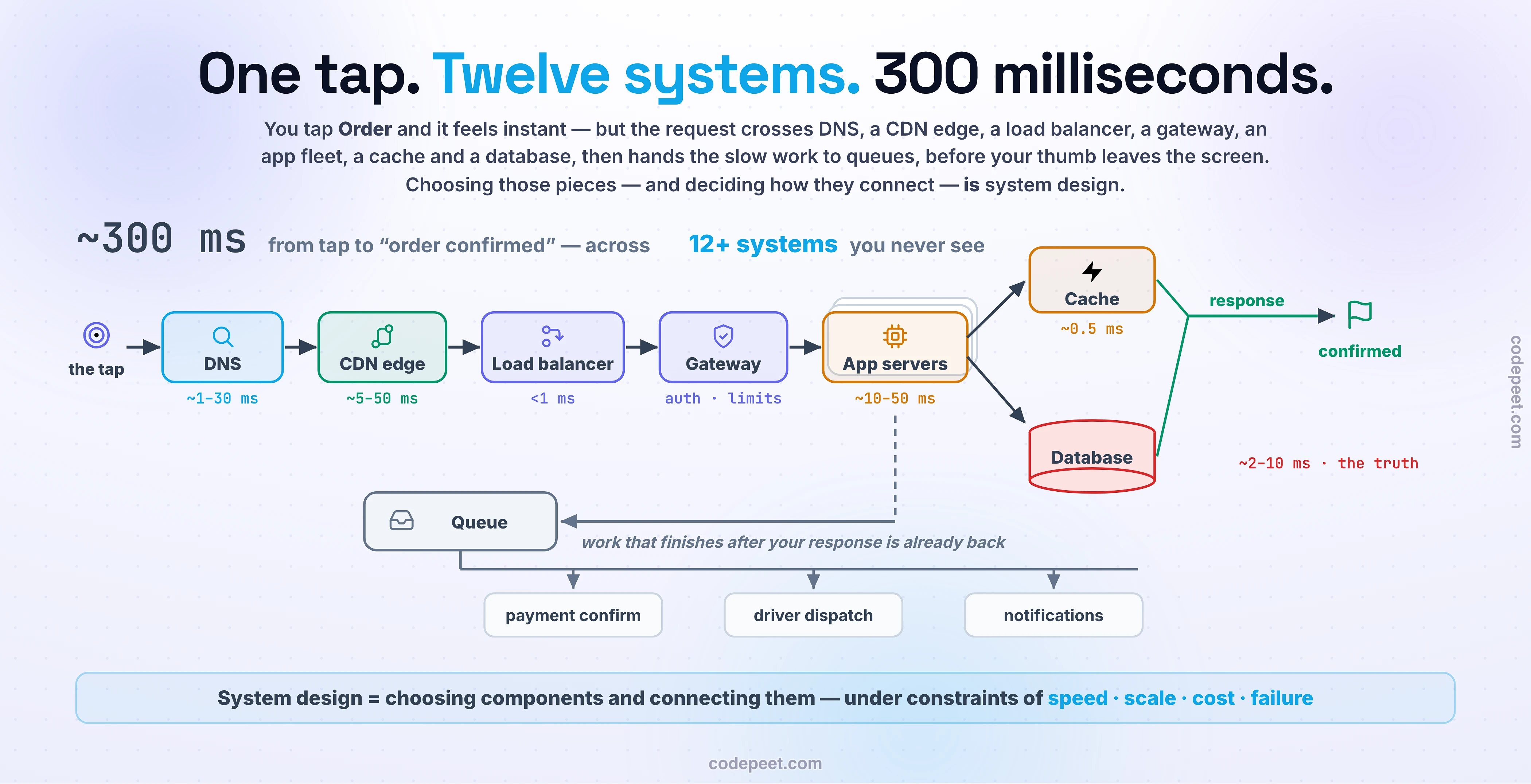
One Tap, Twelve Systems
Let's slow that third of a second down and walk it hop by hop.
1. DNS — the address book (~1–30 ms). Your phone knows a name, api.eats.example, not a location. DNS translates the name into an IP address. Because answers are cached on your phone, your router, and your ISP, repeat lookups are nearly free.
2. The CDN edge (~5–50 ms). Images, scripts, and anything that doesn't change per-user is served from an edge server physically near you — often in your own city — so it never crosses an ocean.
3. TLS + the load balancer (<1 ms to choose). Your connection is encrypted, then hits one public address standing in front of dozens of identical servers. The load balancer picks a healthy one. If server #23 died two minutes ago, you will never know.
4. The API gateway (~1–5 ms). The front door: is your login token valid? Are you sending 10 requests a second or 10,000? Which internal service should handle an order? Checked, limited, routed.
5. The application server (~10–50 ms). Finally, your code. Validate the basket, check the restaurant is open, compute the total. This is the only hop that knows what your product actually does — every other hop exists to protect it, feed it, or speed it up.
6. The cache (~0.5 ms) and the database (~2–10 ms). The menu was already fetched thousands of times today, so it comes from a cache in memory. Your order, though, is new truth — it goes to the database, written durably so a crash a millisecond later loses nothing.
7. The queue (after your response). Receipt email, loyalty points, the driver's notification — none of it should keep your thumb waiting. The app server drops messages onto a queue and answers you now; worker services finish the rest seconds later.
Add it up: ~300 milliseconds, a dozen systems, and you noticed none of them. That invisibility is the point — and it is manufactured, deliberately, by design.
So What *Is* System Design?
Here is the definition this whole course is built on:
System design is choosing components and connecting them — under constraints of speed, scale, cost, and failure.
Notice what that sentence is really about: decisions.
- Which pieces? A cache, or a bigger database? One powerful server, or forty small ones?
- How do they talk? Does the app wait for the email to send (synchronous), or queue it and move on (asynchronous)?
- What happens when one dies? Servers crash, cables get cut, whole datacenters lose power — failure is a certainty, not a possibility. The design decides whether users ever notice.
The components themselves — load balancers, caches, queues, databases — are the vocabulary. They're well-understood, reusable, and mostly available off the shelf. Nobody builds a load balancer from scratch to launch a food app. What cannot be bought off the shelf is the sentence you write with that vocabulary: which pieces, in which arrangement, for your product's needs. Two teams can use identical parts and end up with one system that hums at a million users and one that falls over at a thousand.
That's why this course teaches the vocabulary and the judgment — the parts, and the decisions that connect them.
The Scale That Makes It Unforgiving
Why so much machinery for a food order? Because of what modern scale actually looks like:
- Google handles more than 100,000 searches every second — over 8.5 billion a day.
- WhatsApp moves 100+ billion messages a day across more than two billion users.
- Netflix alone accounts for roughly 15% of the entire world's internet traffic.
No single computer on Earth can do any of that. At this scale, systems aren't allowed to be one computer — distribution stops being an optimization and becomes the only option.
And the cost of getting it wrong is just as concrete. Industry studies in 2026 put average downtime at roughly $15,000 per minute; for most mid-size and large enterprises, a single hour of outage exceeds $300,000, and for banks and payment systems it can pass $5 million. When Facebook disappeared for six hours in 2021, the trigger wasn't an exotic attack — it was a routine configuration change interacting badly with the design of their network. (We dissect that outage properly in Facebook, 2021: The BGP Self-Lockout, much later in this curriculum.)
Design decisions, in other words, are measured in milliseconds and millions of dollars. That's the pressure this discipline was forged under.
It's Not Just Big Tech
Here's the honest part most courses skip: most systems are small, and that's fine.
A clinic's appointment system serves three hundred users a day. A university portal spikes twice a year. A startup's entire product might run comfortably on three servers. None of these need Google's architecture — and giving them Google's architecture would be a design failure: more machinery than the problem needs means more cost, more complexity, and more things that can break, purchased for capacity that never arrives.
But every one of those small systems still faces the same questions: Where does truth live? What happens if the server restarts mid-payment? Why is the Monday-morning rush slow? The clinic system that loses appointments after a crash wasn't unlucky — it was designed (by default, by nobody) to lose them.
So the skill you're building here isn't "how to clone YouTube." It's the ability to look at any system — three users or three billion — and reason about what it needs, what it can skip, and what will hurt when it grows. Engineers who can do that are the ones trusted with architecture, and it's exactly what senior-level interviews test — not memorized diagrams, but judgment. The next lesson, The Trade-off Mindset: There Are No Right Answers, is where that judgment starts.
See It: Drive the Request
The widget below is the journey you just read — but now you're driving. Click each hop to see what it does, what it costs in latency, and (the interesting column) what breaks without it. Notice, as you click, that every hop is answering a question someone had to decide — that's the pattern to carry into the rest of this course.
The Trade-off (Your First One)
You may have noticed something uncomfortable in the journey: every hop we added to make the system better also made it bigger.
The cache made reads fast — and introduced the question of stale data. The queue made responses snappy — and now the receipt email happens eventually, not definitely-by-now. The load balancer removed a single point of failure — and added a component that itself must be kept healthy. Twelve systems that make one tap feel instant are also twelve things that can fail, cost money, and need understanding.
This is the deal you strike with every box you add to a diagram, and it never goes away:
Every component buys you a capability and bills you in complexity, latency, or money. There are no free hops.
A good designer isn't the one who knows the most components — it's the one who knows what each one costs and can defend why it's worth it. How to reason about that, systematically, is exactly where we go next.
🧪 Try It Yourself
Pick an app you used today — music, maps, banking, anything — and one action you performed in it (played a song, sent money, searched a place).
Before scrolling back up, write down the hops you think that single action touched, in order. Then check yourself against the journey above and against these three questions:
- What could be answered near you (CDN/cache) versus what had to reach the system of record (database)?
- What did you actually wait for, and what probably finished after the response (queue + workers)? Hint: did a notification arrive a few seconds later?
- What would you notice if the cache vanished? If DNS broke?
Check: a song play typically hits DNS → CDN (the audio itself is static content — the biggest win on the list) → LB → app (auth, royalties, history) → cache (your playlists) → DB (the new play event) → queue (recommendation updates, artist stats). If you got roughly there, you already think in systems.
Mental-Model Corrections
- "System design means drawing boxes on a whiteboard." → The boxes are notation. The design is the decisions — which boxes exist, how they talk, and what happens when one dies. A diagram nobody can defend is decoration.
- "This is interview material for big-tech jobs only." → Every backend decision you make — sync or async, cache or query, one server or three — is system design. Interviews just test it out loud.
- "The best design is the most impressive architecture." → The best design is the smallest one that meets the need. Boring is a compliment; over-engineering is a failure mode with a monthly bill.
- "There's a correct answer I should memorize." → There are only fits: right for this product, this scale, this team, this budget. That's not a weakness of the field — it's the entire craft, and the next lesson teaches you to wield it.
Key Takeaways
- One "instant" tap is really ~300 ms across a dozen specialized systems — DNS, CDN, load balancer, gateway, app servers, cache, database, queues — each solving one problem well.
- System design = choosing components and connecting them under constraints of speed, scale, cost, and failure. Components are the vocabulary; the connections are the craft.
- Scale is unforgiving: 100,000+ Google searches per second, 100B+ WhatsApp messages a day — and downtime bills at ~$15K per minute. Decisions here are measured in milliseconds and millions.
- Most systems are small, and matching the design to the actual need — not to Google's — is itself the skill.
- Every component buys a capability and bills you in complexity, latency, or money. There are no free hops.
- Next — The Trade-off Mindset: There Are No Right Answers: the reasoning tool you'll use in every lesson (and every design meeting) from here on.