Latency vs Throughput vs Bandwidth
Introduction
Two questions sound identical and are completely different: "how fast is it?" and "how much can it handle?" Confusing them is one of the most common — and most expensive — mistakes in system design. A team spends a fortune on bandwidth to "make the app faster" and the app doesn't get one millisecond faster. A system that flies for one user melts under a thousand. Both are the same root confusion: treating speed and volume as if they were a single dial.
They are two separate axes, and this lesson pins down the three words that keep them straight:
- Latency — how long one request takes. The wait. ("How fast?")
- Throughput — how many requests finish per second. The rate. ("How much?")
- Bandwidth — the maximum the pipe could ever carry. The ceiling.
By the end you'll never mix them up again, because you'll have felt the thing that makes them click: they move independently. You can improve one and leave the other exactly where it was — and sometimes improving one hurts the other. You'll also learn the one equation that ties them together, why some latency is a law of physics you can't buy your way out of, and why pushing a system to its throughput limit is the fastest way to destroy its latency. Let's start with the picture that makes all three obvious.
Three Words, Three Different Axes
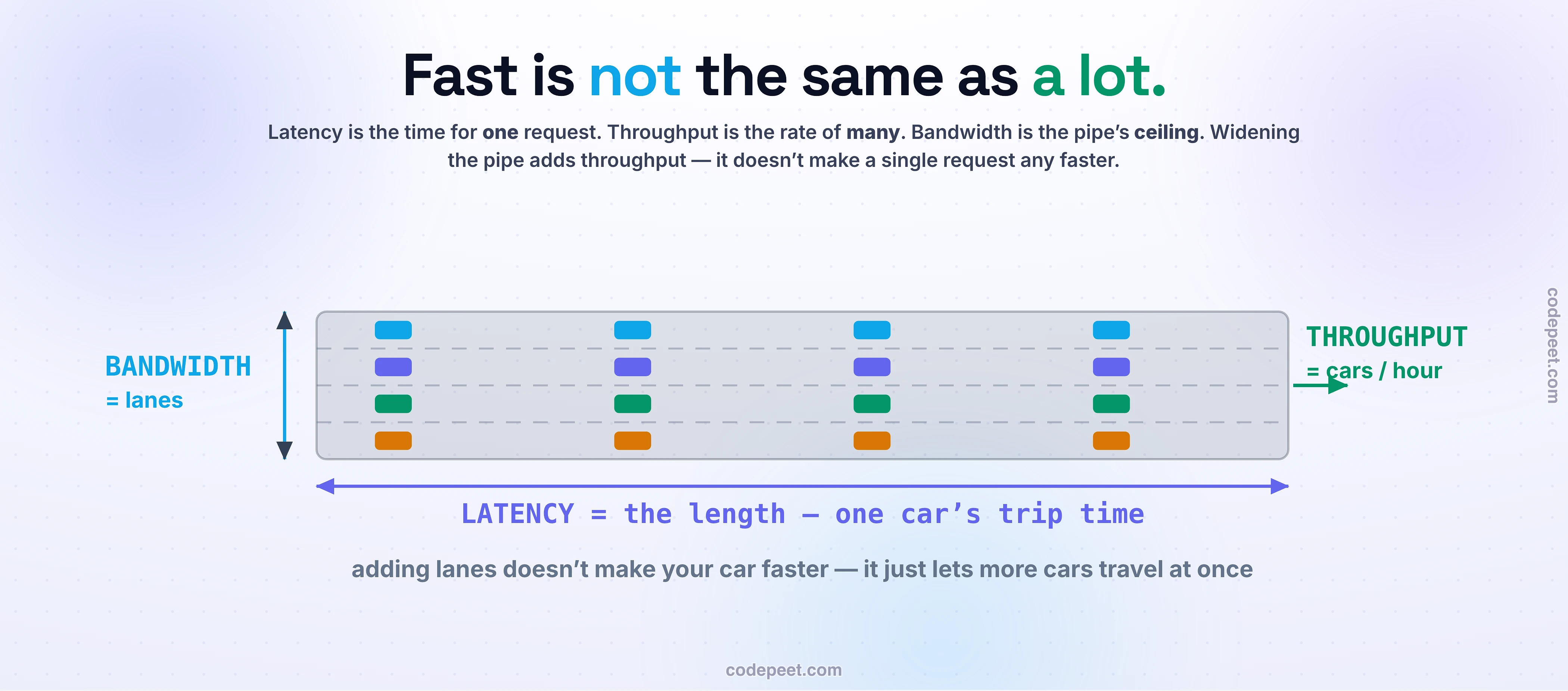
The cleanest way to hold these three apart is a water pipe running from a tap to a pool.
- Latency is how long the first drop takes to travel the pipe from tap to pool. It's about the pipe's length — a longer pipe means each drop takes longer to arrive. Measured in time (nanoseconds, microseconds, milliseconds).
- Throughput is how much water actually fills the pool per hour. It's the rate of flow. Measured in volume over time (liters/sec — or in computing, requests/sec, operations/sec, bytes/sec).
- Bandwidth is the pipe's width. It's the maximum flow the pipe could ever carry — the ceiling that throughput can approach but never exceed. Measured in bits/sec (Mbps, Gbps).
The same three map perfectly onto a highway. Bandwidth is the number of lanes (how many cars can travel at once). Latency is the length of the road — how long one car's trip takes. Throughput is the cars arriving per hour. And that picture hands you the single most important sentence in this lesson:
Adding lanes doesn't make your car go any faster — it just lets more cars travel at once.
Read that twice. More lanes (more bandwidth) is pure throughput — it does nothing for the trip time of any single car (latency). This is the exact confusion that makes people buy bandwidth to "speed up" a system that was never bandwidth-bound. Keep the picture: latency = length, throughput = flow, bandwidth = width. Now watch what happens when you change one at a time.
The Reveal: They Move Independently
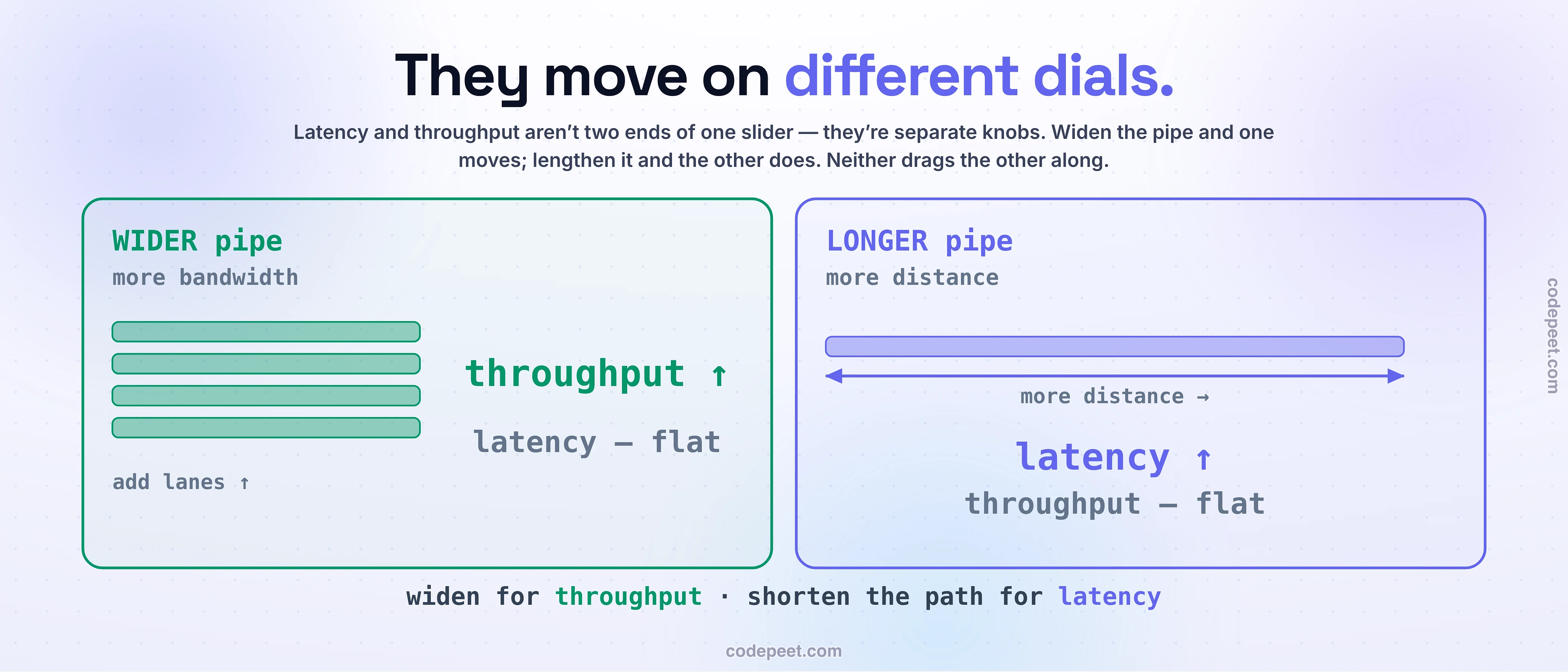
Here's the fact that ends the confusion for good. Latency and throughput are not two ends of one dial — they're two different dials, and you can turn one without moving the other at all.
Make the pipe wider (more bandwidth). More water flows per hour — throughput goes up. But a single drop still travels the same length at the same speed, so it arrives at exactly the same moment — latency doesn't change. Widen a highway from three lanes to six and twice as many cars get through per hour, but your car's drive is precisely as long as before.
Make the pipe longer (more distance). Every drop now has farther to travel — latency goes up. But once the pipe is full and flowing, the same amount of water still comes out per hour — throughput doesn't change. A longer highway means a longer trip for each car, but the same number still arrive per hour.
Batch the water into big slugs. Wait to collect a bucket before sending it, and each bucket carries more — throughput goes up. But the water at the front of the bucket had to wait for the bucket to fill before it left — latency goes up too. This is the one case where they move together, and it's a trade, not a free win.
So there are really three independent moves: width buys throughput (not speed), length costs latency (not throughput), and batching trades latency for throughput. This is the thing to feel with your own hands — which is exactly what the interactive below is for. But first, the one equation that governs all of it.
Little’s Law: The One Equation That Ties Them Together
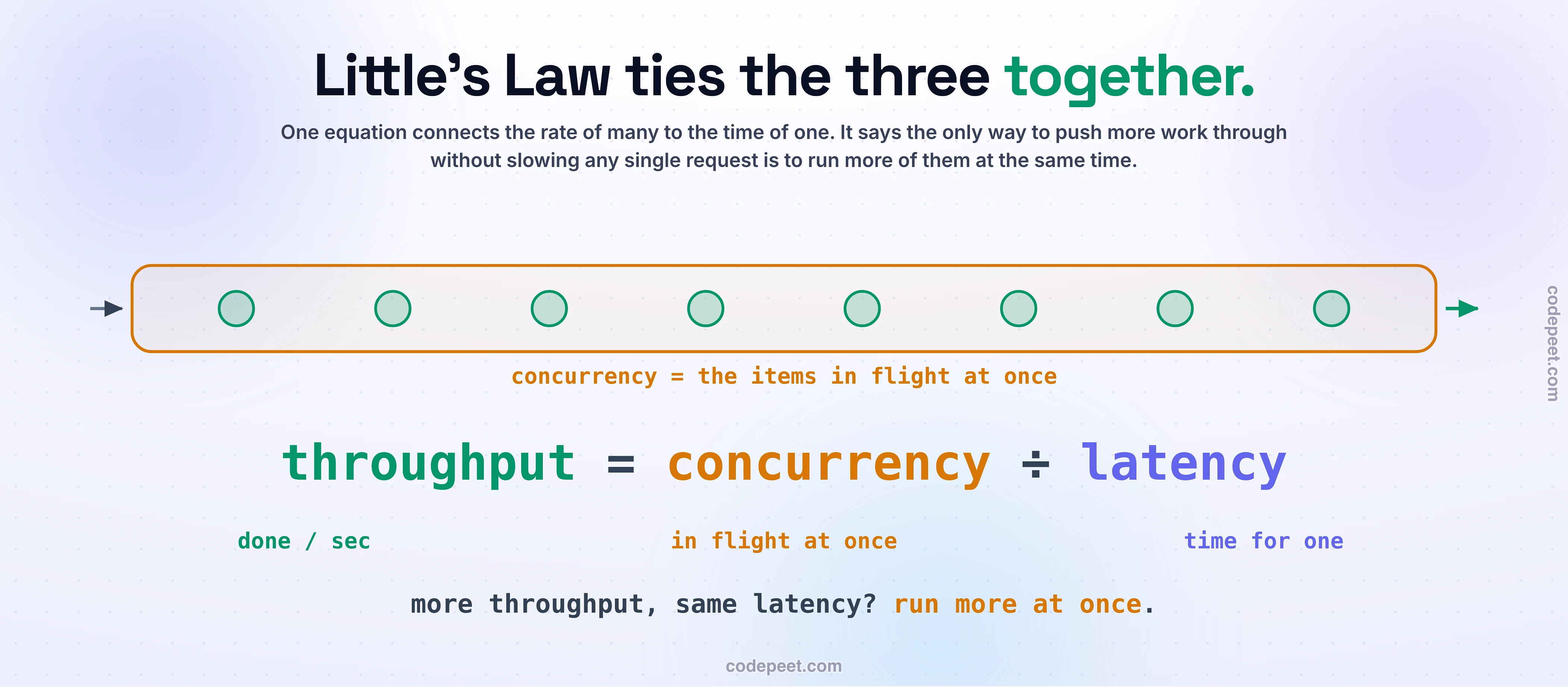
If latency and throughput are independent, is there any rule connecting them? Yes — a beautifully simple one called Little's Law, and it's worth carrying for the rest of your career:
Concurrency = Throughput × Latency
In words: the number of requests in flight at once equals how many finish per second times how long each one takes. Rearrange it and you get the version that matters most:
Throughput = Concurrency ÷ Latency
This says something profound and practical. If each request takes 100 ms (latency) and you can only ever have one in flight at a time (concurrency = 1), your throughput is stuck at 10 requests per second — no matter how much bandwidth you buy. To go faster in total, you have exactly two knobs: make each request quicker (lower latency), or run more of them at once (higher concurrency).
That's the deep reason horizontal scaling works, and the reason a single slow-but-parallel system can out-throughput a fast-but-serial one. It's also the whole trick behind handling ten thousand connections on one thread (§2): you don't make any one request faster — you raise concurrency so thousands are in flight while each waits. The only way to raise throughput without raising latency is to raise concurrency — do more things at the same time. Now go feel the two dials move on their own.
See It: Two Needles, Two Different Dials
This is the whole lesson in one interactive. Below is a live pipe — really a little highway — with cars (requests) flowing through it, and two big meters: LATENCY (how long one car takes) and THROUGHPUT (how many arrive per second).
- Drag WIDTH (bandwidth / lanes) up and watch: throughput climbs, latency doesn't move at all.
- Drag LENGTH (distance) up and watch the exact opposite: latency climbs, throughput doesn't budge.
- Push LOAD past what the pipe can carry and watch cars pile up at the entrance — queuing makes latency spike while throughput flatlines at the bandwidth ceiling. That's the utilization knee we'll talk about next.
- Flip on BATCH and watch throughput and latency rise together — the one trade where they move as a pair.
The one thing to notice: the two needles are on different sliders. That single observation is what everyone who confuses latency and throughput has never actually seen.
What Latency Is Actually Made Of
"Latency" isn't one thing — it's a budget of four delays stacked end to end, and knowing which one dominates tells you what to fix:
- Propagation delay — the time for the signal to physically travel the distance, governed by the speed of light. In fiber, light moves at ~200,000 km/s.
- Transmission delay — the time to push all the bits onto the wire: data size ÷ bandwidth. This is the only one bandwidth helps with — a bigger payload or a narrower pipe takes longer to send.
- Processing delay — the time for routers, switches, and your server to actually handle the request (parse, compute, look things up).
- Queuing delay — time spent waiting in line behind other work. The most unpredictable component, and the one that explodes under load.
That first one hides a humbling truth: some latency is a law of physics you cannot buy your way out of. Light in fiber covers ~200,000 km/s, and New York to London is ~5,585 km — so a round trip is at least ~56 milliseconds, and in reality ~70–80 ms once you add routing and processing. No amount of money, bandwidth, or clever code beats the speed of light over a distance.
So you don't reduce that latency — you hide it. You move the data closer to the user: a CDN or edge cache serving from a city 50 km away instead of a datacenter 5,000 km away turns a 56 ms round trip into a 1 ms one, not by going faster but by going less far. That's the whole game of edge computing: the fastest packet is the one that doesn't have to travel.
Bandwidth Is Not Throughput
These two get used interchangeably and they are not the same thing. Bandwidth is the theoretical maximum — the pipe's rated capacity. Throughput is what you actually get — always less, because of protocol overhead, congestion, packet loss, and the physics of the link. You rent a "1 Gbps" connection (bandwidth) and measure 600 Mbps of real transfer (throughput). The gigabit is the pipe's width; the 600 megabits is how much water actually made it through.
The most surprising gap between them comes from distance, and it has a name: the bandwidth-delay product = bandwidth × round-trip time. It's the amount of data that can be in flight on the wire at once — data you've sent but haven't heard back about yet. Picture a very wide, very long pipe: you can pour water in fast (high bandwidth), but if the pipe is 5,000 km long, a huge amount of water is just in transit at any moment. If your sender only allows a little data in flight before waiting for an acknowledgment, a fat long pipe sits half empty — your throughput collapses far below the bandwidth, not because the pipe is narrow, but because it's long.
This is why a satellite link can have enormous bandwidth and still feel terrible — its ~600 ms round trip means data dribbles out in tiny acknowledged chunks. It's Little's Law again, wearing a network costume: in-flight data = bandwidth × latency. High bandwidth only becomes high throughput if you keep the long pipe full.
Which One Do You Chase?
Latency and throughput are both "performance," but optimizing them pulls in different directions, so the first question on any performance problem is: which one actually matters for this workload? The answer is decided by who's waiting.
If a human is waiting on each request, optimize latency. A search box, a checkout, a page load, a game, an API a user's app calls on every tap — here a person feels every millisecond. Research-worn rules of thumb: under ~100 ms feels instant, ~1 second is the edge of "still engaged," and a few seconds loses them. Total system throughput is almost irrelevant if each individual response is slow.
If you're moving a mountain of work and nobody watches any single piece, optimize throughput. A nightly data pipeline, a video encoder, a batch of a billion analytics rows, a training job — nobody cares that row #4,000,000 took 200 ms; they care that the whole job finishes by morning. Here you happily add latency (batching, buffering) to push throughput up.
And the two levers are different in kind, which is the practical payoff of this whole lesson: you hide latency, and you scale throughput. Latency you attack by shortening the distance and skipping the work — CDNs, caches, prefetching, keeping connections warm, doing less. Throughput you attack by doing more at once — parallelism, more machines, batching, the whole horizontal-scaling playbook. Reach for the wrong lever and you'll spend a lot of money moving the wrong needle.
The Trade-off
The reason you can't just "maximize performance" is that latency and throughput actively fight each other near the limits — and the fight has a shape worth knowing.
The cruelest trap is utilization. It's tempting to run your servers hot — 90% busy feels efficient, like you're getting your money's worth. But queuing theory is brutal here: as utilization climbs toward 100%, queuing delay explodes. Requests start waiting behind other requests, and the wait grows non-linearly — you saw this exact knee around 70% in the four-bottlenecks lesson. Queuing effects start nibbling the tail latency by ~20% utilization and hit average latency past ~40%. So the very act of pushing throughput toward the bandwidth ceiling is what destroys latency. This is why latency-sensitive systems are deliberately run with lots of headroom — a service that must stay fast can't also run full.
| Push for… | You gain | You pay |
|---|---|---|
| higher throughput (batch, high utilization) | more work per second | queuing → latency spikes |
| lower latency (headroom, no batching) | fast individual responses | wasted capacity, lower peak throughput |
And one more subtlety that bites at scale: latency isn't a single number, it's a distribution. The average can look great while the tail — the 99th percentile — is catastrophic. A service with a 100 ms average but a 2-second p99 will feel broken, because a page that calls a hundred services waits on the slowest of them. At scale you optimize the tail, not the mean. Performance is never one number to maximize — it's a set of tensions to balance for the job in front of you.
Mental-Model Corrections
"Latency and throughput are the same thing (or exact opposites)." Different axes — time vs rate. They move independently; they're related only through Little's Law (via concurrency).
"More bandwidth makes it faster / lowers latency." No. Bandwidth is throughput capacity, not speed. A wider pipe doesn't make a drop arrive sooner; a bigger internet plan doesn't lower your ping.
"Throughput and bandwidth are the same number." Bandwidth is the theoretical max; throughput is the actual achieved rate — always lower, cut by overhead, congestion, and the bandwidth-delay product.
"To make it faster, add more machines." More machines add throughput (things done in parallel), not lower the latency of a single request — you usually can't split one request to make it return sooner.
"Just run the servers as hot as possible." As utilization nears 100%, queuing makes latency explode. Latency-sensitive systems run well below capacity, on purpose.
"Batching is free performance." Batching raises throughput but raises per-request latency — a trade, not a win.
"We can optimize the latency away." Some of it is the speed of light over a distance — a hard floor. You hide it (move data closer with a CDN/cache); you don't delete it.
Try It Yourself: Measure the Three in the Real World
Fifteen minutes with tools you already have turns these three words into physical intuition. Predict first: if you upgraded your home internet from 100 Mbps to 1 Gbps, would your ping time to a server get smaller?
- Feel latency vs bandwidth. Open a terminal and run
ping google.com— that round-trip time is latency, and it's mostly distance. Nowpinga server on the other side of the world (tryping 1.1.1.1vs a distant host). Notice the latency roughly tracks distance, and that your expensive bandwidth had nothing to do with it. (This is why the 100 Mbps → 1 Gbps upgrade wouldn't shrink your ping.) - Watch them diverge in the browser. Open your browser dev tools → Network tab and load a page. Each request shows latency (the time-to-first-byte / waiting bar) separately from the throughput (how fast the content bytes actually download). A tiny API call can have high latency and trivial throughput; a big image download can have low latency to start but be throughput-bound.
- Find the right metric for a system you know. Pick something you've built or use. Is it a latency problem (a human waiting on each click) or a throughput problem (a pile of work finishing overnight)? Name it — and then name the lever: would you hide latency (cache, CDN, less distance) or scale throughput (parallelism, more machines)?
Once you can look at any performance complaint and instantly ask "is this a latency problem or a throughput problem?" — you're debugging like an architect instead of guessing.
Recap & What’s Next
Speed vs volume, straightened out for good:
- Latency = time for one (the wait). Throughput = rate of many (finished per second). Bandwidth = the pipe's maximum (the ceiling throughput can't beat).
- They move on different dials: more bandwidth buys throughput, not lower latency; more distance costs latency, not throughput; batching trades latency for throughput.
- Little's Law ties them: throughput = concurrency ÷ latency — the only way to raise throughput without hurting latency is to raise concurrency (do more at once).
- Some latency is physics (speed of light × distance — NYC↔London ≈ 56 ms round trip). You hide it (CDNs, caches, less distance); you don't delete it.
- Push throughput toward the bandwidth ceiling and queuing makes latency explode (the utilization knee) — so latency-sensitive systems run with headroom.
- Chase latency when a human waits on each request; chase throughput when you're moving a mountain of work — you hide latency and scale throughput.
There's a crack in this whole picture we've been quietly stepping around. Everything we just measured — the latency, the throughput — was measured right now, at today's load. But a system that's beautifully fast for a hundred users is a completely different animal at a hundred thousand. "Fast" and "stays fast as it grows" are, it turns out, two more things people constantly confuse — and that's the next and final performance idea in this section: Performance vs Scalability.