DNS: The Internet's Phonebook
Introduction
Look back at every diagram in this section so far. A packet travels to 93.184.216.34; a TCP connection opens to 142.250.72.14. Every single one started from an IP address you somehow already knew. But you don't know those numbers, and you never type them. You type google.com. So there has to be a step — before any packet, before any handshake — that turns the name in your head into the number the network can actually route to.
That step is DNS, the Domain Name System — the internet's phonebook. Its one job sounds almost trivial: map a human-friendly name to an address. But the way it does that job is one of the most elegant pieces of engineering ever built, because it has to work at an absurd scale:
Billions of lookups a second, for hundreds of millions of names nobody could ever store in one place, answered in a handful of milliseconds — by a system with no single owner and no single server.
It pulls that off with two ideas you'll reuse for the rest of your career: a distributed hierarchy (the work is split across a tree of servers, none of which knows everything) and caching at every single layer (the answer gets saved everywhere it passes, so the expensive lookup almost never has to happen twice). And there's a payoff most people miss entirely: because DNS gets to choose which address to hand back, it is quietly the very first traffic-steering decision in your whole system — the thing that sends a user in Tokyo to your Tokyo servers before a single packet is sent. By the end of this lesson you'll be able to trace a name all the way to an address, explain why the whole thing doesn't collapse under its own weight, and see why seasoned engineers, when anything breaks, mutter the same three words: it's always DNS.
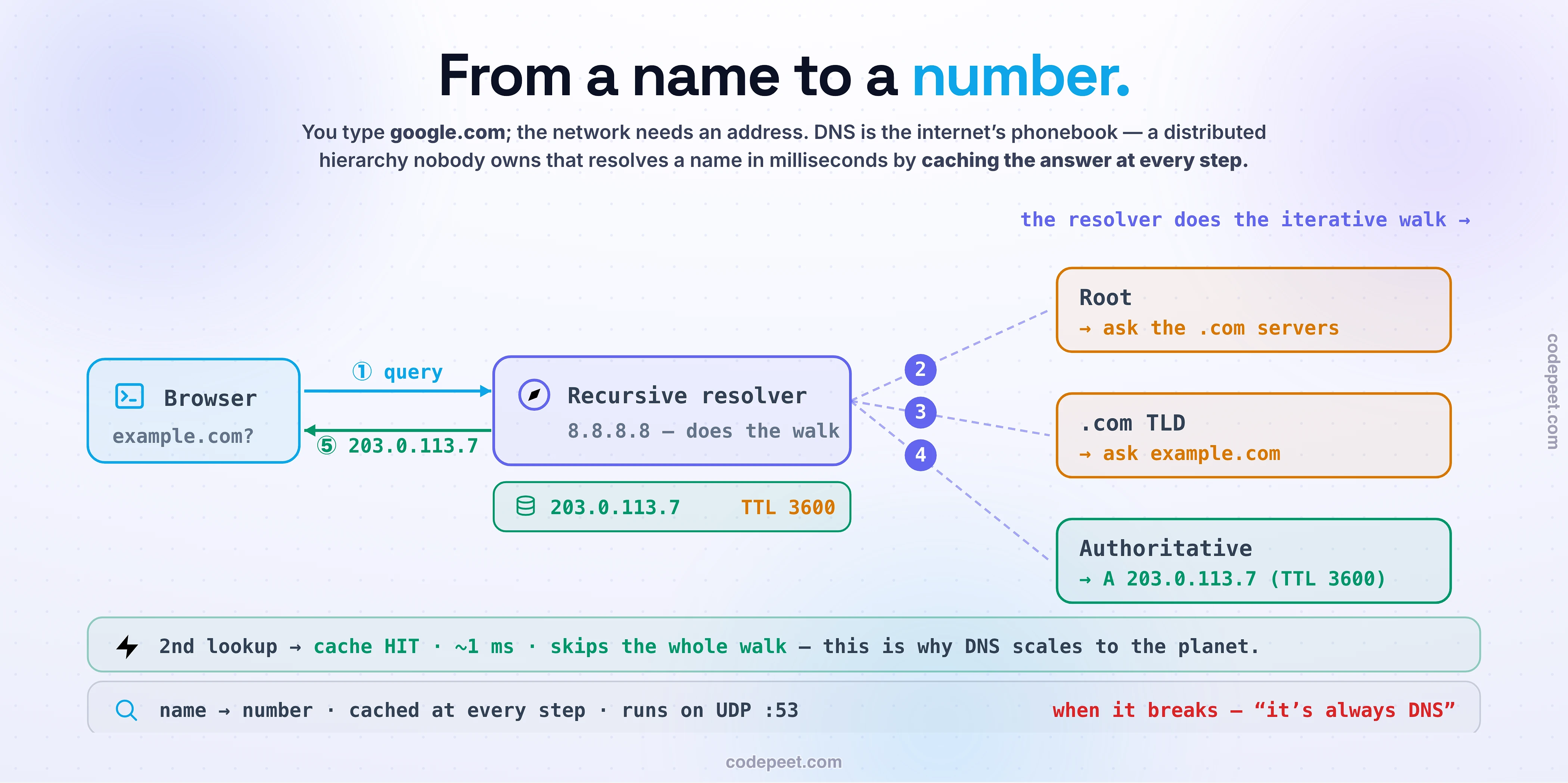
The Cast: A Hierarchy Nobody Owns
No single machine could possibly hold the address of every name on the internet — so DNS doesn't try. Instead it splits the knowledge across a tree, where each level knows just enough to point you one step closer. Meet the cast, because the whole lesson is just these five talking to each other:
- The stub resolver — a tiny client built into your operating system and browser. It doesn't do any real work; it just wants the final answer and asks someone smarter.
- The recursive resolver (or recursor) — the workhorse. It's the one that actually chases down the answer and remembers it. It's usually run by your ISP, or a public one you've definitely heard of: Google's
8.8.8.8or Cloudflare's1.1.1.1. - The root servers — the top of the tree. There are 13 logical roots (named
athroughm), though each is really hundreds of physical machines around the world. Here's the thing: a root server doesn't know whereexample.comis. It only knows who runs.com. - The TLD servers — the top-level domain servers, one set per suffix:
.com,.org,.io, and so on. The.comservers don't knowexample.com's address either — they only know which servers are authoritative forexample.com. - The authoritative servers — the bottom of the tree and the source of truth for a specific domain. These finally hold the actual records — the real address.
Notice the pattern, and read a name right to left to see it: www.example.com → the root hands you off to .com → .com hands you off to example.com → example.com gives you the answer. Each level is deliberately ignorant of everything below it, and just points you down. It's a chain of "I don't know, but I know who does" — and that ignorance is exactly what lets the system scale to the entire planet without anyone owning the whole map.
The Resolution Walk
Let's trace a real lookup the very first time, when nothing is cached yet, so you see every hop. You type www.example.com and hit enter:
- Your stub asks your recursive resolver: "What's the address for
www.example.com? Just give me the final answer." - The resolver asks a root server. The root replies — and here's the crucial part — not with the answer, but with a referral: "I don't know that name, but here are the
.comservers. Ask them." - The resolver asks a
.comTLD server. Again a referral: "I don't have the address, but here areexample.com's authoritative servers. Ask them." - The resolver asks an authoritative server for
example.com. This one knows: "Here's the A record —93.184.216.34— and it's good for 3600 seconds (that's the TTL)." - The resolver hands that address back to your stub, your browser opens a connection to
93.184.216.34, and now everything you learned in the last two lessons kicks in — the TCP handshake, the packets, all of it.
Two things are worth pausing on. First, the root and TLD servers never gave an answer — only referrals, a trail of breadcrumbs leading one step down the tree each time. Second, that little A record is the destination: A means "address," mapping the name to an IPv4 address (its sibling AAAA maps to IPv6). You'll meet a few other record types — CNAME (an alias pointing one name at another), NS (which servers are authoritative), MX (mail servers) — but for getting a browser to a server, A, AAAA, and CNAME are the ones that matter. That whole trip — four questions to four different servers — is what it takes to resolve a name from cold. Which raises an obvious worry: surely we don't do all of that on every click?
Recursive vs Iterative: Who Does the Legwork?
You just watched two different kinds of question get asked in that walk, and telling them apart is the detail that makes DNS finally click. The best way to feel it is directory assistance — the old "411" operator you'd call to get a phone number.
- The question your stub asks the resolver is recursive: "Give me the final answer, and I'll wait — you go do whatever it takes." It's like calling the operator and saying "what's Alice's Pizza's number?" You ask one question and expect one finished answer. You don't want to hear about the intermediate steps.
- The questions the resolver asks the root, TLD, and authoritative servers are iterative: each one replies with a referral, not an answer — "I don't have it, but try them next." It's the operator flipping through directories: the master index says "restaurants are in volume 3," volume 3 says "see the pizza section," and only the pizza section has the number.
So here's the key idea, and it's the whole reason the resolver is called recursive: the recursive resolver absorbs all the iteration for you. You ask it one recursive question; it quietly runs several iterative queries down the tree, chasing referral after referral, and hands you back a single clean answer. All the messy back-and-forth with root and TLD servers happens on your behalf, out of sight. That's the deal: the stub stays dead simple ("just tell me the number"), and one smart, shared resolver does the legwork — and, as you're about to see, remembers it so nobody has to do it again. Let's walk the whole thing yourself.
See It: Resolve a Name Yourself
Reading the walk is one thing; driving it — and predicting each hop before it happens — is what makes the hierarchy and the caching stick. So below, you run the lookup.
Pick a domain and step the resolution one hop at a time. Before each hop, you predict who the resolver asks next — the root, a TLD server, or the authoritative server — and find out if you were right and why. Watch the recursive query go in and the referrals come flying back, and see each cache light up as the answer is saved on the way home. Then do the thing that reveals the magic: look up the same domain a second time, and watch it come back instantly, from cache, with no walk at all. Expire the cache (let the TTL run out) to force a fresh walk, flip between recursive and iterative to see exactly who's doing the legwork, and switch the user's location to watch DNS hand back a different address for a user in Tokyo versus Frankfurt. Everything this lesson is about is on this one screen — go break it and rebuild it until it's obvious.
Cached at Every Step — Why It Doesn't Collapse
Now the answer to that nagging worry: no, your machine does not walk the whole tree on every click. In fact it almost never does — because DNS caches the answer at every single layer it passes through. This is the true heart of the system, the "cached at every step" in this lesson's name.
When that authoritative answer travels back to you, everyone who touches it keeps a copy:
- Your browser holds a short-term cache (seconds to minutes).
- Your operating system holds one too.
- And the big one — the recursive resolver caches it, and that cache is shared by everyone who uses that resolver. When millions of people use
8.8.8.8, the first person to look up a popular domain pays for the full walk; everyone after them gets it from the cache in about a millisecond.
This is why the whole structure holds up. The expensive root-to-authoritative journey is the exception, not the rule — it only happens on a cold cache. The 13 logical root servers can serve the entire planet precisely because caching filters out the overwhelming majority of traffic before it ever gets near them. Popular names live in caches all over the world, answered locally, instantly.
The dial that controls all of this is the TTL — time to live — a number attached to every record that says how long a cache is allowed to keep it before checking again. A record with a TTL of 3600 can be reused for an hour before anyone re-asks the authoritative server. TTL is what makes caching safe: it guarantees a stale answer can only be stale for so long. And, as you'll see next, choosing that number is a real decision with real consequences.
DNS Is Secretly a Traffic Director
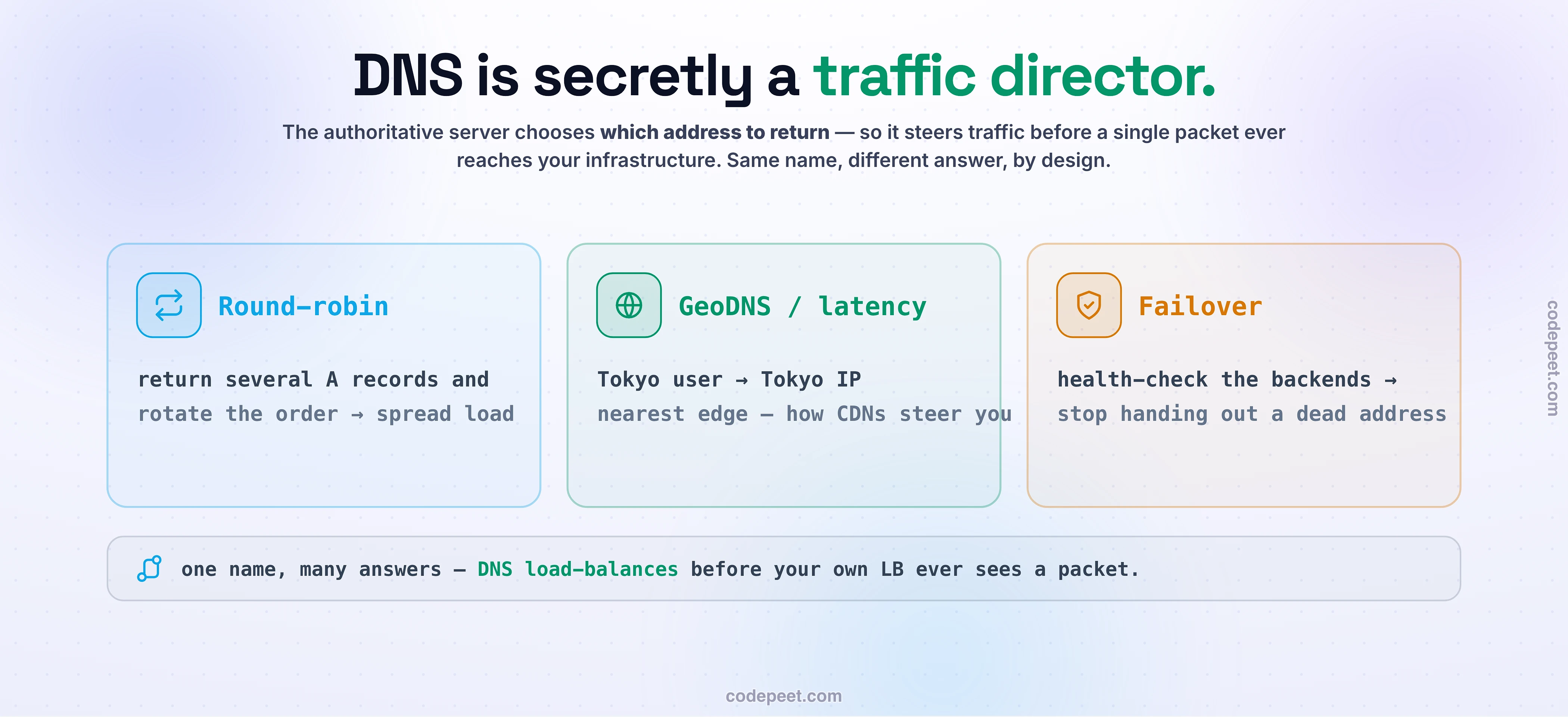
Here's the part that turns DNS from "a lookup table" into a genuine system-design tool — and it's the thing that separates people who use DNS from people who design with it. Go back to that authoritative server. When it answers "the address is…," who says it has to give the same answer to everyone? Nobody. The authoritative server chooses what address to return — and that choice is the first load-balancing and routing decision in your entire request path, made before a single packet reaches your infrastructure.
That single degree of freedom is enormously powerful. With it, DNS becomes a traffic director:
- Round-robin DNS — return several A records and rotate the order → traffic spreads across several servers. A crude but genuine load balancer, for free.
- GeoDNS / latency-based routing — return a different address depending on where the query came from. A user in Tokyo gets your Tokyo data center's IP; a user in Frankfurt gets Frankfurt's. This is exactly how CDNs and global load balancers steer you to the nearest edge — the managed DNS service keeps a live map of internet latencies and answers accordingly. The "magic" of a fast global site is, in large part, this.
- Failover — health-check your servers and simply stop returning a dead one's address, so new lookups route around the outage.
- Weighted routing — send 5% of answers to a new version to test it (a canary), 95% to the old.
So the humble name-to-address lookup is doing double duty: it's how users find your system, and it's the first place you get to decide which copy of your system they find. Every time you use a CDN, run in multiple regions, or do a blue-green deploy, you're leaning on this. Keep it in mind — when we reach load balancing and CDNs later, you'll realize the steering started here.
When DNS Breaks: “It's Always DNS”
There's a proverb every experienced engineer knows: "It's always DNS." It's half a joke and half hard-won wisdom, and the reason is simple — every connection your system makes starts with a name lookup, so DNS sits on the critical path of everything. When it misbehaves, it doesn't look like "a DNS problem"; it looks like the entire application is down for no reason. So the pros check DNS first. Here's what actually goes wrong:
- The propagation gotcha. You change a record to point at a new server — but the old answer is still cached everywhere, and it stays cached until its TTL expires. For up to the TTL, some users hit the old server and some hit the new one, and the site looks half-broken. "DNS hasn't propagated yet" almost always just means "the old TTL hasn't run out." The pro move: lower the TTL a day before a planned change so the switch is quick, then raise it back after.
- Negative caching. Even a "that name doesn't exist" answer (NXDOMAIN) gets cached. So a typo, or a record you haven't created yet, can stay broken in caches even after you fix it — until the negative cache expires. Baffling if you don't know it's a thing.
- Your DNS provider is a single point of failure. In October 2016, a botnet called Mirai — built from hijacked IoT devices like cameras and baby monitors — hammered Dyn, a big managed-DNS provider, with a massive DDoS. The result: Twitter, Reddit, Netflix, Spotify, GitHub, and 50-plus other giants went dark — even though their own servers were perfectly healthy. Their DNS was the weak link. The lesson is straight from the single-point-of-failure playbook: DNS is critical infra, so serious operations run more than one DNS provider.
None of these are exotic. They're the everyday ways a name-lookup layer bites back — and knowing them is the difference between a five-minute fix and a five-hour outage.
The Trade-off
The cleanest trade-off in DNS lives in that TTL number you keep hearing about — and it's a perfect little model of "there are no right answers, only trade-offs."
A high TTL buys speed and resilience; a low TTL buys agility. You can't have both.
Set a high TTL (say 24 hours) and you get wonderful things: the answer is cached far and wide, so lookups are instant, your authoritative servers see almost no load, and your site keeps resolving even if your DNS provider has a bad hour — the cached answers ride right through it. The cost: when you need to change where a name points — a migration, a failover, an emergency — that change crawls out over hours as caches slowly expire. You are slow to react.
Set a low TTL (say 60 seconds) and you flip it: changes and failovers take effect almost immediately, which is exactly what you want during a deploy or an incident. The cost: far more traffic hammering your authoritative servers, and a tighter dependency on your DNS being up right now, because caches expire constantly and everyone keeps re-asking.
| TTL | You gain | You pay |
|---|---|---|
| high (hours) | instant lookups · low load · rides out provider blips | changes are slow to propagate |
| low (seconds) | fast failover & changes | more load · tighter dependence on live DNS |
That's why pros treat TTL as a lever they adjust on purpose — high for stable records, and temporarily lowered right before a planned change. And zoom out one level: the whole idea of a name pointing at an address is itself a trade-off. You gain enormous flexibility — move servers, swap IPs, route by geography, fail over — all without ever changing the name people typed. You pay for it with one more lookup on the critical path, and one more thing that can break. For the flexibility it buys, the whole internet has decided that's a bargain.
Mental-Model Corrections
"DNS finds the website / loads the page." No — DNS only turns a name into an address. It hands you the phone number; making the actual call (the HTTP request over TCP or QUIC) is a completely separate step.
"There's one big DNS server somewhere." No — it's a distributed hierarchy with no single owner (root → TLD → authoritative), plus caches everywhere. That structure is exactly why it scales and survives.
"A domain maps to one IP address." Often it maps to many, and different users get different answers on purpose — round-robin, geo-routing, failover. The answer is a routing decision, not a fixed fact.
"DNS changes take effect instantly." No — old answers live in caches until their TTL expires. "It hasn't propagated" = "the TTL hasn't run out." Lower the TTL before you make a change.
"Every lookup goes all the way to the root servers." Almost none do — caching absorbs the vast majority. The root sees your query only on a cold cache. That's how 13 logical roots serve the whole planet.
"Recursive and iterative are the same thing." The stub → resolver query is recursive ("give me the final answer"); the resolver's root → TLD → authoritative queries are iterative ("give me a referral"). The resolver hides the iteration from you.
"DNS is private and secure by default." No — classic DNS is plaintext UDP; anyone on the path can see and even tamper with your lookups. DoT and DoH encrypt them; DNSSEC signs records so they can't be forged.
Try It Yourself: Walk a Real Lookup
Ten minutes at a terminal and you'll see everything in this lesson happen for real. Predict first: how many milliseconds do you think a cached lookup takes versus a cold one — and how much difference will caching make when you run the same query twice?
- See the answer and its TTL. Run
dig www.example.com(ornslookup www.example.com). Read the ANSWER section: the A record (the address) and its TTL. Run it again a few seconds later and watch the TTL count down — you're literally watching your resolver's cache age. That countdown is caching, made visible. - Watch the whole walk. Run
dig +trace www.example.com. Instead of a single answer, you'll see the actual referral chain — root →.com→ authoritative — each server pointing one step further down, exactly the hops you stepped through above. This is the resolution walk, live. - Catch DNS steering traffic. Look up a big global name (like
google.com) from two different networks or two public resolvers — saydig @8.8.8.8 google.comversusdig @1.1.1.1 google.com, or from home versus a VPN in another country. Compare the addresses. If they differ, you just caught GeoDNS routing you to a nearby data center — the traffic director from earlier, doing its job.
That third one is the aha: the same name, answered differently depending on where you're standing. Once you've seen it with your own eyes, DNS stops being a boring lookup and becomes what it really is — the front door and the traffic cop of every system on the internet.
Recap & What’s Next
The internet's phonebook, and why it's so much more than a phonebook:
- DNS turns a name into an address by walking a distributed hierarchy nobody owns: stub → recursive resolver → root (→
.comTLD → authoritative), each level handing down a referral until the authoritative server returns the A record. - Your stub asks one recursive question; the resolver runs the iterative walk on your behalf and hands back a clean answer.
- It survives planetary scale because it's cached at every step — browser, OS, and the shared resolver cache — so most lookups return in ~1 ms and never touch the root. TTL is the dial for how long caches may keep an answer.
- DNS is secretly a traffic director: round-robin, GeoDNS/latency routing (how CDNs steer you to the nearest edge), and failover all happen here, before any packet reaches your servers.
- The trade-off is TTL: high = fast & resilient but slow to change; low = agile but heavier. And because everything starts with a lookup, when things break — it's always DNS.
So now the full picture of "how do I even reach a server" is complete: a name becomes an address (DNS), a packet finds that address across the layers (IP), and a connection carries your bytes reliably or fast (TCP/UDP). You've arrived at the front door of the server with an open connection — and now you finally get to say something. The language you speak through that connection, the one that powers the entire web, is HTTP — and it has quietly reinvented itself three times to get faster. That's next: HTTP/1.1 → HTTP/2 → HTTP/3.