Proxies: Forward vs Reverse
Introduction
The last lesson ended with a powerful trick: terminate TLS at the edge — do the expensive handshake on a box close to the user, then quietly forward the request to your real servers far away. But that casually assumed something important: a box sitting in the middle, between the user and your servers, doing work on someone's behalf. That box has a name — a proxy — and it's one of the most quietly important building blocks in all of system design. Almost every request you make on the internet passes through one.
A proxy is simply a middleman: it sits between two parties, catches the traffic, and forwards it on — often doing something useful in between. And here's the entire lesson, on a single axis:
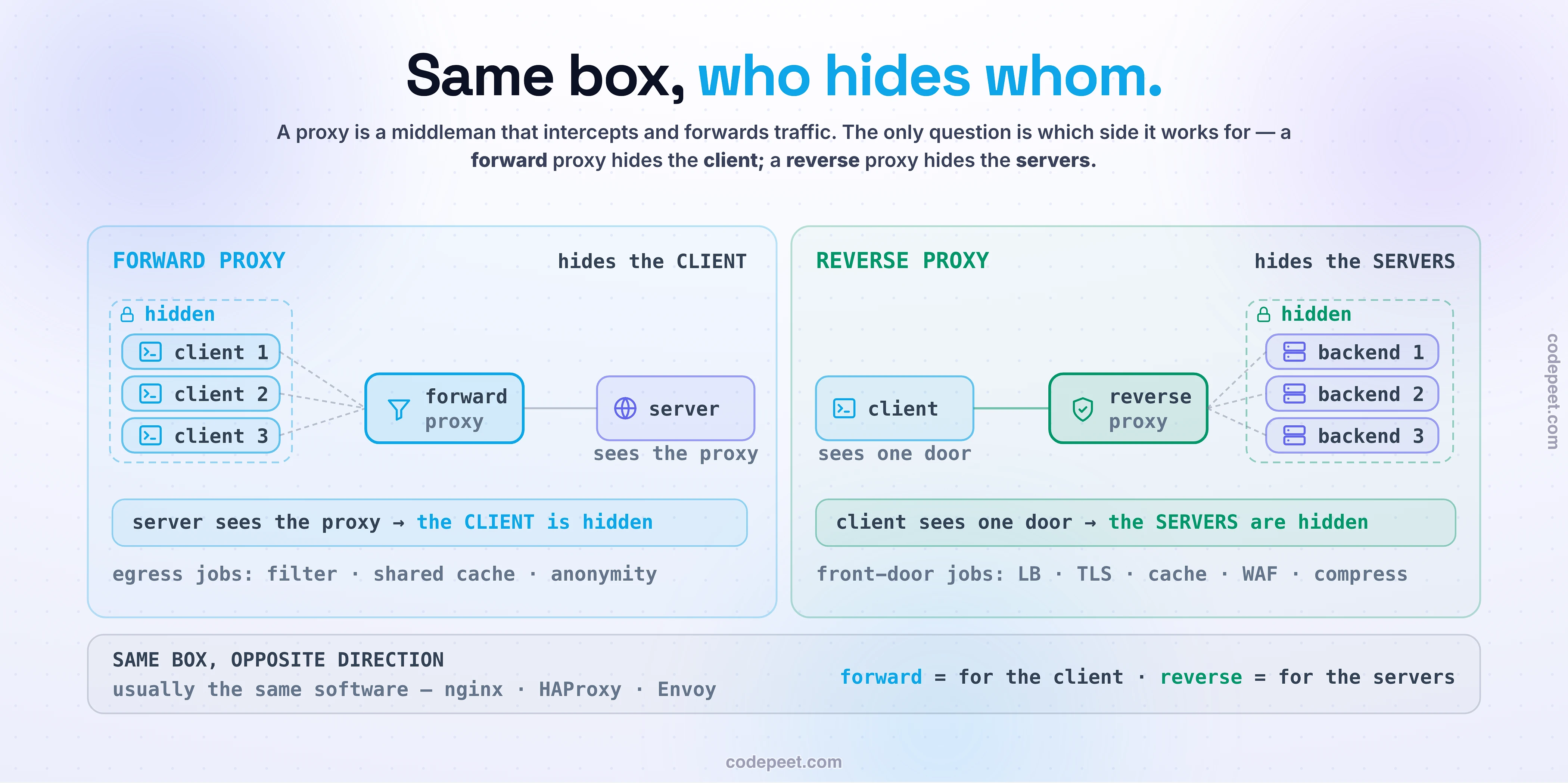
A proxy always sits in the middle. The only question is which side it works for — and therefore whose identity it hides. A forward proxy works for the client and hides the client from the server. A reverse proxy works for the servers and hides the servers from the client.
Same box, pointed in opposite directions. That's it — and once you feel that symmetry, "forward vs reverse" stops being a confusing pair of terms and becomes obvious. By the end you'll not only tell them apart instantly (with a mnemonic you won't forget), you'll understand why the reverse proxy in particular is the unsung hero of the modern web — the single box that terminates your TLS, balances your load, caches your responses, and guards your servers, all at once. Let's meet the middleman.
A Proxy Is a Middleman
Before we split them apart, hold the thing they have in common, because it's most of the concept. A proxy is an intermediary that stands between two communicating parties. Instead of A talking directly to B, A talks to the proxy, and the proxy talks to B. It intercepts the traffic and forwards it on — and while it has the traffic in hand, it can do things: filter it, cache it, encrypt or decrypt it, log it, or route it somewhere clever.
That's true of both forward and reverse proxies. They are not two different technologies — in fact it's usually the exact same software (nginx, HAProxy, Envoy) playing either role. A single program can be a forward proxy in one deployment and a reverse proxy in another. So if the machinery is identical, what makes one "forward" and the other "reverse"?
Just one thing: which side of the conversation the proxy is standing in for — and, as a direct consequence, whose identity disappears behind it. A middleman who makes calls for you hides you from the people you call. A middleman who answers calls for a company hides the company's internal structure from the callers. Same middleman, opposite direction, opposite thing hidden. Everything else in this lesson — the use cases, the jobs, the trade-offs — flows from that one distinction. So let's take each direction in turn, starting with the one that faces outward.
Forward Proxy: Hides the Client
A forward proxy sits in front of the clients, facing outward toward the internet. The clients are set up to send their outbound requests to the proxy, and the proxy makes each request to the destination on their behalf. The consequence is the whole point: the destination server sees the request coming from the proxy's address, not the client's. The client is hidden from the server.
The analogy that nails it: a forward proxy is a personal assistant who places your calls for you. When your assistant rings a restaurant on your behalf, the restaurant's caller ID shows the assistant's number — they never learn yours. You're hidden from them. And your assistant can do more than just relay: they can refuse to call certain places (content filtering / access control), and remember answers so they don't have to call again (caching).
That maps directly onto why organizations run forward proxies — they're a client-side, outbound (egress) control point:
- Access control & filtering. A company routes all employee traffic through a forward proxy to block certain sites and log usage. (Your office or school network almost certainly does this.)
- Shared caching. Cache popular content once for the whole office, so a hundred people downloading the same update only fetch it from the internet once — saving bandwidth.
- Anonymity & bypassing restrictions. Hide the client's real IP from destinations, or route around geo-blocks. A VPN is a close cousin of this idea.
One honest caveat worth internalizing: a forward proxy makes you anonymous only to the destination server. The proxy operator itself still sees everything you do and can log it. You haven't removed trust — you've moved it, from the websites you visit to whoever runs the proxy. Keep that straight and you'll never be fooled by "use this proxy, it makes you totally anonymous." Now flip the box around.
Reverse Proxy: Hides the Servers
A reverse proxy is the mirror image. It sits in front of your servers, facing inward from the internet. Every client out there sends its request to one public endpoint — the reverse proxy — and the proxy forwards each request to one of several backend servers hidden behind it. The consequence, again, is the whole point: the client sees only the proxy. It has no idea how many backends exist, what their addresses are, or which one actually answered. The server pool is hidden from the client.
The perfect analogy here is a company's receptionist at the front desk. Every visitor, no matter what they need, first talks to the one receptionist. The receptionist figures out where they should go and routes them to the right department — but the visitor never sees the internal org chart. They don't know how many people work there, who's in which office, or which employee handled their request. From the outside, the whole company is the receptionist. That's exactly what a reverse proxy does for your servers: it presents one friendly front door to the world and keeps the messy internal structure — the pool of backends, their real IPs, which ones are up — completely hidden.
And just like a great receptionist, the reverse proxy doesn't only route. It quietly does a whole stack of other jobs on the way through — checking IDs, taking messages, handling the paperwork, spreading visitors across available staff. Those "other jobs" are where the reverse proxy goes from "a box that hides servers" to the single most useful piece of infrastructure in a typical system. That's worth seeing for yourself before we list them — so let's put both proxies in your hands.
See It: One Box, Two Directions
The forward/reverse flip is one of those ideas that's slippery in words and instant once you watch a request go through. So below, you drive the middleman.
Start by flipping between forward and reverse mode and firing a request. In forward mode, watch the destination server's "what I see" readout: it only ever shows the proxy's address — never the client's. The client is hidden. In reverse mode, watch the client's readout: it only ever shows one front door — never the pool of backends behind it. The servers are hidden. Same box, opposite direction, opposite thing disappearing. Then, in reverse mode, switch on the proxy's real jobs one by one and watch them work live: load-balance a burst of requests and see them fan out across the backends; terminate TLS and watch the lock come off at the edge; fire a repeat request with caching on and watch it come straight back from the proxy without ever touching a backend; and send a malicious request with the WAF on and watch it get blocked right at the door. By the time you've toggled all four, you'll feel why this one box is the front door of the internet.
The Reverse Proxy Is the Front Door
Here's the claim to take seriously: the reverse proxy is the single most important box in a typical production system's request path — because it's where all the annoying, repetitive, cross-cutting concerns get handled once, at the edge, instead of being reimplemented in every backend service. Look at everything one reverse proxy routinely does:
- Load balancing — spread incoming requests across a pool of backends by availability and capacity, so no single server is overwhelmed. (This is so important it's the entire next section.)
- TLS termination — do the expensive TLS handshake right here at the edge (exactly the trick from the last lesson), so your backend services can speak plain, simple HTTP and never worry about certificates. All your crypto lives in one well-tuned place.
- Caching — serve a cached response directly, without bothering the backends at all. A cache hit at the reverse proxy is a request your servers never even see.
- Security — a WAF (web application firewall) inspects and blocks malicious requests before they reach your code; the proxy hides your backends' real addresses so attackers can't hit them directly; and it can absorb DDoS floods at the edge.
- Plus compression, rate limiting, request rewriting, and acting as a single API gateway for many services.
Notice the pattern: none of these belong in your business logic. Your product code should worry about products and payments, not about parsing TLS or checking for SQL-injection attempts on every endpoint. The reverse proxy is where you hoist all of that out and solve it once, for everything behind it. That's why it's nearly universal — the tools that do it (nginx, which fronts around 34% of the world's busiest sites, plus HAProxy, Envoy, and managed services like Cloudflare and AWS ALB) are some of the most deployed software on earth. When you type a URL, the very first thing that answers you is almost always a reverse proxy — not the actual server.
Load Balancer, Reverse Proxy, CDN — Untangled
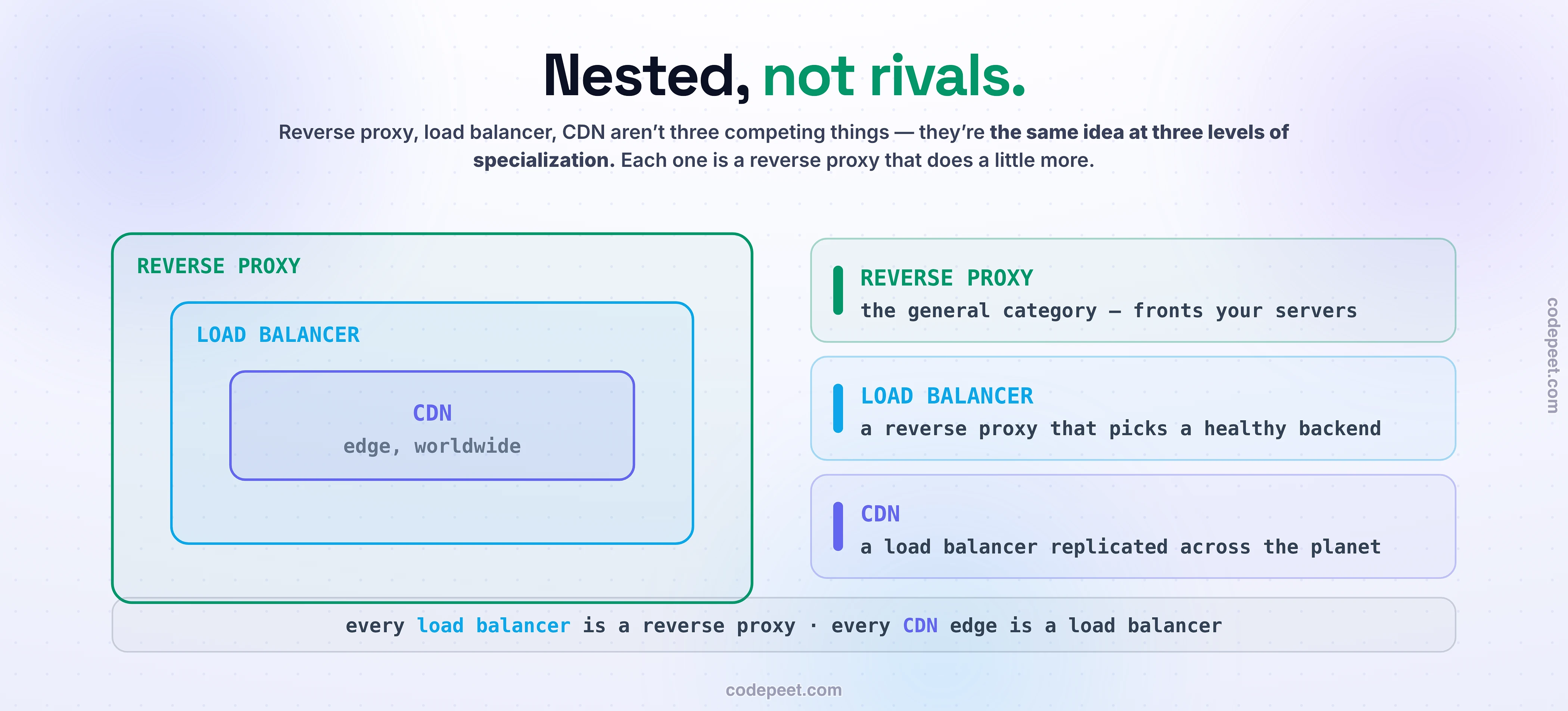
Three terms get mixed up constantly, and this is a favorite interview trap, so let's nail the relationship cleanly. They're not three separate things competing — they're nested.
- A reverse proxy is the general category: any box that sits in front of servers and forwards requests to them (doing TLS, caching, security, routing, and so on).
- A load balancer is a reverse proxy with one specific superpower: the intelligence to choose which backend handles each request (round-robin, least-connections, and the like). So — every load balancer is a reverse proxy; it's just a reverse proxy whose main job is distributing traffic. But not every reverse proxy is a load balancer — a reverse proxy that only terminates TLS and caches, pointing at a single backend, isn't balancing anything. Load balancing is one of the jobs, not the definition.
- A CDN (content delivery network) is essentially a reverse proxy replicated all over the planet — hundreds of edge locations, each a caching reverse proxy close to users, so content is served from a few milliseconds away instead of from a distant origin. It's the reverse-proxy idea plus geography.
So the mental hierarchy is: reverse proxy (the concept) → load balancer (a reverse proxy that picks backends) → CDN (reverse proxies spread across the world). They're the same fundamental building block at three levels of specialization. If you internalize that, a huge amount of infrastructure vocabulary suddenly clicks into a single picture — and you'll never again wonder whether "the load balancer" and "the reverse proxy" in an architecture diagram are two boxes or one. (Usually: one.)
The Costs: A Hop, a SPOF, and a Plaintext Boundary
A proxy is not free, and a good engineer knows exactly what they're paying for the convenience. Three costs, each a callback to something you've already learned:
- An extra hop = extra latency. Every request now makes one more stop before reaching a backend. It's usually small — and often more than repaid by caching, TLS offload, and keeping warm connections to the origin — but it's real, and a carelessly placed proxy can add round-trips you didn't budget for.
- A single point of failure. If you run one reverse proxy and it dies, your entire site is unreachable — every backend can be perfectly healthy, but the front door is locked. This is the single-point-of-failure lesson from earlier, in its most common real-world form. So production reverse proxies are themselves made redundant — a pair or a pool, often fronted by another balancer or reached via anycast. (Turtles all the way down, as the SPOF lesson warned.)
- A trust boundary where plaintext lives. This one's subtle and important. When the reverse proxy terminates TLS, it decrypts the traffic at the proxy. Which means the hop from the proxy to your backends may travel as plain, unencrypted HTTP. Inside a locked-down data center that's often an acceptable trade; but for a zero-trust posture you re-encrypt that internal hop (mutual TLS between proxy and backend). Either way, understand that the padlock in the user's browser guarantees encryption up to the proxy — not necessarily all the way to the server that runs your code. The proxy is now a high-value target: it holds the certificates and sees everything in the clear.
None of these should scare you off — the reverse proxy is worth it many times over. But naming the costs is what separates "I put nginx in front of it" from understanding what that box now owns, risks, and must be protected against.
The Trade-off
Strip the lesson to its essence and the trade-off is clean:
A proxy buys you a control point at the cost of a hop. You add latency and one more thing to keep alive — and in return you get a single place to enforce everything that shouldn't be scattered across your backends.**
That's the whole bargain, and for the reverse proxy it's a wildly good one. Look at what centralizing on that one box buys: TLS handled in one well-tuned place instead of on every server; security rules (WAF, rate limits) applied once at the door instead of reimplemented in every service; caching that spares your backends entirely; load balancing that keeps any one server from drowning; a single, stable front door whose address never changes even as you add, remove, and restart backends freely behind it. You pay one network hop and the discipline of making the proxy redundant — and you get a clean separation between "the messy shared concerns of being on the internet" and "your actual application logic." That separation is worth far, far more than the hop.
There's a sharper sub-trade nested inside, the one from the last section: TLS termination centralizes your crypto but creates a plaintext trust boundary between proxy and backend — convenience versus a security decision you have to make consciously (accept it inside a trusted network, or re-encrypt for zero-trust). But the headline trade is simple and nearly always worth taking: one box in the middle, and a whole category of hard problems gets solved in one place. That's why the reverse proxy is not an optional add-on — it's the front door.
Mental-Model Corrections
"Forward and reverse proxies are different technologies." No — usually the same software (nginx, Envoy, HAProxy). The only difference is where it sits and whom it represents/hides, not the tech.
"A reverse proxy is just a load balancer." No — load balancing is one of its jobs. It also does TLS termination, caching, WAF/security, compression, and gateway routing. Every load balancer is a reverse proxy; not every reverse proxy is a load balancer.
"A forward proxy makes me anonymous." Only to the destination server. The proxy operator still sees everything and can log it. You moved trust, you didn't remove it.
"The reverse proxy is an optional performance add-on." It's the front door of nearly every production system — where TLS terminates, security lives, and traffic is distributed. Most requests you make hit a reverse proxy first, before any real server.
"A proxy hides the client from everyone." Direction matters. Forward hides the client from the server; reverse hides the servers from the client. They point opposite ways.
"Adding a proxy always makes things slower." It adds a hop, but it usually nets faster — caching skips backend work, TLS offload frees your servers, and one warm origin connection beats many cold ones.
"TLS termination means the whole path is encrypted." Only up to the proxy. Past it (proxy → backend) the traffic may be plain HTTP unless you re-encrypt — a real security consideration, not a detail.
Try It Yourself: Spot the Middleman
Five minutes and you'll catch both kinds of proxy in the wild — including the one you're almost certainly behind right now. Predict first: when you curl a giant website, do you think you're talking to its actual application server, or to something standing in front of it?
- Meet the reverse proxy. Run
curl -sI https://<any-big-site>(try a few big names) and read the response headers. Look forServer:(oftencloudflareornginx),Via:, orCF-Ray:— those are fingerprints of the reverse proxy / CDN that answered you. You are not talking to the origin server; you never even learn its real address. The servers are hidden — exactly as advertised. - Meet the forward proxy (probably yours). Check your apparent public IP at a "what is my IP" site. Now connect to a VPN (or a corporate/school network) and check again — your apparent IP changes to the proxy's. Every site you visit now sees that address, not your device's. You're hidden from the destinations — the forward-proxy trick, live. (And remember: the VPN provider can still see you.)
- Watch the direction flip. Put those two together and feel the symmetry: in step 1, a box in front of the servers hid the servers from you. In step 2, a box in front of the clients hid you from the servers. Same middleman idea; opposite ends; opposite thing hidden.
That contrast — servers hidden vs client hidden — is the entire lesson, and now you've seen both with your own eyes on real traffic. You'll never mix up forward and reverse again.
Recap & What’s Next
One middleman, two directions:
- A proxy is a middleman that intercepts and forwards traffic — usually the same software in either role. The only question is which side it works for, and whom it hides.
- A forward proxy sits in front of clients (egress) and hides the client from the server — used for filtering, shared caching, and anonymity (but the proxy operator still sees you).
- A reverse proxy sits in front of servers (ingress) and hides the servers from the client — and it's the front door of the modern web, doing TLS termination, load balancing, caching, WAF/security, compression, and gateway routing all in one place.
- The terms are nested: a load balancer is a reverse proxy that chooses a backend; a CDN is a reverse proxy replicated across the planet.
- The trade-off: a proxy buys a control point at the cost of a hop (plus a SPOF to make redundant, and a plaintext trust boundary if it terminates TLS). For the reverse proxy, that bargain is almost always worth taking.
We keep circling one magic phrase — a reverse proxy or CDN "close to the user," reached at one public address that somehow leads to the nearest edge out of hundreds worldwide. How can a single IP address live in a hundred places at once, and how does your request automatically find the closest one? That beautiful trick is what makes global CDNs and edge networks possible, and it's next: anycast — one IP, many places.