Load Balancers: The Traffic Directors
Introduction
Back in the very first section, we handed you a rule that shapes almost every large system: scale out, not up — when one server isn't enough, run a fleet of many identical servers instead of buying one impossibly-big machine. It's the right answer. But it quietly smuggled in a problem we never solved, and it's a doozy:
If your app runs on ten servers, which one does a user's request actually go to — and how does the user even reach it? They can't memorize ten IP addresses. Your domain can only point somewhere. So where?
This is the question that makes or breaks horizontal scaling, and the answer is a single, elegant piece of infrastructure: the load balancer. It's one box that sits in front of your whole fleet, gives the world one address to talk to, and quietly hands each incoming request to one of the servers behind it. It's the traffic director — and it is, as this section's title promises, the first and most fundamental tool of scaling out. Without it, a pile of servers is just that — a pile nobody can use. With it, that pile becomes a single, elastic, resilient service that can grow, shrink, and heal without a single user ever noticing.
This lesson is the foundation of the whole Load Balancing section: what a load balancer is, why a fleet is useless without one, and the one gift it gives you that changes everything — a stable front door. The clever details — how it picks a server, how it spots a dead one, how it works across continents — are the lessons that follow. First, the front door.
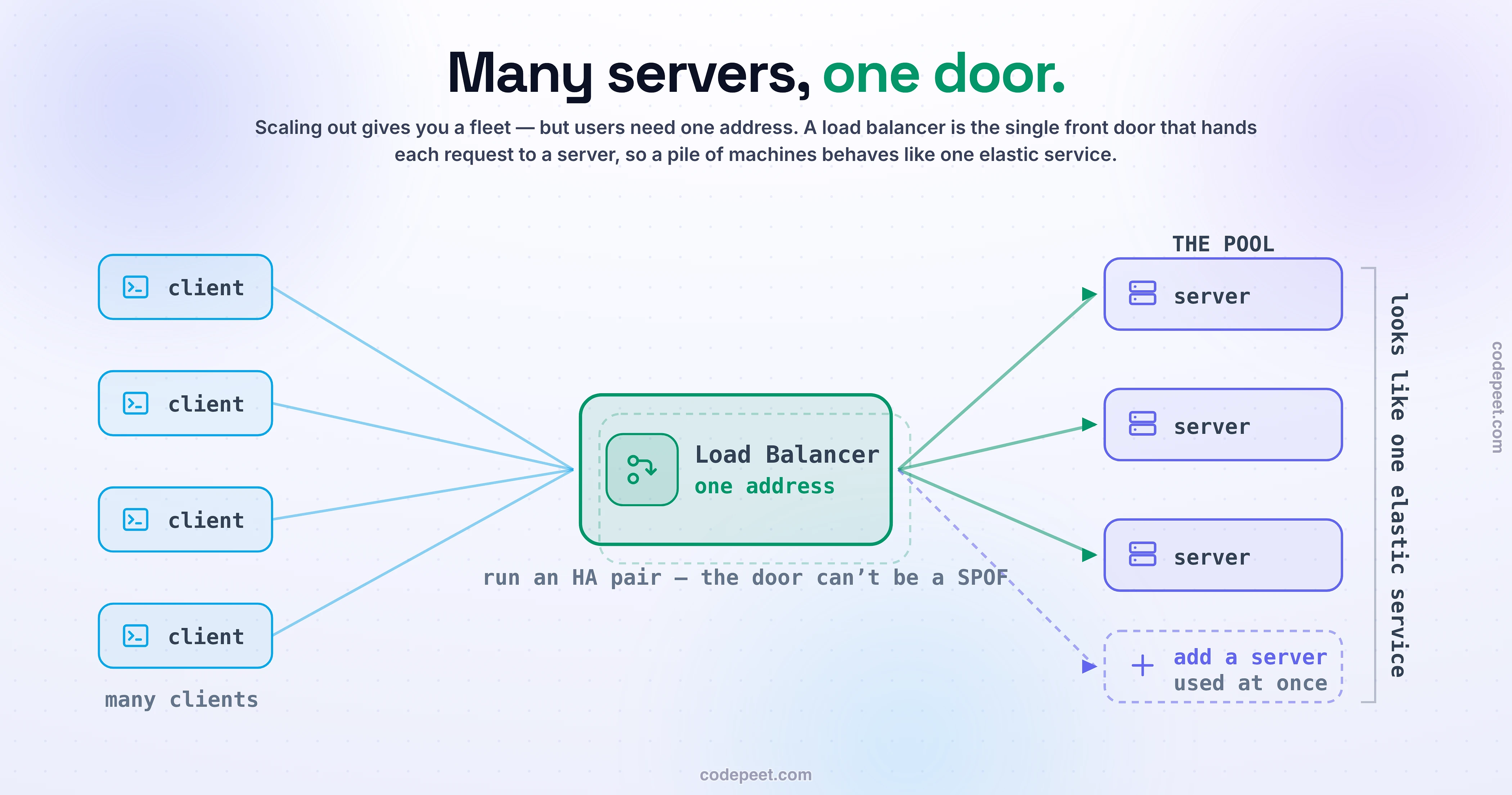
The Problem: A Fleet Needs a Front Door
Let's make the problem concrete, because the load balancer is meaningless until you feel the gap it fills. Say your app outgrows one server, so — good instinct — you spin up a second identical one. Now you have two servers, server-A at one IP and server-B at another. Great. Now what?
Your users type yourapp.com. DNS has to resolve that to an address. But you have two. So which one? If you send everyone to server-A, then server-B sits idle and you've gained nothing — you're paying for two servers and using one. If you somehow split users between the two IPs by hand, you've created a mess: some users are hardwired to A, some to B, the split is uneven, and — worst of all — if server-A dies, every user pinned to it just breaks, while server-B sits there perfectly healthy and unable to help them. Add a third server next month and the whole nightmare gets worse: now you have to somehow tell the world about a new IP that nobody's clients know to use.
See the fundamental tension? Users need exactly one thing to talk to. You have many things serving them. Those two facts are in direct conflict, and no amount of adding servers resolves it — it makes it worse. The pile of servers can't act like a service until something reconciles "one address the world can reach" with "many servers doing the work."
That reconciliation is the entire job of the load balancer. It's the missing piece that turns "scale out" from a nice idea into something you can actually run. So let's put it in place.
The Load Balancer: One Door, Many Servers
A load balancer sits in front of your fleet and does something beautifully simple: it presents one address to the world, accepts every incoming request at that address, and hands each one to one of the servers in the pool behind it. That's it. One front door; many rooms behind it.
If you recognize that shape, you should — it's a reverse proxy (from the networking section), the box that hides a pool of servers behind a single public face. A load balancer is a reverse proxy whose specific mission is distributing the load across the pool so no single server gets buried while others idle.
The analogy that makes it click for good is a restaurant host. Guests don't wander into the dining room and hunt for an open table themselves — they all walk up to one host stand at the door (the single entry point). The host looks out over the floor and seats each party at an available table (distributes the requests), so the load spreads evenly and no waiter gets slammed while another stands around. To every guest, the experience is dead simple: you talk to the host, you get seated, you eat. They never think about which table is free, how many tables there are, or which waiter is busy. The host makes a whole room of tables feel like one smoothly-run restaurant — and that is exactly what a load balancer does for a fleet of servers. Now, resolving yourapp.com points at one address — the load balancer's — and behind it, quietly, sit A, B, and however many more. The conflict from the last section is gone. But the single most powerful consequence of this setup is what happens when you want to change the fleet.
Transparent Scaling: The Whole Point
Here is the gift that makes the load balancer the tool of horizontal scaling — the thing worth remembering long after you forget the details. Because clients only ever talk to the one front-door address, what's behind that door can change freely, and nobody on the outside ever knows.
Watch what that unlocks:
- Add a server → it just starts getting traffic. Spin up a new identical server, register it with the load balancer, and the LB immediately begins routing some requests to it. No client changes. No DNS changes. No downtime. The fleet just got bigger and every user is oblivious.
- Remove a server → the load just spreads to the rest. Take one out for maintenance and the LB stops sending to it; the others pick up the slack, again invisibly.
- The fleet can breathe. This is exactly how autoscaling works: when traffic spikes, an autoscaler launches new servers that register with the load balancer and immediately share the load; when the spike passes, they drain and leave. The whole pool grows and shrinks with demand, behind the stable front door, with zero disruption to users. That "add a server with no downtime" promise from the scaling lesson? This is the machinery that makes it real.
Step back and name what you've built: from the outside, a hundred ordinary commodity servers now look like one single, enormous, always-available service. That illusion — many machines presenting as one elastic service — is the load balancer's deepest gift, and it's the foundation every scalable system is built on. The best way to believe it is to toggle the door on and off yourself and watch a fleet go from unusable to seamless.
See It: With vs Without a Load Balancer
The value of that single front door is invisible until you take it away — so below, you get to run a fleet both ways and feel the difference in your gut.
First, switch the load balancer OFF. Now clients have to reach servers directly, and it's a mess: one server gets hammered while another sits idle, the split is lopsided, and — the killer — when you add a new server, nobody knows it exists, so it just sits there doing nothing while the busy one keeps drowning. Adding capacity doesn't help, because there's no one to direct traffic to it. Then flip the load balancer ON. Every client now hits one address; the traffic spreads itself across the pool; and here's the moment worth waiting for — add a server and the load balancer starts using it instantly, with zero change for a single client. Fire traffic, add servers, remove servers, and watch a pile of machines transform into one smooth, elastic service. That transformation is the entire reason this box exists.
What Else the Traffic Director Does
So far the load balancer has done one job: spread requests across the pool so a fleet becomes usable. That's the foundation — but a real traffic director is smarter than "deal the next request to the next server," and those extra powers are exactly what the rest of this section is about. Think of this as the map of where we're headed:
- It decides which server, cleverly. "Next one in line" is just the simplest rule. It can send each request to the server with the fewest active connections, or weight bigger servers more heavily, or always route a given user to the same server. Those are load-balancing algorithms — your very next lesson.
- It can be dumb-and-fast or smart-and-aware. A load balancer can route by just the raw connection (blazing fast, content-blind) or actually read the HTTP request and route by URL or host (slower, far smarter). That's the Layer 4 vs Layer 7 decision — a lesson of its own.
- It notices death before your users do. It constantly health-checks every server and, the instant one stops responding, stops routing to it and lets the others cover — automatic failover. How that works (and how to watch a server die and traffic reroute) gets its own lesson too.
- It can span the planet. The same balancing idea, stretched across continents with the GeoDNS and anycast tricks from the networking section, sends each user to the nearest region — global load balancing.
Don't worry about mastering any of those right now — each gets its own deep dive. The point of this lesson is the thing they all stand on: a single front door that turns a fleet into a service. Hold that, and everything else in this section is just refinement. But before we refine, two honest caveats about the front door itself.
The Door Itself Can Fail
Here's the caveat you can never forget about, because forgetting it has taken down real companies. You put a load balancer in front of your fleet to escape the single point of failure of one server. But look closely at what you built: now every single request in your entire system flows through that one load balancer. If it dies, your beautifully redundant fleet of ten healthy servers becomes completely unreachable — the front door is locked, and it doesn't matter how many rooms are fine behind it. You didn't eliminate the single point of failure; you moved it to the door.
This is the single-point-of-failure lesson from earlier, in its most important real-world form, and the fix is the same: make the load balancer itself redundant. Production systems never run one load balancer — they run a highly-available pair (or pool): two load balancers, either both active, or one active with a hot standby ready to take over in seconds if the primary fails. And often that pair is itself reached via anycast or DNS — the exact turtles-all-the-way-down pattern you saw with anycast, where one IP is served from many places. In the restaurant analogy: if your one host walks off, the whole restaurant jams at the door — so a good restaurant always has a second host ready to step in.
The mental upgrade here is important: you don't run "a load balancer." You run a load-balancer layer — a redundant tier whose whole job is to never, ever be the thing that's down. The traffic director is too important to have a single one of.
“Why Not Just Point DNS at Several Servers?”
A sharp reader — or a skeptical teammate — will ask the obvious shortcut: "Do I even need a whole load balancer? Can't I just list all my servers' IPs in DNS and let it hand them out in turn?" This is a real technique — it's called round-robin DNS — and it's worth understanding exactly why it's not a substitute for a real load balancer, because the gaps are precisely what a load balancer exists to fix.
Round-robin DNS does spread traffic, crudely: you give your domain several IP addresses and the DNS server rotates which one it returns. But it's blind in three costly ways:
- No health checks. DNS has no idea whether a server is alive. If one of those IPs belongs to a dead server, DNS will cheerfully keep handing it out, and every unlucky client who gets it just fails. A real load balancer watches each server and instantly stops routing to a dead one.
- Slow, sticky failover. DNS answers are cached for their TTL (seconds to hours), so even after you notice a server is down and yank its IP, clients keep using the cached bad answer for a while. A load balancer reroutes in seconds, not TTLs.
- Uneven, unaware distribution. DNS just rotates addresses; it has no clue that one server is overloaded and another is idle. A load balancer can balance by actual load (fewest connections, etc. — next lesson).
So they're not rivals — they're complementary. DNS (and its geo/anycast tricks) is great for getting a user near the right region; the load balancer does the precise, health-aware, per-request distribution once traffic arrives. You use DNS to get to the neighborhood, and a load balancer to get to the right, healthy door. "Just use DNS" gets you a crude approximation and a bunch of 3 a.m. pages; the real thing is a load balancer.
The Trade-off
Even something as clearly-good as a load balancer isn't free, and naming the cost is what turns "always add one" into real understanding:
A load balancer buys you scalability, elasticity, and resilience — at the cost of one more hop in the path and one more critical component to run and keep alive.
The costs are real. Every request now takes one extra stop on its way to a server (a little latency). You've added a component you have to operate — configure it, monitor it, and (as we just saw) make it redundant so it isn't a single point of failure. At truly enormous scale, the load balancer can even become a bottleneck of its own that you have to scale out in turn (a load-balancer layer behind anycast). None of that is nothing.
But look at what you get for that price: the one thing horizontal scaling is impossible without — a single, stable front door behind which a fleet of servers can grow, shrink, and heal, completely invisibly to your users. Without it, "scale out" is a slogan you can't actually execute. With it, your capacity becomes usable, your fleet becomes elastic, and a dead server becomes a shrug instead of an outage. For any system that needs to serve more than one box can handle, this isn't really a trade-off you deliberate over — it's the price of admission, and it's a bargain for what it unlocks. The interesting decisions aren't whether to use a load balancer; they're how it should behave — and that's the rest of this section.
Mental-Model Corrections
"A load balancer is just round-robin." Round-robin is one algorithm it can use. A load balancer is the whole traffic director — the single entry point, distribution, health awareness, elasticity — and the algorithm is one knob on it (your next lesson).
"A load balancer creates capacity / makes everything infinitely fast." No — it distributes existing capacity. If both your servers are saturated, the LB can't conjure a third; you still have to provide enough servers. It makes your capacity usable and elastic, it doesn't manufacture it.
"The load balancer can't fail — it's the reliable part." It's a single point of failure unless you make it redundant. One LB in front of a fleet just relocates the SPOF to the front door — run a highly-available pair.
"Round-robin DNS is basically a load balancer." No — it's crude distribution with no health checks and slow, TTL-cached failover. A real LB chooses per request, health-aware, with instant failover.
"The load balancer holds my data or my session." No — it's stateless; it just routes. State lives in the servers or a shared store (the statelessness lesson) — which is exactly why any server can handle any request, and why the LB can freely spread them.
"If one big server is fast enough, I don't need a load balancer." That's vertical scaling — a hard ceiling and a single point of failure. The load balancer is precisely what lets you escape both by going wide.
Try It Yourself: Meet the Door
Ten minutes and you'll catch a load balancer in the act — including the "add a server, it just works" moment that is this lesson. Predict first: when you curl a big website, do you think you're talking to its actual application server, or to a load balancer standing in front of a pool you never see?
- Spot the front door. Run
dig <any-big-site>and thencurl -sI https://<that-site>and read theServer:header. The address you reached and the thing that answered are almost always a load balancer / reverse proxy (Cloudflare, an nginx, an AWS ALB) — not the app server. You hit one door; the pool behind it is invisible, exactly as designed. - Build a two-server pool. On any cloud account (or locally with Docker), run nginx as a load balancer with a tiny
upstream { server a; server b; }block pointing at two little backends — or stand up an ALB/NLB in front of two instances. Hit the one LB address a bunch of times (curlin a loop) and watch responses come back from different backends. You just built a fleet that looks like one service. - Feel the magic. Now add a third backend to the pool and keep hitting that same LB address. Within moments, responses start coming from the new server too — and you changed nothing on the client side. That instant, invisible "the fleet just got bigger" is the whole point of a load balancer, and now you've made it happen with your own hands.
Step 3 is the one to sit with. The client kept talking to one unchanged address, and the capacity behind it silently grew. That is horizontal scaling, working — and it only works because the load balancer is there.
Recap & What’s Next
The front door of every scalable system:
- Scaling out creates a conflict — users need one address, but you have many servers. The load balancer resolves it: one stable front door in front of the fleet, handing each request to a server behind it.
- It's a reverse proxy whose job is distribution — a traffic director. Its deepest gift is transparent scaling: add, remove, or lose servers behind the door and clients never know — the pool grows, shrinks, and heals invisibly (this is what makes autoscaling real).
- From the outside, a fleet of commodity boxes looks like one elastic, always-up service.
- Two honest caveats: the load balancer is itself a single point of failure → run a highly-available pair; and round-robin DNS is not a substitute (no health checks, TTL-slow failover, uneven) — a real LB is per-request and health-aware.
- The trade-off — a hop and a component to run — is really just the price of admission for being able to scale out at all.
You now have the what and the why. But we've been hand-waving the most interesting part: when a request arrives at the door, which server does the load balancer actually send it to? "The next one" is only the beginning — send it to the least-busy server, or weight the beefier ones, or always route a user to the same place, and you get very different behavior. Those are the load-balancing algorithms, and choosing the right one is a real design decision. That's next.