OAuth2 & SSO
The Password You Should Never Hand Over
Last lesson, we built tokens under one quiet assumption: your server has the secret and signs the token itself. But look at the button you've clicked a hundred times — "Continue with Google." A different company is about to vouch for who you are, and your app will trust that vouching without ever seeing your Google password. How? That's this lesson, and it's the finale of the whole APIs section.
Start with the problem OAuth actually exists to solve, because it is almost never the one people think. Imagine a photo-printing app that wants to pull photos from your Google account. The caveman solution: it asks for your Google password, logs in as you, grabs the photos. Sit with how catastrophic that is. That app now has your Google password — so it can read your email, empty your Drive, change your recovery settings, act as you in every way, forever, and there's no way to take just the photo access back short of changing your password everywhere. And it's storing your password, so when that little app gets breached (it will), your Google account goes with it. Passwords are all-or-nothing, permanent, and unrevocable. Sharing one is handing someone a copy of your house key when they asked to water your plants.
OAuth 2.0 is the protocol that replaces "give the app your password" with "grant the app a scoped, expiring, revocable token — and never let it see your password at all." That's its real job, and its real name is delegated authorization: you authorize an app to do a specific thing on your behalf. Not login — permission. ("Log in with Google" turns out to be a thin identity layer built on top of this, and we'll get there.) The famous "dance" — those redirects that bounce your browser between three parties — looks like ceremony, but every single step of it defuses a specific attack. By the end you'll be able to run the dance, and break it, on purpose.
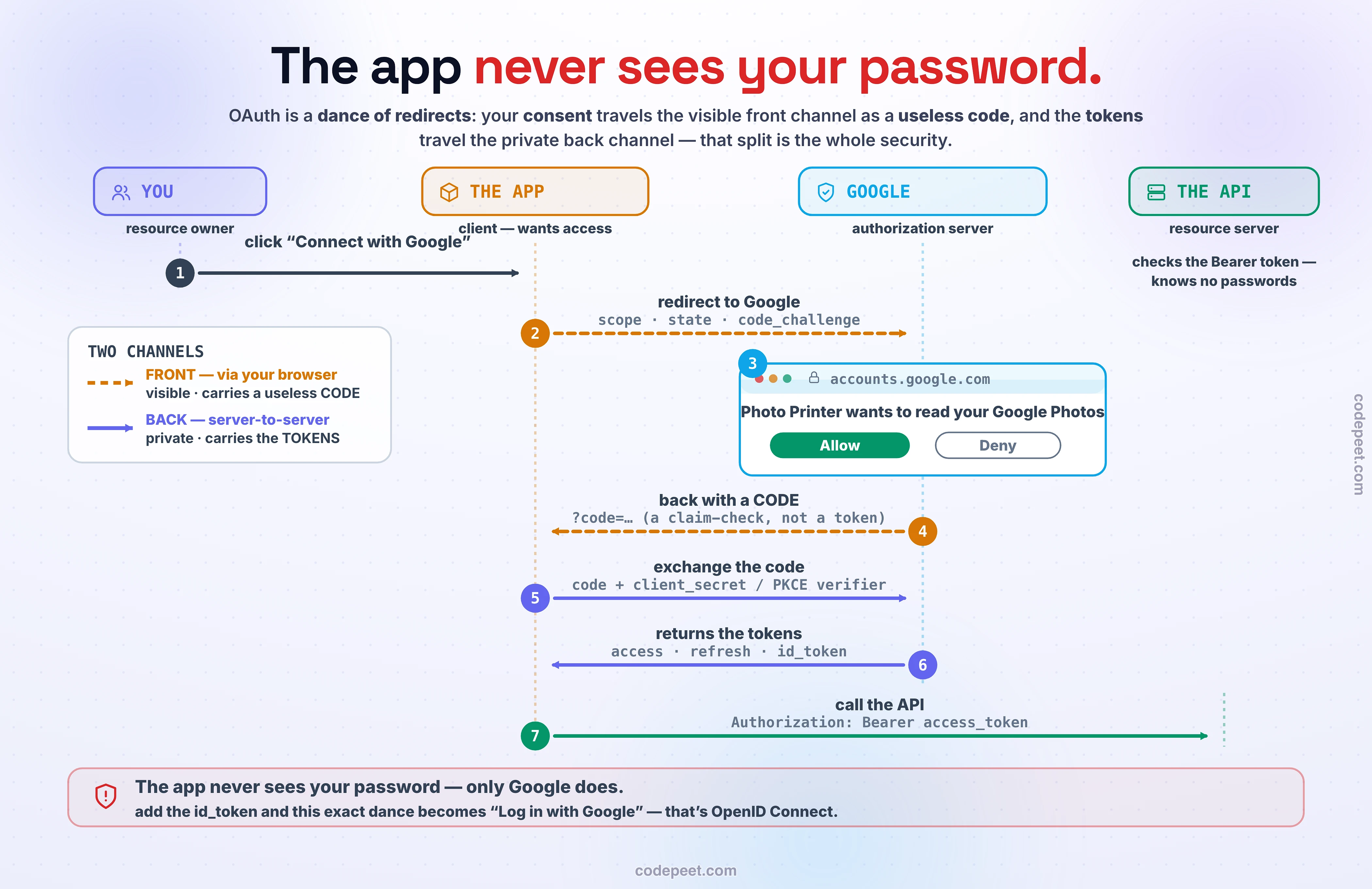
The Cast: Four Roles
Before the choreography, meet the four parties — because half of OAuth confusion is not knowing who's who:
- The Resource Owner — you. The human who owns the data and gets to say yes or no.
- The Client — the app that wants access. The photo printer, Canva posting to your Instagram, the website with the "sign in with Google" button. This is the party that must never see your password.
- The Authorization Server — the one that knows you and issues tokens. Google's (or GitHub's, or Auth0's) login-and-consent service. It authenticates you and, if you consent, mints tokens.
- The Resource Server — the API holding the goods. The Google Photos API. It doesn't know or care who you are; it just checks the token the client presents and serves the data the token unlocks.
(In practice the authorization server and resource server are usually the same company — Google runs both — but they're different jobs, and keeping them separate in your head makes the flow click.)
The entire protocol is about getting a token from the authorization server into the client's hands — with your consent, scoped to just what you allowed — so the client can present it to the resource server. The dance is how that token travels safely. Watch.
The Dance: The Authorization Code Flow
Here is the flow that runs behind essentially every "Connect your account" button on the internet. Seven steps — and I'll tell you why each exists, because that's the whole lesson:
- You click "Connect with Google" in the app.
- The app redirects your browser to Google — this is the front channel (it happens through your browser's URL bar). The redirect carries the app's
client_id, thescopeit's requesting ("read your photos"), a randomstatevalue, and (we'll explain) a PKCEcode_challenge. Notice what it does not carry: any secret. This channel is visible — it's in your browser history, server logs, referrer headers. - Google logs you in and shows the consent screen: "Photo Printer wants to read your Google Photos — Allow?" This is why the front channel must exist: only by routing you through Google's own domain can Google verify it's really you (with your Google password, which the app never sees) and ask for your explicit consent.
- You click Allow, and Google redirects your browser back to the app — carrying a short-lived, single-use authorization code (and the same
state). Read this twice: it's a CODE, not a token. The code is a claim-check, not the goods. On its own it's useless — you'll see exactly why in a moment. - The app checks that
statematches what it sent (if not, this is a forged callback — reject it), then exchanges the code for tokens over the back channel — a private, server-to-server HTTPS call from the app's backend to Google's token endpoint, carrying thecode, the app'sclient_secret(proving it's the real app), and (PKCE) thecode_verifier. - Google returns the tokens: an
access_token(what the app may do), usually arefresh_token(to mint more — last lesson's pattern), and, if this is a login, anid_token(who you are). - The app calls the Photos API with
Authorization: Bearer <access_token>— and finally gets your photos, scoped to exactly what you allowed.
The genius is hiding in plain sight, and it's the one thing to carry out of this lesson: the flow uses two channels on purpose. The front channel (browser redirects) is where consent must happen — it has to involve you and Google's real domain — but it's visible, so the only thing allowed to travel there is a useless code. The back channel (server-to-server) is private and authenticated by the secret, so the actual tokens only ever travel there. Splitting "the thing that needs your consent" from "the thing that grants access" across a visible and a private channel is the entire security architecture. Everything else is defense for those two channels.
See It: Run the OAuth Dance
This flow is a sequence, and sequences are for stepping through — so here's the whole dance, live, across four lanes (you, the app, Google, the API), and you drive it.
Click Connect and follow the objects, because the objects are the lesson: watch the browser redirect to Google carrying scope and state but no secret; watch Google log you in and ask for consent; watch Allow send back a code — drawn deliberately as a different object from a token — that the app then trades on the private back channel for the real access, refresh, and id tokens. Front-channel hops are dashed and visible; back-channel hops are solid and private. Feel the split.
Then break it on purpose, because that's where the "why" lives. Flip off the state check and fire a forged callback — watch a login-CSRF sail through and link the attacker's account to you. Flip off PKCE, "steal" the code from the browser history the way a real attacker would, and watch the tokens get stolen — then turn PKCE on and watch the identical theft fail for want of the verifier. Try the "just give the app your password" toggle to see the anti-pattern the whole protocol exists to kill. And try calling the API with the id_token to meet the single most common OIDC bug. Every step you're allowed to skip is a vulnerability you get to watch happen.
Why a CODE and Not the Token? (State, PKCE, and the Secret)
The step that trips everyone up is #4 — why hand back a useless code instead of just the token? Because the front channel is visible, and three guards make that visibility safe:
state— CSRF defense. An attacker can trick your browser into completing their authorization (linking their account to you, or worse). So the client sends a randomstateat step 2 and refuses any callback whosestatedoesn't match. A forged callback can't guess it. PKCE does not replace this — different attack.- The
client_secret— proving the app is the app. At step 5, the back-channel exchange includes a secret only the real app's backend knows. An attacker who somehow grabbed the code still can't redeem it without the secret. Which raises a problem… - The code being short-lived and single-use. Even if a code leaks (browser history, logs, a referrer header — codes leak even over TLS), it expires in seconds and dies on first use. It's a claim-check for a locker, not the contents of the locker.
That middle guard has a gaping hole, though: what about apps that can't keep a secret? A mobile app or a single-page app runs on the user's device — any client_secret you ship inside it can be extracted from the binary or the JavaScript in minutes. For these public clients, "the secret proves it's the real app" simply doesn't work. Enter the fix that OAuth now recommends for everyone.
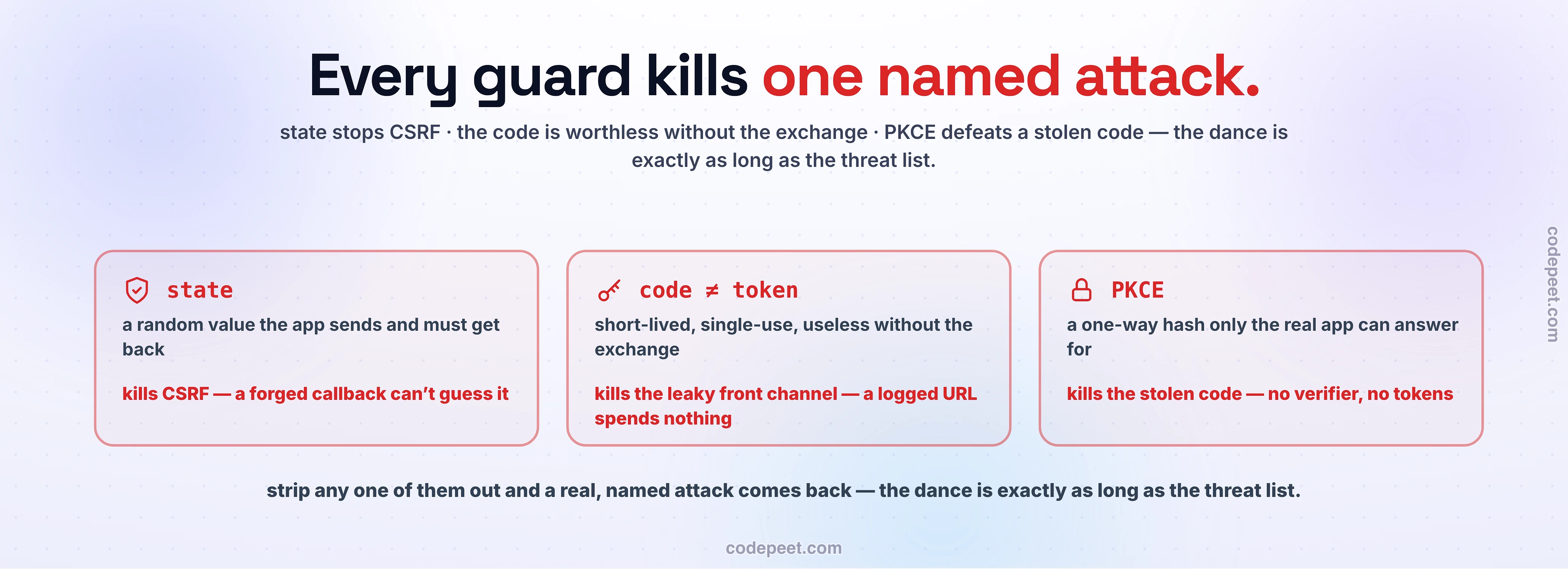
PKCE: Securing the Apps That Can't Keep a Secret
PKCE — Proof Key for Code Exchange (say "pixie") — replaces the shipped-secret with a fresh, one-time secret the client generates per flow, using a bit of one-directional math:
- Before step 2, the client generates a random
code_verifierand computes its SHA-256 hash: thecode_challenge. It sends only the challenge in the visible front-channel request. - At step 5, the client sends the original
code_verifier. The auth server hashes it and checks the result equals the challenge it stored earlier.
The magic is that hashing is one-directional: verifier → challenge is trivial, but challenge → verifier is computationally impossible. So an attacker who steals the code from the visible channel also needs the code_verifier to redeem it — and the verifier never traveled the visible channel; it lives only in the real client's memory and appears only on the private back channel. The stolen code is worthless.
This is so effective that OAuth 2.1 and the current security best-practice require PKCE for all authorization-code flows — public and confidential clients — precisely because codes leak through history, logs, and referrers even under TLS, and PKCE closes that whole class of interception. (And to repeat the trap: PKCE stops code theft; state stops CSRF. You need both. They defend different doors.)
Three Tokens, and the OIDC Login Payoff
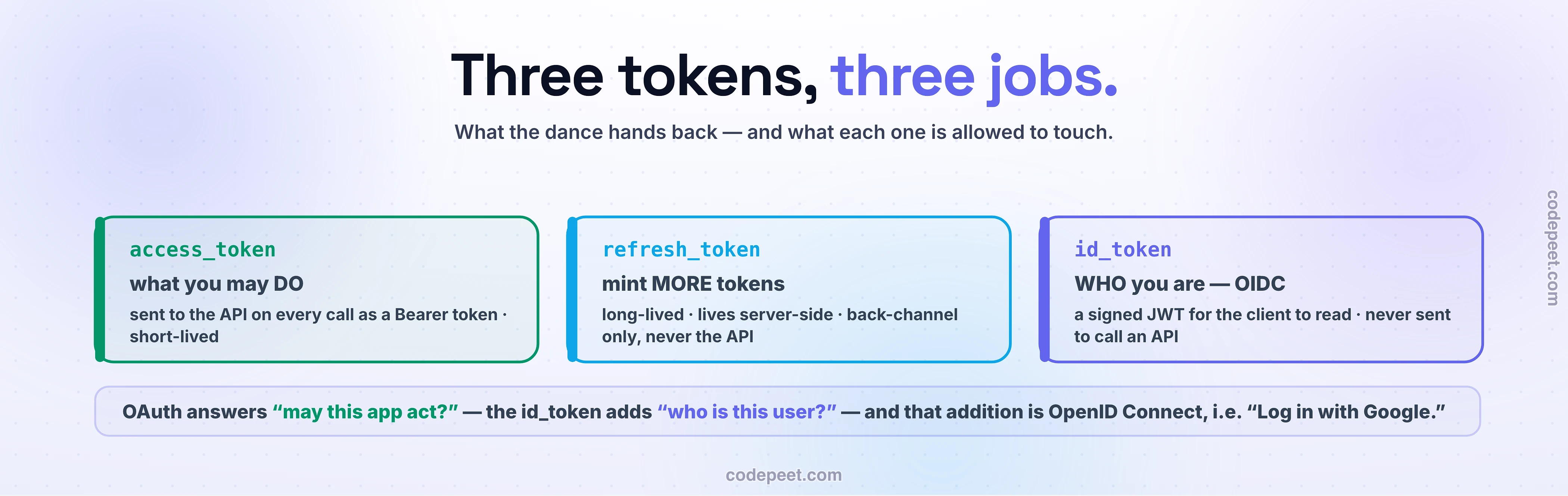
The exchange hands back up to three tokens, and confusing them is where real bugs live — so, precisely (and yes, these are the JWTs from last lesson):
access_token— what you may do. Short-lived, scoped, presented to the Resource Server asAuthorization: Bearer …. The API reads it to authorize the call. This is the OAuth token.refresh_token— mint more. Long-lived, kept private (back-channel only), used to get fresh access tokens without re-dancing. This is last lesson's stateful revocation anchor.id_token— who you are. A signed JWT (verify the signature — last lesson!) with identity claims likesub,email,name. It is for the client to read, never to call an API with. The single most common OIDC mistake is using an id_token as an access token: one answers who is this user (for your app's own use), the other answers what may this caller do (for the API). Swap them and things break in confusing, insecure ways.
That id_token is the missing piece that turns authorization into login. Plain OAuth2 gives you a token to do things but never standardizes who you are. OpenID Connect (OIDC) is a thin identity layer bolted onto OAuth's exact same code flow that adds the id_token and a /userinfo endpoint — so now the app receives a verified answer to "who is this?" That's what "Log in with Google" actually is: OIDC. Your app never sees your Google password; Google authenticates you and vouches with a signed token your app verifies (the signature check from last lesson, doing its job across company boundaries). Authorization, with an identity layer on top — the whole section, closing the loop.
SSO, and the SAML-vs-OIDC Trade-off
Pull the camera back one notch. If a central Identity Provider (IdP) can vouch for who you are, then many apps can trust that same IdP — and you authenticate once and walk into all of them. That's Single Sign-On (SSO): log into your company's IdP in the morning, and Gmail, Slack, Jira, and the expense tool all just… let you in, no per-app password. Under the hood, modern SSO is OIDC plus a central IdP — the exact dance you just learned, with one IdP trusted by a fleet of apps.
There's an older protocol you'll meet the instant you touch enterprise software, and it's worth one paragraph so it's never a mystery: SAML (Security Assertion Markup Language, early 2000s). Same idea — an IdP authenticates you and vouches to apps — but a different era and format: SAML passes big XML assertions (signed XML documents with your identity) through browser redirects, and it's deeply entrenched in enterprise and workforce SSO (Active Directory / ADFS, HR and ERP systems, strong audit trails). OIDC is the lightweight, JSON/JWT, mobile-and-API-native successor. The trade-off is generational: SAML for legacy enterprise SSO, OIDC for anything modern — and most large organizations run both, SAML for the old fleet, OIDC for the new. Same trust idea; XML-and-2003 versus JWT-and-now.
Mental-Model Corrections
- "OAuth is a login system." OAuth is delegated authorization — permission for an app to act on your behalf, scoped and revocable. Login is OIDC, a thin layer built on OAuth. When people say "OAuth login," they mean OIDC.
- "The redirect dance is pointless ceremony." Every step defuses an attack: the front channel makes consent involve you and the real IdP; handing back a code, not a token, means the visible channel carries nothing usable;
statestops CSRF; the back channel + secret/PKCE means only the real app redeems the code. Delete any step and a specific vulnerability opens. - "The authorization code is the access token." No — the code is a short-lived, single-use claim-check, deliberately useless until the private back-channel exchange (with a secret or PKCE) turns it into tokens. That split across two channels is the security.
- "If I use PKCE I can skip
state." No. PKCE stops code interception;statestops CSRF. Different attacks, different doors — you need both. - "Call the API with the id_token." Never —
id_token= who you are (for the client to read);access_token= what you may do (for the API). Swapping them is the most common OIDC bug. - "OAuth means the app sees my password." The exact opposite — the entire protocol exists so the app never sees your password. Only the IdP does. If an app asks for your Google password directly, that's the anti-pattern OAuth was invented to kill.
Try It Yourself: Watch the Dance in Your Browser
Thirty minutes with dev-tools open, and OAuth stops being magic:
- Watch a real redirect. Open your browser's Network tab (preserve log), go to any site and click "Sign in with Google/GitHub." Watch the redirect to
accounts.google.com(orgithub.com/login/oauth/authorize) — and read the query string:client_id,redirect_uri,scope,state, and oftencode_challenge. You're seeing step 2's front-channel request in the wild. - Catch the code. Complete the consent, and watch the redirect back to the app's
redirect_uri— with?code=…&state=…in the URL. There's the authorization code, in your address bar, on the visible channel. Notice it's not a token. - Register your own app. Create an OAuth app on GitHub (Settings → Developer settings → OAuth Apps — 2 minutes, free). You get a
client_idandclient_secret. Now you are the client. - Run the exchange by hand. After getting a
code,curl -X POST https://github.com/login/oauth/access_tokenwith yourclient_id,client_secret, and thecode. Out comes anaccess_token— you just performed step 5, the back-channel exchange, in your terminal. - Use the token.
curl -H "Authorization: Bearer <token>" https://api.github.com/user— the resource server hands you your profile, scoped to what you authorized. Then decode the token or the id_token at jwt.io (last lesson!) and read the claims. - Bonus — feel PKCE: use the interactive OAuth Playground (oauth.com/playground) and run the "Authorization Code with PKCE" flow; watch the
code_verifier/code_challengepair get generated and checked. The one-way math, live.
Recap & What's Next
OAuth2 is how one app borrows scoped, revocable permission to your data on another service — without ever seeing your password — and its dance is pure, deliberate security:
- Delegated authorization, not login. The problem it solves is "let this app do this specific thing on my behalf" — never "hand it my password" (all-or-nothing, permanent, breach-catastrophic).
- Four roles: you (resource owner), the app (client), the auth server (issues tokens), the resource server (holds the data).
- The auth-code flow's genius is two channels: consent travels the visible front channel as a useless code; tokens travel the private back channel.
statestops CSRF, the code≠token split keeps the visible channel safe,client_secret/PKCE proves the redeemer is real, and PKCE's one-way hash secures the apps that can't keep a secret (now recommended for all clients). - Three tokens:
access_token(what — for the API),refresh_token(mint more),id_token(who — for the client, never to call an API). They're the JWTs from last lesson, issued across a company boundary. - OIDC = a login layer on OAuth's dance (
id_token) → "Continue with Google." SSO = one IdP trusted by many apps (OIDC modern, SAML the entrenched XML-based enterprise elder).
And that closes the APIs section. Step back and see what you built: a contract strangers can guess (L1), walked honestly (L2), repeated safely (L3), in bytes you chose (L4), evolved without breaking (L5), shaped by the client (L6) or streamed as typed functions (L7), gathered behind one governed door (L8), where identity is proven (L9) and delegated across companies (L10). That's the complete language your servers speak to the world.
Next, the course turns from request-and-response to a different shape of communication entirely — the one the gRPC lesson kept pointing at, the one browsers need and gRPC can't give them. When a server needs to push to a client, when work should happen later instead of now, when services talk through queues instead of calls: that's §7, Real-time & Asynchronous Communication — WebSockets, message queues, pub/sub, and events. The synchronous world ends here.