What is ETL
Overview
In the previous lesson, we learned that a data warehouse collects data from multiple source systems and organizes it for analysis. But how does data actually get from those source systems into the warehouse?
The answer is ETL — which stands for Extract, Transform, Load. ETL is the process (or set of processes) that moves data from where it's generated to where it's analyzed. In this lesson, we'll break down each phase of ETL, see how it works in practice, and understand why it's so critical for data warehousing.
The Big Picture
Before we dive into each phase, let's look at the full ETL flow from start to finish:
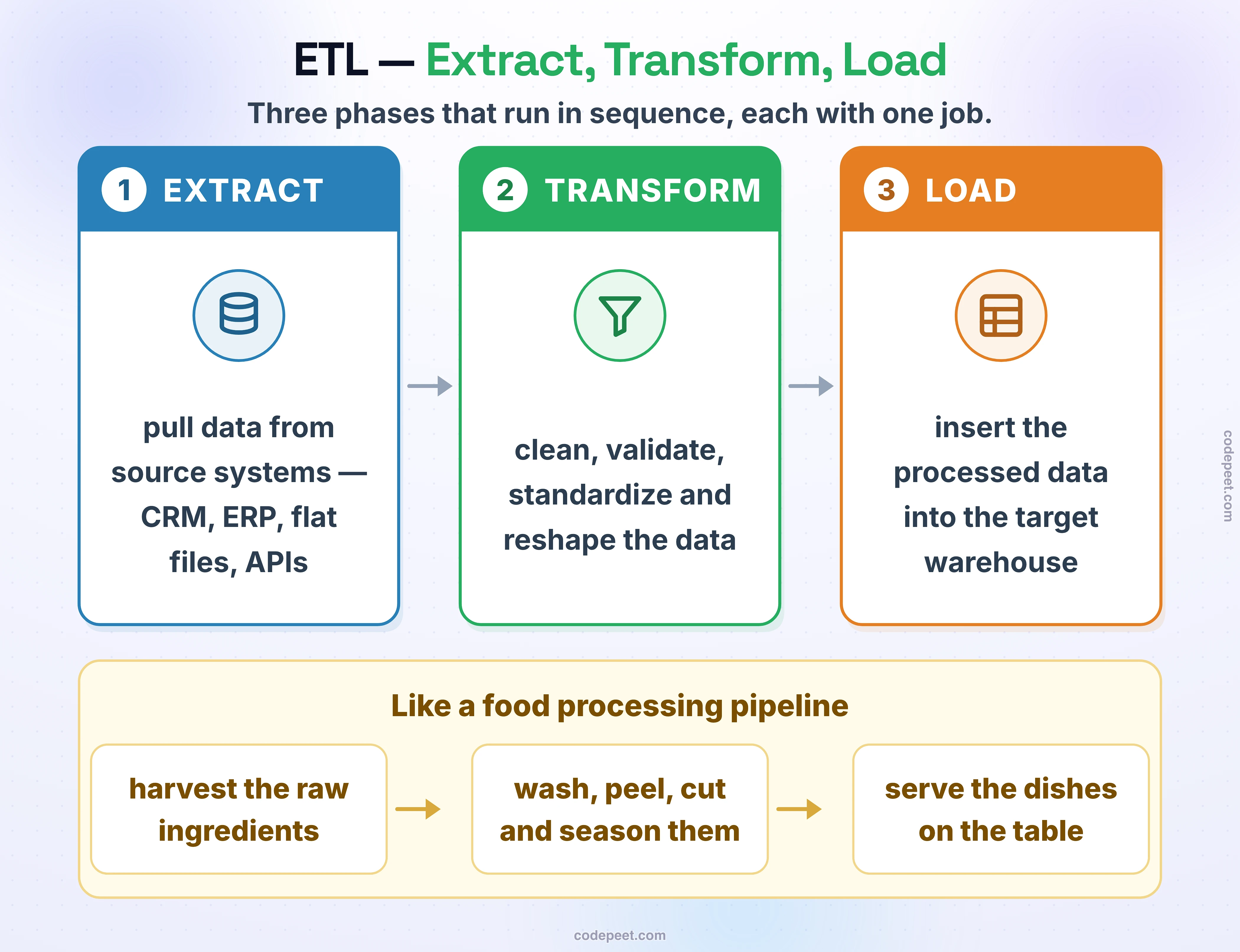
Think of ETL like a food processing pipeline:
- Extract = Harvesting raw ingredients from different farms (source systems)
- Transform = Washing, peeling, cutting, and seasoning the ingredients (cleaning and transforming data)
- Load = Placing the prepared dishes on the serving table (loading into the warehouse)
Each phase has a specific job, and they run in sequence. Let's explore each one.
Phase 1 — Extract
The Extract phase is about pulling data out of source systems and bringing it into your pipeline. This is the starting point — you can't transform or load data that you haven't extracted first.
Source systems can include:
- Databases: Connecting to operational databases (MySQL, PostgreSQL, Oracle, SQL Server) and reading tables or running queries
- Flat Files: Reading CSV, Excel, JSON, or XML files from file systems or cloud storage
- APIs: Calling REST or SOAP APIs to pull data from web services (e.g., Salesforce API, Google Analytics API)
- Message Queues: Reading events from systems like Kafka or RabbitMQ
- Cloud Services: Pulling data from cloud platforms like AWS S3, Azure Blob Storage, or Google Cloud Storage
Key Considerations During Extraction
- Full vs. Incremental Extraction: Do you extract ALL data every time (full load), or only the data that has changed since the last run (incremental load)? Full loads are simpler but slower; incremental loads are faster but more complex to implement.
- Data Volume: How much data are you extracting? A few thousand rows is trivial, but millions of rows require careful handling.
- Source System Impact: Extraction queries can slow down source systems. In production environments, extractions are often scheduled during off-peak hours.
- Error Handling: What happens if the source system is down or a file is missing? A good ETL process handles these failures gracefully.
Extraction in Our Project
In our data warehouse project, we'll extract data from CSV files that represent CRM and ERP source systems. We'll use SQL Server's BULK INSERT command to load these files directly into our Bronze layer tables.
-- Example: Extracting data from a CSV file into the Bronze layer
BULK INSERT bronze.crm_cust_info
FROM 'C:\sql\dwh_project\datasets\source_crm\cust_info.csv'
WITH (
    FIRSTROW = 2,            -- Skip the header row
    FIELDTERMINATOR = ',',
    TABLOCK                  -- Lock the table for faster loading
);
After extraction, the data sits in the Bronze layer in its raw form — exactly as it appeared in the source file. We haven't cleaned or modified anything yet.
Phase 2 — Transform
The Transform phase is where the real work happens. Raw data from source systems is almost never in the shape you need for analysis. It's messy, inconsistent, and incomplete. The Transform phase fixes all of that.
Common transformations include:
Data Cleaning
- Trimming whitespace: Removing leading and trailing spaces from text fields
- Handling NULLs: Replacing missing values with defaults or calculated values
- Removing duplicates: Identifying and eliminating duplicate records
- Fixing data types: Converting strings to dates, integers, or decimals
- Correcting invalid data: Filtering out records with impossible values (e.g., negative ages, future birthdates)
-- Example: Cleaning transformations (from our Silver load of erp_cust_az12)
SELECT
    -- Strip the 'NAS' prefix from the customer ID
    CASE
        WHEN cid LIKE 'NAS%'
        THEN SUBSTRING(cid, 4, LEN(cid))
        ELSE cid
    END AS cid,
    -- Correct invalid data: NULL out future birthdates
    CASE
        WHEN bdate > GETDATE() THEN NULL
        ELSE bdate
    END AS bdate,
    -- Trim whitespace and normalize the gender values
    CASE
        WHEN UPPER(TRIM(gen)) IN ('F', 'FEMALE') THEN 'Female'
        WHEN UPPER(TRIM(gen)) IN ('M', 'MALE')   THEN 'Male'
        ELSE 'n/a'
    END AS gen
FROM bronze.erp_cust_az12;
Data Standardization
- Consistent formats: Ensuring dates are in the same format, names are in the same case, etc.
- Code mapping: Converting system-specific codes to business-friendly values
- Unit conversion: Making sure all monetary values are in the same currency, measurements in the same units
-- Example: Standardization transformations (from our Silver load of crm_prd_info)
SELECT
    prd_id,
    prd_nm,
    -- A missing cost becomes 0, so every product has a number
    ISNULL(prd_cost, 0) AS prd_cost,
    -- Map the product line codes to business-friendly values
    CASE UPPER(TRIM(prd_line))
        WHEN 'M' THEN 'Mountain'
        WHEN 'R' THEN 'Road'
        WHEN 'S' THEN 'Other Sales'
        WHEN 'T' THEN 'Touring'
        ELSE 'n/a'
    END AS prd_line
FROM bronze.crm_prd_info;
Data Enrichment
- Calculated fields: Creating new columns from existing data (e.g., age from birthdate, full name from first + last)
- Lookups: Joining with reference tables to add descriptive information
- Aggregations: Pre-calculating totals, averages, or counts for the Gold layer
Transformation in Our Project
In our project, the Transform phase happens when we move data from the Bronze layer to the Silver layer. We'll write stored procedures that read from Bronze tables, apply all necessary transformations, and insert the cleaned data into Silver tables. Then the Gold layer transforms the data once more: views on top of Silver join the tables and model them into a star schema for reporting.
Phase 3 — Load
The Load phase takes the transformed data and inserts it into the target data warehouse tables. While it might sound simple — just an INSERT statement — there are important decisions to make about how you load the data.
Loading Strategies
Full Refresh (Truncate and Reload)
The simplest approach: delete everything in the target table and reload it from scratch.
- ✅ Simple to implement and understand
- ✅ Guarantees the target matches the source
- ❌ Slow for large tables
- ❌ Brief period where the table is empty (downtime)
-- Example: Full refresh (truncate and reload)
-- Step 1: Clear the target table
TRUNCATE TABLE silver.erp_px_cat_g1v2;

-- Step 2: Reload the complete dataset
INSERT INTO silver.erp_px_cat_g1v2 (
    id,
    cat,
    subcat,
    maintenance
)
SELECT
    id,
    cat,
    subcat,
    maintenance
FROM bronze.erp_px_cat_g1v2;
Incremental Load (Upsert)
A more advanced approach: only insert new records and update existing ones that have changed.
- ✅ Much faster for large datasets
- ✅ No downtime — existing data stays in place
- ❌ More complex to implement
- ❌ Requires a way to detect changes (timestamps, checksums)
-- Example: Incremental load using MERGE (upsert)
-- (an illustration only: our project uses a full refresh)
MERGE INTO silver.erp_loc_a101 AS target
USING (
    SELECT
        REPLACE(cid, '-', '') AS cid,
        TRIM(cntry) AS cntry
    FROM bronze.erp_loc_a101
) AS source
ON target.cid = source.cid
WHEN MATCHED THEN
    UPDATE SET
        cntry = source.cntry
WHEN NOT MATCHED THEN
    INSERT (cid, cntry)
    VALUES (source.cid, source.cntry);
Loading in Our Project
In our project, we'll use the Full Refresh (Truncate and Reload) strategy. It's simpler to understand and implement, and our dataset is small enough that performance isn't a concern. This is a very common approach for data warehouses that refresh on a daily or weekly schedule.
The Complete ETL Flow
Let's put all three phases together and see how they map to the Medallion Architecture in our project:
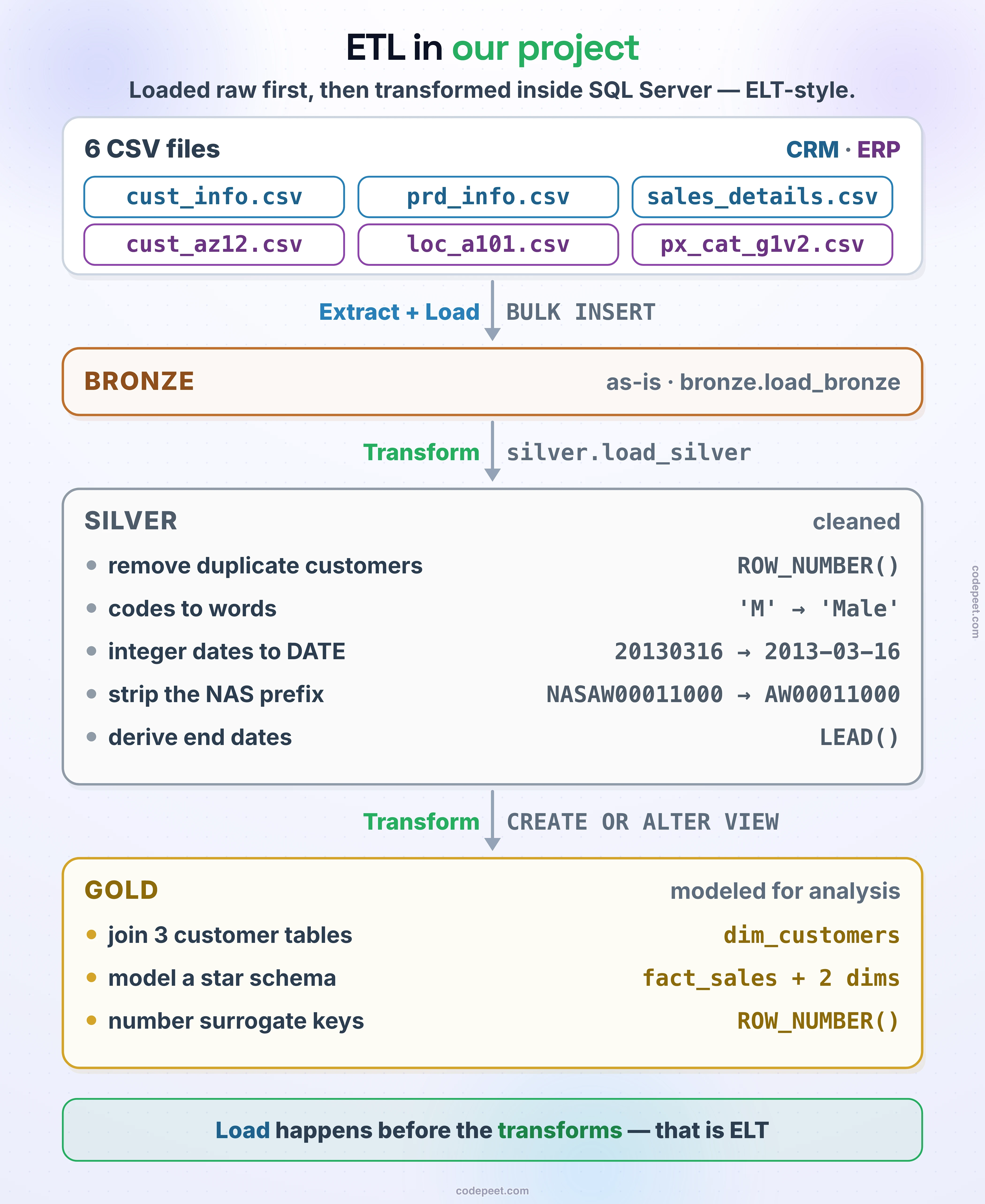
The Bronze and Silver steps are implemented as stored procedures in SQL Server (bronze.load_bronze and silver.load_silver), and the Gold step as views on top of the Silver tables. This makes the ETL process:
- Repeatable: Run the same procedures every time new data arrives
- Testable: Execute individual procedures to verify each step
- Debuggable: If something goes wrong, you can inspect data at each layer
- Automatable: The procedures can be scheduled to run on a regular basis — with SQL Server Agent jobs (Standard, Enterprise and Developer editions), or with Windows Task Scheduler and
sqlcmdon SQL Server Express, which has no SQL Server Agent
Why ETL is Critical
ETL is the backbone of any data warehouse. Without it, you'd just have a bunch of disconnected source systems with messy, inconsistent data. Here's why ETL matters:
-
Data Quality: Raw data from source systems is almost always dirty. ETL is where you enforce data quality rules — cleaning NULLs, removing duplicates, standardizing formats. Without this, your reports and analytics would be unreliable.
-
Data Integration: Different source systems use different structures, naming conventions, and data types. ETL brings everything together into a unified, consistent format.
-
Automation: A well-built ETL pipeline runs automatically. New data arrives, gets extracted, transformed, and loaded — without anyone manually copying files or running queries.
-
Auditability: Each layer in the pipeline serves as a checkpoint. If a number looks wrong in a report, you can trace it back through Gold → Silver → Bronze → Source to find where the problem is.
-
Scalability: As data volume grows, ETL processes can be optimized, parallelized, and distributed to handle the increased load.
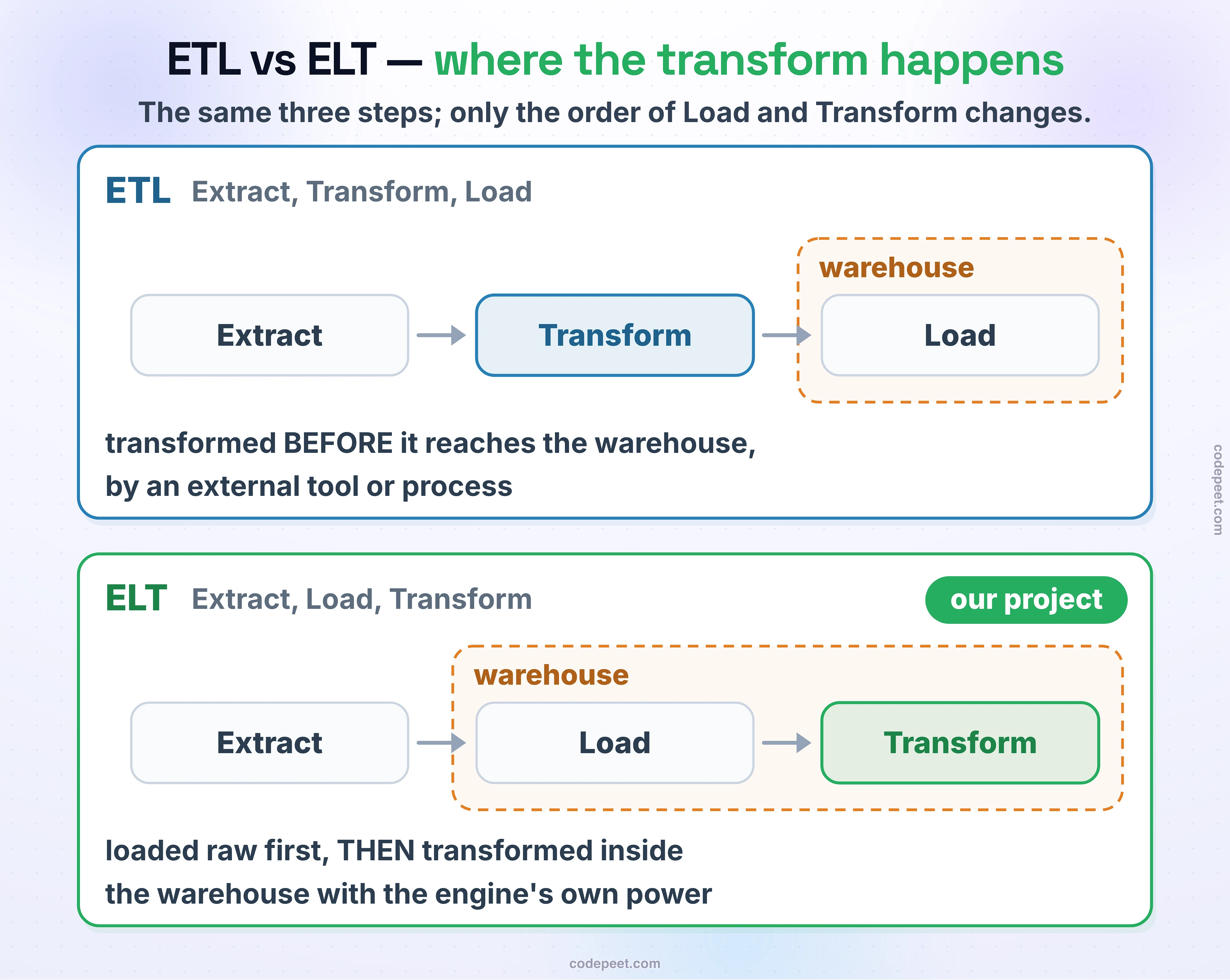
ETL vs ELT
You might also hear the term ELT (Extract, Load, Transform) — notice the L and T are swapped. Let's compare the two approaches:
When to Use ETL
- When the target database has limited processing power
- When you need to transform data before it enters the warehouse (for compliance or security reasons)
- When using traditional data warehouses with limited compute
- Common with tools like SSIS (SQL Server Integration Services), Informatica, or Talend
When to Use ELT
- When the target system has powerful processing capabilities (cloud warehouses like Snowflake, BigQuery, or Azure Synapse)
- When you want to keep raw data available for reprocessing
- When transformations are complex and benefit from the database engine's SQL capabilities
- Becoming more popular with the rise of cloud data platforms
Our Project's Approach
Our project actually follows an ELT-style approach, even though we'll refer to it as ETL for simplicity:
- We Extract data from CSV files
- We Load the raw data into the Bronze layer (no transformation yet)
- We Transform the data inside SQL Server as it moves from Bronze → Silver → Gold
The key insight is that all the transformation happens inside the database using SQL queries and stored procedures, which is the hallmark of ELT. This is a very practical approach when your data warehouse runs on a capable database engine like SQL Server.
Summary
Let's recap the key takeaways from this lesson:
- ETL stands for Extract, Transform, Load — the three phases of moving data into a warehouse.
- Extract: Pull data from source systems (databases, CSV files, APIs, etc.)
- Transform: Clean, standardize, validate, and enrich the data
- Load: Insert the processed data into the target warehouse tables
- ETL is critical for data quality, integration, automation, and auditability
- ELT is an alternative where data is loaded first, then transformed inside the target system
- In our project, the full ETL (technically ELT) pipeline runs inside SQL Server: stored procedures load the Bronze and Silver layers, and views build the Gold layer
Now that you understand both the data warehouse concept and the ETL process, the next lesson compares the main ETL methods — full load, incremental load, full refresh and change data capture — and explains why this project uses a full refresh.