Intro to Data Warehouse
Overview
In this lesson, we'll explore one of the most important concepts in the data world: the Data Warehouse. Understanding what a data warehouse is and why it exists is essential before we start building one.
By the end of this lesson, you'll know what a data warehouse is, how it differs from a regular database, and how data flows into it. You'll also learn about the Medallion Architecture — the specific design pattern we'll use in our project.
What is a Data Warehouse?
A Data Warehouse is a special type of database designed specifically for analysis and reporting. It collects data from multiple source systems, organizes it in a clean and consistent way, and makes it easy to query for insights.
Think of it like this: imagine a library. Each department in a company (sales, marketing, support) has its own filing cabinet full of documents. A data warehouse is like taking the most important information from every filing cabinet, organizing it into a clean catalog system, and putting it all in one central library that anyone can search.
Why Do Organizations Need a Data Warehouse?
Most companies use multiple software systems to run their business:
- A CRM system (like Salesforce) tracks customers and sales activities
- An ERP system (like SAP) manages orders, inventory, and finances
- A website analytics tool tracks visitor behavior
- A support system tracks customer tickets and issues
Each of these systems stores data in its own database, with its own structure and naming conventions. If a manager asks "What were our total sales by region last quarter, and how does customer satisfaction correlate with repeat purchases?" — that question requires data from multiple systems.
Without a data warehouse, someone would need to manually export data from each system, combine it in spreadsheets, and try to make it all consistent. This is slow, error-prone, and not repeatable.
With a data warehouse, all of that data is already combined, cleaned, and ready to query with a single SQL statement.
OLTP vs OLAP
To understand data warehouses, you need to know the difference between two types of database systems: OLTP and OLAP.
OLTP — Online Transaction Processing
OLTP databases are the ones behind your everyday applications. When you place an order on a website, sign up for a service, or update your profile — those operations hit an OLTP database.
Characteristics of OLTP:
- Optimized for fast reads and writes of individual records
- Handles many small transactions happening at the same time
- Data is normalized (split across many related tables to avoid duplication)
- Designed for the current state of data (what's happening right now)
Examples: CRM databases, e-commerce databases, banking transaction systems.
OLAP — Online Analytical Processing
OLAP databases are designed for analysis — running complex queries across large volumes of data to find patterns and trends.
Characteristics of OLAP:
- Optimized for reading large amounts of data quickly
- Handles fewer but more complex queries (aggregations, joins across big tables)
- Data is often denormalized (combined into fewer, wider tables for faster querying)
- Designed for historical analysis (how things changed over time)
A data warehouse is an OLAP system.
| Characteristic | OLTP | OLAP |
|---|---|---|
| Purpose | Day-to-day operations | Analysis and reporting |
| Query Type | Simple, fast (INSERT, UPDATE) | Complex, aggregated (GROUP BY, JOIN) |
| Data Structure | Normalized (many tables) | Denormalized (fewer, wider tables) |
| Data Freshness | Real-time (current state) | Periodic refresh (historical data) |
| Users | Application users | Analysts, managers, data scientists |
| Examples | CRM, ERP, E-commerce DB | Data Warehouse, Data Mart |
Important: You should never run heavy analytical queries directly on an OLTP database. Doing so can slow down the application for all users. That's another reason data warehouses exist — they give analysts their own dedicated system to query without affecting production applications.
Four Characteristics of a Data Warehouse
Bill Inmon, known as the "Father of Data Warehousing," defined four key characteristics that make a data warehouse different from a regular database:
1. Subject-Oriented
A data warehouse is organized around key business subjects like customers, products, and sales — not around the applications or departments that generate the data.
For example, instead of having a "CRM" table and an "ERP" table, the warehouse has a "Customers" table that combines customer information from both systems into one unified view.
2. Integrated
Data from different source systems often uses different formats, naming conventions, and codes. A data warehouse integrates all of this into a consistent format.
For example:
- The CRM system might store gender as
"M"/"F" - The ERP system might store it as
"Male"/"Female"
In the warehouse, you pick one standard and convert everything to match.
-- Example: Integrating inconsistent data in the warehouse
SELECT
    cid,
    CASE
        WHEN UPPER(TRIM(gen)) IN ('F', 'FEMALE') THEN 'Female'
        WHEN UPPER(TRIM(gen)) IN ('M', 'MALE')   THEN 'Male'
        ELSE 'n/a'
    END AS gen
FROM bronze.erp_cust_az12;
3. Non-Volatile
Once data is loaded into the warehouse, it doesn't change. Unlike an OLTP database where records are constantly being updated and deleted, a data warehouse preserves historical records.
If a customer changes their address, the OLTP system updates the record. But the warehouse keeps both the old and new addresses (or at least tracks the change), so you can analyze historical patterns.
4. Time-Variant
A data warehouse stores data over time, allowing you to analyze trends and changes. Every record is associated with a specific time period.
This is what makes questions like "How did our sales compare this year vs. last year?" or "When did customer churn start increasing?" possible to answer.
How Data Flows into a Data Warehouse
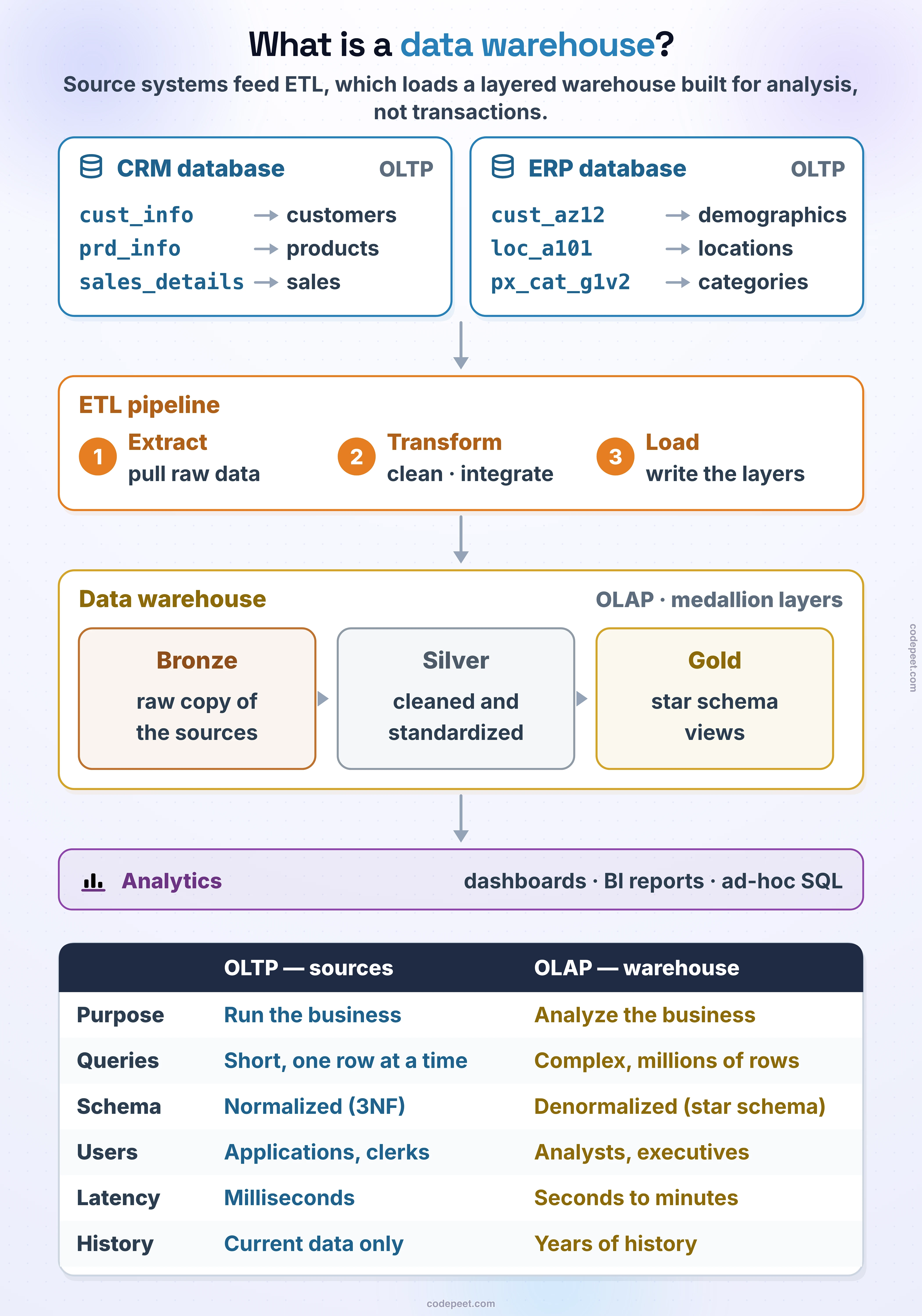
Data doesn't magically appear in a data warehouse. There's a well-defined flow that moves data from source systems through a series of steps into the warehouse. Here's a high-level view:
- Source Systems: These are the operational systems that generate data — CRM, ERP, flat files (CSV), APIs, etc.
- ETL Process: Data is extracted from sources, transformed (cleaned, standardized, enriched), and loaded into the warehouse.
- Data Warehouse: The central repository where all the integrated, clean data lives.
- Reporting & Analysis: Analysts, dashboards, and BI tools query the warehouse to generate insights.
In our project, the source systems are CRM and ERP CSV files, and we'll build the ETL process using SQL Server stored procedures.
The Medallion Architecture
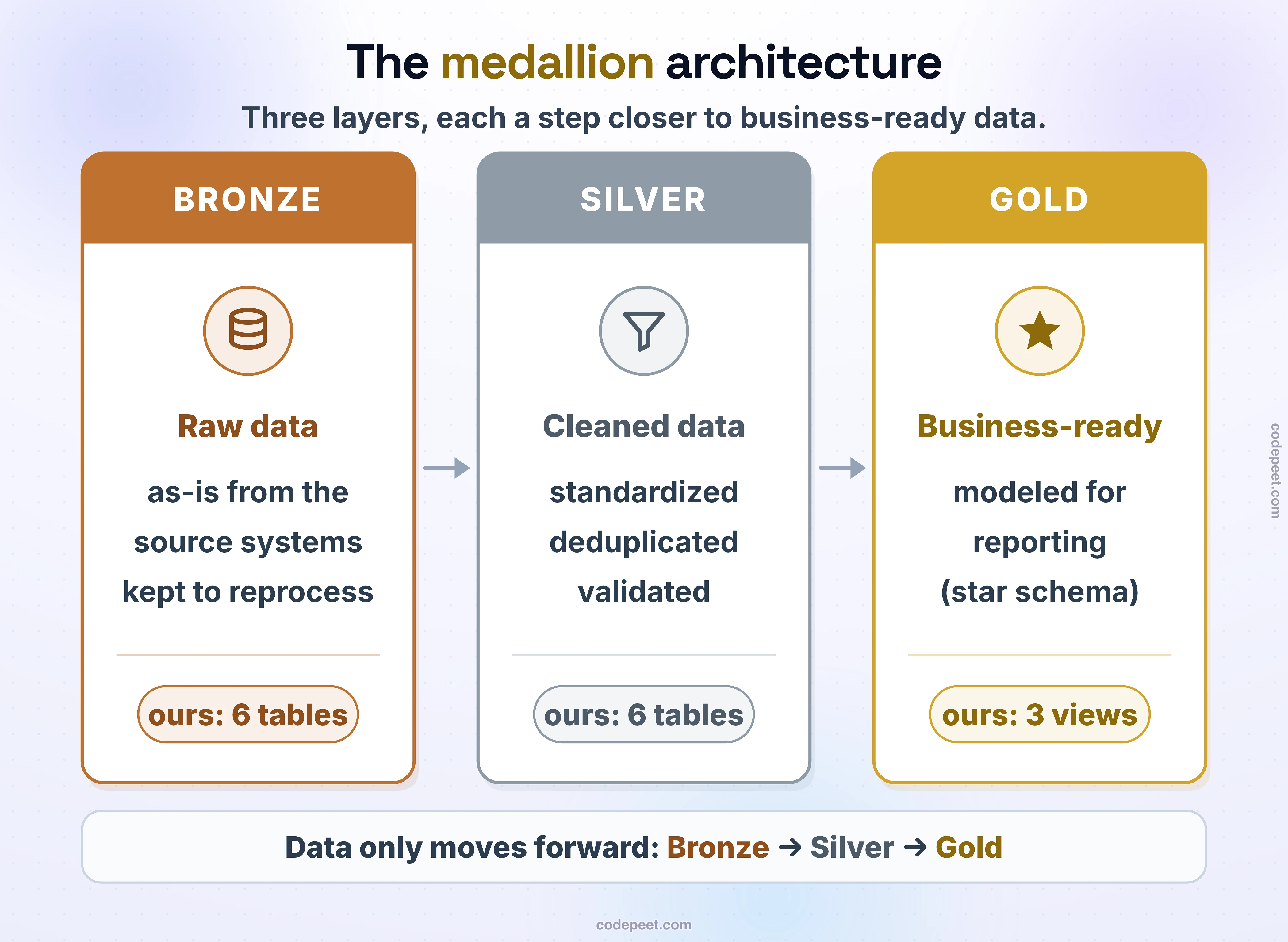
The Medallion Architecture is a modern design pattern for organizing a data warehouse into three layers, each with a specific purpose. The layers are named after metals that increase in value: Bronze, Silver, and Gold.
This architecture is widely used in industry because it provides a clear, structured approach to progressively improving data quality.
Bronze Layer (Raw Data)
The Bronze layer stores a raw copy of the data exactly as it came from the source systems. No cleaning, no transformation — just a faithful copy.
Why keep raw data? Because if something goes wrong in later stages, you can always go back to the original source data and reprocess it. It acts as a safety net.
In our project, the Bronze layer will contain tables like bronze.crm_cust_info and bronze.erp_cust_az12 loaded directly from CSV files.
Silver Layer (Cleaned Data)
The Silver layer takes the raw Bronze data and cleans, standardizes, and validates it. This is where the heavy transformation work happens.
Common transformations in the Silver layer:
- Trimming whitespace from text fields
- Standardizing date formats
- Handling NULL values and replacing them with defaults
- Removing duplicate records
- Standardizing codes and categories (e.g., gender, country codes)
- Data type conversions
-- Example: Silver layer transformation
-- (simplified: the full Silver script also removes duplicate customers)
INSERT INTO silver.crm_cust_info (
    cst_id,
    cst_key,
    cst_firstname,
    cst_lastname,
    cst_marital_status,
    cst_gndr,
    cst_create_date
)
SELECT
    cst_id,
    cst_key,
    TRIM(cst_firstname) AS cst_firstname,
    TRIM(cst_lastname)  AS cst_lastname,
    CASE
        WHEN UPPER(TRIM(cst_marital_status)) = 'S' THEN 'Single'
        WHEN UPPER(TRIM(cst_marital_status)) = 'M' THEN 'Married'
        ELSE 'n/a'
    END AS cst_marital_status,
    CASE
        WHEN UPPER(TRIM(cst_gndr)) = 'F' THEN 'Female'
        WHEN UPPER(TRIM(cst_gndr)) = 'M' THEN 'Male'
        ELSE 'n/a'
    END AS cst_gndr,
    cst_create_date
FROM bronze.crm_cust_info;
Gold Layer (Business-Ready Data)
The Gold layer is the final, polished version of the data. It's modeled for specific business use cases and optimized for querying.
This is where you might see:
- Fact tables containing measurable events (sales, orders, transactions)
- Dimension tables containing descriptive attributes (customers, products, dates)
- Aggregated views that pre-calculate common metrics
- Business logic applied to create derived fields
The Gold layer is what analysts, dashboards, and BI tools connect to. It's the "finished product" of the data warehouse.
Our Project Architecture
Here's what the complete architecture for our project looks like:
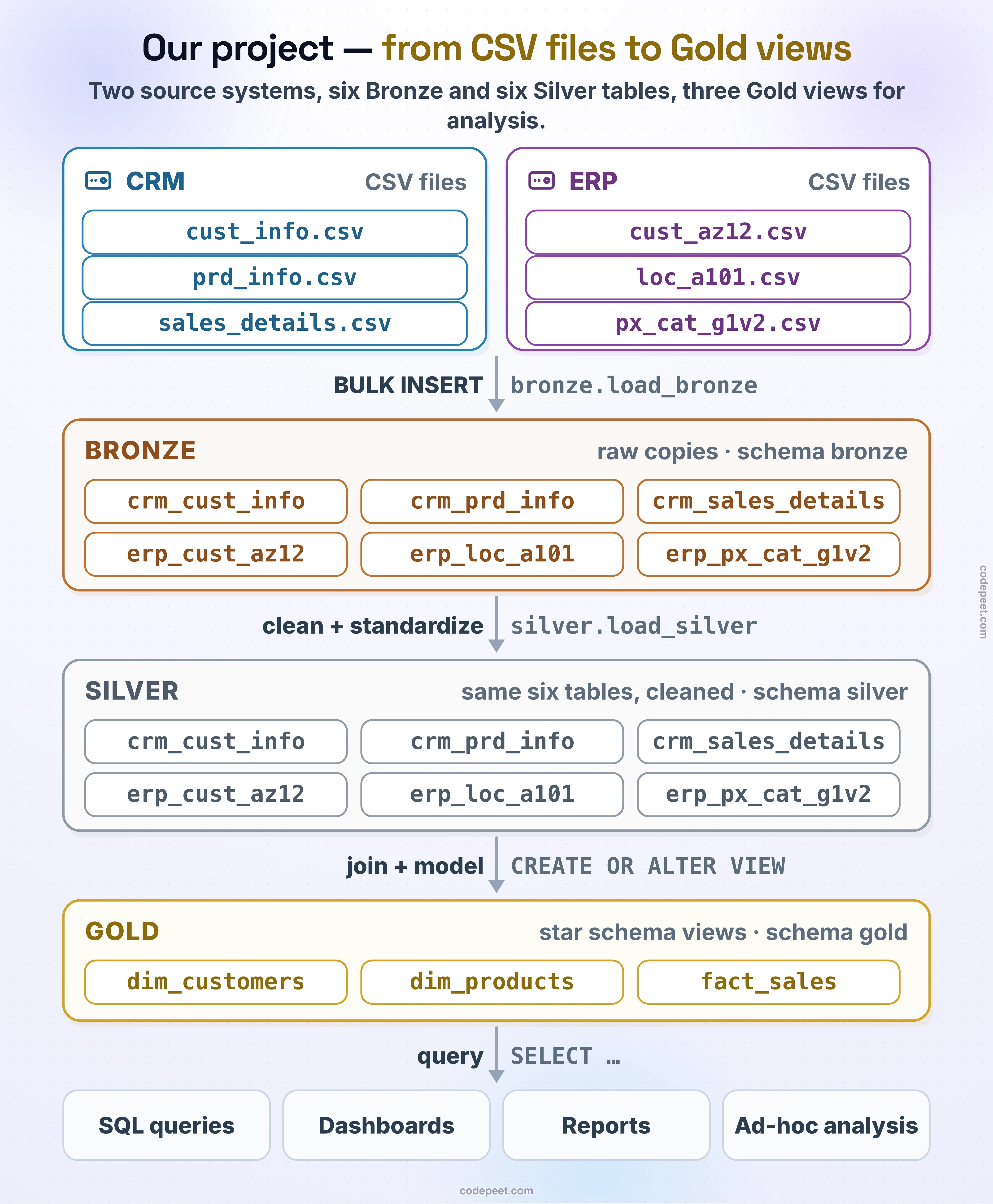
We'll implement this architecture step by step throughout the project:
- Create the database and schema structure
- Build Bronze tables and load CSV data into them
- Build Silver tables with stored procedures that clean and transform the data
- Build Gold views that model the data for business analysis
- Write analytical queries against the Gold layer to answer business questions
Summary
Let's recap the key concepts from this lesson:
- A Data Warehouse is a database designed for analysis and reporting, not day-to-day operations.
- OLTP systems handle transactions (CRM, ERP); OLAP systems handle analytics (data warehouses).
- A data warehouse is subject-oriented, integrated, non-volatile, and time-variant.
- Data flows from source systems → ETL process → data warehouse → reporting.
- The Medallion Architecture organizes the warehouse into three layers: Bronze (raw), Silver (cleaned), and Gold (business-ready).
In the next lesson, we'll dive deeper into the ETL process — the mechanism that makes data flow through these layers.