ETL Methods
What is ETL?
ETL stands for Extract, Transform, Load — the three fundamental steps in moving data from source systems into a data warehouse.
- Extract: Pull raw data from one or more source systems (databases, CSV files, APIs, etc.).
- Transform: Clean, reshape, and enrich the data so it matches the structure and quality standards of your warehouse.
- Load: Write the final data into your destination tables.
Choosing the right ETL method is one of the most important decisions you will make when building a data warehouse. The method you pick affects how long your pipeline takes to run, how much data you move each cycle, and how you handle failures.
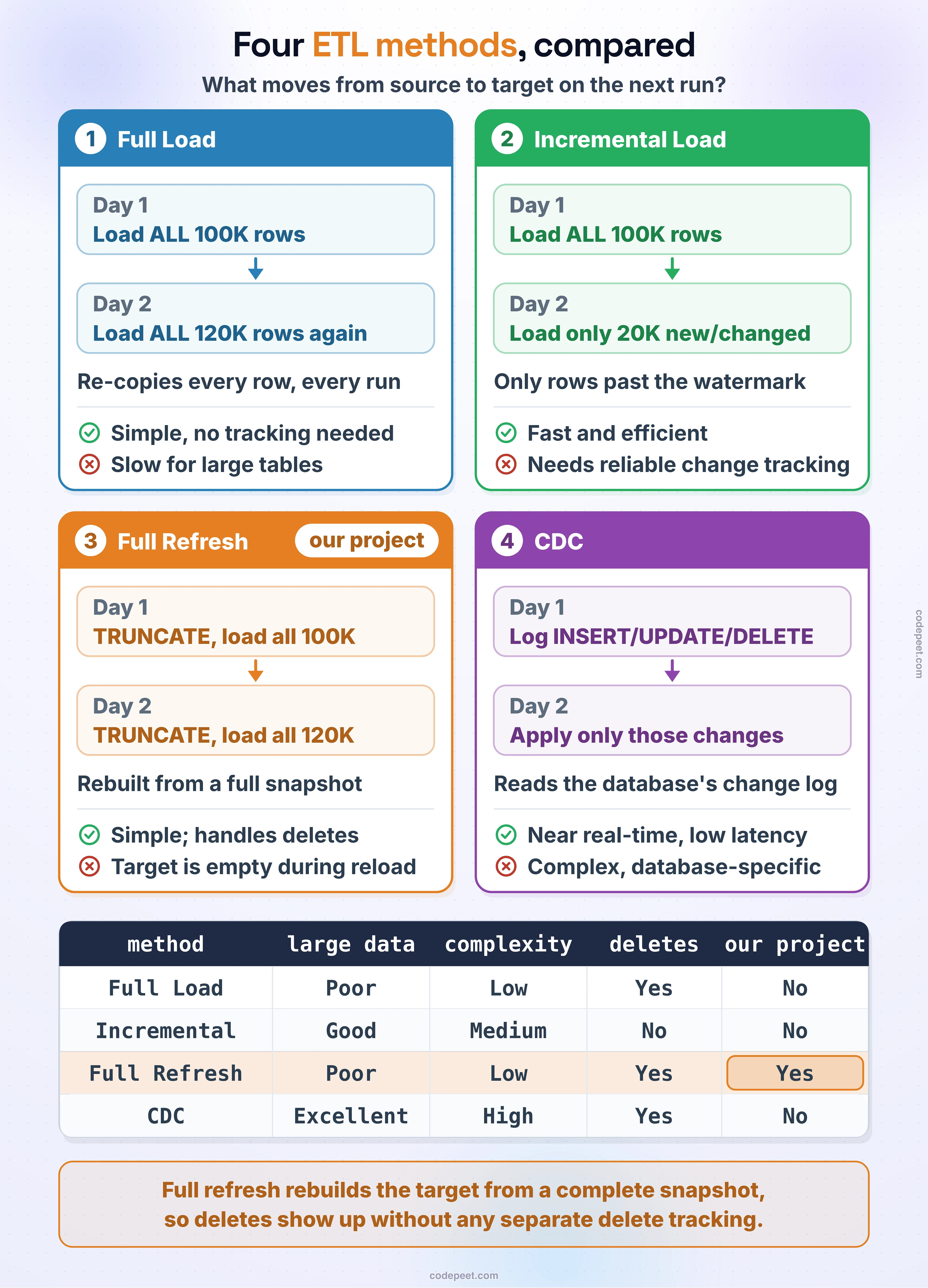
Full Load
A Full Load means you extract the entire dataset from the source system every single time the pipeline runs. You do not try to figure out which rows are new or which rows changed — you simply grab everything.
How it works:
- Connect to the source system.
- Read every row from the source table or file.
- Load all the rows into the destination table.
Pros:
- Very simple to implement — no need to track changes.
- Guarantees the destination is a complete copy of the source.
- Easy to debug because you always start from a known state.
Cons:
- Can be slow for large datasets because you move all data every time.
- Uses more network bandwidth and compute resources.
- Not practical when source tables have millions or billions of rows.
Full Load is a great starting point for small-to-medium datasets. If your source tables have a few thousand to a few hundred thousand rows, a full load is perfectly fine and keeps your pipeline simple.
Incremental Load
An Incremental Load only extracts data that is new or has changed since the last time the pipeline ran. This is much more efficient for large datasets.
How it works:
- Record a "watermark" — usually the last modified timestamp or the highest ID that was loaded.
- On the next run, query the source for rows where the timestamp or ID is greater than the watermark.
- Load only those new or changed rows into the destination.
- Update the watermark.
-- Example: Incremental load using a date watermark
-- (an illustration only: our CSV sources have no "last modified"
--  column, so our project reloads everything)
DECLARE @LastLoadDate DATETIME, @ThisLoadDate DATETIME = GETDATE();

-- Get the watermark from a control table
SELECT @LastLoadDate = last_load_date
FROM etl_control
WHERE table_name = 'customers';

-- Extract only rows modified since the last load
INSERT INTO staging.customers (customer_id, customer_name, modified_date)
SELECT customer_id, customer_name, modified_date
FROM source_db.customers
WHERE modified_date > @LastLoadDate
  AND modified_date <= @ThisLoadDate;

-- Move the watermark to the time this load started, so rows
-- changed while it ran are picked up next time
UPDATE etl_control
SET last_load_date = @ThisLoadDate
WHERE table_name = 'customers';
Pros:
- Much faster than full load for large tables.
- Uses fewer resources because you only move the delta (the difference).
- Scales well as your data grows.
Cons:
- More complex to implement — you need a reliable way to detect changes.
- Requires the source system to have a trustworthy "last modified" column or change tracking mechanism.
- Handling deletes is tricky — if a row is deleted in the source, an incremental load may not catch it.
- Harder to debug because you are dealing with partial data each run.
Full Refresh (Truncate and Reload)
Full Refresh, also called Truncate and Reload, combines the simplicity of a full load with a clean-slate approach. Each time the pipeline runs, you first delete all existing data in the destination table, and then load the complete dataset from the source.
How it works:
- Truncate (empty) the destination table.
- Extract all rows from the source.
- Insert all rows into the now-empty destination table.
This is the approach we use in our data warehouse project because it keeps things simple and our source datasets are small enough that performance is not a concern.
-- Full Refresh pattern: Truncate + Bulk Insert
-- Step 1: Remove all existing data from the Bronze table
TRUNCATE TABLE bronze.crm_cust_info;

-- Step 2: Reload the complete dataset from the source file
BULK INSERT bronze.crm_cust_info
FROM 'C:\sql\dwh_project\datasets\source_crm\cust_info.csv'
WITH (
    FIRSTROW = 2,
    FIELDTERMINATOR = ',',
    TABLOCK
);
Pros:
- Simple and easy to understand — no change tracking needed.
- The destination always perfectly mirrors the source.
- Handles deletes automatically — if a row was removed from the source, it will not appear after the reload.
- Easy to recover from errors — just re-run the pipeline.
Cons:
- Not efficient for very large tables.
- The destination table is briefly empty during the truncate step (consider wrapping in a transaction if this matters).
- Moves all data every time, even if nothing changed.
Here is a more complete example that wraps the truncate-and-load pattern inside a stored procedure with basic error handling:
-- Example: one table's truncate-and-load in its own procedure
-- (our project puts all six tables in one procedure, bronze.load_bronze — see below)
CREATE OR ALTER PROCEDURE bronze.load_crm_cust_info
AS
BEGIN
    DECLARE @start_time DATETIME = GETDATE();
    DECLARE @row_count INT;

    BEGIN TRY
        PRINT '>> Loading bronze.crm_cust_info...';

        -- Truncate the target table
        TRUNCATE TABLE bronze.crm_cust_info;

        -- Reload from the source file
        BULK INSERT bronze.crm_cust_info
        FROM 'C:\sql\dwh_project\datasets\source_crm\cust_info.csv'
        WITH (FIRSTROW = 2, FIELDTERMINATOR = ',', TABLOCK);

        SET @row_count = @@ROWCOUNT;
        PRINT '>> Loaded ' + CAST(@row_count AS VARCHAR) + ' rows in '
              + CAST(DATEDIFF(SECOND, @start_time, GETDATE()) AS VARCHAR) + ' seconds.';

    END TRY
    BEGIN CATCH
        PRINT '>> ERROR loading bronze.crm_cust_info: ' + ERROR_MESSAGE();
    END CATCH
END;
Change Data Capture (CDC)
Change Data Capture (CDC) is an advanced technique where the database engine itself tracks every insert, update, and delete that happens on a table. Instead of querying the source for changes, you read a change log that the database maintains automatically.
SQL Server has built-in CDC support. When you enable CDC on a table, SQL Server creates a change table that records every modification along with metadata about the type of change.
-- Enable CDC on the database
EXEC sys.sp_cdc_enable_db;

-- Enable CDC on a specific table
EXEC sys.sp_cdc_enable_table
    @source_schema = N'dbo',
    @source_name   = N'customers',
    @role_name     = NULL;

-- Query the change table for recent changes
DECLARE @from_lsn BINARY(10) = sys.fn_cdc_get_min_lsn('dbo_customers');
DECLARE @to_lsn   BINARY(10) = sys.fn_cdc_get_max_lsn();

SELECT *
FROM cdc.fn_cdc_get_all_changes_dbo_customers(@from_lsn, @to_lsn, N'all');
Pros:
- Captures every change — inserts, updates, and deletes.
- Very efficient because the database does the tracking for you.
- Near real-time data movement is possible.
Cons:
- More complex to set up and maintain.
- Adds overhead to the source database (the change log consumes storage and I/O).
- Needs SQL Server Agent and the Standard, Enterprise or Developer edition (Standard since SQL Server 2016 SP1); SQL Server Express, which this course uses, has neither.
- Not all source systems support CDC.
CDC is typically used in production environments where data freshness is critical and the volume of data is too large for full loads.
Comparison of ETL Methods
Here is a side-by-side comparison to help you pick the right method for your use case:
| Feature | Full Load | Incremental Load | Full Refresh (Truncate & Reload) | CDC |
|---|---|---|---|---|
| Complexity | Low | Medium | Low | High |
| Handles Deletes | Yes (by overwriting) | No (needs extra logic) | Yes (truncate removes all) | Yes (tracked automatically) |
| Performance (Large Data) | Poor | Good | Poor | Excellent |
| Performance (Small Data) | Good | Overkill | Good | Overkill |
| Data Freshness | Batch | Batch | Batch | Near Real-Time |
| Source Requirements | None | Needs change column | None | Needs CDC support |
| Error Recovery | Easy (re-run) | Complex | Easy (re-run) | Complex |
| Best For | Small tables | Large tables with timestamps | Small-to-medium tables | Mission-critical pipelines |
Why We Use Full Refresh in This Project
In our SQL Data Warehouse Project, we use the Full Refresh (Truncate and Reload) method for loading the Bronze and Silver layers. Here is why:
- Small dataset size: Our source CSV files are small — the largest,
sales_details.csv, has 60,398 rows, and the customer files about 18,500 each. Reloading all six takes about a second. - Simplicity: We do not need to build change-tracking logic, watermark tables, or delta detection. This lets us focus on learning data warehouse concepts rather than wrestling with ETL complexity.
- Reliability: Every run produces a complete, consistent copy of the source data. If something goes wrong, we just re-run the pipeline.
- Handles all change types: Whether rows were inserted, updated, or deleted in the source, our Bronze layer will reflect the current state after a full refresh.
As you work on larger projects with bigger datasets, you will likely move toward incremental loads or CDC. But for learning purposes, the truncate-and-reload pattern is the perfect starting point.
/*
    Stored Procedure: bronze.load_bronze
    Description: Loads all six Bronze tables from the source CSV files
                 using the Truncate-and-Reload pattern. A shortened
                 version of the procedure you will build in
                 "Bronze Layer | Build Stored Procedure".
*/
CREATE OR ALTER PROCEDURE bronze.load_bronze AS
BEGIN
    DECLARE @batch_start_time DATETIME = GETDATE();
    BEGIN TRY
        PRINT 'Loading Bronze Layer';

        -- CRM Tables
        TRUNCATE TABLE bronze.crm_cust_info;
        BULK INSERT bronze.crm_cust_info
        FROM 'C:\sql\dwh_project\datasets\source_crm\cust_info.csv'
        WITH (FIRSTROW = 2, FIELDTERMINATOR = ',', TABLOCK);

        TRUNCATE TABLE bronze.crm_prd_info;
        BULK INSERT bronze.crm_prd_info
        FROM 'C:\sql\dwh_project\datasets\source_crm\prd_info.csv'
        WITH (FIRSTROW = 2, FIELDTERMINATOR = ',', TABLOCK);

        TRUNCATE TABLE bronze.crm_sales_details;
        BULK INSERT bronze.crm_sales_details
        FROM 'C:\sql\dwh_project\datasets\source_crm\sales_details.csv'
        WITH (FIRSTROW = 2, FIELDTERMINATOR = ',', TABLOCK);

        -- ERP Tables
        TRUNCATE TABLE bronze.erp_cust_az12;
        BULK INSERT bronze.erp_cust_az12
        FROM 'C:\sql\dwh_project\datasets\source_erp\cust_az12.csv'
        WITH (FIRSTROW = 2, FIELDTERMINATOR = ',', TABLOCK);

        TRUNCATE TABLE bronze.erp_loc_a101;
        BULK INSERT bronze.erp_loc_a101
        FROM 'C:\sql\dwh_project\datasets\source_erp\loc_a101.csv'
        WITH (FIRSTROW = 2, FIELDTERMINATOR = ',', TABLOCK);

        TRUNCATE TABLE bronze.erp_px_cat_g1v2;
        BULK INSERT bronze.erp_px_cat_g1v2
        FROM 'C:\sql\dwh_project\datasets\source_erp\px_cat_g1v2.csv'
        WITH (FIRSTROW = 2, FIELDTERMINATOR = ',', TABLOCK);

        PRINT 'Loading Bronze Layer is Completed';
        PRINT 'Total Load Duration: '
            + CAST(DATEDIFF(SECOND, @batch_start_time, GETDATE()) AS NVARCHAR) + ' seconds';
    END TRY
    BEGIN CATCH
        PRINT 'ERROR OCCURRED DURING LOADING BRONZE LAYER';
        PRINT 'Error Message: ' + ERROR_MESSAGE();
    END CATCH
END
Key Takeaways
- Full Load pulls all data every time — simple but can be slow on large tables.
- Incremental Load only pulls new or changed data — efficient but requires change detection logic.
- Full Refresh (Truncate & Reload) clears the destination first, then loads everything — simple, reliable, and handles deletes.
- CDC (Change Data Capture) uses the database engine to track changes automatically — powerful but complex.
- For small-to-medium datasets, Full Refresh is the best choice because it is easy to implement and maintain.
- Always consider your data volume, freshness requirements, and team skills when choosing an ETL method.