Design the Data Warehouse Layers
Introduction
Now that you've selected the Medallion Architecture, it's time to design each layer in detail. Good design means you know exactly what tables you'll create, what transformations you'll apply, and what the final output looks like — all before writing a single line of production code.
In this lesson, you'll walk through the Bronze, Silver, and Gold layers one by one, understand the purpose and rules of each, and see table-level examples that match the CRM and ERP source data.
The Big Picture
Before zooming into each layer, here's the full data flow from source to consumer:
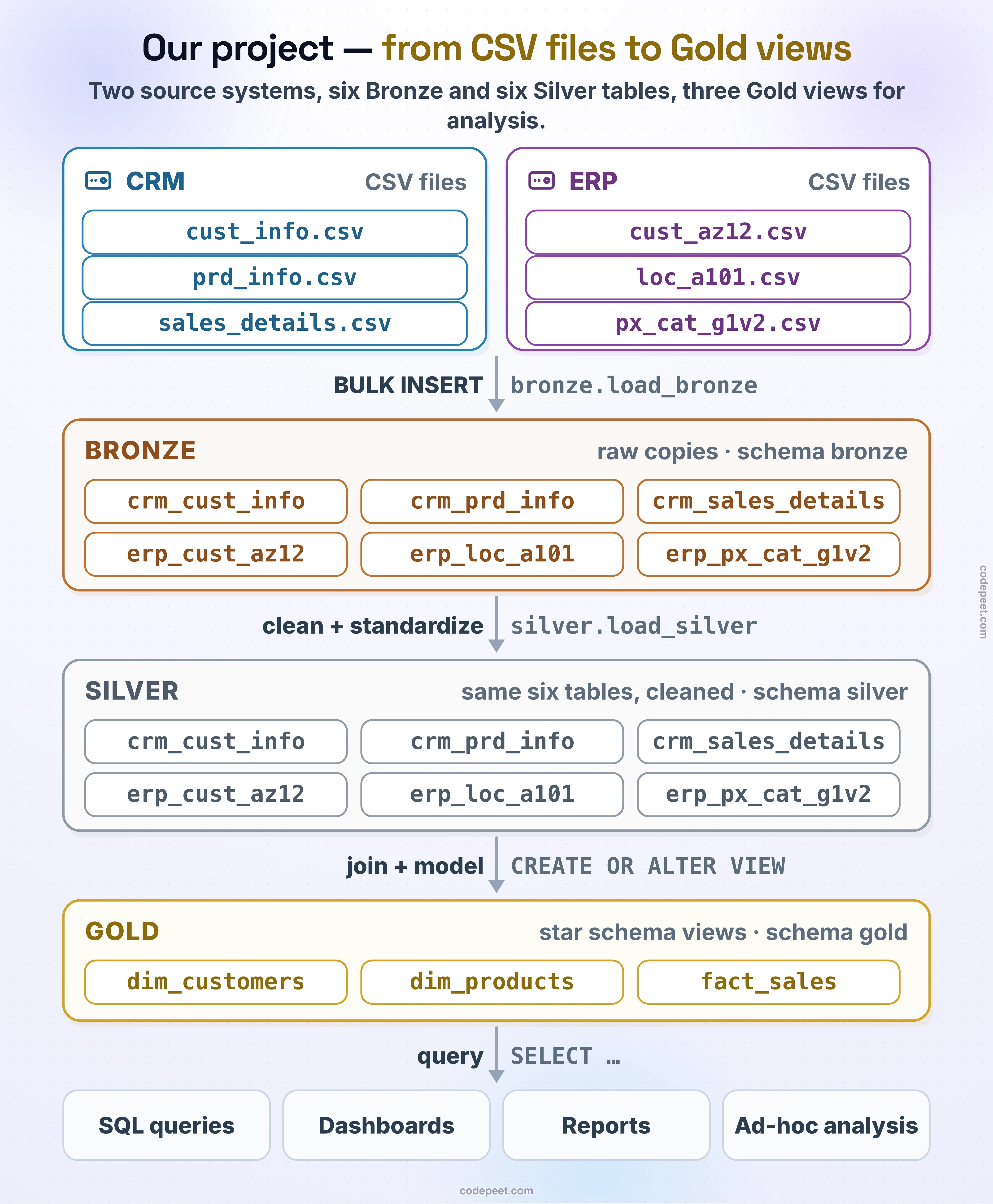
Each arrow represents a transformation step. Let's look at what happens at every stage.
Bronze Layer — Raw Data Landing Zone
The Bronze layer is your landing zone. Its only job is to ingest data from the source systems and store it exactly as-is, with no modifications.
Design rules for Bronze:
| Rule | Explanation |
|---|---|
| No transformations | Data is loaded in its original form — even if it has errors |
| Schema matches source | Column names and types mirror the CSV headers |
| Full refresh | Truncate the table and reload all rows on every run |
| One table per source file | Each CSV file maps to one Bronze table |
| No extra columns | Only the file's columns; the dwh_create_date metadata column is added in Silver |
Why keep raw data?
Imagine you discover a bug in your Silver cleansing logic three months from now. If Bronze has the original data, you simply fix the logic and re-process. Without Bronze, you'd have to go back to the source system and re-export — which might no longer be possible if the source data has changed.
Bronze Table Examples
Based on the CRM and ERP source files, here are the Bronze tables you'll create:
| Source | Bronze table | What it holds |
|---|---|---|
| CRM | bronze.crm_cust_info | Customer information |
| CRM | bronze.crm_prd_info | Product information |
| CRM | bronze.crm_sales_details | Sales transactions |
| ERP | bronze.erp_cust_az12 | Customer birthdates and gender |
| ERP | bronze.erp_loc_a101 | Customer countries |
| ERP | bronze.erp_px_cat_g1v2 | Product categories |
Notice that the ERP table names look cryptic (az12, a101, g1v2). This is common in enterprise systems. You'll keep these exact names in Bronze and Silver to maintain traceability; human-readable names only appear in Gold (dim_customers, dim_products, fact_sales).
-- Example: Creating a Bronze table for CRM customer information
IF OBJECT_ID('bronze.crm_cust_info', 'U') IS NOT NULL
    DROP TABLE bronze.crm_cust_info;
GO

CREATE TABLE bronze.crm_cust_info (
    cst_id          INT,
    cst_key         NVARCHAR(50),
    cst_firstname   NVARCHAR(50),
    cst_lastname    NVARCHAR(50),
    cst_marital_status NVARCHAR(50),
    cst_gndr        NVARCHAR(50),
    cst_create_date DATE
);
The column names match the CSV headers exactly, and each column gets the type of the data it holds — INT for ids, DATE for dates, a generous NVARCHAR(50) for text. Nothing is cleaned or renamed here; where a type needs fixing (integer dates like 20101229, for example), Silver does it.
Silver Layer — Cleansed and Standardized
The Silver layer is where you fix everything that's wrong with the raw data. Think of it as a quality control station on a factory floor.
Design rules for Silver:
| Rule | Explanation |
|---|---|
| Data cleansing | Fix NULLs, trim whitespace, correct invalid values |
| Standardization | Unify formats (e.g., date formats, country codes, casing) |
| Type casting | Fix column types (e.g., integer dates like 20101229 become DATE) |
| Deduplication | Remove duplicate records using business keys |
| Same names | Columns keep their source names; business-friendly names come in Gold |
| Stored procedure | All Silver logic lives in one stored procedure, silver.load_silver, for repeatability |
Common Cleansing Patterns
Here are the most common data quality issues you'll fix in Silver:
-- 1. Trim whitespace
SELECT TRIM(cst_firstname) AS cst_firstname
FROM bronze.crm_cust_info;

-- 2. Standardize values (one name per country)
SELECT
    CASE
        WHEN TRIM(cntry) = 'DE' THEN 'Germany'
        WHEN TRIM(cntry) IN ('US', 'USA') THEN 'United States'
        WHEN TRIM(cntry) = '' OR cntry IS NULL THEN 'n/a'
        ELSE TRIM(cntry)
    END AS cntry
FROM bronze.erp_loc_a101;

-- 3. Replace invalid values
SELECT
    CASE
        WHEN UPPER(TRIM(cst_gndr)) = 'F' THEN 'Female'
        WHEN UPPER(TRIM(cst_gndr)) = 'M' THEN 'Male'
        ELSE 'n/a'
    END AS cst_gndr
FROM bronze.crm_cust_info;

-- 4. Remove duplicates (keep latest record)
WITH ranked AS (
    SELECT *,
        ROW_NUMBER() OVER (
            PARTITION BY cst_id
            ORDER BY cst_create_date DESC
        ) AS rn
    FROM bronze.crm_cust_info
)
SELECT * FROM ranked WHERE rn = 1;

-- 5. Cast data types (integer dates like 20101229 become DATE)
SELECT
    CASE
        WHEN sls_order_dt = 0 OR LEN(sls_order_dt) != 8 THEN NULL
        ELSE CAST(CAST(sls_order_dt AS VARCHAR) AS DATE)
    END AS sls_order_dt
FROM bronze.crm_sales_details;
Silver Table Examples
| Source | Silver table | What it holds |
|---|---|---|
| CRM | silver.crm_cust_info | Cleaned customer data |
| CRM | silver.crm_prd_info | Cleaned product data |
| CRM | silver.crm_sales_details | Cleaned sales data |
| ERP | silver.erp_cust_az12 | Cleaned ERP customer data |
| ERP | silver.erp_loc_a101 | Cleaned country data |
| ERP | silver.erp_px_cat_g1v2 | Product categories (already clean, copied as-is) |
-- Example: Creating a Silver table with proper data types
IF OBJECT_ID('silver.crm_cust_info', 'U') IS NOT NULL
    DROP TABLE silver.crm_cust_info;
GO

CREATE TABLE silver.crm_cust_info (
    cst_id              INT,
    cst_key             NVARCHAR(50),
    cst_firstname       NVARCHAR(50),
    cst_lastname        NVARCHAR(50),
    cst_marital_status  NVARCHAR(50),
    cst_gndr            NVARCHAR(50),
    cst_create_date     DATE,
    dwh_create_date     DATETIME2 DEFAULT GETDATE()
);
Notice the Silver table adds a dwh_create_date column. This metadata column tracks when each record was processed into Silver, which is invaluable for debugging and auditing.
Gold Layer — Business-Ready Star Schema
The Gold layer is the consumer-facing layer. This is where cleaned data from CRM and ERP is combined into a unified star schema that analysts and BI tools will query.
Design rules for Gold:
| Rule | Explanation |
|---|---|
| Star schema | Organize into dimension and fact tables |
| Business naming | Use clear names like dim_customers, fact_sales |
| Integrated | Combine CRM + ERP data into single entities |
| Views | Implement as SQL views on top of Silver tables |
| Surrogate keys | Generate warehouse-level unique keys |
Dimension Tables
Dimensions describe the context of a business event. They answer who, what, and where.
For this project, you'll create two dimension tables:
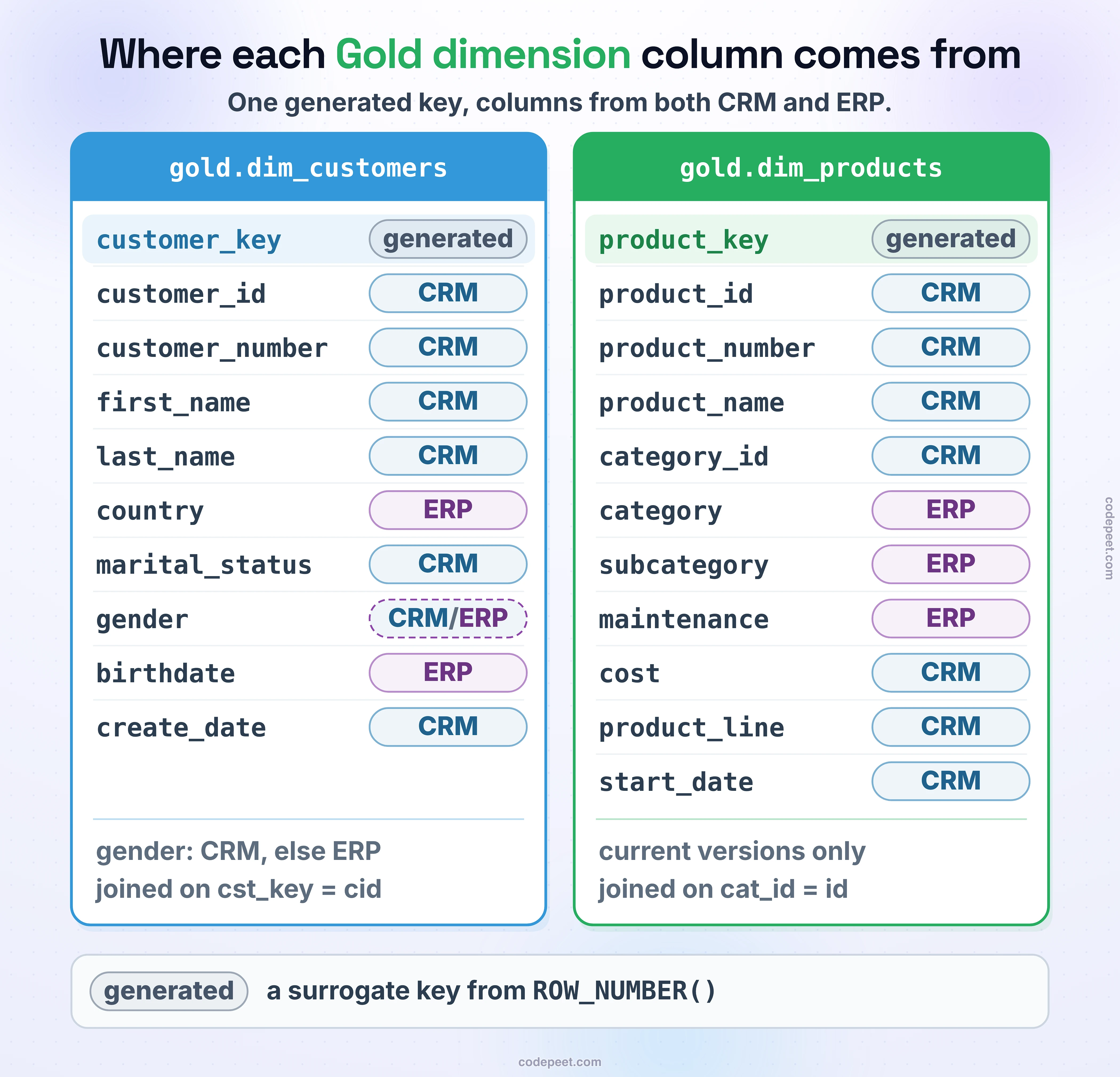
Notice how dim_customers integrates data from both CRM (names, marital status) and ERP (birthdate, country). This is the power of the Gold layer — users query one table instead of hunting across multiple source systems.
Fact Table
Facts record measurable events. In this project, the primary fact is a sale:
gold.fact_sales
| Column | Role |
|---|---|
order_number | Degenerate dimension (the order id, kept on the fact) |
product_key | Foreign key to dim_products |
customer_key | Foreign key to dim_customers |
order_date | Date |
shipping_date | Date |
due_date | Date |
sales_amount | Measure |
quantity | Measure |
price | Measure |
The fact table links to dimensions through keys (product_key, customer_key). Analysts can JOIN fact_sales to any dimension to slice and dice the data:
- Sales by customer country — JOIN to
dim_customers. - Sales by product category — JOIN to
dim_products. - Monthly revenue trend — GROUP BY
order_date.
Gold as Views
An important design decision: the Gold layer is implemented using SQL views rather than physical tables.
Why views?
- Always up-to-date — a view reads from Silver at query time, so Gold automatically reflects the latest Silver data.
- No ETL step needed — you don't need a stored procedure to populate Gold tables.
- Less storage — no duplicate copy of the data.
- Simpler maintenance — changing a view is as easy as
ALTER VIEW.
-- Example: Gold view for dim_customers
CREATE OR ALTER VIEW gold.dim_customers AS
SELECT
    ROW_NUMBER() OVER (ORDER BY cst_id) AS customer_key,
    ci.cst_id AS customer_id,
    ci.cst_key AS customer_number,
    ci.cst_firstname AS first_name,
    ci.cst_lastname AS last_name,
    la.cntry AS country,
    ci.cst_marital_status AS marital_status,
    CASE
        WHEN ci.cst_gndr != 'n/a' THEN ci.cst_gndr
        ELSE COALESCE(ca.gen, 'n/a')
    END AS gender,
    ca.bdate AS birthdate,
    ci.cst_create_date AS create_date
FROM silver.crm_cust_info ci
LEFT JOIN silver.erp_cust_az12 ca ON ci.cst_key = ca.cid
LEFT JOIN silver.erp_loc_a101 la ON ci.cst_key = la.cid;
This single view joins CRM customer data with ERP customer details and location data, producing a unified customer dimension.
Complete Star Schema Diagram
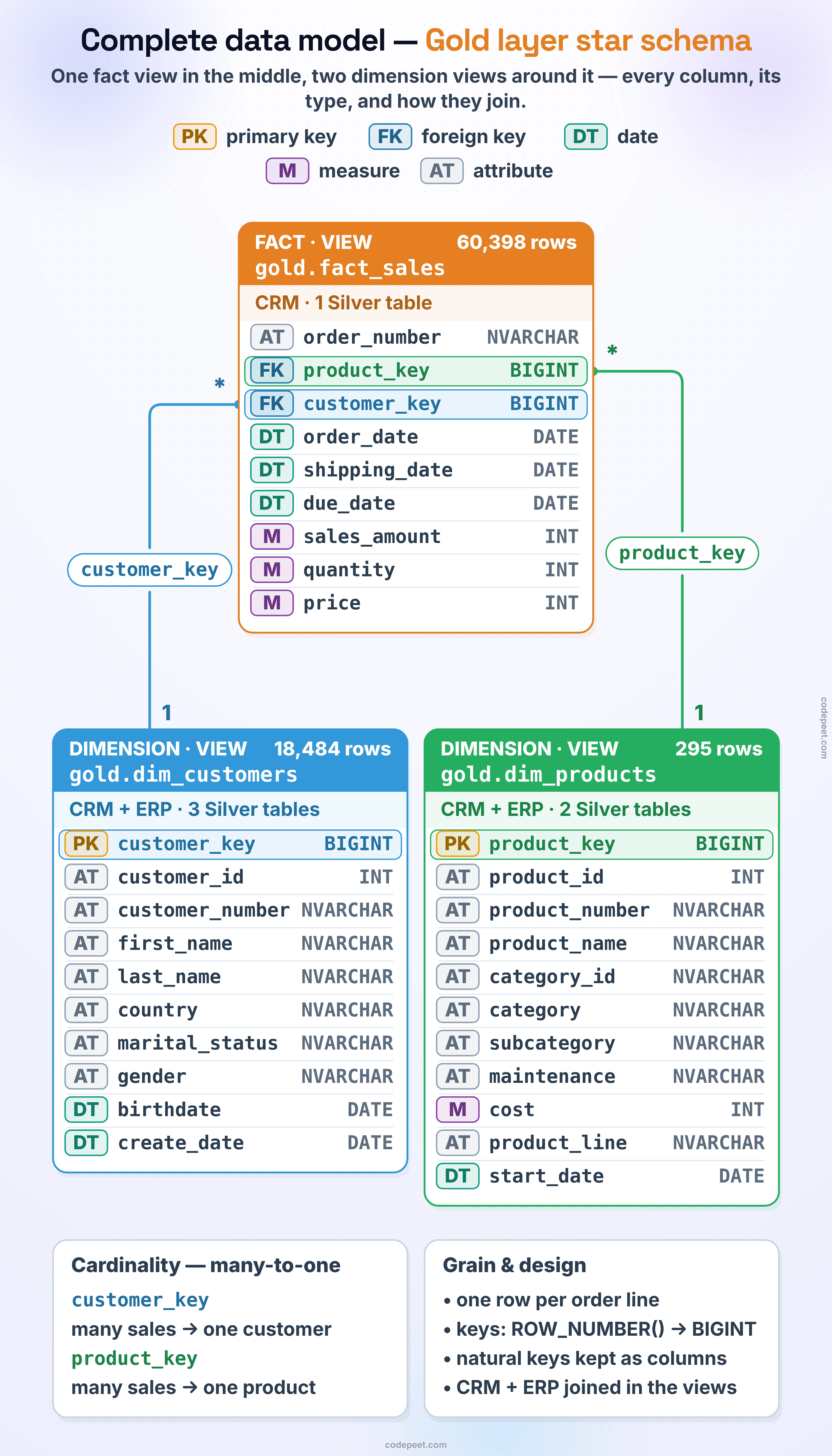
This is the classic star shape: the fact_sales table sits at the center with foreign keys pointing to each surrounding dimension. Analysts can write simple, intuitive queries by joining the fact to any combination of dimensions.
Naming Conventions
Consistent naming makes your warehouse easier to navigate:
| Layer | Schema | Table Prefix | Example |
|---|---|---|---|
| Bronze | bronze | Source system prefix | bronze.crm_cust_info |
| Silver | silver | Source system prefix | silver.crm_cust_info |
| Gold | gold | dim_ or fact_ | gold.dim_customers, gold.fact_sales |
Column conventions:
- Use
snake_casefor all column names. - Suffix keys with
_key(surrogate) or_id(business). - Use full words in Gold (
first_namenotfname).
Summary
Here's what you learned:
- Bronze stores raw data exactly as it arrives from CSV files — no transformations, the files' own columns and types, and full refresh on every load.
- Silver applies cleansing (trim, case, NULLs), standardization, type casting, and deduplication through one stored procedure (
silver.load_silver). - Gold integrates cleaned data into a star schema with dimension tables (
dim_customers,dim_products) and a fact table (fact_sales), implemented as SQL views. - Each layer has clear naming conventions and design rules that keep the warehouse organized and maintainable.
- The data flows: CSV → Bronze (raw) → Silver (clean) → Gold (star schema) → BI tools.
With the design complete, you're ready to draw the full architecture diagram.