Simplify Path
Description
You are given an absolute path for a Unix-style file system, which always begins with a slash '/'. Your task is to transform this absolute path into its simplified canonical path.
In a Unix-style file system:
- A single period '.' refers to the current directory.
- A double period '..' refers to the parent directory (moving one level up).
- Multiple consecutive slashes such as '//' and '///' are treated as a single slash '/'.
- Any sequence of periods that does not match the above rules (like '...' or '....') should be treated as a valid directory or file name.
The simplified canonical path must:
- Start with a single slash '/'.
- Have directories separated by exactly one slash '/'.
- Not end with a trailing slash '/' (unless it is the root directory '/').
- Not contain any single or double period references ('.' or '..').
Examples
Example 1
Input: path = "/home/"
Output: "/home"
Explanation: The trailing slash is removed. The directory 'home' is the only component, so the canonical path is '/home'.
Example 2
Input: path = "/home//foo/"
Output: "/home/foo"
Explanation: Multiple consecutive slashes between 'home' and 'foo' are treated as a single slash. The trailing slash is also removed.
Example 3
Input: path = "/home/user/Documents/../Pictures"
Output: "/home/user/Pictures"
Explanation: The '..' after 'Documents' means we go up one level from 'Documents' back to 'user'. Then we enter 'Pictures'. So the canonical path is '/home/user/Pictures'.
Example 4
Input: path = "/../"
Output: "/"
Explanation: We are already at the root directory '/'. Going one level up with '..' from root is not possible, so we stay at root. The canonical path is simply '/'.
Example 5
Input: path = "/.../a/../b/c/../d/./"
Output: "/.../b/d"
Explanation: '...' is a valid directory name (only '.' and '..' have special meaning). We enter '...', then 'a', then '..' takes us back to '...', then 'b', then 'c', then '..' takes us back to 'b', then 'd', and '.' keeps us in 'd'. The canonical path is '/.../b/d'.
Constraints
- 1 ≤ path.length ≤ 3000
- path consists of English letters, digits, period '.', slash '/' or underscore '_'.
- path is a valid absolute Unix path.
Editorial
Brute Force - Split and Rebuild
Intuition
The most straightforward way to think about this problem is to break the path into its individual components and then figure out what the final directory structure looks like.
Imagine you receive a set of navigation instructions like: 'go to home, then go to user, then go back up one level, then go to docs'. You would follow each instruction one by one and keep a list of where you currently are.
The brute force approach does exactly this:
- Split the entire path string by '/' to get all the individual tokens.
- Create a result list to track the final directories.
- Go through each token: skip empty strings and '.', remove the last directory for '..', and add everything else as a valid directory.
- Join the result list with '/' to build the final path.
This is essentially what a stack does, but here we use a simple list and process tokens with repeated scans. The difference from the optimal approach is more about clarity of thought — we are explicitly handling each rule as a separate concern rather than recognizing the elegant stack pattern.
Step-by-Step Explanation
Let's trace through with path = "/a/./b/../../c/":
Step 1: Split the path by '/' delimiter.
- path.split('/') gives us: ["", "a", ".", "b", "..", "..", "c", ""]
- We get 8 tokens including empty strings from leading and trailing slashes.
Step 2: Initialize an empty result list: result = []
Step 3: Process token "" (empty string from leading '/').
- Empty string → skip it.
- result = []
Step 4: Process token "a".
- "a" is a valid directory name (not empty, not '.', not '..').
- Add "a" to result.
- result = ["a"]
Step 5: Process token ".".
- "." means current directory → skip it.
- result = ["a"]
Step 6: Process token "b".
- "b" is a valid directory name.
- Add "b" to result.
- result = ["a", "b"]
Step 7: Process token "..".
- ".." means go to parent directory.
- result is not empty, so remove the last element ("b").
- result = ["a"]
Step 8: Process token "..".
- ".." means go to parent directory.
- result is not empty, so remove the last element ("a").
- result = []
Step 9: Process token "c".
- "c" is a valid directory name.
- Add "c" to result.
- result = ["c"]
Step 10: Process token "" (empty string from trailing '/').
- Empty string → skip it.
- result = ["c"]
Step 11: Build the final path by joining with '/' and prepending '/'.
- "/" + "c" = "/c"
Result: "/c"
Split and Rebuild — Processing Path Tokens — Watch how we process each token from the split path and build the result list by pushing valid directories and popping for '..' references.
Algorithm
- Split the input path by the '/' delimiter to get individual tokens.
- Initialize an empty list (result) to store valid directory names.
- For each token in the split result:
- If the token is empty or equals '.', skip it (no navigation).
- If the token equals '..', remove the last element from the result list (if not empty) to go to the parent directory.
- Otherwise, the token is a valid directory name — add it to the result list.
- Join all elements in the result list with '/' and prepend a leading '/'.
- Return the constructed canonical path.
Code
#include <string>
#include <vector>
#include <sstream>
using namespace std;

class Solution {
public:
    string simplifyPath(string path) {
        vector<string> result;
        stringstream ss(path);
        string token;

        // Split by '/' and process each token
        while (getline(ss, token, '/')) {
            if (token.empty() || token == ".") {
                // Skip empty tokens and current directory
                continue;
            } else if (token == "..") {
                // Go to parent directory
                if (!result.empty()) {
                    result.pop_back();
                }
            } else {
                // Valid directory name
                result.push_back(token);
            }
        }

        // Build the canonical path
        string canonical = "/";
        for (int i = 0; i < result.size(); i++) {
            canonical += result[i];
            if (i < result.size() - 1) {
                canonical += "/";
            }
        }

        return canonical;
    }
};
class Solution:
def simplifyPath(self, path: str) -> str:
result = []
# Split by '/' and process each token
tokens = path.split('/')
for token in tokens:
if not token or token == '.':
# Skip empty tokens and current directory
continue
elif token == '..':
# Go to parent directory
if result:
result.pop()
else:
# Valid directory name
result.append(token)
# Build the canonical path
return '/' + '/'.join(result)class Solution {
public String simplifyPath(String path) {
List<String> result = new ArrayList<>();
// Split by '/' and process each token
String[] tokens = path.split("/");
for (String token : tokens) {
if (token.isEmpty() || token.equals(".")) {
// Skip empty tokens and current directory
continue;
} else if (token.equals("..")) {
// Go to parent directory
if (!result.isEmpty()) {
result.remove(result.size() - 1);
}
} else {
// Valid directory name
result.add(token);
}
}
// Build the canonical path
return "/" + String.join("/", result);
}
}Complexity Analysis
Time Complexity: O(n)
Where n is the length of the input path string. Splitting the string takes O(n) time. Processing each token involves constant-time string comparisons and list operations. Joining the result list also takes O(n) in the worst case. Overall: O(n).
Space Complexity: O(n)
The split operation creates a list of tokens that together occupy O(n) space. The result list can hold at most O(n) directory names. The final joined string also takes O(n) space. Total space: O(n).
Why This Approach Is Not Efficient
While the brute force approach using a list already achieves O(n) time complexity, it is conceptually less efficient in its design. It treats the problem as a generic token-processing task without recognizing the inherent stack-like structure of directory navigation.
The key inefficiency is conceptual rather than asymptotic:
- Using a generic list means we must think about removal from the end as a separate operation, rather than recognizing it as a natural 'pop' from a stack.
- The approach does not leverage the Last-In-First-Out (LIFO) property of directory traversal. When you navigate into directories and then use '..', you always undo the most recent navigation — this is exactly what a stack models.
The optimal approach makes this stack pattern explicit, resulting in cleaner, more idiomatic code that directly maps to the problem's navigation semantics. It also uses a dedicated stack data structure (like a deque in C++) which makes the intent clearer to anyone reading the code.
Optimal Approach - Stack-Based Navigation
Intuition
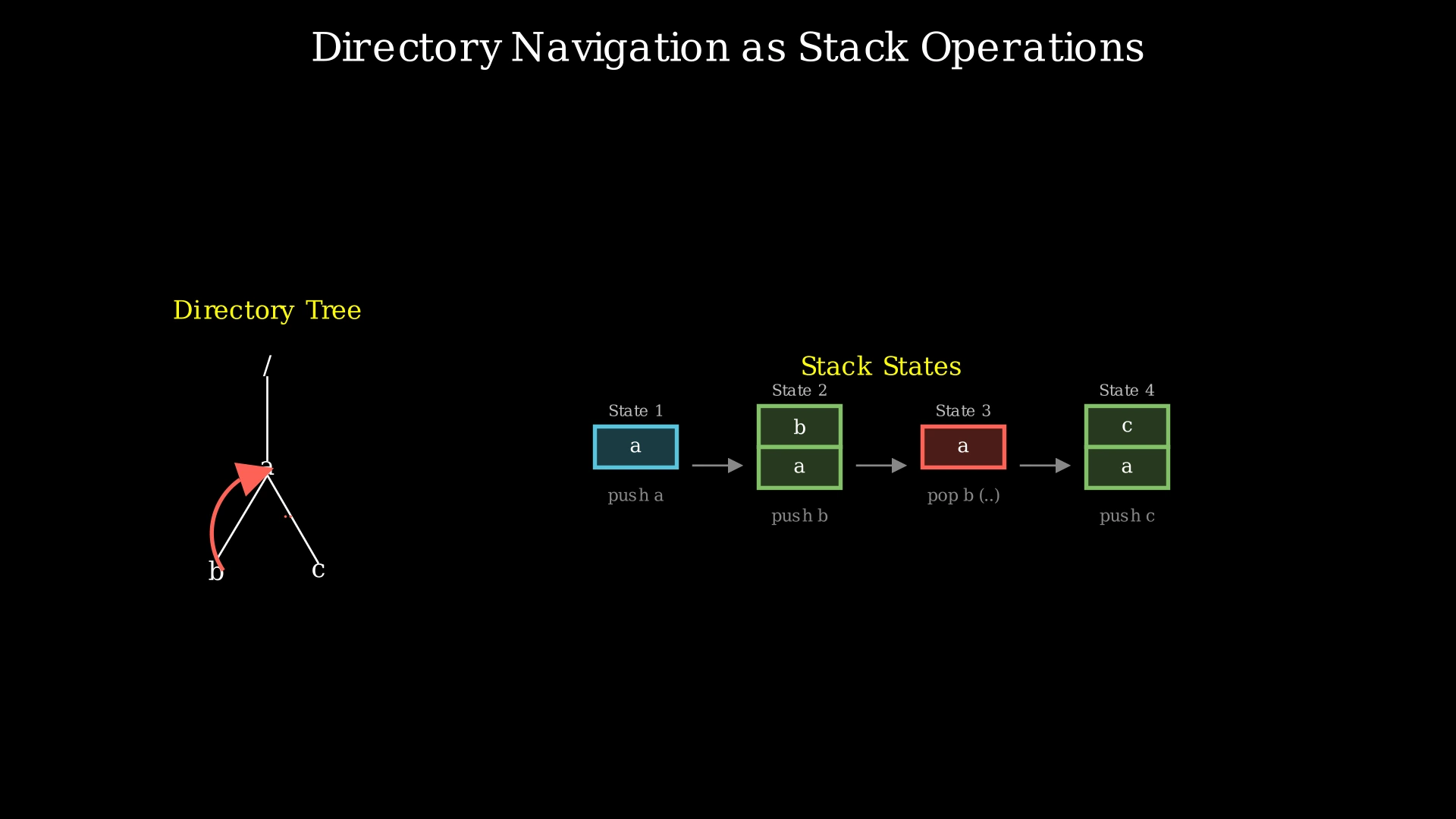
Directory navigation in a file system is inherently a stack operation. Think of it like walking through rooms in a building:
- When you enter a new room (a directory), you push it onto your mental stack of 'where I've been'.
- When someone says 'go back' (the '..' command), you pop the most recent room off your stack — you return to the last place you were.
- When someone says 'stay here' (the '.' command), your stack doesn't change.
This Last-In-First-Out (LIFO) behavior is the defining characteristic of a stack. The most recently entered directory is the first one to be removed when we encounter '..'.
By splitting the path into tokens and using an explicit stack, we can process each token in one pass:
- Push valid directory names onto the stack.
- Pop from the stack when we see '..' (if the stack isn't empty — we can't go above root).
- Ignore '.' and empty strings.
At the end, the stack contains exactly the directories in our final path, ordered from root to the current location. Joining them with '/' gives us the canonical path.
Step-by-Step Explanation
Let's trace through with path = "/home/../usr/./bin/":
Step 1: Split the path by '/'.
- "/home/../usr/./bin/".split('/') → ["", "home", "..", "usr", ".", "bin", ""]
- We have 7 tokens to process.
Step 2: Initialize an empty stack: stack = []
Step 3: Token "" (empty from leading '/').
- Empty string → skip.
- Stack: []
Step 4: Token "home".
- Valid directory name → push onto stack.
- Stack: ["home"]
Step 5: Token "..".
- Go to parent directory → pop from stack.
- Popped "home". Stack is now empty.
- Stack: []
Step 6: Token "usr".
- Valid directory name → push onto stack.
- Stack: ["usr"]
Step 7: Token ".".
- Current directory → skip.
- Stack: ["usr"]
Step 8: Token "bin".
- Valid directory name → push onto stack.
- Stack: ["usr", "bin"]
Step 9: Token "" (empty from trailing '/').
- Empty string → skip.
- Stack: ["usr", "bin"]
Step 10: Build the canonical path.
- Join stack elements: "usr" + "/" + "bin" = "usr/bin"
- Prepend '/': "/usr/bin"
Result: "/usr/bin"
Stack-Based Navigation — Building the Canonical Path — Watch how the stack naturally models directory navigation: push for entering directories, pop for '..' parent references, and skip for '.' current directory references.
Algorithm
- Split the input path by '/' to extract individual tokens.
- Initialize an empty stack (or deque).
- Iterate through each token:
- If the token is empty or equals '.', skip it.
- If the token equals '..':
- If the stack is not empty, pop the top element (go to parent).
- If the stack is empty, do nothing (cannot go above root).
- Otherwise, push the token onto the stack (enter directory).
- Join all stack elements from bottom to top with '/' separator.
- Prepend a '/' to the result.
- Return the canonical path (returns '/' if the stack is empty).
Code
#include <string>
#include <deque>
#include <sstream>
using namespace std;

class Solution {
public:
    string simplifyPath(string path) {
        deque<string> stk;
        stringstream ss(path);
        string token;

        // Split by '/' and process each token
        while (getline(ss, token, '/')) {
            if (token.empty() || token == ".") {
                continue;
            } else if (token == "..") {
                if (!stk.empty()) {
                    stk.pop_back();
                }
            } else {
                stk.push_back(token);
            }
        }

        // Build canonical path
        if (stk.empty()) {
            return "/";
        }

        string result;
        for (const string& dir : stk) {
            result += "/" + dir;
        }

        return result;
    }
};
class Solution:
def simplifyPath(self, path: str) -> str:
stack = []
# Split by '/' and process each token
for token in path.split('/'):
if not token or token == '.':
continue
elif token == '..':
if stack:
stack.pop()
else:
stack.append(token)
# Build canonical path
return '/' + '/'.join(stack)import java.util.Deque;
import java.util.ArrayDeque;
class Solution {
public String simplifyPath(String path) {
Deque<String> stack = new ArrayDeque<>();
// Split by '/' and process each token
String[] tokens = path.split("/");
for (String token : tokens) {
if (token.isEmpty() || token.equals(".")) {
continue;
} else if (token.equals("..")) {
if (!stack.isEmpty()) {
stack.pollLast();
}
} else {
stack.offerLast(token);
}
}
// Build canonical path
StringBuilder result = new StringBuilder();
for (String dir : stack) {
result.append("/").append(dir);
}
return result.length() > 0 ? result.toString() : "/";
}
}Complexity Analysis
Time Complexity: O(n)
Where n is the length of the input path string. Splitting the path takes O(n). Iterating through the tokens takes O(n) in total since each character belongs to at most one token. Each stack operation (push/pop) is O(1). Joining the stack elements to build the result takes O(n). Overall: O(n).
Space Complexity: O(n)
The stack can hold at most O(n) directory names in the worst case (a path like '/a/b/c/d/...'). The token array from the split operation also takes O(n) space. The result string takes O(n) space. Total: O(n).