What Are Design Patterns? — History & Classification
Introduction
You have spent Sections 1–9 building a powerful foundation: OOP pillars, SOLID principles, design heuristics like DRY and YAGNI, domain modeling, and refactoring techniques. You can look at a messy codebase, identify code smells, and restructure it into something clean and maintainable.
But here is the thing — most design problems have already been solved. Over decades of building large-scale systems, experienced engineers noticed the same structural challenges appearing again and again: "I need to create objects without specifying their exact class," "I need to add behavior to an object without modifying its code," "I need objects to communicate without knowing about each other."
Design patterns are proven, reusable solutions to these recurring design problems. They are not code you copy-paste — they are blueprints you adapt to your specific context. Think of them the way an architect thinks about arches: an arch is not a specific building, but a structural concept that works across cathedrals, bridges, and doorways.
This tutorial introduces what design patterns are, where they came from, how they are organized, and — most importantly — how they connect to every principle and technique you have already learned.
Where Design Patterns Came From
The concept of design patterns did not originate in software engineering at all. In 1977, architect Christopher Alexander published A Pattern Language, documenting 253 recurring solutions to architectural and urban design problems — things like "how should a window be placed to maximize natural light while ensuring privacy?" Each pattern had three elements: a name, a problem description, and a reusable solution that could be adapted across many buildings.
Alexander's key insight was that good design is not about inventing everything from scratch. It is about recognizing common problems and applying known solutions thoughtfully.
In 1994, four software engineers — Erich Gamma, Richard Helm, Ralph Johnson, and John Vlissides — adapted Alexander's idea to object-oriented software. Their book Design Patterns: Elements of Reusable Object-Oriented Software cataloged 23 design patterns organized into three categories. The authors became known as the Gang of Four (GoF), and their book became one of the most influential programming books ever written.
The 23 GoF patterns are language-agnostic. They work equally well in Python, Java, C#, C++, or any language that supports objects, interfaces, and polymorphism. In Sections 10–12 of this course, you will learn all of them — and more importantly, you will learn when to use each one and when not to.
What Makes Something a Design Pattern
Not every coding trick or clever technique qualifies as a design pattern. A true design pattern has four essential elements defined by the GoF:
1. Pattern Name
A shared vocabulary entry that lets developers communicate precisely and efficiently. When you say "let's use a Factory here" or "this is a classic Observer setup," every experienced developer immediately understands the class structure, responsibilities, and interactions involved — no lengthy explanation needed. Pattern names compress complex design concepts into a single word.
2. Problem
The specific recurring design challenge the pattern addresses, including the context and constraints under which it applies. For example: "How do I create objects without coupling the client code to the concrete class, so that adding new product types doesn't require modifying existing code?" A well-defined problem statement prevents misapplication — you should only use a pattern when you actually face its stated problem.
3. Solution
The arrangement of classes, interfaces, objects, and relationships that solves the problem. This is a template, not finished code. It describes the participants (the classes/interfaces involved), their responsibilities, and how they collaborate. You must adapt it to your specific domain — a Factory for creating vehicles looks different from a Factory for creating documents, even though the structural pattern is identical.
4. Consequences
The trade-offs and results of applying the pattern. Every pattern has benefits and costs. The Singleton pattern gives you global access to a single instance — but it also introduces hidden global state, makes unit testing harder, and creates tight coupling. The Factory Method pattern decouples creation from usage — but adds an extra class hierarchy. Understanding consequences is what separates developers who use patterns well from developers who abuse them.
The Three Categories
The Gang of Four organized all 23 patterns into three categories based on their purpose — the kind of design problem they solve. Understanding these categories helps you navigate the pattern catalog and quickly narrow down which patterns are relevant to a given challenge.
Creational Patterns (Section 10 — This Section)
Core question: How do I create objects in a flexible, controlled way?
Creational patterns abstract the instantiation process. Instead of calling constructors directly and hard-coding concrete class names, you delegate object creation to a method, a separate factory object, or a prototype. This decouples the code that uses objects from the code that creates them — so adding new types requires no changes to existing client code.
| Pattern | One-Line Summary |
|---|---|
| Singleton | Ensure a class has exactly one instance with a global access point |
| Factory Method | Let subclasses decide which class to instantiate |
| Abstract Factory | Create families of related objects without specifying concrete classes |
| Builder | Construct complex objects step by step, separating construction from representation |
| Prototype | Create new objects by cloning existing ones |
Structural Patterns (Section 11)
Core question: How do I compose classes and objects into larger, flexible structures?
Structural patterns deal with how classes and objects are assembled to form bigger systems. They use inheritance and composition to achieve flexibility — adapting interfaces, wrapping objects, sharing state, and organizing components into trees. The goal is to build large structures that remain easy to change.
| Pattern | One-Line Summary |
|---|---|
| Adapter | Make incompatible interfaces work together |
| Facade | Provide a simplified interface to a complex subsystem |
| Decorator | Add responsibilities to objects dynamically without subclassing |
| Composite | Treat individual objects and compositions uniformly as a tree |
| Proxy | Control access to an object through a surrogate |
| Bridge | Separate an abstraction from its implementation so both can vary |
| Flyweight | Share common state across many objects to save memory |
Behavioral Patterns (Section 12)
Core question: How do objects communicate and distribute responsibilities?
Behavioral patterns focus on algorithms, responsibility assignment, and communication between objects. They describe not just how objects are structured, but how control flow and data move between them. These patterns help you design systems where adding new behaviors doesn't require modifying existing objects.
| Pattern | One-Line Summary |
|---|---|
| Strategy | Swap algorithms at runtime behind a common interface |
| Observer | Notify multiple objects automatically when state changes |
| Command | Encapsulate a request as an object for undo, queue, or log |
| State | Change an object's behavior when its internal state changes |
| Template Method | Define an algorithm skeleton, let subclasses override specific steps |
| Iterator | Traverse a collection without exposing its internal structure |
| Chain of Responsibility | Pass a request along a chain of handlers until one processes it |
| Mediator | Centralize complex communication between many objects |
| Memento | Capture and restore an object's internal state (undo/snapshot) |
| Visitor | Add new operations to a class hierarchy without modifying the classes |
Design Pattern Categories Overview
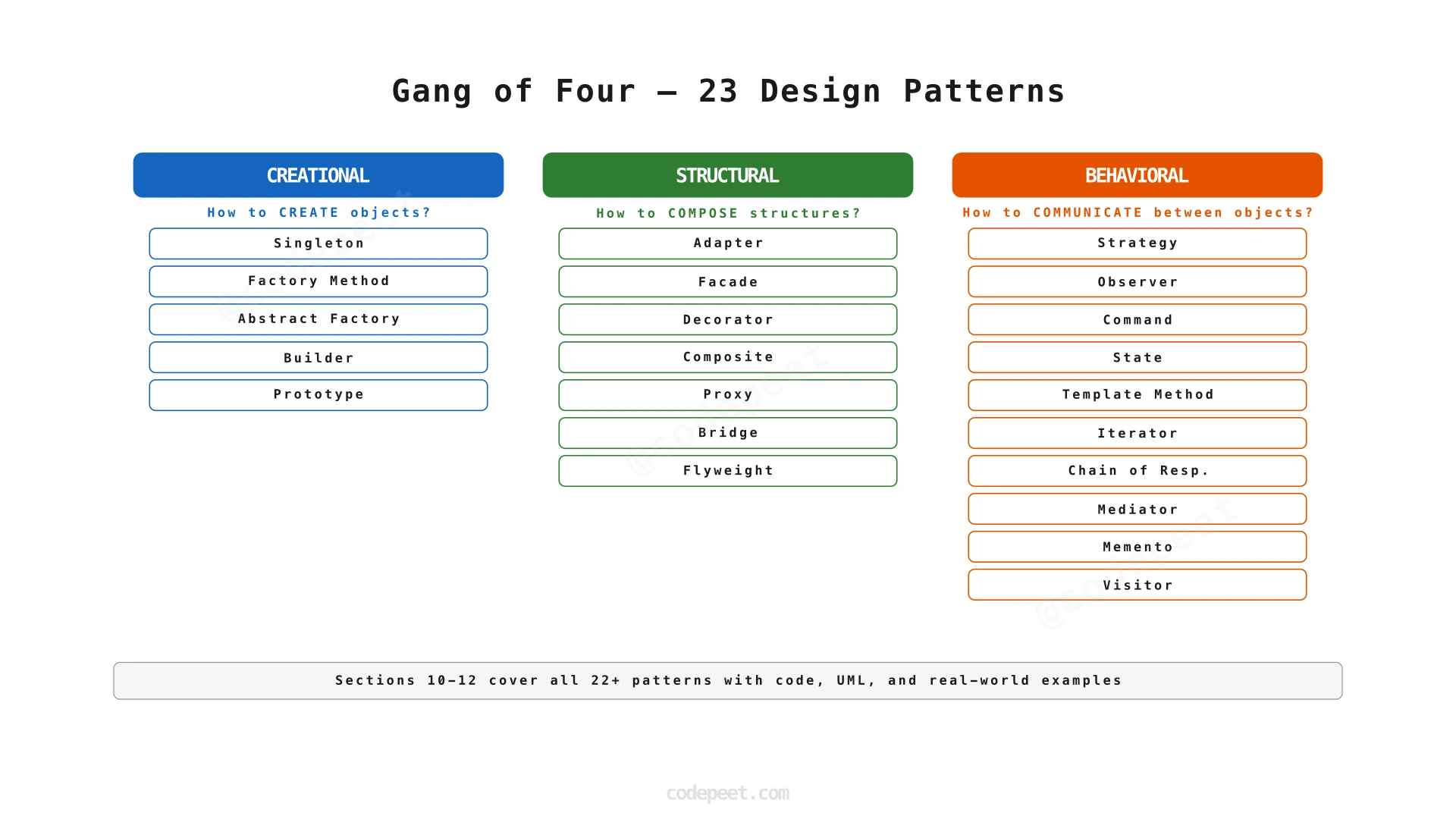
Visualization
How Design Patterns Connect to What You Already Know
Design patterns are not isolated techniques that appeared out of thin air. They are the practical applications of the principles and concepts you have been learning throughout this course. Every pattern is built on the same OOP foundations and design principles you already understand.
| Principle You Learned | How Patterns Apply It |
|---|---|
| Single Responsibility (S6) | Most patterns achieve SRP by separating creation logic from business logic, or by separating coordination from data processing. Factory Method moves object creation out of the client class. Observer separates event handling from event triggering. |
| Open/Closed Principle (S6) | Factory Method, Strategy, and Observer let you add new types and behaviors without modifying existing code — the definition of OCP. |
| Liskov Substitution (S6) | Patterns that rely on polymorphism — Strategy, State, Factory Method — depend on subtypes being fully substitutable for their base types. |
| Interface Segregation (S6) | Adapter and Facade create focused interfaces tailored to what clients actually need, rather than forcing clients to depend on bloated interfaces. |
| Dependency Inversion (S6) | Factory Method, Abstract Factory, and Strategy all program to abstractions rather than concrete classes — the core of DIP. |
| Composition over Inheritance (S7) | Decorator, Strategy, and Observer achieve flexibility through composition rather than rigid inheritance hierarchies. |
| Refactoring (S9) | The "Replace Conditional with Polymorphism" refactoring from S9 is literally the Strategy Pattern. "Extract Class" is often the first step toward patterns like Facade and Mediator. |
In fact, you have already used three patterns without naming them:
- Strategy Pattern — when you replaced switch-case with polymorphism in S9
- Dependency Injection — when you decoupled tightly coupled classes in S9 by passing dependencies through constructors
- Template Method — the refactoring process in S9 followed a fixed sequence of steps (identify smell → extract → replace) with customizable details at each step
Design patterns are not new concepts to add on top of what you know. They are names for the solutions you are already learning to build.
When to Use Design Patterns
Design patterns are powerful tools, but like any tool, they are only valuable when applied to the right problem. Use them when:
-
You recognize a recurring problem that a specific pattern is designed to solve. If you catch yourself writing switch/case on object types to decide how to create them, that is the Factory Method problem. If you need multiple objects to react to a state change, that is the Observer problem. Pattern recognition comes with practice — by the end of Section 12, you will spot these problems instinctively.
-
You need flexibility for future changes. If you know the system will add new payment methods, new notification channels, or new vehicle types, patterns like Strategy, Observer, and Factory prepare the codebase for extension without modification.
-
You are building a system maintained by a team. Patterns provide a shared vocabulary and a standardized structure that makes onboarding faster and code reviews clearer. Saying "this is a Builder" communicates more than a paragraph of explanation.
-
You are in an LLD interview. Interviewers expect pattern usage — but they expect it to be justified, not gratuitous. Naming the pattern and explaining why it fits the problem demonstrates design maturity.
When NOT to Use Design Patterns
Pattern misuse is as harmful as no patterns at all. Avoid patterns when:
-
Premature application. Do not use Factory Method when a simple
newconstructor works fine and no variation is expected. YAGNI (S7) still applies — do not add complexity for hypothetical future requirements. -
Pattern stacking. Using Decorator + Proxy + Adapter + Facade for a feature that needs a single well-designed class is over-engineering. Each pattern adds a layer of indirection and at least one additional interface or class.
-
Wrong pattern for the problem. Choosing Singleton because "I want easy access from everywhere" when you actually need Dependency Injection is solving convenience, not design. It makes testing harder, introduces hidden dependencies, and couples your codebase to global state.
-
Pattern as identity. "My design uses 8 patterns" is not an achievement. Solving the problem with the minimum necessary structure is. A design with one well-chosen pattern outperforms a design drowning in six misapplied ones.
The goal is never to use as many patterns as possible. The goal is to use the right pattern for the right problem, and only when the complexity of the problem justifies the added structure.
Common Mistakes
1. Treating Patterns as Copy-Paste Code
Mistake: Finding a pattern example online and pasting it into your project without adapting the class names, responsibilities, or interactions to your domain.
Why it is wrong: Patterns are blueprints, not templates. The GoF book describes an abstract structure — the specific class names, method signatures, and interactions must be designed for your problem. A ConcreteCreator in a document system creates PDFDocument and HTMLDocument; in an e-commerce system it creates PhysicalProduct and DigitalProduct. The structure is the same; the implementation is entirely different.
Fix: Understand the intent of the pattern first. Map the participants (Creator, Product, Subject, Observer) to your domain's nouns and verbs. Then build the classes using your domain language.
2. Using Patterns You Do Not Need
Mistake: Adding an Abstract Factory when you have one type of object, no product families, and no foreseeable variation.
Why it is wrong: Every pattern introduces indirection — more interfaces, more classes, more layers to navigate. If the problem does not require the flexibility the pattern provides, you are paying the complexity cost without getting the benefit.
Fix: Apply YAGNI (S7). Start with the simplest design that works. Introduce patterns when you feel the pain of inflexibility — when adding a new type forces you to modify five classes, that is when Factory Method earns its keep.
3. Not Understanding the Trade-Offs
Mistake: Choosing Singleton because "it sounds simple and gives me global access," without considering that it introduces hidden global mutable state, prevents dependency injection, and makes unit testing with mocks nearly impossible.
Why it is wrong: Every pattern has consequences the GoF explicitly document. If you skip the consequences, you cannot make informed decisions. A pattern that solves one problem while creating three new ones is not a good trade.
Fix: For every pattern you learn in Sections 10–12, study the "When NOT to Use" section as carefully as the "When to Use" section. A mature designer knows when to apply a pattern and when to avoid it.
Key Takeaways
- Design patterns are proven, reusable solutions to recurring OOP design problems — first formalized by architect Christopher Alexander (1977) and brought to software by the Gang of Four (1994).
- Every pattern has four elements: a name (shared vocabulary), a problem (when to apply it), a solution (class structure and interactions), and consequences (trade-offs and costs).
- The 23 GoF patterns are organized into three categories: Creational (how to create objects flexibly), Structural (how to compose objects into larger structures), and Behavioral (how objects communicate and distribute responsibility).
- Patterns are built on the SOLID principles and OOP concepts you already know — they are practical applications of SRP, OCP, DIP, and composition over inheritance.
- You have already used patterns without naming them — Strategy (S9 polymorphic replacement), Dependency Injection (S9 decoupling), and Template Method (S9 refactoring process).
- Pattern discipline matters more than pattern quantity — use the right pattern for the right problem, only when the complexity justifies it, and always understand the trade-offs.
- Sections 10–12 cover all three categories in depth. By the end, you will have the complete toolkit to solve any LLD interview design problem.