Adapter Pattern — Making Incompatible Interfaces Work
Introduction
You're traveling from the US to Europe. You plug your laptop charger into the wall outlet and... it doesn't fit. European outlets have a different shape than American ones. Your charger works perfectly — the outlet works perfectly — but they're incompatible. So you buy a travel adapter that sits between your plug and the wall socket, translating one shape into another.
This exact situation happens constantly in software. You have a class that does exactly what you need, but its interface doesn't match what your code expects. Maybe it's a third-party payment gateway that returns XML when your system speaks JSON. Maybe it's a legacy logging library whose method signatures don't match your new framework. The functionality is right there — you just can't plug it in.
The Adapter Pattern solves this by creating a wrapper class that translates one interface into another. The adapter sits between your code and the incompatible class, converting calls so they work seamlessly — just like that travel power adapter.
This is one of the most practical patterns you'll encounter. In the Design Problems course, you'll see it applied when integrating external payment processors in the Shopping Cart system, connecting different map providers in the Ride-Sharing service, and bridging legacy APIs in enterprise systems.
The Problem Adapter Solves
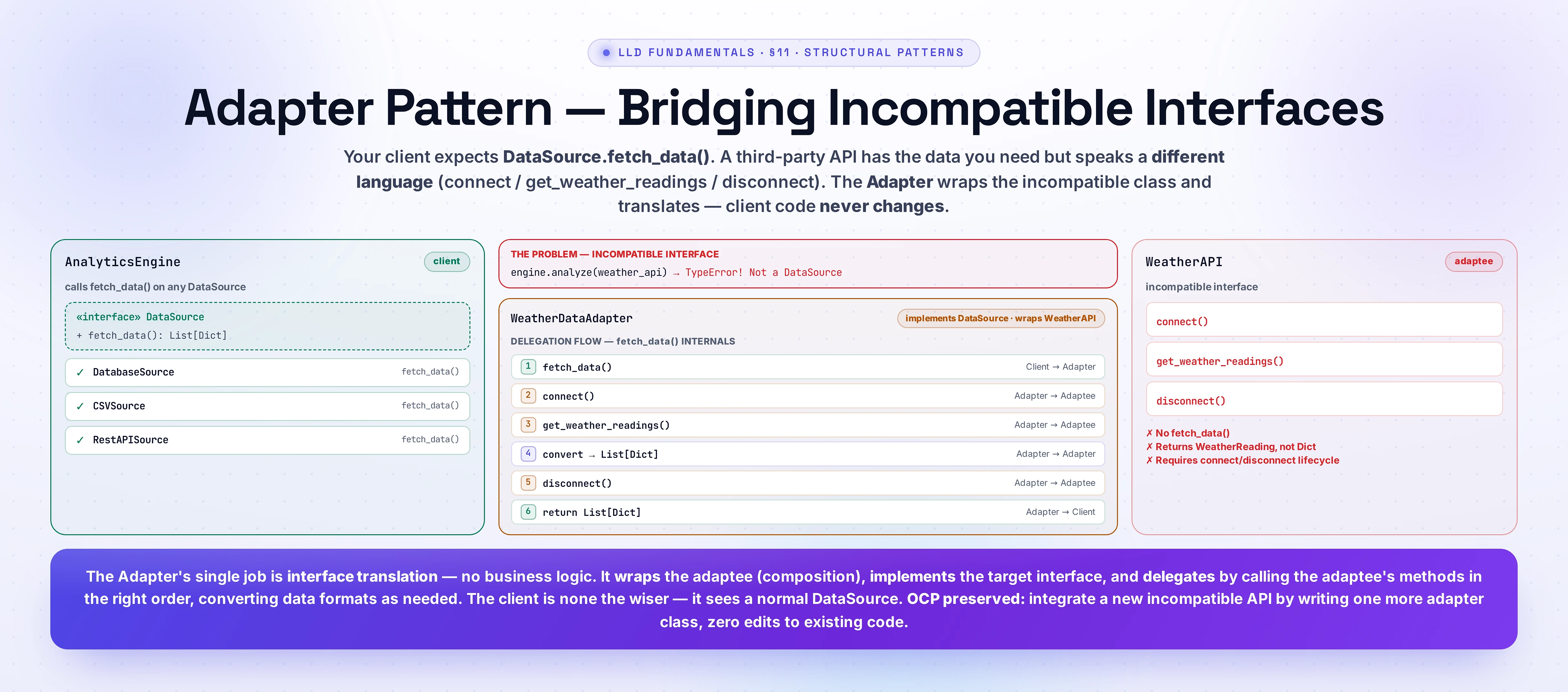
Imagine you're building an analytics dashboard. Your AnalyticsEngine expects data from a DataSource interface that provides data through a fetch_data() method returning a list of dictionaries. You've built three data sources — database, CSV file, REST API — all implementing this interface.
Now your company acquires a partner whose weather data would be valuable for your dashboard. Their WeatherAPI class has the data you need, but its interface is completely different:
- It uses
get_weather_readings()instead offetch_data() - It returns a list of
WeatherReadingobjects instead of dictionaries - It requires calling
connect()before fetching anddisconnect()after
Without the Adapter Pattern, you have three bad options:
- Modify the
WeatherAPIsource code — You might not have access to it (it's a third-party library), and even if you do, modifying it breaks other systems using the original interface. - Modify your
AnalyticsEngine— Adding special-case handling for the weather API violates the Open/Closed Principle (S6). Every new incompatible source means more if/else branches. - Copy-paste the weather logic into a new class matching your interface — Code duplication, maintenance nightmare.
With the Adapter Pattern, you create a WeatherDataAdapter that implements your DataSource interface and internally delegates to the WeatherAPI. Your AnalyticsEngine never knows it's talking to an adapted class — it just calls fetch_data() like always.
Real-World Analogy
Think about language interpreters at the United Nations. A French diplomat speaks French. A Japanese diplomat speaks Japanese. Neither needs to learn the other's language — an interpreter sits between them, listening in one language and speaking in another.
The interpreter doesn't change what's being said (the business logic stays the same). They don't change how either diplomat communicates (neither interface is modified). They simply translate between two incompatible communication protocols.
In software terms:
- French diplomat = the existing class with an incompatible interface (the Adaptee)
- Japanese diplomat = your code that expects a specific interface (the Client)
- Interpreter = the Adapter that translates between them
- The language each diplomat speaks = the interface each side expects
How It Works — Structure & Participants
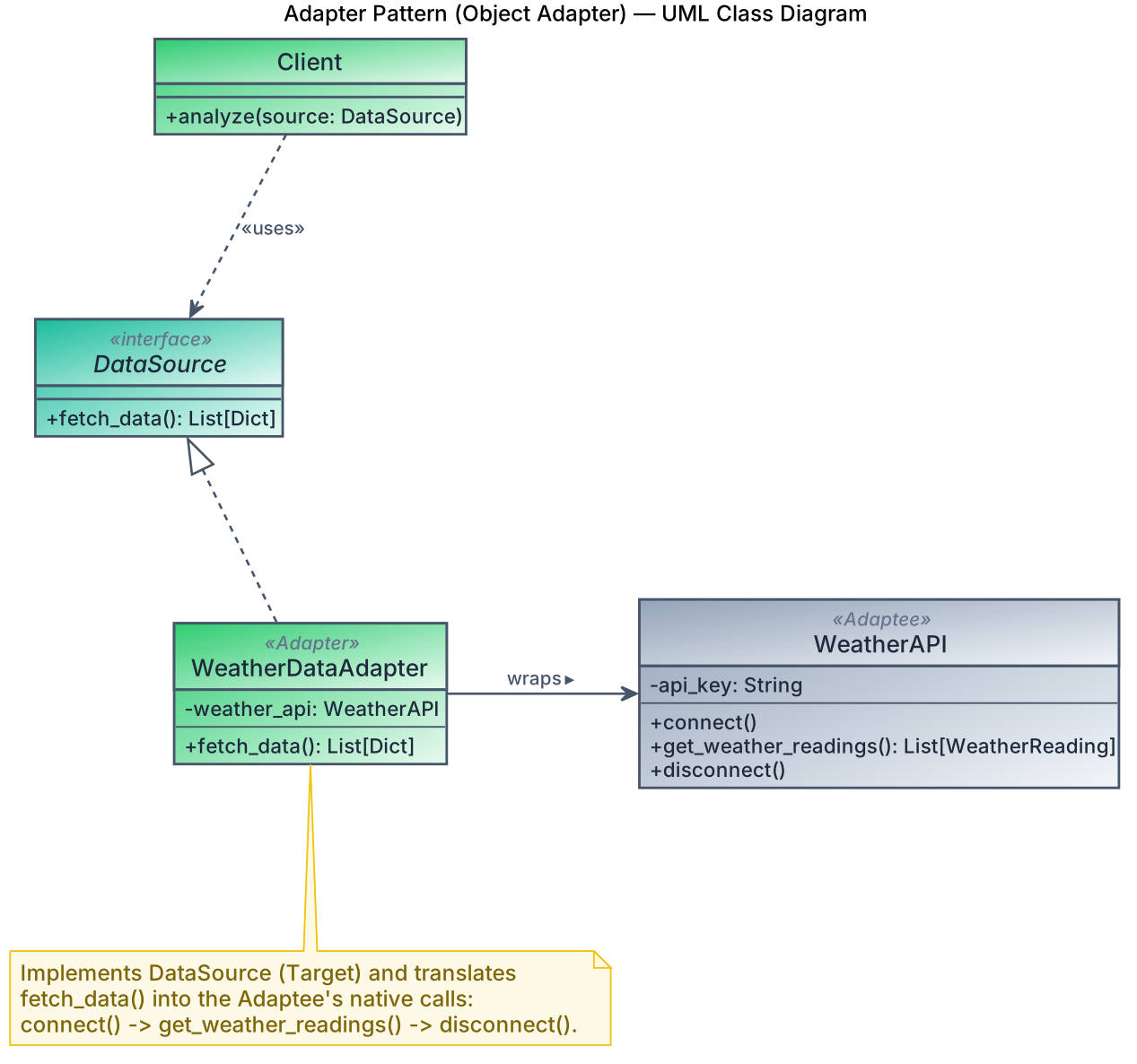
The Adapter Pattern has four participants:
-
Target Interface: The interface your client code expects. All calls go through this interface. In our example, this is
DataSourcewith itsfetch_data()method. -
Client: The existing code that uses the Target interface. It doesn't know or care about adapters — it works with any
DataSource. In our example, this is theAnalyticsEngine. -
Adaptee: The existing class with an incompatible interface that you want to integrate. It has useful functionality but the wrong method signatures. In our example, this is
WeatherAPIwith itsget_weather_readings()method. -
Adapter: The bridge class that implements the Target interface and wraps the Adaptee. It translates Target method calls into Adaptee method calls. In our example, this is
WeatherDataAdapter— it implementsfetch_data()by internally callingWeatherAPI.get_weather_readings()and converting the result.
Two Flavors: Object Adapter vs Class Adapter
There are two ways to implement adapters:
-
Object Adapter (composition): The adapter holds a reference to the adaptee and delegates calls. This is the preferred approach — it's more flexible (you can adapt any subclass) and follows the Composition over Inheritance principle from S7.
-
Class Adapter (multiple inheritance): The adapter inherits from BOTH the target and the adaptee. This is possible in languages like Python and C++ that support multiple inheritance, but it tightly couples the adapter to the specific adaptee class and is generally discouraged.
We'll focus on the Object Adapter — it's what you'll use in interviews and production code.
UML Class Diagram
Visualization
Code Implementation
Let's implement the Adapter Pattern for integrating an incompatible weather API into our analytics system.
from abc import ABC, abstractmethod
from typing import List, Dict, Any
from dataclasses import dataclass


# ---------- Target Interface ----------
class DataSource(ABC):
    """Interface that our AnalyticsEngine expects all data sources to implement."""

    @abstractmethod
    def fetch_data(self) -> List[Dict[str, Any]]:
        """Return data as a list of dictionaries."""
        pass


# ---------- Existing compatible source ----------
class DatabaseSource(DataSource):
    """A data source that reads from a relational database."""

    def __init__(self, connection_string: str):
        self._connection_string = connection_string

    def fetch_data(self) -> List[Dict[str, Any]]:
        # Simulated database query results
        return [
            {"metric": "page_views", "value": 15230, "date": "2025-03-01"},
            {"metric": "page_views", "value": 17450, "date": "2025-03-02"},
        ]


# ---------- Adaptee — incompatible third-party class ----------
@dataclass
class WeatherReading:
    """Third-party data class — NOT a dictionary."""
    city: str
    temperature_celsius: float
    humidity_percent: float
    timestamp: str


class WeatherAPI:
    """Third-party weather service with a completely different interface.
    We cannot modify this class — it comes from an external library."""

    def __init__(self, api_key: str):
        self._api_key = api_key
        self._connected = False

    def connect(self) -> None:
        """Must be called before fetching readings."""
        print(f"[WeatherAPI] Connecting with key {self._api_key[:4]}...")
        self._connected = True

    def get_weather_readings(self) -> List[WeatherReading]:
        """Returns WeatherReading objects — NOT dicts."""
        if not self._connected:
            raise RuntimeError("Must call connect() first")
        return [
            WeatherReading("New York", 22.5, 65.0, "2025-03-01T12:00:00"),
            WeatherReading("London", 15.3, 80.2, "2025-03-01T12:00:00"),
            WeatherReading("Tokyo", 18.7, 55.1, "2025-03-01T12:00:00"),
        ]

    def disconnect(self) -> None:
        """Release the connection after use."""
        print("[WeatherAPI] Disconnected.")
        self._connected = False


# ---------- Adapter — bridges the gap ----------
class WeatherDataAdapter(DataSource):
    """Adapts the WeatherAPI to the DataSource interface.
    Handles connection lifecycle and data format conversion."""

    def __init__(self, weather_api: WeatherAPI):
        self._weather_api = weather_api

    def fetch_data(self) -> List[Dict[str, Any]]:
        """Translates WeatherAPI calls into the DataSource contract."""
        # Step 1: Handle the connection protocol the adaptee requires
        self._weather_api.connect()

        try:
            # Step 2: Call the adaptee's method (different name!)
            readings = self._weather_api.get_weather_readings()

            # Step 3: Convert WeatherReading objects → dicts
            return [
                {
                    "metric": f"temperature_{reading.city.lower().replace(' ', '_')}",
                    "value": reading.temperature_celsius,
                    "date": reading.timestamp,
                    "metadata": {
                        "humidity": reading.humidity_percent,
                        "city": reading.city,
                    },
                }
                for reading in readings
            ]
        finally:
            # Step 4: Clean up the connection
            self._weather_api.disconnect()


# ---------- Client — knows nothing about adapters ----------
class AnalyticsEngine:
    """Processes data from any DataSource. Doesn't know about WeatherAPI."""

    def analyze(self, source: DataSource) -> None:
        data = source.fetch_data()
        print(f"\nAnalyzing {len(data)} records:")
        for record in data:
            print(f"  {record['metric']}: {record['value']}")


# ---------- Usage ----------
engine = AnalyticsEngine()

# Works directly — DatabaseSource implements DataSource
db_source = DatabaseSource("postgresql://localhost/analytics")
print("--- Database Source ---")
engine.analyze(db_source)

# WeatherAPI doesn't implement DataSource... but the adapter does!
weather_api = WeatherAPI(api_key="wk_9f3a7b2c")
adapted_weather = WeatherDataAdapter(weather_api)
print("\n--- Weather Source (via Adapter) ---")
engine.analyze(adapted_weather)
import java.util.*;
// ---------- Target Interface ----------
interface DataSource {
/** Return data as a list of key-value maps. */
List<Map<String, Object>> fetchData();
}
// ---------- Existing compatible source ----------
class DatabaseSource implements DataSource {
private final String connectionString;
public DatabaseSource(String connectionString) {
this.connectionString = connectionString;
}
@Override
public List<Map<String, Object>> fetchData() {
List<Map<String, Object>> results = new ArrayList<>();
results.add(Map.of("metric", "page_views", "value", 15230, "date", "2025-03-01"));
results.add(Map.of("metric", "page_views", "value", 17450, "date", "2025-03-02"));
return results;
}
}
// ---------- Adaptee — third-party class with incompatible interface ----------
class WeatherReading {
private final String city;
private final double temperatureCelsius;
private final double humidityPercent;
private final String timestamp;
public WeatherReading(String city, double temperatureCelsius,
double humidityPercent, String timestamp) {
this.city = city;
this.temperatureCelsius = temperatureCelsius;
this.humidityPercent = humidityPercent;
this.timestamp = timestamp;
}
public String getCity() { return city; }
public double getTemperatureCelsius() { return temperatureCelsius; }
public double getHumidityPercent() { return humidityPercent; }
public String getTimestamp() { return timestamp; }
}
class WeatherAPI {
private final String apiKey;
private boolean connected = false;
public WeatherAPI(String apiKey) {
this.apiKey = apiKey;
}
public void connect() {
System.out.println("[WeatherAPI] Connecting with key " + apiKey.substring(0, 4) + "...");
connected = true;
}
public List<WeatherReading> getWeatherReadings() {
if (!connected) throw new IllegalStateException("Must call connect() first");
return List.of(
new WeatherReading("New York", 22.5, 65.0, "2025-03-01T12:00:00"),
new WeatherReading("London", 15.3, 80.2, "2025-03-01T12:00:00"),
new WeatherReading("Tokyo", 18.7, 55.1, "2025-03-01T12:00:00")
);
}
public void disconnect() {
System.out.println("[WeatherAPI] Disconnected.");
connected = false;
}
}
// ---------- Adapter ----------
class WeatherDataAdapter implements DataSource {
private final WeatherAPI weatherApi;
public WeatherDataAdapter(WeatherAPI weatherApi) {
this.weatherApi = weatherApi;
}
@Override
public List<Map<String, Object>> fetchData() {
weatherApi.connect();
try {
List<WeatherReading> readings = weatherApi.getWeatherReadings();
List<Map<String, Object>> result = new ArrayList<>();
for (WeatherReading reading : readings) {
String metricName = "temperature_" +
reading.getCity().toLowerCase().replace(" ", "_");
Map<String, Object> record = new HashMap<>();
record.put("metric", metricName);
record.put("value", reading.getTemperatureCelsius());
record.put("date", reading.getTimestamp());
record.put("metadata", Map.of(
"humidity", reading.getHumidityPercent(),
"city", reading.getCity()
));
result.add(record);
}
return result;
} finally {
weatherApi.disconnect();
}
}
}
// ---------- Client ----------
class AnalyticsEngine {
public void analyze(DataSource source) {
List<Map<String, Object>> data = source.fetchData();
System.out.println("\nAnalyzing " + data.size() + " records:");
for (Map<String, Object> record : data) {
System.out.println(" " + record.get("metric") + ": " + record.get("value"));
}
}
}
// ---------- Main ----------
public class Main {
public static void main(String[] args) {
AnalyticsEngine engine = new AnalyticsEngine();
DatabaseSource dbSource = new DatabaseSource("jdbc:postgresql://localhost/analytics");
System.out.println("--- Database Source ---");
engine.analyze(dbSource);
WeatherAPI weatherApi = new WeatherAPI("wk_9f3a7b2c");
WeatherDataAdapter adapted = new WeatherDataAdapter(weatherApi);
System.out.println("\n--- Weather Source (via Adapter) ---");
engine.analyze(adapted);
}
}When to Use the Adapter Pattern
Use the Adapter Pattern when:
- Integrating third-party libraries whose interfaces don't match your system's expectations. You can't (or shouldn't) modify library code — wrap it instead.
- Working with legacy code that has the right functionality but outdated method signatures. An adapter lets new code use old code without rewriting it.
- Standardizing heterogeneous interfaces. Multiple external services (payment gateways, map providers, notification channels) each have different APIs — adapters give them a uniform interface.
- Migrating systems incrementally. When replacing OldSystem with NewSystem, adapters let you swap one piece at a time while the rest of the code keeps working.
- Testing with mocks. You can create an adapter that implements the target interface but delegates to an in-memory fake, making unit testing easier.
When NOT to Use the Adapter Pattern
Avoid the Adapter Pattern when:
- The interfaces are already compatible. If a class already matches (or nearly matches) the expected interface, an adapter adds unnecessary indirection. A simple method call is better than a layer of wrapping.
- You control both sides. If you own both the client and the service, refactor the interface directly instead of adding an adapter as a band-aid.
- The behavior needs to change, not just the interface. If you need to add new functionality (logging, caching, access control), that's the Decorator Pattern (next tutorial, S11) or Proxy Pattern (S11, Tutorial 5) — not Adapter.
- Excessive adapters accumulate. If your system has adapters wrapping adapters, it's a sign the underlying interfaces need redesign — not more wrapping.
Common Mistakes
Mistake 1: Adding Logic in the Adapter
The problem: Developers sneak business logic into the adapter — filtering records, computing averages, applying transformations beyond format conversion.
Why it's wrong: An adapter's single job is interface translation. If it also processes business logic, it violates the Single Responsibility Principle (S6). When the business rules change, you'll need to update the adapter — which should have been a stable glue layer.
The fix: Keep adapters thin. They translate method signatures and data formats — nothing else. Business logic belongs in the client or a dedicated service class.
Mistake 2: Confusing Adapter with Facade
The Facade Pattern (next tutorial) also wraps existing code — but for a different reason. Facade simplifies a complex subsystem; Adapter makes an incompatible interface compatible. If you're wrapping five classes into one easy API, that's Facade. If you're making one class match a different interface, that's Adapter.
Mistake 3: Using Class Adapter When Object Adapter Works
The problem: Using multiple inheritance to create a class adapter when a simple composition-based object adapter would suffice.
Why it's wrong: Class adapters inherit the adaptee's implementation, creating tight coupling. You can only adapt that specific class, not its subclasses. Object adapters (composition) can adapt any class that matches.
The fix: Default to object adapters. Only consider class adapters if you need to override specific adaptee methods — and even then, think twice.
Related Patterns
- Facade (S11, Tutorial 2): Both wrap existing code, but Adapter converts one interface to another while Facade provides a simplified interface to a complex subsystem. Adapter is about compatibility; Facade is about simplification.
- Decorator (S11, Tutorial 3): Both wrap objects, but Decorator adds new behavior while Adapter changes the interface without adding behavior. Decorator preserves the original interface; Adapter changes it.
- Proxy (S11, Tutorial 5): Proxy provides the same interface as the real object but controls access (lazy loading, caching, access control). Adapter provides a different interface.
- Bridge (S11, Tutorial 6): Bridge separates abstraction from implementation to let them vary independently — designed upfront. Adapter retrofits compatibility between existing classes — applied after the fact.
- Strategy (S12, Tutorial 1): When you adapt multiple services behind a common interface and swap them at runtime, Adapter and Strategy overlap — the adapted objects become interchangeable strategies.
Key Takeaways
- The Adapter Pattern lets you integrate classes with incompatible interfaces by wrapping one interface to match another — without modifying either side
- Prefer object adapters (composition) over class adapters (multiple inheritance) — they're more flexible and follow the Composition over Inheritance principle from S7
- Adapters should be thin translation layers — convert method names and data formats, but don't add business logic
- The pattern preserves the Open/Closed Principle (S6): new integrations require new adapter classes, not changes to existing code
- You'll encounter Adapter frequently in real-world codebases — libraries like
java.io.InputStreamReader(adapting byte streams to character streams) and Python'scsv.DictReader(adapting CSV rows to dictionaries) are classic examples