Tour of Vector DBs: pgvector, Pinecone, Weaviate, Chroma, Qdrant
Introduction
You understand ANN indexes (HNSW, IVF). A vector database wraps one of those indexes in everything you actually need to ship: durable storage, metadata filtering, live insert/update/delete, scaling and replication, persistence, security, and a clean API. The raw index finds neighbors; the database makes it a production system.
There are dozens of options and the space moves fast — so, like the Model Families lesson, we'll learn the stable map (by category) and how to choose, not a leaderboard that's stale by next month. Get the categories straight and any specific product slots right in.
In this lesson you'll learn:
- What a vector DB adds beyond a raw index
- The four categories — and the headline players in each
- A simple way to choose by a few axes
- The same operation in pgvector and a client SDK
What a Vector DB Adds (Beyond an Index)
You could run raw FAISS + your own code and get nearest-neighbor search. A vector database is that, productionized — it bundles the parts you'd otherwise build yourself:
- Persistent storage — vectors survive restarts; you don't rebuild the index on every boot.
- Metadata + filtered search — store
{source, date, user, tags}next to each vector and filter on them (e.g. "only this user's docs from 2026") — its own lesson next. - Live CRUD — insert, update, and delete vectors as your data changes (raw FAISS makes this painful).
- Scaling & reliability — sharding, replication, backups, high availability.
- Hybrid search, an API/SDK, auth, monitoring — the operational layer.
So the question isn't "index or database?" — past a prototype, you want a database. The question is which kind.
The Four Categories
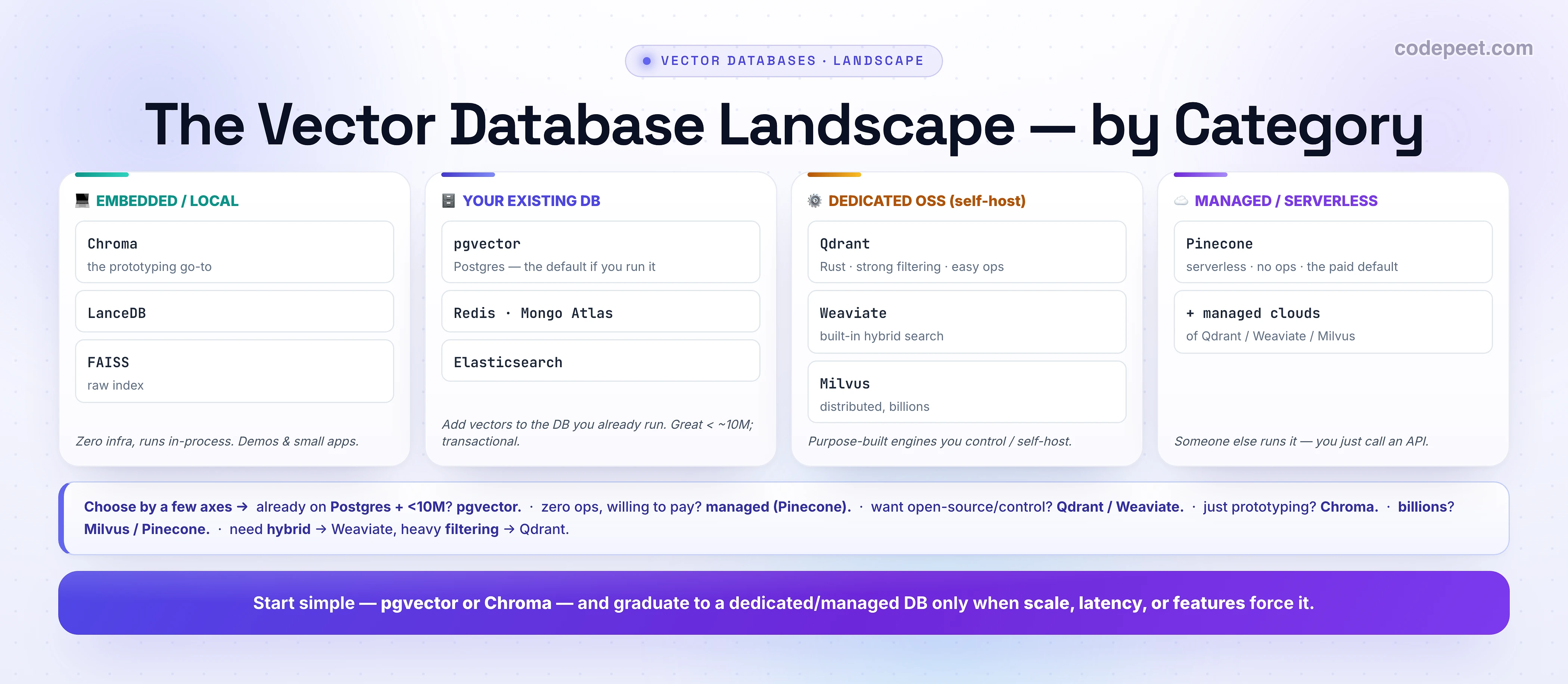
Sort the whole field into four buckets and the choice gets simple:
1. Embedded / local — Chroma, LanceDB, FAISS. Runs in your process, zero infrastructure. The fastest way to a working "chat with my docs" prototype; Chroma is the popular default here. Great for demos and small apps; struggles past ~10M vectors.
2. Your existing database — pgvector (Postgres), Redis, MongoDB Atlas, Elasticsearch. Add vector search to a database you already run. pgvector is the default recommendation if you're on Postgres — vectors live alongside your application data with full transactional consistency, and you avoid running a second system. Production-grade (Supabase, Neon, Instacart) and ideal under ~10M vectors.
3. Dedicated, self-hosted (open-source) — Qdrant, Weaviate, Milvus. Purpose-built vector engines you host yourself. Qdrant (Rust, strong filtered search, the easiest dedicated DB to self-host), Weaviate (built-in hybrid search + rich schema), Milvus (distributed, billion-scale).
4. Fully managed / serverless — Pinecone, plus managed clouds of the open-source ones. Someone else runs the infrastructure; you just call an API. Pinecone is the dominant managed default — serverless, no ops — if you're willing to pay for zero operational burden.
The Players at a Glance
Stable positioning (exact features/pricing move — check the docs):
| DB | Category | Known for |
|---|---|---|
| pgvector | your Postgres | vectors in your existing DB, transactional, < ~10M |
| Chroma | embedded | prototyping / local, dead-simple |
| Qdrant | OSS self-host | filtering performance, Rust, easy ops |
| Weaviate | OSS + cloud | hybrid search built-in, rich schema |
| Milvus | OSS self-host | billion-scale, distributed |
| Pinecone | managed | serverless, no-ops, scales without tuning |
(Plus Redis, Mongo Atlas, Elasticsearch if you already run them; Vespa, MyScale, LanceDB, and more.) Don't memorize — know which bucket each is in and what it's for.
How to Choose (the Axes)
The real decision comes down to a few questions (the full decision guide is the last lesson of this section):
- Already on Postgres and under ~10M vectors? → pgvector. Don't add a second system for a feature your DB now has.
- Want zero ops and willing to pay? → managed/serverless (Pinecone).
- Want open-source and control (self-host)? → Qdrant or Weaviate.
- Just prototyping / local? → Chroma.
- Billions of vectors? → Milvus or Pinecone (and IVF-PQ-class indexes).
- Need built-in hybrid search? → Weaviate. Heavy metadata filtering? → Qdrant.
The default ladder: start with pgvector or Chroma, and graduate to a dedicated or managed DB only when scale, latency, or a feature (hybrid, advanced filtering, billions) genuinely forces it. Most apps never need the exotic option.
The Same Search, Two Ways (Code)
pgvector — it's just SQL in the Postgres you already have:
CREATE EXTENSION IF NOT EXISTS vector;

CREATE TABLE docs (
    id        bigserial PRIMARY KEY,
    content   text,
    embedding vector(1536)          -- the vector column
);

-- add an ANN index (HNSW), with cosine distance
CREATE INDEX ON docs USING hnsw (embedding vector_cosine_ops);

-- search: <=> is cosine distance (smaller = closer). Filtering is just WHERE!
SELECT content
FROM   docs
WHERE  created_at > '2026-01-01'    -- metadata filter, for free
ORDER BY embedding <=> '[0.12, -0.04, ...]'
LIMIT 5;
Chroma — an embedded DB in a few lines of Python (it can even embed for you):
import chromadb
client = chromadb.PersistentClient(path="./db")   # persists to disk
col = client.get_or_create_collection("docs")

col.add(ids=["1", "2"],
        documents=["Refunds are processed in 5 days", "To reset your password, click..."])
        # ^ Chroma embeds these for you (or pass embeddings=[...] yourself)

res = col.query(query_texts=["how do I get my money back?"], n_results=2)
print(res["documents"])   # -> the refunds doc, ranked first
🧪 Try It Yourself
Pick the vector store. For each, which category/DB?
- A weekend prototype: "chat with my 200 PDFs" on your laptop. → ?
- A SaaS app already running Postgres, ~2M document chunks, wants vectors next to its app data. → ?
- A startup that wants zero infra/ops and will pay for it, scaling to 50M+. → ?
- An on-prem deployment needing open-source, self-hosted, with heavy metadata filtering. → ?
→ 1: Chroma (embedded, zero infra). 2: pgvector (it's already in your Postgres; <10M; transactional). 3: Pinecone (managed serverless, no ops). 4: Qdrant (OSS self-host, strong filtering). Notice none of them is "the best vector DB" — it's the best for the situation.

Mental-Model Corrections
- "I need a dedicated vector DB to start." No — pgvector (if you're on Postgres) or Chroma (local) is plenty for most apps. Add a dedicated/managed DB when scale forces it.
- "pgvector is a toy." It's production-grade in 2026 (Supabase, Neon, Instacart at scale) for < ~10M vectors with transactional guarantees a dedicated DB can't match.
- "A vector DB is just an ANN index." It's the index plus storage, metadata filtering, CRUD, scaling, and an API — the productionized system.
- "Managed vs open-source is about quality." It's about ops vs control/cost: managed (Pinecone) = no ops, you pay; OSS (Qdrant/Weaviate) = self-host, you control.
- "Memorize the leaderboard." It moves monthly — learn the four categories and choose by your axes.
Key Takeaways
- A vector database = an ANN index + storage, metadata filtering, CRUD, scaling, and an API — the productionized system (raw FAISS is just the index).
- Four categories: embedded/local (Chroma, LanceDB, FAISS — prototyping), your existing DB (pgvector for Postgres <10M, Redis, Mongo, Elastic), dedicated OSS (Qdrant=filtering, Weaviate=hybrid, Milvus=billions), managed/serverless (Pinecone).
- Choose by axes: Postgres+<10M → pgvector; zero-ops+pay → Pinecone; OSS/control → Qdrant/Weaviate; prototype → Chroma; billions → Milvus/Pinecone; hybrid → Weaviate, filtering → Qdrant.
- Start simple (pgvector/Chroma), graduate when forced by scale, latency, or features.
- Learn the categories (stable); check exact features/pricing (they move). Full decision guide comes in the last lesson of this section.