What Makes Something an "Agent"?
Introduction
"Agent" is the most hyped — and most misused — word in AI. A chatbot gets called an agent. So does a RAG app. So does a fixed five-step pipeline. Most of them aren't agents at all.
Getting this definition right matters, because agents are powerful but expensive, slower, and less predictable than the alternatives. Knowing what truly makes something an agent tells you when to reach for one — and, just as importantly, when not to.
You'll learn:
- A crisp definition of an agent
- The four ingredients every agent has
- The key distinction: workflow vs. agent (who controls the steps?)
- When you actually need an agent — and when a simpler design wins
The Definition
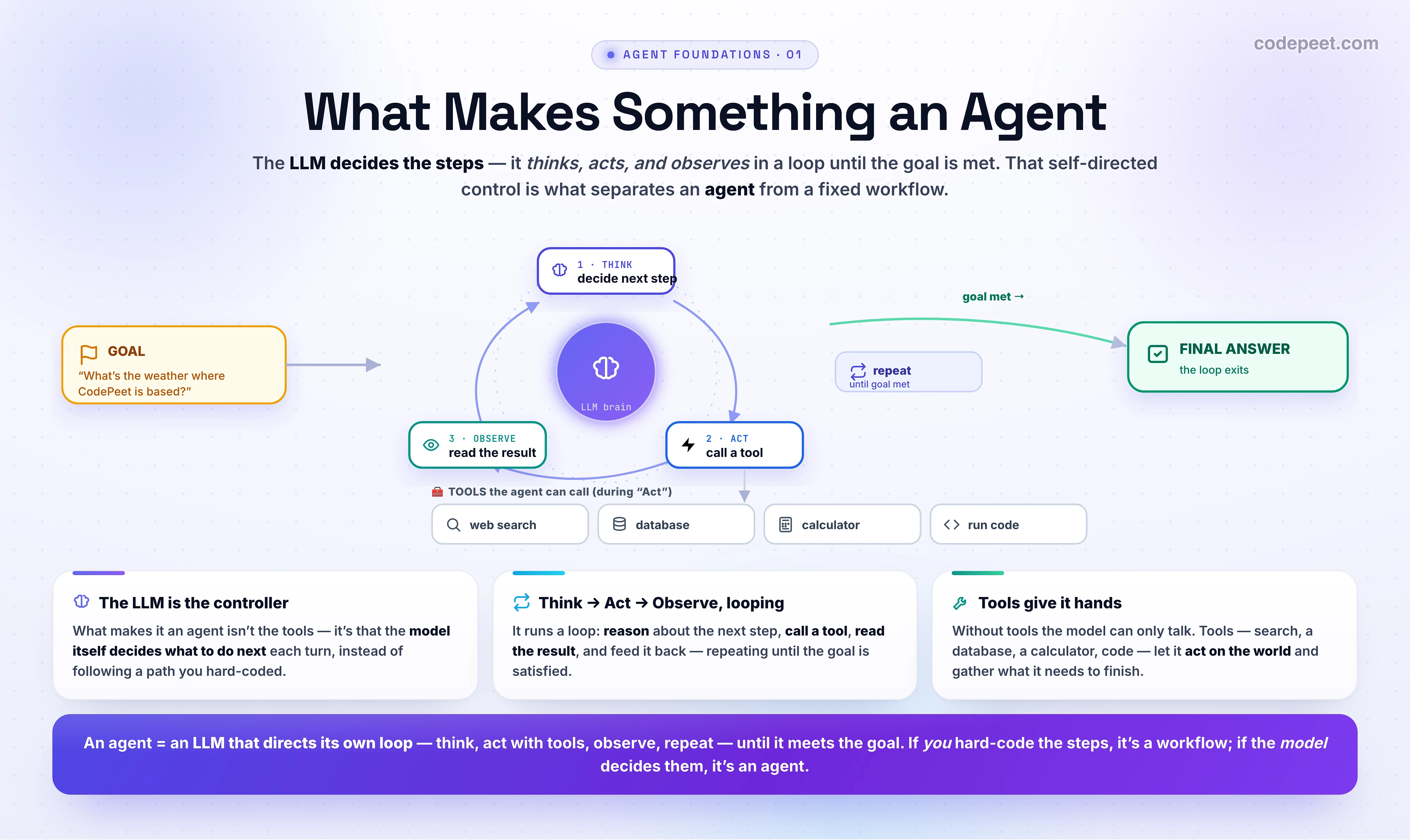
An agent is a system in which an LLM directs its own actions in a loop — deciding which tools to use and when, observing the results, and continuing until a goal is met.
The defining word is directs. In a normal app, you write the control flow: do A, then B, then C. In an agent, the LLM decides the control flow at runtime — it looks at the goal and the situation so far and chooses the next step itself. The model is the brain, not a cog following your script.
That's it. Everything that follows — tools, planning, memory, multi-agent systems — is machinery in service of that one idea: let the model decide what to do next.
The Four Ingredients
Every agent combines four things:
- An LLM as the decision-maker (the brain). It reasons about the goal and picks the next action.
- Tools (the hands). Functions it can call to do things and see the world: search the web, query a database, run code, call an API. (Without tools, an LLM can only talk.)
- A loop. It acts, observes the result, and decides again — repeating until the task is done. One shot isn't an agent.
- Autonomy toward a goal. It chooses the sequence of steps; you specify the goal and the available tools, not the path.
Remove any one and it stops being an agent: no tools → just a chatbot; no loop → a single call; no autonomy → a workflow you scripted.
Workflow vs. Agent — Who Controls the Steps?
This is the distinction that cuts through the hype (and it's the one Anthropic draws in Building Effective Agents). The question is simple: who decides the control flow — you, or the model?
- Workflow: you define the steps in advance. Even if it uses several LLM calls and tools, the path is fixed at design time (e.g., "summarize → translate → email"). Predictable, cheap, debuggable.
- Agent: the model defines the steps at runtime, looping over tools until it decides it's done. Flexible and powerful, but less predictable and more expensive.
| System | Tools? | Loops? | Who controls the steps? | Agent? |
|---|---|---|---|---|
| Single LLM call | no | no | — | ❌ |
| Chatbot | no | (chat turns) | the user | ❌ |
| RAG app | retrieval only | no | you (fixed: retrieve→answer) | ❌ |
| Workflow (chaining/routing) | yes | fixed | you (predefined) | ❌ |
| Agent | yes | yes | the LLM (dynamic) | ✅ |
Most "agents" in the wild are actually workflows — and that's often the right design. Calling it correctly keeps you honest about cost and complexity.
A Tiny Agent, in Shape
Strip away the frameworks and an agent is just a loop where the model chooses the next move. In pseudocode:
# The essence of every agent (we build a real one in the next lessons)
state = {"goal": "What's the weather in the city where CodePeet is based?"}

while not done:
    decision = llm(
        goal=state["goal"],
        history=state,
        tools=[search, lookup_company_hq, get_weather],   # what it's allowed to do
    )
    if decision.is_final_answer:
        done = True                      # the MODEL decided it's finished
    else:
        result = run_tool(decision.tool, decision.args)   # ACT
        state = remember(state, decision, result)         # OBSERVE -> loop

print(decision.answer)
Notice there is no hard-coded path: nothing in the code says "first find the HQ, then get the weather." The model figures that out by looping — choose a tool, see the result, choose again — until it judges the goal met. That dynamic, model-driven loop is the whole game. (We formalize it as the Thought → Action → Observation loop in the next lesson.)
When Do You Actually Need One?
Agents buy you flexibility on open-ended tasks — and charge you for it in cost (many LLM calls), latency (sequential loops), and unpredictability (the model can wander or loop). So the golden rule, straight from production practice:
Use the simplest thing that works. Reach for an agent only when the task genuinely needs dynamic, open-ended steps you can't script in advance.
The ladder of increasing power and cost:
- One LLM call — can a single prompt do it? Start here.
- A workflow — fixed sequence of calls/tools (chaining, routing)? Predictable and usually enough.
- An agent — only when the steps truly depend on what's discovered along the way (open-ended research, multi-step tool use with unknown depth, interactive problem-solving).
If you can draw the flowchart in advance, you want a workflow, not an agent.
Visualization
🧪 Try It Yourself
Is it an agent? Which of these counts as an agent?
- One API call that returns an answer. 2. A chatbot loop that remembers the conversation. 3. A model that loops — think → call a tool → observe the result → decide the next step — on its own until the task is done.
→ 3. The defining trait is an autonomous loop with tools and decisions, not just multi-turn chat. (Recall ReAct — that Thought→Action→Observation loop is the agent's beating heart.)
Common Pitfalls
- Calling everything an agent. A chatbot or RAG app isn't one. The test: does the LLM choose the steps at runtime? If you scripted them, it's a workflow.
- Reaching for an agent too early. Agents are the most expensive, slowest, least predictable option. Try a single call, then a workflow, first.
- No termination condition. Without a clear "done" check (and a max-steps guard), agents loop forever, burning tokens. Always bound the loop.
- Tools that can't observe. A tool must return a useful result the model can read; otherwise the loop is blind. (More on tool design soon.)
Key Takeaways
- An agent = an LLM that directs its own actions in a loop, choosing tools until a goal is met. The model controls the steps.
- Four ingredients: LLM brain + tools + a loop + autonomy toward a goal. Remove one and it's no longer an agent.
- The key distinction is who controls the control flow: a workflow is scripted by you; an agent is steered by the model. Most "agents" are really workflows — and that's fine.
- Use the simplest thing that works: single call → workflow → agent. Go agentic only for genuinely open-ended, unscriptable tasks.
Next: the Thought → Action → Observation loop — the heartbeat of every agent, built from scratch.