Tools, Resources & Prompts in MCP
Introduction
L138 (MCP Architecture) showed you that an MCP server exposes capabilities to a client — and named three of them. This lesson is those three in depth. They're called primitives, and they are the entire vocabulary a server speaks:
Tools, Resources, and Prompts — and the cleanest way to tell them apart isn't what they are, it's who controls them.
That one idea — the control axis — is the key that makes the whole protocol click:
- Tools are model-controlled — the LLM decides to call them.
- Resources are application-controlled — the host app decides what to load.
- Prompts are user-controlled — the human explicitly invokes them.
Get this axis and you'll never wonder "should this be a tool or a resource?" again — you'll just ask "who should be in charge of it?"
In this lesson:
- The three primitives and the control axis that defines them (hands-on)
- Each in depth — Tools (actions), Resources (data), Prompts (templates) — with their methods and shapes
- How they compose into a real workflow, and when to use which
Scope: this is what a server exposes and why. Building a server that exposes them is the next lesson (L140 — Hands-On: Build Your First MCP Server); connecting an agent to them is L141 (Connecting an Agent to MCP Servers). (There are also client primitives — sampling, elicitation — which you met in L138 — MCP Architecture.)
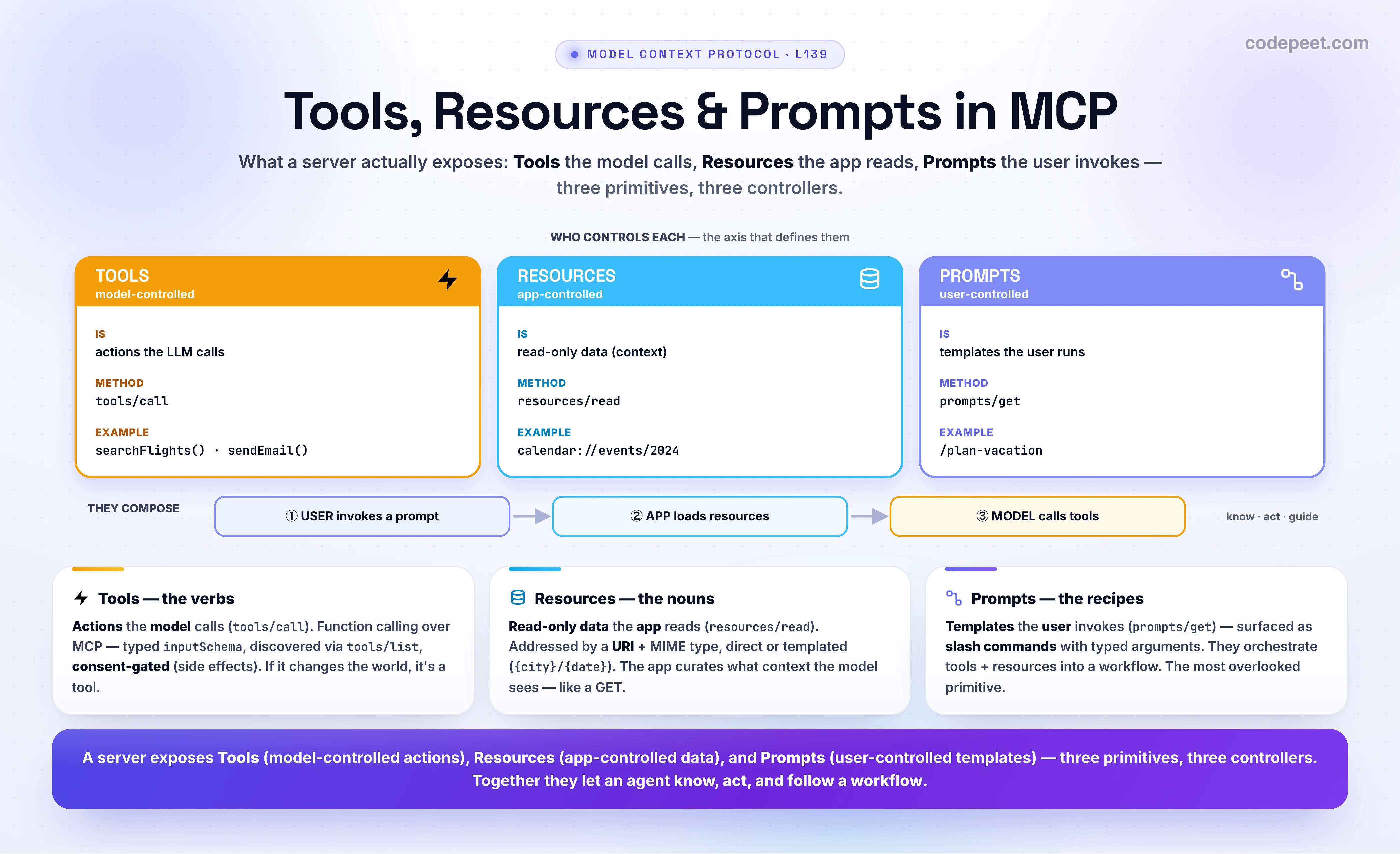
Three Primitives, Three Controllers
Here's the whole lesson in one table — the official MCP framing, and the control axis is the last column:
| Primitive | What it is | Examples | Who controls it |
|---|---|---|---|
| Tools | Functions the LLM can call to act — write to a DB, hit an API, send a message | searchFlights, sendEmail, createEvent | Model |
| Resources | Passive, read-only data for context — file contents, DB schema, docs | a calendar, a PDF, a knowledge base | Application |
| Prompts | Pre-built templates that structure a task with tools + resources | "Plan a vacation", "Summarize my meetings" | User |
A one-line mnemonic that sticks: Tools are verbs (the model acts), Resources are nouns (the app reads), Prompts are recipes (the user triggers). Or by analogy to the web: a tool is a POST (an action with effects), a resource is a GET (fetch data), and a prompt is a saved workflow the user kicks off.
Train the distinction now — classify each capability, and watch the control axis appear:
If an item made you pause — "is the database a tool or a resource?" — that's the lesson landing. Querying the database is a tool (an action); the database schema is a resource (read-only context). Action vs data is the line, and who controls it is the tell.
Tools — Actions the Model Calls
Tools are the verbs. A tool is an executable function the model can invoke to do something — and that "something" usually has a side effect: writing to a database, calling an external API, modifying a file, sending a message. If it changes the world, it's a tool.
This should feel familiar — it's function calling (Section 3, L121 — Tools), now delivered through MCP instead of hard-coded into your app. The shape is the same: a name, a description (the prompt that teaches the model when to use it), and an inputSchema (JSON Schema) for typed, validated arguments. The difference MCP adds is dynamic discovery — the client calls tools/list to find out what tools exist (so they can change at runtime), then tools/call to run one:
- Model-controlled: the LLM reads the descriptions and decides when to call a tool, automatically — the user doesn't pick it.
- Consent-gated: because tools act, MCP emphasizes human oversight — clients commonly show an approval dialog before executing (especially for destructive actions), display available tools, or log every call.
Here's a tool definition (and you'll see resources and prompts right after):
// TOOLS — model-controlled ACTIONS (tools/list → tools/call); inputs are JSON Schema.
{ "name": "searchFlights", "description": "Search for available flights",
  "inputSchema": { "type": "object",
    "properties": { "origin": {"type":"string"}, "destination": {"type":"string"},
                    "date": {"type":"string","format":"date"} },
    "required": ["origin","destination","date"] } }

// RESOURCES — app-controlled READ-ONLY data, addressed by a URI (resources/read).
{ "uri": "calendar://events/2024", "name": "calendar", "mimeType": "application/json" }
{ "uriTemplate": "weather://forecast/{city}/{date}", "name": "weather" }   // dynamic params

// PROMPTS — user-controlled TEMPLATES (a slash command), typed arguments (prompts/get).
{ "name": "plan-vacation", "title": "Plan a vacation",
  "arguments": [ {"name":"destination","required":true}, {"name":"budget","required":false} ] }
The top block is the tool. Notice it's just a schema — searchFlights with three typed inputs. The server doesn't run it until the model issues a tools/call, and a well-behaved host asks the user first if it matters. Tools are how an agent reaches out and changes things.
Resources — Data the App Reads
Resources are the nouns. A resource is a passive, read-only data source the application can pull in as context — file contents, a database schema, API documentation, a calendar. It never acts; it just provides information. The defining detail: each resource has a unique URI (like calendar://events/2024 or file:///Documents/passport.pdf) and a MIME type, so it's addressable and self-describing (second block above).
Resources come in two flavors:
- Direct resources — fixed URIs pointing at specific data:
calendar://events/2024. - Resource templates — dynamic URIs with parameters, for flexible queries:
weather://forecast/{city}/{date}, ortravel://activities/{city}/{category}. (These even support parameter completion — type "Par" and the host can suggest "Paris.")
The crucial part is who's in charge: the application. Unlike a tool (the model decides), a resource is application-controlled — the host app decides whether, when, and how much of a resource to load into context. It might show a file-picker, auto-include a resource based on the conversation, search resources with embeddings, or pass raw data straight to the model. The model doesn't reach for resources; the app hands them over. That's why a resource is the right home for context you want to curate — you, the application, stay in control of what the model sees. Methods: resources/list (and resources/templates/list) to discover, resources/read to fetch, resources/subscribe to watch for changes.
Prompts — Templates the User Invokes
Prompts are the recipes. A prompt is a reusable, parameterized template — a pre-built workflow that tells the model how to combine tools and resources for a common task. Think "Plan a vacation" or "Summarize my meetings": a structured starting point instead of the user typing the whole instruction from scratch.
The defining trait: prompts are user-controlled — they require explicit invocation. The model doesn't trigger a prompt and the app doesn't auto-load it; the human picks it. The canonical UI is the slash command — type / in Claude Desktop or an IDE and you see /plan-vacation, /summarize-meetings (also command palettes, buttons, context menus). A prompt declares typed arguments (third block above: destination required, budget optional), and once invoked it can pull in resources and call tools to drive the whole workflow. Methods: prompts/list to discover, prompts/get to retrieve a filled-in prompt.
Prompts are the most overlooked primitive — many servers ship only tools. But they're how a server author packages expertise: "here's the right way to use my tools and resources for this task," exposed as a one-click command the user controls.
Why the Control Axis Matters
The model/app/user split isn't trivia — it's a safety and UX design decision baked into the protocol, and it maps each primitive to the actor best suited to control it:
- Tools → the model, because which action to take depends on reasoning over the live conversation — only the model has that context. (But because tools act, the human keeps a veto via consent prompts — autonomy with a safety rail.)
- Resources → the application, because what context to load is a curation and privacy decision — the app (and user) should decide which of your files/data the model gets to see, not the model itself grabbing whatever it wants.
- Prompts → the user, because a workflow is an intent — the human decides "I want to do this task now." You don't want the model spontaneously launching a "book a vacation" workflow.
Read it as a chain of trust: the user sets the intent (prompt), the app curates what's seen (resources), and the model chooses the actions (tools) — with the user able to approve each one. Each actor controls exactly the piece it should. That is why MCP feels safe to wire into real tools and data: control is distributed to the right hands by design.
They Compose — A Real Workflow
The three primitives shine together. Walk the official travel-planner example end to end and watch each actor play its part:
- The user invokes the
/plan-vacationprompt with arguments (Barcelona, 7 days, $3000). User-controlled — the human starts the workflow. - The app loads the chosen resources — the user's calendar, travel preferences, past trips — as context. Application-controlled — the app curates what the model sees.
- The model, now grounded in that context, decides which tools to call —
searchFlights,checkWeather, thenbookHotel,createCalendarEvent,sendEmail— acting, with the user approving the bookings. Model-controlled actions, user-gated.
In code, the composition reads exactly like the control axis:
# The three primitives COMPOSE — each driven by a DIFFERENT actor:
user_invokes("/plan-vacation", destination="Barcelona", budget=3000)    # PROMPT   · user
context = [ host.read("calendar://events/2024"),                        # RESOURCE · app
            host.read("travel://past-trips/Spain-2023") ]               # RESOURCE · app

# → grounded in that context, the MODEL decides which tools to call:
model.call("searchFlights", origin="NYC", destination="Barcelona")      # TOOL · model
model.call("bookHotel", budget=3000)                                    # TOOL · model (asks consent)
model.call("createCalendarEvent", title="Barcelona Trip")              # TOOL · model
# USER picks the workflow  ->  APP supplies the data  ->  MODEL takes the actions.
That's the payoff: a task that could take hours, done in minutes — because the user supplied the intent, the app supplied the context, and the model supplied the actions. Resources tell the agent what's true, tools let it act, and the prompt ties them into a workflow. (And it spanned multiple servers — travel, weather, calendar — each via its own client, exactly the M+N architecture of L137–L138 — The Integration Problem MCP Solves → MCP Architecture.)
When to Use Which
Designing your own server? Route every capability by the control question — who should decide?:
- Is it an action with an effect (write, send, query, modify)? → Tool. Let the model call it; gate the dangerous ones behind consent. (Verb.)
- Is it read-only data the model needs as context (a file, a schema, a record)? → Resource. Let the app curate when to load it. (Noun.)
- Is it a repeatable task or workflow a user will want to launch on demand? → Prompt. Expose it as a user-invoked template. (Recipe.)
Two traps to avoid: (1) Don't make read-only context a tool — e.g., a get_schema tool the model must remember to call — when it should be a resource the app supplies up front. (2) Don't bury a common workflow in a long natural-language instruction the user retypes every time — package it as a prompt. The best servers use all three, each for what it's for: tools to act, resources to know, prompts to guide.
🧪 Try It Yourself
Classify each, and name who controls it:
delete_file(path)— removes a file.git://repo/README.md— the contents of a README, for context./draft-release-notes— a saved template the user runs before a launch.- A capability that returns the list of tables in a database (read-only).
- A teammate exposes the company's style guide as a tool (
get_style_guide()) the model must call. What's wrong, and what should it be?
→ (1) Tool (model-controlled, tools/call) — it's a destructive action; definitely gate it behind a consent prompt. (2) Resource (application-controlled, resources/read) — read-only data addressed by a URI; the app loads it as context. (3) Prompt (user-controlled, prompts/get) — a reusable template the human explicitly invokes (a slash command). (4) Resource — read-only context (the schema/table list); querying the DB would be a tool, but listing/describing it is data. (5) A read-only style guide is context, not an action — making it a tool forces the model to decide to fetch it and burns a tool slot. It should be a resource the app includes as context (or a prompt that bakes the style in). Don't model data as an action.
Mental-Model Corrections
- "Tools, resources, and prompts are basically the same — ways to give the model stuff." They differ by who controls them: Tools = model, Resources = app, Prompts = user. That axis is the distinction.
- "A resource is just a read-only tool." No — a tool is an action the model decides to call; a resource is data the app decides to load. Action vs data; model vs app.
- "Prompts are the system prompt." MCP prompts are user-invoked templates (slash commands) with typed arguments — reusable workflows, not the hidden system message.
- "The model picks everything." Only tools are model-controlled. The app controls resources (what context to load); the user controls prompts (which workflow to start).
- "Tools are new — they're not function calling." They are function calling (L121), just delivered over MCP and discovered dynamically via
tools/listinstead of hard-coded. - "Just expose everything as tools." Read-only context belongs in resources (so the app curates it) and repeatable tasks in prompts (so the user launches them). Using all three is the mark of a good server.
Key Takeaways
- A server exposes three primitives, defined by the control axis: Tools (the model calls — actions,
tools/call), Resources (the app reads — read-only data by URI,resources/read), Prompts (the user invokes — templates,prompts/get). - Mnemonic: Tools = verbs (act) · Resources = nouns (know) · Prompts = recipes (guide). Or web-style: tool ≈ POST, resource ≈ GET, prompt ≈ a saved workflow.
- Tools = function calling delivered over MCP —
name+description+ JSON-SchemainputSchema, discovered viatools/list, consent-gated because they have side effects. - Resources = curated context — unique URIs + MIME types, direct or templated (
{city}/{date}); the app decides what to load (privacy + relevance), not the model. - Prompts = packaged expertise — user-invoked templates with typed arguments, surfaced as slash commands, that orchestrate tools + resources. The most overlooked primitive.
- They compose: the user sets the intent (prompt) → the app supplies context (resources) → the model takes actions (tools), with the user approving. Control is distributed to the right actor — that's what makes MCP safe.
- Next — L140: Hands-On — Build Your First MCP Server — you'll implement a server that exposes a tool, a resource, and a prompt.