LangGraph: Graph-Based Agent Control
Introduction
Last lesson placed LangGraph at the maximum-control end of the framework spectrum (L149). Now we go deep on why — and on the one idea that defines it: your agent is an explicit graph.
Most frameworks hand you an agent abstraction and hide the control flow. LangGraph does the opposite: you draw the state machine yourself — the nodes (steps), the edges (what runs next), and a shared state that flows through them. It's more code, but nothing is hidden, and you get the things production agents actually need: loops, branching, durability, and resumability.
LangGraph (a LangChain project, 1.0 GA in October 2025) is "minimum magic, maximum control." It powers production agents at Klarna (80% faster case resolution), Uber, LinkedIn, and Replit — exactly the high-stakes, stateful systems the graph model is built for.
In this lesson:
- The mental model — everything is a graph (nodes, edges, state) and why that matters
- State & reducers — the typed shared state, and how updates merge
- The ReAct agent as a graph —
agent → tools_condition → tools → loop → END(hands-on) - The prebuilt
create_react_agent, and persistence — checkpointers, durable execution, time-travel, human-in-the-loop - When it earns its keep — and when it's overkill
Scope: this is the LangGraph deep dive — the first of the framework lessons (L149 was the map). CrewAI (L151), smolagents (L152), and the OpenAI Agents SDK (L153) follow. Builds on the agent loop (L111), tools (L121), and multi-agent ideas (Section 7).
The Mental Model — Everything Is a Graph
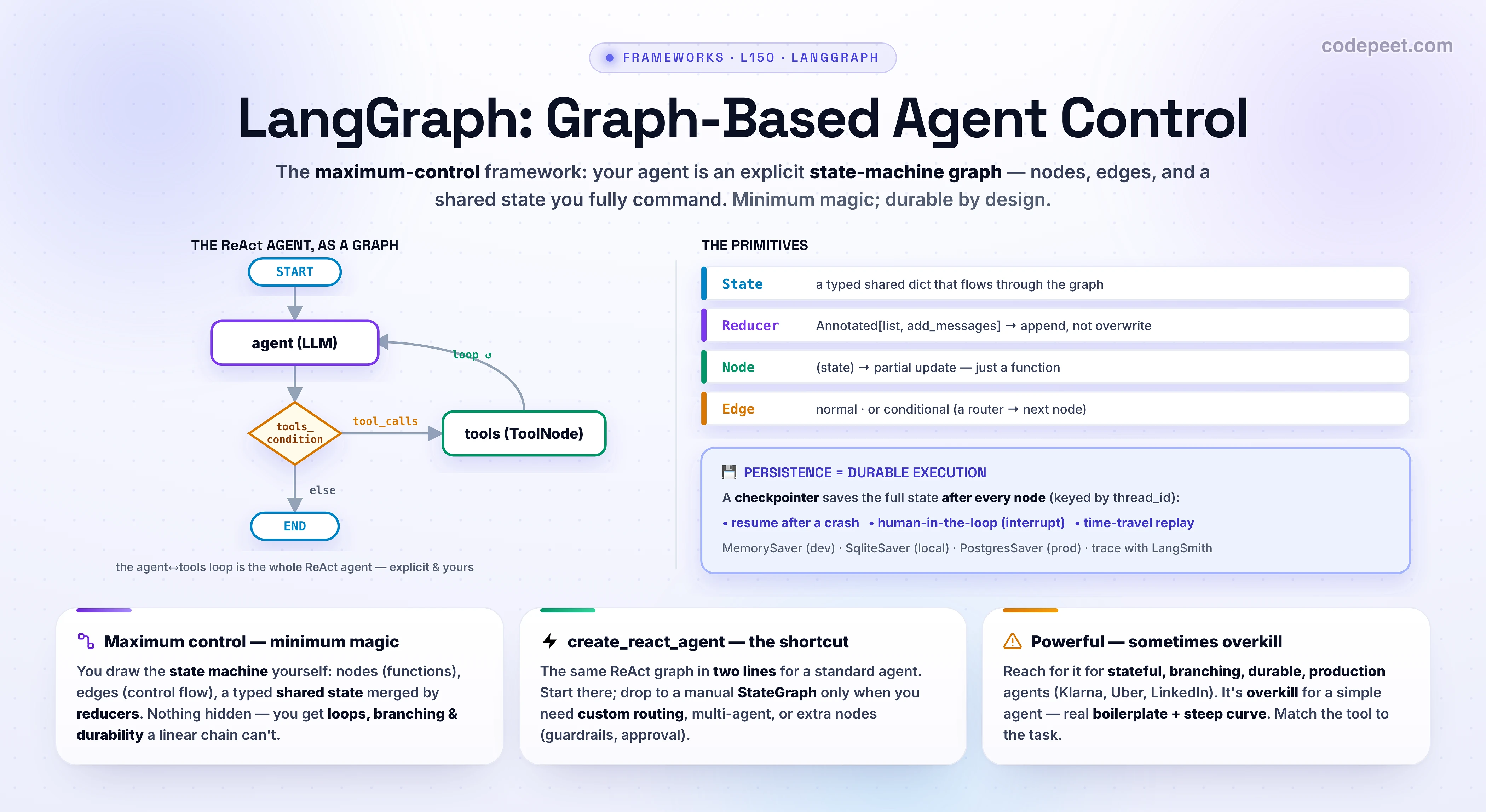
LangGraph borrows a 50-year-old idea — the state machine — and applies it to agents. Three primitives, and that's almost the whole framework:
- State — a single shared object that every step reads and writes. It flows through the graph; it's the agent's working memory for this run.
- Nodes — the steps. A node is just a function: it takes the current state and returns a partial update. A node can call the LLM, run a tool, hit an API, transform data — anything.
- Edges — the control flow: which node runs next. A normal edge is unconditional (A always → B); a conditional edge runs a small router function that looks at the state and decides where to go.
Why bother drawing a graph instead of just writing a loop? Because a graph gives you, for free, the things a linear chain can't: cycles (an agent that loops until done), branches (route to different nodes by condition), parallelism (fan out to several nodes), and — once you add a checkpointer — durability (pause, resume, rewind).
The shift in thinking: you're not writing "the agent does X then Y" — you're declaring a map of possible paths and letting state + edges decide which path this particular run takes. That explicitness is the cost and the payoff of LangGraph.
State & Reducers — the Backbone
Everything in a LangGraph run hangs off the State — a typed schema (a TypedDict, or the prebuilt MessagesState) that defines the channels the graph carries. The subtle, crucial part is the reducer: an annotation that tells the graph how to merge each node's update into the shared state.
The canonical example is the message list:
messages: Annotated[list, add_messages]
Without a reducer, when a node returns {"messages": [...]} it would overwrite the channel — you'd lose the history. The add_messages reducer says "append these to the list" instead. That one annotation is what lets the conversation accumulate as the graph loops, exactly the shared-state idea from L145 (Agent Handoffs & Shared State). You can write custom reducers for any channel (sum a counter, union a set, keep-last-write) — each channel decides its own merge rule, and that rule is a contract every node honors.
Mental model: nodes don't mutate the state — they return updates, and reducers merge them. Get the reducers right and parallel nodes compose cleanly; get them wrong and updates clobber each other. The state schema is the design of your agent.
The ReAct Agent as a Graph
Time to build the real thing. The ReAct agent (reason → act → observe → repeat, from L111 — Building a ReAct Agent From Scratch) is the canonical LangGraph: a tiny graph with a loop. Two nodes — an agent (calls the LLM) and tools (runs the tool calls) — plus one conditional edge:
START → agent- after
agent, a conditional edgetools_conditionchecks the last message: has tool calls →tools, otherwise →END tools → agent(the loop back — this is what makes it iterate)
Step through the compiled graph — watch the active node, the conditional routing, the loop, and the state grow:
Here's that exact graph in code — notice it's declarative: you define the state, write the nodes as plain functions, wire the edges (including the conditional one), and compile:
from typing import Annotated, TypedDict
from langgraph.graph import StateGraph, START, END
from langgraph.graph.message import add_messages
from langgraph.prebuilt import ToolNode, tools_condition
from langchain_anthropic import ChatAnthropic

# 1) STATE — a typed shared dict. The REDUCER decides how each update MERGES:
class State(TypedDict):
    messages: Annotated[list, add_messages]      # add_messages APPENDS — never overwrites

llm = ChatAnthropic(model="claude-opus-4-8").bind_tools(TOOLS)

# 2) NODES — each is just  (state) -> partial state update:
def agent(state: State):
    return {"messages": [llm.invoke(state["messages"])]}

# 3) WIRE THE GRAPH — nodes, edges, and one CONDITIONAL edge:
g = StateGraph(State)
g.add_node("agent", agent)
g.add_node("tools", ToolNode(TOOLS))             # prebuilt: runs the tool calls
g.add_edge(START, "agent")
g.add_conditional_edges("agent", tools_condition)  # has tool_calls? → "tools"  :  END
g.add_edge("tools", "agent")                     # loop back — the ReAct cycle

# 4) COMPILE into a runnable graph (Runnable: .invoke / .stream / .ainvoke):
app = g.compile()
app.invoke({"messages": [("user", "What's the weather in Tokyo?")]})
That's the whole agent, and every piece is visible and yours: you can add a node, change a route, insert a guardrail step, or fan out — because the control flow is data, not hidden inside an abstraction. The prebuilt ToolNode and tools_condition save you the boilerplate of the two most common pieces, but you could write them by hand. This explicitness is the entire value proposition.
The Prebuilt — create_react_agent
Writing the graph by hand is the right way to learn it (and essential when you need custom routing), but for a standard tool-calling agent you don't have to. LangGraph ships create_react_agent — it builds the exact same graph you just saw, in two lines:
# THE PREBUILT — the EXACT same ReAct graph, in two lines (start here for standard agents):
from langgraph.prebuilt import create_react_agent
from langgraph.checkpoint.sqlite import SqliteSaver

agent = create_react_agent(
    model="claude-opus-4-8", tools=TOOLS,
    prompt="You are a helpful weather assistant.",
    checkpointer=SqliteSaver.from_conn_string("graph.db"),   # ← durable state
)

# thread_id is your persistent CURSOR — reuse it to RESUME the same conversation:
cfg = {"configurable": {"thread_id": "user-42"}}
agent.invoke({"messages": [("user", "weather in Tokyo?")]}, cfg)
# …the process restarts mid-run… the checkpointer picks up exactly where it left off:
agent.invoke({"messages": [("user", "and tomorrow?")]}, cfg)
# Human-in-the-loop: interrupt() pauses + saves state until you resume; time-travel
# replays from any past checkpoint_id. Drop to a manual StateGraph for custom routing.
Same graph, less boilerplate. The rule of thumb: start with create_react_agent for a standard agent; drop to a manual StateGraph the moment you need custom routing, multiple agents, extra nodes (validation, guardrails, human approval), or anything the prebuilt doesn't express. This is LangGraph's answer to the "too much boilerplate" critique — the prebuilt for the common case, the full graph when you actually need the control.
Notice both snippets passed a
checkpointer— that single argument unlocks the feature that most justifies reaching for LangGraph at all.
Persistence — Checkpointers & Durable Execution
Here is LangGraph's standout capability, the one that's genuinely hard to build yourself: durable execution. Attach a checkpointer and the graph saves its complete state after every node — and that unlocks four things at once:
- Memory across turns. State persists between calls keyed by a
thread_id— your persistent cursor. Reuse the id to continue a conversation; use a new one to start fresh. - Fault tolerance (durable execution). If the process crashes or a long-running workflow is interrupted mid-step, it resumes exactly where it left off — no lost context, no re-running completed work.
- Human-in-the-loop.
interrupt()pauses the graph, saves state, and waits indefinitely for input — then you resume. This is how you gate a risky tool call behind human approval (L142), cleanly. - Time-travel. Because every step is a saved checkpoint, you can re-invoke from any past
checkpoint_id— replay, fork an alternate branch, or debug a run step by step.
Pick the checkpointer by environment: MemorySaver (in-process, dev), SqliteSaver (local persistence), PostgresSaver (cloud production).
This is why Klarna, Uber, and LinkedIn run LangGraph: a customer-service or long-running agent that survives restarts, pauses for a human, and can be replayed for debugging is a different class of system from a simple loop — and the checkpointer gives you all of it from one argument. Pair it with LangSmith for full execution tracing and you can see every state transition.
When It Earns Its Keep — and When It's Overkill
LangGraph is powerful, but its power has a price, so be honest about the fit:
Reach for it when you need: cyclic workflows (loops with conditions), branching control flow, durable state / resume / human-in-the-loop, multi-agent orchestration, or simply precise control over a production-grade agent you must debug and trust. This is the home turf — the reason it powers high-stakes deployments.
It's overkill when the task is simple. A basic chatbot, a one-shot summarizer, or a single agent with a couple of tools doesn't need a cyclic graph — reaching for a full StateGraph there is "using a complex CAD program to draw a straight line." For those, use create_react_agent, a vendor SDK, or no framework at all (L149).
The honest costs: LangGraph is low-level with a steep learning curve — you design state, nodes, edges, and routing by hand. A trivial "call LLM, use tool, answer" agent needs more boilerplate than it should, because the framework optimizes for the complex case. Mitigate with the prebuilt, lean on LangSmith for observability, and — the recurring lesson of this course — only add this much structure when the task demands it.
The trade is explicit: LangGraph gives you control and durability in exchange for verbosity and a learning curve. When the agent is complex, stateful, and must not fall over, that trade is a bargain. When it's simple, it's a tax.
🧪 Try It Yourself
Reason these through, then check with the graph executor:
- In the ReAct graph, what does
tools_conditioncheck, and what are its two possible destinations? - Your
messageschannel keeps getting overwritten instead of growing. What's missing, and what's the one-line fix? - What single thing turns a LangGraph run into a durable, resumable one — and what do you pass to continue the same conversation later?
- A teammate hand-writes a 60-line
StateGraphfor a chatbot that just calls one tool and answers. What should they use instead, and why? - You need the agent to pause for human approval before a risky tool runs. Which LangGraph feature, and what makes it possible?
→ (1) tools_condition checks whether the last message has tool calls: if yes → the tools node; if no → END. (2) A reducer on the channel — messages: Annotated[list, add_messages] — so updates append instead of overwrite. (3) Attaching a checkpointer (it saves state after every node); pass a thread_id in the config to resume the same conversation. (4) create_react_agent (or no framework) — a simple one-tool agent doesn't need a hand-built cyclic graph; the manual StateGraph is boilerplate it doesn't need. (5) interrupt() (human-in-the-loop) — it works because the checkpointer can pause and persist the exact state, then resume when you provide input.
Mental-Model Corrections
- "LangGraph is just LangChain." It's a separate, lower-level library: LangChain gives you components and quick agents; LangGraph gives you an explicit state-machine graph for control, loops, and durability.
- "Nodes mutate the state." No — a node returns a partial update, and a reducer merges it. That's what makes parallel nodes and clean accumulation possible.
- "A conditional edge is a node." It isn't — it's a router function on an edge that reads state and returns the name of the next node. The branching lives in the edge, not a step.
- "Checkpointers are just chat memory." Memory is one benefit. The same mechanism gives durable execution (crash-resume), human-in-the-loop (
interrupt), and time-travel — all from saving state per node. - "You must hand-build every graph." Use
create_react_agentfor standard agents; hand-build aStateGraphonly for custom routing / multi-agent / extra nodes. - "More control is always better." LangGraph's control is overkill for simple agents and carries real boilerplate + learning-curve cost. Match the tool to the task (L149).
Key Takeaways
- LangGraph models your agent as an explicit state-machine graph — minimum magic, maximum control. LangChain project, 1.0 GA Oct 2025; powers Klarna, Uber, LinkedIn, Replit.
- Three primitives: State (a typed shared object that flows through), nodes (functions:
state → partial update), edges (control flow — normal, or conditional via a router function).START/ENDbound the graph;.compile()makes it runnable. - Reducers merge updates.
messages: Annotated[list, add_messages]appends instead of overwriting — nodes return updates, reducers combine them. The state schema is the design. - The ReAct agent is a loop:
START → agent → tools_condition → (tools → agent) / END. PrebuiltToolNode+tools_conditionwire the common case. create_react_agentbuilds that graph in two lines — start there; drop to a manualStateGraphfor custom routing / multi-agent / extra nodes.- Persistence is the killer feature: a checkpointer saves state after every node → durable execution (crash-resume via
thread_id), human-in-the-loop (interrupt), and time-travel.MemorySaver/SqliteSaver/PostgresSaver; trace with LangSmith. - Use it for stateful, branching, durable, production agents; it's overkill for simple ones (boilerplate + steep curve — "a CAD program to draw a line").
- Next — CrewAI: Role-Based Multi-Agent Teams — the convenience end of the spectrum: agents as a crew of roles.