MCP Architecture: Hosts, Clients, Servers
Introduction
Last lesson you saw why MCP exists — it collapses the N×M integration explosion into M+N (L137). This lesson opens the hood: how is the protocol actually structured? Three roles, two layers, one handshake — and once you see them, every MCP tutorial, error message, and config file suddenly makes sense.
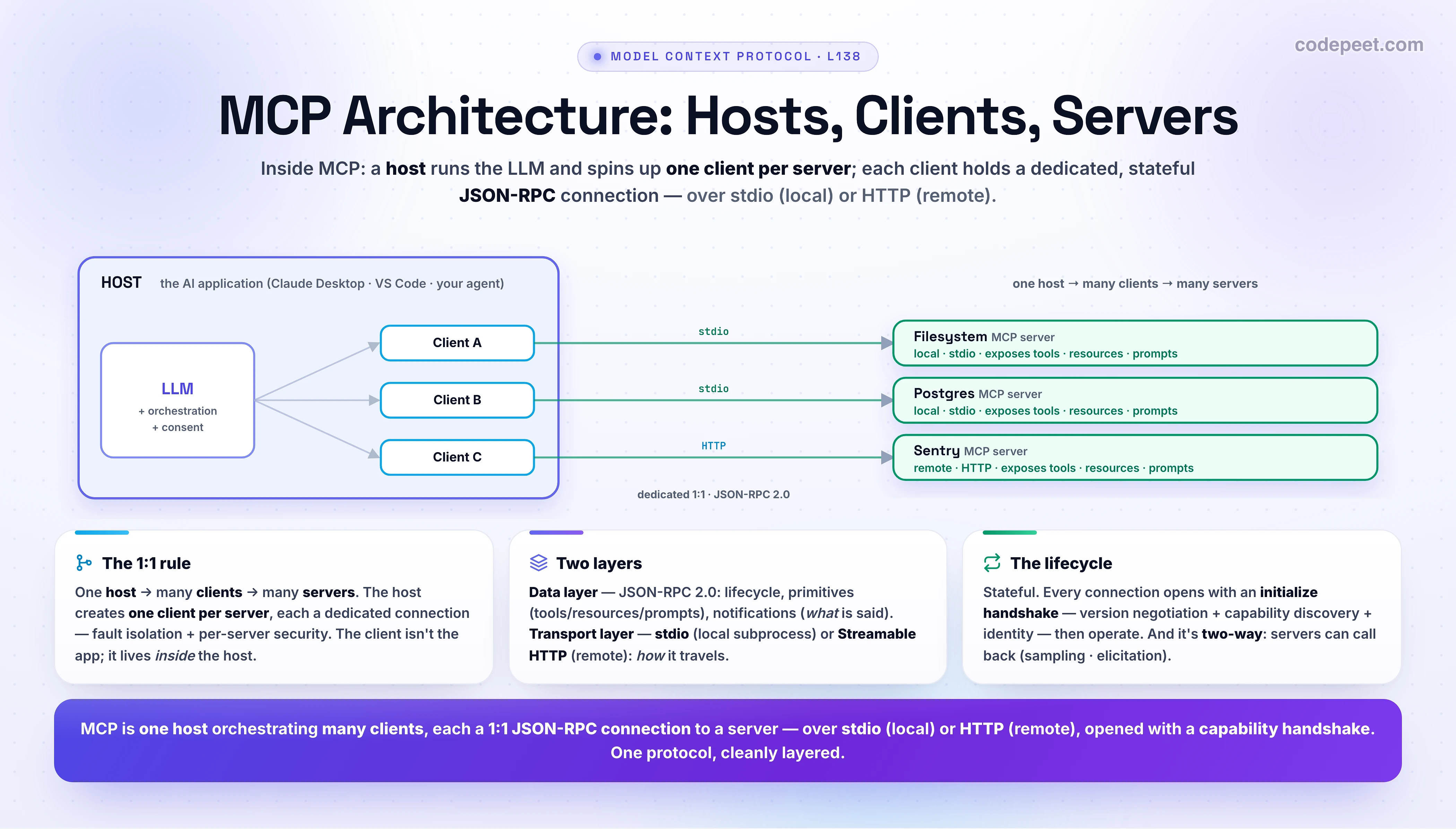
The whole architecture rests on three participants — Host, Client, Server — and the single most-confused point in all of MCP: the client is not the app.
Get this lesson right and you'll never be lost in an MCP setup again — you'll know exactly what's talking to what, over which channel, and in what sequence.
In this lesson:
- The three participants — host, client, server — and the 1:1 rule that trips everyone up (hands-on)
- Two layers — the data layer (JSON-RPC) and the transport layer (stdio vs HTTP, local vs remote)
- The connection lifecycle — the initialize handshake, capability negotiation, and the JSON-RPC messages that flow
- That MCP is a two-way street — servers can call back into the host
Scope: this is the architecture and the wire protocol. What a server actually exposes — tools, resources, and prompts — is the next lesson (L139 — Tools, Resources & Prompts in MCP); you'll build a server in L140 (Hands-On: Build Your First MCP Server), connect an agent in L141 (Connecting an Agent to MCP Servers), and cover security in L142 (The MCP Ecosystem & Security Considerations).
The Three Participants
MCP follows a client–server architecture, but with a twist in the naming that you must get straight. There are three roles (per the official spec):
- MCP Host — "the AI application that coordinates and manages one or multiple MCP clients." It's the app the user runs (Claude Desktop, VS Code, your agent), it holds the LLM, and it's in charge.
- MCP Client — "a component that maintains a connection to an MCP server and obtains context from [it] for the host to use." The host creates one client per server.
- MCP Server — "a program that provides context to MCP clients" — exposing tools, resources, and prompts. Local or remote.
The official example makes it concrete: VS Code is a host. When it connects to the Sentry server, the VS Code runtime instantiates an MCP client for it. When it also connects to the filesystem server, it instantiates another client. One host, two clients, two servers.
Click through the three roles — pay attention to who creates whom:
If only one thing sticks, make it this: the client is not the application. The application is the host; the client is a small connector the host spins up — one for each server — to manage that one connection. Mixing up host and client is the single most common MCP misconception.
The 1:1 Rule — One Client Per Server
Here's the structural heart of MCP, and it's worth stating as a rule:
One host → many clients → many servers, where each client maintains a dedicated, 1:1 connection to exactly one server.
Want to connect your agent to GitHub, Postgres, and Slack? The host creates three clients — one per server — each holding its own stateful connection. Add a fourth server → a fourth client. This isolation is deliberate and buys you a lot:
- Fault isolation — if the Slack server crashes or hangs, only its client is affected; GitHub and Postgres keep working.
- Independent state & security — each connection has its own capabilities, permissions, and session. The host can grant the filesystem server access to one folder and the GitHub server a read-only token, separately.
- Clean lifecycle — connecting or disconnecting one server is just creating or tearing down one client; nothing else is touched.
And the relationship runs both ways across the ecosystem: a local server (stdio) usually serves one client, while a remote server (HTTP) can serve many clients from many hosts at once. That's how "M+N" from L137 (The Integration Problem MCP Solves) physically happens: one GitHub MCP server serves Claude, Cursor, and your agent — each via its own client.
Two Layers — Data & Transport
MCP is built as two layers, and separating them is what lets the same protocol run locally and over the internet:
- The data layer (inner) — a JSON-RPC 2.0 protocol that defines the actual messages and meaning: the lifecycle (handshake, capability negotiation), the primitives (tools, resources, prompts), and notifications. This is the part you reason about — what is said.
- The transport layer (outer) — how the bytes move: connection setup, message framing, and authentication. It abstracts the channel so the identical JSON-RPC messages work over any transport.
There are two transports, and the choice maps exactly to local vs remote:
| stdio | Streamable HTTP | |
|---|---|---|
| Server runs | locally, as a subprocess | remotely, behind a URL |
| Channel | stdin / stdout pipes | HTTP POST (+ optional SSE stream) |
| Auth | (none — same machine) | bearer tokens / API keys / OAuth |
| Use it for | local files, local DBs, dev tools | hosted SaaS, shared multi-user servers |
So a "local MCP server" is one your host launches as a subprocess and talks to over stdio (e.g., the filesystem server); a "remote MCP server" is one running on someone's platform that you reach over Streamable HTTP (e.g., the Sentry server). Same JSON-RPC underneath — different pipe.
The Connection Lifecycle — The Handshake
MCP is a stateful protocol: a connection isn't just fire-and-forget requests — it's opened, operated, and closed, and it begins with a mandatory capability-negotiation handshake. The purpose: before doing any work, the client and server agree on a protocol version and tell each other what they each support (so neither calls something the other can't do). The opening sequence:
// 1) INITIALIZE — the client opens with a capability-negotiation handshake.
// client → server: "here's my version + what I can do"
{ "jsonrpc": "2.0", "id": 1, "method": "initialize",
  "params": { "protocolVersion": "2025-11-25",
              "capabilities": { "elicitation": {} },
              "clientInfo": { "name": "example-client", "version": "1.0.0" } } }

// server → client: "agreed — and here's what I expose"
{ "jsonrpc": "2.0", "id": 1, "result": {
    "protocolVersion": "2025-11-25",
    "capabilities": { "tools": { "listChanged": true }, "resources": {} },
    "serverInfo": { "name": "example-server", "version": "1.0.0" } } }

// client → server: "ready" (a notification — no id, no response)
{ "jsonrpc": "2.0", "method": "notifications/initialized" }
Three things are happening in that exchange: (1) version negotiation — both sides confirm a compatible protocolVersion; if they can't agree, the connection is terminated. (2) capability discovery — the server declares it supports tools (and can send listChanged notifications) and resources; the client declares its capabilities (here, elicitation). Now each side knows what's safe to call. (3) identity exchange — names and versions, for debugging. After the server replies, the client sends a notifications/initialized message and the connection is ready.
The Messages — JSON-RPC in Action
With the handshake done, everything else is JSON-RPC 2.0: requests (carry an id, expect a response), responses (echo that id), and notifications (no id, no response). Every MCP primitive follows the same pattern — a */list to discover, then an action like tools/call to use:
// 2) OPERATE — discover, then call. Requests carry an `id`; the response echoes it.
{ "jsonrpc": "2.0", "id": 2, "method": "tools/list" }          // "what tools do you have?"

{ "jsonrpc": "2.0", "id": 3, "method": "tools/call",            // "run this one"
  "params": { "name": "weather_current",
              "arguments": { "location": "San Francisco", "units": "imperial" } } }

// server → client (id 3 → correlates to the request above)
{ "jsonrpc": "2.0", "id": 3, "result": {
    "content": [ { "type": "text", "text": "68°F, partly cloudy, winds 8 mph." } ] } }

// later, server → client: "my tools changed" (notification → client re-lists)
{ "jsonrpc": "2.0", "method": "notifications/tools/list_changed" }
Notice the id correlation — the response to request id: 3 carries id: 3, so the client can match replies to requests even with many in flight. And notice the discover-then-use pattern: the client first asks tools/list (so the toolset can be dynamic), then calls a tool by its exact name. The last message is a notification — tools/list_changed, sent by the server (because it declared listChanged: true at init) when its tools change; the client reacts by re-listing. This is how an MCP connection stays live and current, not just request-reply.
A Two-Way Street
One more architectural surprise that shapes everything later: MCP is bidirectional. It's not just client asks, server answers — servers can call back into the host, through client-side primitives. The two important ones:
- Sampling (
sampling/createMessage) — a server can ask the host's LLM to generate a completion. Why? So a server can use a language model without bundling its own — it stays model-independent and lets the host (and the user's chosen model + billing) do the inference. A clever inversion: the tool borrows the agent's brain. - Elicitation (
elicitation/create) — a server can ask the user for more input or confirmation mid-operation ("which repo?", "approve this delete?"). This is how a server gets human-in-the-loop without owning a UI.
(There's also roots — the client tells servers which filesystem boundaries (directory URIs) they're allowed to operate within — and logging, for servers to emit debug messages to the host.) You won't wire these up today, but hold the shape: the host is the hub, and capabilities flow both directions through it — servers expose tools/resources/prompts to the host, and can request sampling/elicitation from it. That two-way design is exactly why the host must own consent and security — it sits in the middle of everything.
🧪 Try It Yourself
Reason it through, then check with the role explorer:
- Your agent connects to 4 MCP servers. How many hosts, clients, and servers are in play?
- A teammate says "the MCP client is the app the user opens." Correct them in one sentence.
- You're connecting to a local filesystem server and a hosted Sentry server. Which transport does each use, and which is "local" vs "remote"?
- Before any tool is called, what does the initialize handshake accomplish (name two things)?
- A server wants to summarize text but doesn't want to ship its own LLM. Which client primitive does it use, and what does that reveal about MCP's direction?
→ (1) 1 host (your agent), 4 clients (one per server), 4 servers. (2) The app is the host; the client is a per-server connector the host creates inside itself — one for each server — not the app. (3) Filesystem = stdio (a local subprocess → "local"); Sentry = Streamable HTTP (reached over a URL → "remote"). Same JSON-RPC, different pipe. (4) Any two of: protocol-version negotiation (compatible versions or terminate), capability discovery (what each side supports), identity exchange (names/versions). (5) Sampling (sampling/createMessage) — the server asks the host's LLM to generate, staying model-independent. It reveals MCP is bidirectional: servers can call back into the host, not just answer it.
Mental-Model Corrections
- "The client is the app I open." No — the host is the app; the client is a per-server connector the host creates inside itself, one per server. This is the MCP gotcha.
- "One client talks to all my servers." Each client is 1:1 with one server. Four servers → four clients. The isolation gives you fault-tolerance and per-server security.
- "Local vs remote is a different protocol." Same JSON-RPC 2.0 data layer — only the transport differs: stdio (local subprocess) vs Streamable HTTP (remote URL).
- "You just send requests." MCP is stateful: a connection initializes (version + capability handshake) before any work, and stays live with notifications.
- "Servers only answer the client." It's two-way — servers can request sampling (use the host's LLM) and elicitation (ask the user) back through the host.
- "MCP decides how the LLM uses tools." No — MCP only standardizes context exchange; how the host/LLM uses what it gets is up to the application.
Key Takeaways
- Three participants: Host (the AI app — runs the LLM, manages clients, owns consent) · Client (a per-server connector the host creates, 1:1 with a server) · Server (exposes tools/resources/prompts; local or remote). The client is not the app.
- The 1:1 rule: one host → many clients → many servers, each client a dedicated connection to one server — giving fault isolation and per-server security. (A remote server can serve many clients/hosts.)
- Two layers: the data layer (JSON-RPC 2.0 — lifecycle, primitives, notifications — what is said) over the transport layer (how it travels): stdio (local subprocess) or Streamable HTTP (remote, with OAuth/keys).
- Stateful lifecycle: every connection opens with an initialize handshake — version negotiation + capability discovery + identity — then
notifications/initialized, then operation. - Messages are JSON-RPC: requests (with
id) ↔ responses (echoid), plus notifications (noid). The pattern is*/listto discover,tools/callto use, with live*/list_changedupdates. - It's two-way: servers can call back via sampling (use the host's LLM) and elicitation (ask the user) — which is why the host owns security.
- Next — L139: Tools, Resources & Prompts in MCP — the three things a server actually exposes, in depth.