Project Brief & Design
Introduction
Welcome to Project 2. Project 1 built a RAG assistant — it retrieves and answers. This project builds an agent — something that reasons and acts. Where RAG hands the model a fixed pipeline (retrieve → generate), an agent is an LLM in a loop, deciding its own next move: which tool to call, what to do with the result, and when it's done. That shift — from a hardcoded path to model-driven control flow — is the second great pattern of AI engineering, and the one most companies are racing to ship.
Over the next five lessons you'll build a multi-tool agent: given a natural-language goal, it plans and executes a multi-step task by calling tools — including your Project 1 RAG assistant, reused as a tool — over the Model Context Protocol (MCP), while holding memory across turns and running under production guardrails (step caps, cost budgets, human approval for risky actions). It's the natural sequel: the agent can now act on the grounded answers your RAG system produces.
Why an agent makes a portfolio piece (and an interview story). Agents are the frontier — and the place teams get burned. A demo agent is easy; a safe, observable, evaluated agent that you can defend is rare. Building one shows you understand the hardest parts: tool design, memory, the agentic loop, and the guardrails that keep autonomy from becoming a liability. You'll carry forward everything from Project 1 — grounding, evaluation, observability, deployment — and apply it to a system that does things.
Like Project 1, this first lesson is the brief and the design — the most skipped, most important step. Before a line of agent code, you'll decide what you're building, draw the agent architecture (the loop, the tools, memory, guardrails), choose the stack (the course's own), and scaffold the repo so every later lesson drops in cleanly.
Scope: this lesson owns the brief, architecture, stack, and scaffold. The build is split across the project: tools + memory → L7, MCP server integration → L8, agent evaluation → L9, ship it (deploy + observe) → L10.
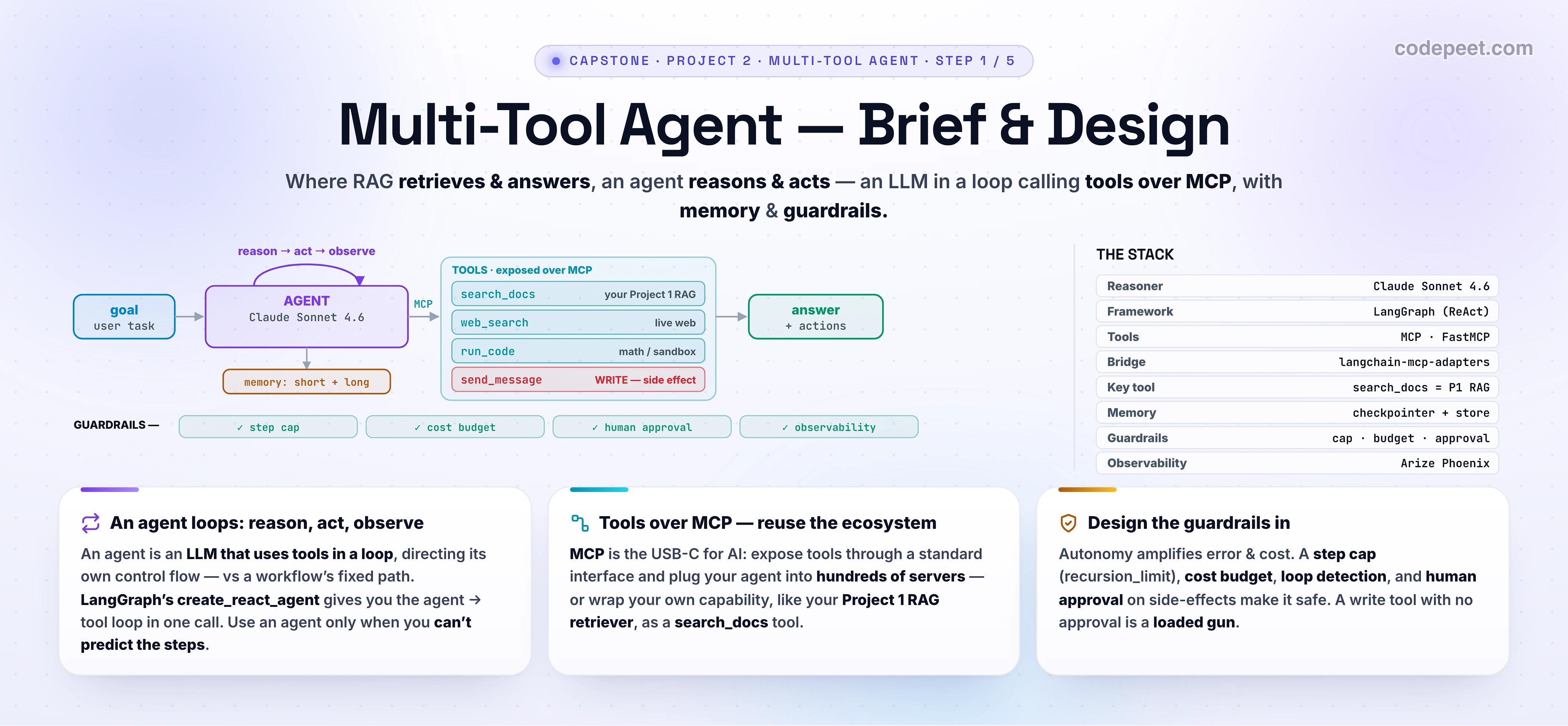
The Brief — A Multi-Tool Agent
Stated like a real ticket:
Build an agent that, given a natural-language goal, completes a multi-step task by reasoning and calling tools — over MCP — holding memory across turns, and operating safely under guardrails.
Pick a domain where acting matters (not just answering). Good choices:
- A research/ops assistant — searches your docs (Project 1!) and the web, does calculations, drafts and (with approval) sends a summary.
- A support agent — looks up policy, checks an order via an API, and files or escalates a ticket.
- A data/analyst agent — queries a database, runs analysis code, and writes a report.
Reuse Project 1. Your RAG assistant becomes the agent's search_docs tool — grounded, cited retrieval is one capability the agent can choose to use. This is the synthesis: the agent orchestrates RAG plus other tools toward a goal.
Success criteria (definition of done for the whole project):
- The agent completes multi-step goals a single LLM call can't — chaining tool calls, using results to decide the next move.
- It holds memory — remembers the conversation (short-term) and useful facts across sessions (long-term).
- It's safe by design — a step cap, a cost budget, human approval before any side-effecting action, and loop detection.
- It's evaluated (L9 — agents need trajectory eval, not just final-answer eval) and observable (every step traced).
Keep a README from day one — the agent's design decisions and guardrails are the interview.
Agent vs. Workflow (vs. RAG)
Before you build an agent, be sure you need one — agents trade predictability for flexibility, and that trade has real costs. Anthropic's framing is the clearest:
- A workflow orchestrates LLMs and tools through predefined code paths — you decide the steps. Predictable, testable, cheap. (Project 1's RAG pipeline is a workflow: retrieve → rerank → generate, always.)
- An agent is an LLM that dynamically directs its own process — the model decides which tools to use and how many steps to take, looping on the results. Flexible, but less predictable and more expensive.
The definition to remember: an agent is an LLM using tools in a loop. That's it. The loop is the agentic loop:
- Reason — the model thinks about the goal and decides the next action (which tool, what args).
- Act — it calls the tool.
- Observe — the tool's result comes back into context.
- Repeat — until the model decides the goal is met and answers.
When to use an agent: for open-ended problems where you can't predict the steps — where the path depends on what each tool returns, and hardcoding it is impossible. When not to: if a fixed pipeline works, use the pipeline — it's cheaper, faster, and safer. Start simple; earn the agent. (Anthropic: "for many applications, a single LLM call with retrieval is enough.") Our project genuinely needs one — multi-step goals over a toolset the user chooses at runtime — but knowing the trade-off is the senior skill.
The Architecture — The Agent Loop
Every agent is the loop, wrapped in plumbing. Drawing this is the deliverable of the lesson — internalize it and you can whiteboard an agent in any interview.
At the core, the loop is a tiny state machine: an agent node (the LLM call) and a tool node (runs whatever the LLM asked for), with a conditional edge between them — if the model asked for a tool, go run it and come back; otherwise, finish. On the course stack, LangGraph gives you this exact machine in one call, create_react_agent:
# src/agent/graph.py
from langchain_anthropic import ChatAnthropic
from langgraph.checkpoint.memory import InMemorySaver
from langgraph.prebuilt import create_react_agent

from agent.config import settings
from agent.tools import search_docs        # a tool (next section)

llm = ChatAnthropic(model=settings().model, max_tokens=2048)   # claude-sonnet-4-6

SYSTEM = (
    "You are a capable assistant that completes tasks by using tools. "
    "Think step by step; gather grounded information with tools before answering; "
    "and stop as soon as the goal is met."
)

# The whole agent loop: agent node -> (tools node -> agent node)* -> end
agent = create_react_agent(
    model=llm,
    tools=[search_docs],
    prompt=SYSTEM,
    checkpointer=InMemorySaver(),         # short-term memory (this lesson: dev default)
)
What create_react_agent builds for you: it calls the LLM with the messages; if the reply contains tool_calls, it routes to the tools node, runs them, appends the results as ToolMessages, and calls the LLM again — looping until the model returns a final answer with no tool calls. That's the reason → act → observe loop, productionized.
Start with create_react_agent for any standard tool-calling agent. Reach for a manual StateGraph (LangGraph's lower-level primitive) only when you need parallel tool execution, a supervisor-worker topology, or custom branching — the prebuilt agent covers this project. Run it with a thread id and a step cap (a guardrail we'll insist on later):
>>> cfg = {"configurable": {"thread_id": "u-123"}, "recursion_limit": 20}  # step cap
>>> agent.invoke({"messages": [("user", "What is our refund window?")]}, cfg)
# agent: reason -> call search_docs('refund window') -> observe -> answer (grounded)
Tools Over MCP — The USB-C for AI
An agent is only as capable as its tools — and the question is how you give it tools. You could hand-write each one as a Python function, but the modern, portable answer is the Model Context Protocol (MCP) — an open standard (introduced by Anthropic, now stewarded by the Linux Foundation, and adopted across the industry including OpenAI) for connecting AI apps to tools and data.
Think of MCP as the USB-C port for AI. Instead of writing a bespoke integration for every tool, an MCP server exposes its tools through a standard interface, and any MCP host (your agent) can plug in. The architecture has three roles:
- Host — your agent application (it wants tools).
- Client — one connection from the host to a server (the host runs many).
- Server — exposes tools (executable functions), plus resources and prompts, over JSON-RPC (stdio or HTTP).
Why it matters for you: you can plug your agent into hundreds of existing MCP servers (GitHub, Slack, databases, the filesystem…) and wrap your own capabilities — like your Project 1 retriever — as a server, with no per-tool glue. On the course stack, FastMCP makes writing a server trivial (@mcp.tool), and langchain-mcp-adapters converts MCP tools into LangChain tools your create_react_agent can use:
# wiring MCP tools into the agent (full detail in L8)
from langchain_mcp_adapters.client import MultiServerMCPClient

client = MultiServerMCPClient({
    "docs": {"command": "python", "args": ["-m", "agent.mcp.docs_server"], "transport": "stdio"},
    "web":  {"url": "http://localhost:8000/mcp", "transport": "streamable_http"},
})
tools = await client.get_tools()          # MCP tools -> LangChain tools
agent = create_react_agent(llm, tools, prompt=SYSTEM)
We'll build a real MCP server (wrapping your RAG retriever) in L8. For now, it's a box in the design.
Designing Tools an Agent Can Actually Use
Tools are the agent's hands — and a confused agent is usually a badly-designed-tools problem. Anthropic's guidance for writing agent tools is the standard; the essentials:
- Clear, distinct names + namespacing. The agent picks tools by name and description, so make them unambiguous and group related tools under prefixes (
docs.search,docs.get) so it doesn't confuse them. - Prompt-engineer the descriptions. A tool's description is loaded into the agent's context — it's prompt engineering. Spell out when to use it and what it returns; this is the highest-leverage way to improve tool use.
- Unambiguous parameters. Name params for what they are —
user_id, notuser. The model fills these from reasoning; ambiguity causes wrong calls. - Return meaningful, token-efficient context. A tool that dumps 50 KB of JSON blows the context window and buries the signal. Paginate, filter, truncate with sane defaults; return what the agent needs to decide its next step.
- Read vs. write — the safety line. A read tool (
search_docs) is safe to call freely. A write/side-effecting tool (send_message,delete_record) changes the world — it must go through human approval (a guardrail, below). Mark these clearly in your design.
Here's search_docs — your Project 1 retriever, wrapped as a tool (detail in L7):
# src/agent/tools.py
from langchain_core.tools import tool

from rag.retrieve import retrieve         # <- reuse Project 1's retrieve()!


@tool
def search_docs(query: str) -> str:
    """Search the internal knowledge base for grounded, cited facts about company
    docs, policies, and products. Use this for any factual question before answering.
    Returns the most relevant passages with their source titles."""
    hits = retrieve(query)                # hybrid + RRF + rerank, from Project 1
    return "\n\n".join(f"[{h['title']}] {h['text']}" for h in hits[:5])
Memory — Short-Term vs. Long-Term
A stateless agent is amnesiac — it forgets everything between turns. Memory is what makes it feel like an assistant, and LangGraph splits it into two distinct mechanisms you should treat separately:
- Short-term memory (the checkpointer) — thread-scoped. It persists the graph's state (the message history) within a conversation, so the agent remembers what was said two turns ago and can be paused/resumed (the basis for human-in-the-loop). It's infrastructure — enable it and move on. Dev default:
InMemorySaver; production: Postgres/Redis. - Long-term memory (the store) — cross-thread. A general key-value store for facts worth keeping across sessions (user preferences, learned facts), optionally with a semantic (vector) index so the agent retrieves memories by meaning. This is an application design problem — you decide what's worth remembering, how it's scoped, and when it expires. Dev default:
InMemoryStore.
Both plug into the same agent:
from langgraph.checkpoint.memory import InMemorySaver
from langgraph.store.memory import InMemoryStore

checkpointer = InMemorySaver()                       # short-term: conversation (thread)
store = InMemoryStore(index={"dims": 1024, "embed": embed_fn})  # long-term: semantic recall

agent = create_react_agent(llm, tools, prompt=SYSTEM,
                           checkpointer=checkpointer, store=store)
Rule of thumb: the checkpointer is infra (turn it on for any multi-turn agent); the store is design (add it when the agent needs to learn across sessions). We wire both for real in L7.
Guardrails — Autonomy Without the Liability
Here's the part demos skip and production cannot: an autonomous loop amplifies errors and cost. A single bad LLM call is one wrong answer; an agent in a bad loop can call a tool 50 times, burn $50–100 in credits, and — if it has a write tool — take real, wrong actions in the world. Guardrails aren't optional polish; they're what makes an agent safe to ship. Design these in from the start:
- A hard step cap. The single most important control. Set a
recursion_limit(LangGraph default is 25; ~15–25 is typical) so a runaway loop cannot run forever. It's the backstop. - No-progress / loop detection. The backstop fires after waste; detect a stuck agent earlier by hashing each (tool + args) call and stopping when the same call repeats — that's what actually catches a spinning loop.
- A cost/token budget. Cap total tokens or dollars per task; stop and return a fallback when hit, so a stuck agent can't run up an unbounded bill.
- Human-in-the-loop for side effects. Before any write tool (
send_message,delete_…), pause and ask a human — show the exact arguments the model produced and let them approve, edit, or reject. The checkpointer makes this pause/resume trivial. The approver is the last line of defense — models hallucinate tool arguments. - Observability. Trace every reason → act → observe step (Phoenix, from Project 1) — you cannot debug a loop you cannot see.
The mantra: an agent with a side-effecting tool and no approval, no step cap, and no tracing is a loaded gun. Every one of these is a toggle in the blueprint console below — watch the readiness score climb from PROTOTYPE to PRODUCTION-READY as you add them.
The Stack & Scaffold
Use the course's own stack — every piece was taught earlier, so this project is assembly:
| Layer | Choice | Why |
|---|---|---|
| Reasoner | Claude Sonnet 4.6 (Haiku for cheap sub-steps) | strong tool-use + reasoning per dollar |
| Agent framework | LangGraph (create_react_agent) | the production standard; the loop + memory + interrupts, built in |
| Tools | MCP (FastMCP servers) + langchain-mcp-adapters | standard, portable, reuse the ecosystem |
| A key tool | search_docs = your Project 1 RAG | grounded retrieval as one capability |
| Memory | checkpointer (thread) + store (cross-thread) | short- and long-term, separately |
| Guardrails | recursion_limit · budget · human approval · loop detection | safe autonomy |
| Eval / Obs | trajectory eval (L9) · Phoenix tracing | measure + see the loop |
Scaffold the repo so each later lesson has a home (it can live alongside your Project 1 rag package — the agent imports it):
agent-project/
├── pyproject.toml          # deps: langgraph, langchain-anthropic, langchain-mcp-adapters, fastmcp
├── .env.example            # ANTHROPIC_API_KEY, ... (secrets from env)
├── src/agent/
│   ├── config.py           # typed Settings (model, recursion_limit, budgets)
│   ├── graph.py            # create_react_agent — the loop (this lesson: minimal)
│   ├── tools.py            # tool defs incl. search_docs (wraps rag.retrieve)  -> L7
│   ├── memory.py           # checkpointer + store                              -> L7
│   ├── mcp/                # FastMCP servers + client wiring                   -> L8
│   ├── guardrails.py       # step cap, budget, approval, loop detection        -> L7-L8
│   ├── eval/               # trajectory eval                                   -> L9
│   └── api.py              # FastAPI: /health, /run (deploy + observe)          -> L10
└── tests/
A minimal runnable agent today is graph.py + one tool + a step cap — agent.invoke(..., {"recursion_limit": 20}) and watch it loop. Commit now; the rest is one module per lesson.
✅ Definition of Done (this step)
Before L7, you should have:
- A one-paragraph brief + your agent's domain chosen (a task where acting, not just answering, matters).
- The agent architecture sketched — the loop (reason → act → observe), the tools (incl.
search_docsreusing Project 1), memory (short + long), and guardrails. - The stack decided, with a one-line why per choice.
- The repo scaffolded —
config.py, a minimalgraph.pywithcreate_react_agent+ one tool,.envfrom the example. - A runnable agent:
agent.invoke({...}, {"recursion_limit": 20})loops and answers (even with just one tool). - You can explain agent vs. workflow — and why this task earns an agent.
-
git init+ first commit.
If your agent can take a goal, call a tool, and answer — under a step cap — you have the skeleton. Next, L7 gives it real tools and memory.
See It — The Agent Blueprint Console
Design before you build. The console lets you make every decision in the agent architecture and watch two things respond: the loop diagram (it redraws with your tools, memory, and guardrails) and the production-readiness readout (capability, a risk meter, cost/step, and a 0–6 essentials score).
Click Naive agent first — note it scores 1/6 PROTOTYPE with risk 64: it has a side-effecting send_message tool and NO human approval, no step cap, no tracing. The readout names exactly what's missing. Now click Production agent — 6/6 PRODUCTION-READY, risk 28: tools over MCP, memory, and every guardrail. Then tweak: add send_message without approval and watch risk spike; remove the step cap and see the warning; drop memory and watch capability fall. This is your design space — and every toggle is a lesson you're about to build.
Notice three things. One: an agent with no tools is just a chatbot — tools are what make it an agent. Two: a side-effecting tool without human approval is the single biggest risk — autonomy cuts both ways. Three: the gap from PROTOTYPE to PRODUCTION-READY is guardrails + memory, not a smarter model — exactly what L7–L10 build.
🧪 Try It Yourself
Reason these out, then check against the console.
1. A task is "summarize these three fixed PDFs into one paragraph." Should you build an agent or a workflow, and why?
2. Your agent has a delete_user(user_id) tool. What single guardrail is non-negotiable before it ships, and why isn't a step cap enough?
3. What's the difference between the checkpointer and the store, and which one do you need just to make a chat agent remember the previous turn?
4. Why expose your tools over MCP instead of just writing Python functions and passing them to create_react_agent? Give two reasons.
5. Your agent keeps calling search_docs with the same query over and over and never finishes. Which two guardrails address this, and what does each one do?
Answers.
1. A workflow. The steps are fixed and known (load 3 PDFs → summarize), so a hardcoded pipeline is cheaper, faster, predictable, and testable. You only reach for an agent when you can't predict the steps in advance. Start simple; earn the agent.
2. Human-in-the-loop approval before the call executes. delete_user is a side effect that changes the world irreversibly; the model can hallucinate the argument (the wrong user_id), and a step cap only limits how many actions it takes — not whether a single destructive one is correct. A human must scrutinize the exact args and approve.
3. The checkpointer is short-term, thread-scoped memory (the conversation state, pause/resume); the store is long-term, cross-thread memory (facts kept across sessions). To remember the previous turn in one conversation you only need the checkpointer.
4. (a) Portability/reuse — MCP is a standard, so you can plug into hundreds of existing servers and expose your own capability (your RAG retriever) once, for any MCP host. (b) Decoupling — tools live as independent servers (own deps, own process, own security boundary), so they can be versioned, isolated, and shared instead of being tangled into the agent's code.
5. No-progress / loop detection stops it now — by hashing each (tool + args) call and terminating when the same call repeats (the real fix for a stuck loop). The step cap / recursion_limit is the backstop — it guarantees the loop ends after N steps even if detection misses, capping the damage. Detection stops the waste; the cap bounds it.
Mental-Model Corrections
- "An agent is just a smarter chatbot." → An agent is an LLM that uses tools in a loop, directing its own control flow. No tools, no agent — it's the loop + tools that make it one.
- "Agents are always better than workflows." → Agents trade predictability for flexibility, at higher cost and risk. If a fixed pipeline works, use it. Earn the agent.
- "More tools = better agent." → More tools = more ways to get confused and more risk. Well-designed, clearly-described tools (and as few as needed) beat a big pile.
- "I'll add guardrails later." → An autonomous loop amplifies errors and cost — a missing step cap or approval is how agents burn money or take wrong actions. Design guardrails in.
- "A side-effecting tool is just another tool." → Write tools change the world and the model can hallucinate their arguments. They require human approval — the non-negotiable guardrail.
- "Memory is one thing." → It's two: the checkpointer (short-term, thread, infra) and the store (long-term, cross-thread, design). Treat them separately.
- "I'll write all the tools myself." → MCP lets you reuse a huge ecosystem and expose your own capabilities once, portably. Hand-writing every integration doesn't scale.
- "Agents are too risky to build." → Agents are risky without guardrails. With a step cap, budget, approval, loop detection, and tracing, autonomy becomes supervised — and shippable.
Key Takeaways
- Project 2 builds an agent — something that reasons and acts — where Project 1's RAG retrieves and answers. The agent even reuses your RAG as a tool (
search_docs). - An agent is an LLM using tools in a loop: reason → act → observe → repeat, with model-driven control flow. Use one only when you can't predict the steps — otherwise use a workflow.
- The architecture is the loop + plumbing: LangGraph
create_react_agentgives you the agent/tool loop; tools over MCP (FastMCP + langchain-mcp-adapters) give it capabilities; memory (checkpointer + store) gives it continuity. - Design tools for the model: clear names + namespacing, prompt-engineered descriptions, unambiguous params, token-efficient returns, and a hard line between read (safe) and write (needs approval) tools.
- Memory is two mechanisms: the checkpointer (short-term, thread, infra) and the store (long-term, cross-thread, design).
- Guardrails make autonomy safe: a step cap (
recursion_limit), loop detection, a cost budget, human approval on side effects, and tracing. An agent without them is a loaded gun. - Use the course stack (Claude · LangGraph · MCP · checkpointer+store · Phoenix) and scaffold + verify now — a minimal
create_react_agentwith one tool, under a step cap. - Next — L7 (Tools + Memory): give the agent its real toolset (including the Project 1 retriever) and wire short- and long-term memory — turning the skeleton into a capable assistant.