Project Brief & Architecture
Introduction
Welcome to the capstone — where everything you learned becomes something you can show. Concepts get you through an interview's first round; a real system you built and can defend gets you the job. Over the next five lessons you'll build the first of three portfolio-grade projects: a production RAG assistant over your own documents — not a notebook demo, but a system with hybrid retrieval, reranking, cited answers, a guardrail that refuses to guess, a continuous evaluation harness, and observability. The kind of thing you'd put on a résumé and walk an interviewer through.
Why RAG first? Because retrieval-augmented generation is the single most common AI-engineering system in production — "answer questions over my company's docs" is the default ask at thousands of companies. Building one well — the production version, not the toy — demonstrates the exact skills employers screen for: retrieval quality, grounding, evaluation, and shipping. This project is a synthesis of Container 2 (RAG) and Container 6 (Production); you already know each piece — now you assemble them.
This first lesson is the brief and the architecture — the most important and most skipped step. Before you write a line of retrieval code, you'll decide what you're building, draw the whole system, choose the stack, and scaffold the repo so every later lesson drops cleanly into place. A clear architecture is what separates a weekend hack from a portfolio piece.
In this step you will:
- Write the project brief — and pick your corpus (the project is yours to make real).
- See the gap between naive RAG and production RAG, and why it matters.
- Draw the reference architecture — the two pipelines and every component.
- Choose the stack (the course's own tools) and understand each decision.
- Scaffold the repo — one typed config, a FastAPI health check, the Claude client — and run it.
Scope: this lesson owns the brief, architecture, stack, and scaffold. The implementation is split across the rest of the section: ingestion + hybrid retrieval → L2, generation, citations & guardrails → L3, the evaluation harness → L4, deploy & observe → L5. We'll wire the skeleton here and fill one module per lesson.
The Brief — A RAG Assistant Over *Your* Docs
Here's the project, stated like a real ticket:
Build an assistant that answers natural-language questions over a document corpus, grounding every answer in retrieved sources with citations, refusing to answer when the corpus doesn't support it, and measurably good enough to ship.
Pick your corpus — and make it real. The project is far more impressive (and more useful to you) when it's over documents you actually care about. Good choices:
- Your company's / team's internal docs (the classic enterprise use case).
- A codebase + its docs — "ask my repo" (great for a developer-tools angle).
- A domain you know — a set of papers, a product's help center, a body of regulations, a wiki.
Aim for a few hundred to a few thousand documents — big enough that retrieval matters (you can't just stuff it all in the context window), small enough to iterate fast.
Success criteria (your definition of done for the whole project):
- Answers are grounded — every claim traces to a retrieved chunk, shown as a citation.
- The assistant abstains ("I don't have enough information") instead of hallucinating when retrieval is weak.
- Quality is measured, not vibes — a held-out eval set with target scores (we'll set faithfulness > 0.9, answer-relevancy > 0.85, context-precision > 0.8 in L4).
- It runs as a service with a health check, tracing, and a cost/latency budget.
Why this makes a portfolio piece: it's the use case companies actually pay for, it demonstrates the full lifecycle (ingest → retrieve → generate → evaluate → deploy), and — critically — you'll be able to explain every decision, which is exactly what a system-design interview tests (L16). Keep a short README from day one; it becomes your project write-up.
Naive RAG vs. Production RAG — Mind the Gap
Most RAG tutorials teach the naive pipeline, and most RAG systems fail in production for exactly the reasons the naive pipeline ignores. Naming the gap is the whole point of designing first.
Naive RAG (the 20-line demo): split documents into fixed-size chunks → embed them → on a query, vector-search for the top-k → stuff them into the prompt → generate. It demos beautifully and breaks on contact with real users:
- Dense-only retrieval misses exact terms — names, error codes, IDs, acronyms, API symbols. Semantic similarity ≠ keyword match.
- No reranking — the top-k by embedding score is noisy; the truly relevant chunk is often #7, not #1, and the model gets distracted by the near-misses.
- No grounding discipline — it happily hallucinates a confident answer when the corpus has nothing, and gives you no citations to check.
- No evaluation — you change the chunk size, feel like it got better, and have no idea if you helped or hurt.
- No observability — when it's wrong in production, you can't see what was retrieved, so you can't debug it.
Production RAG is naive RAG plus the five things that make it trustworthy: hybrid retrieval (BM25 + vector, fused with RRF) so exact terms land; a reranker (cross-encoder) so the best chunks rise to the top; citations + abstention so answers are auditable and honest; a continuous eval harness so you can prove a change helped; and observability so you can debug failures. (Plus, for enterprise: document-level access control, redaction, and audit — note it in your design even if you stub it.)
That five-item gap is the rest of this project. The blueprint console below lets you toggle each one and watch the readiness score climb from PROTOTYPE (0/5) to PRODUCTION-READY (5/5) — which is the journey L2–L5 walk you through.
The Architecture — Two Pipelines
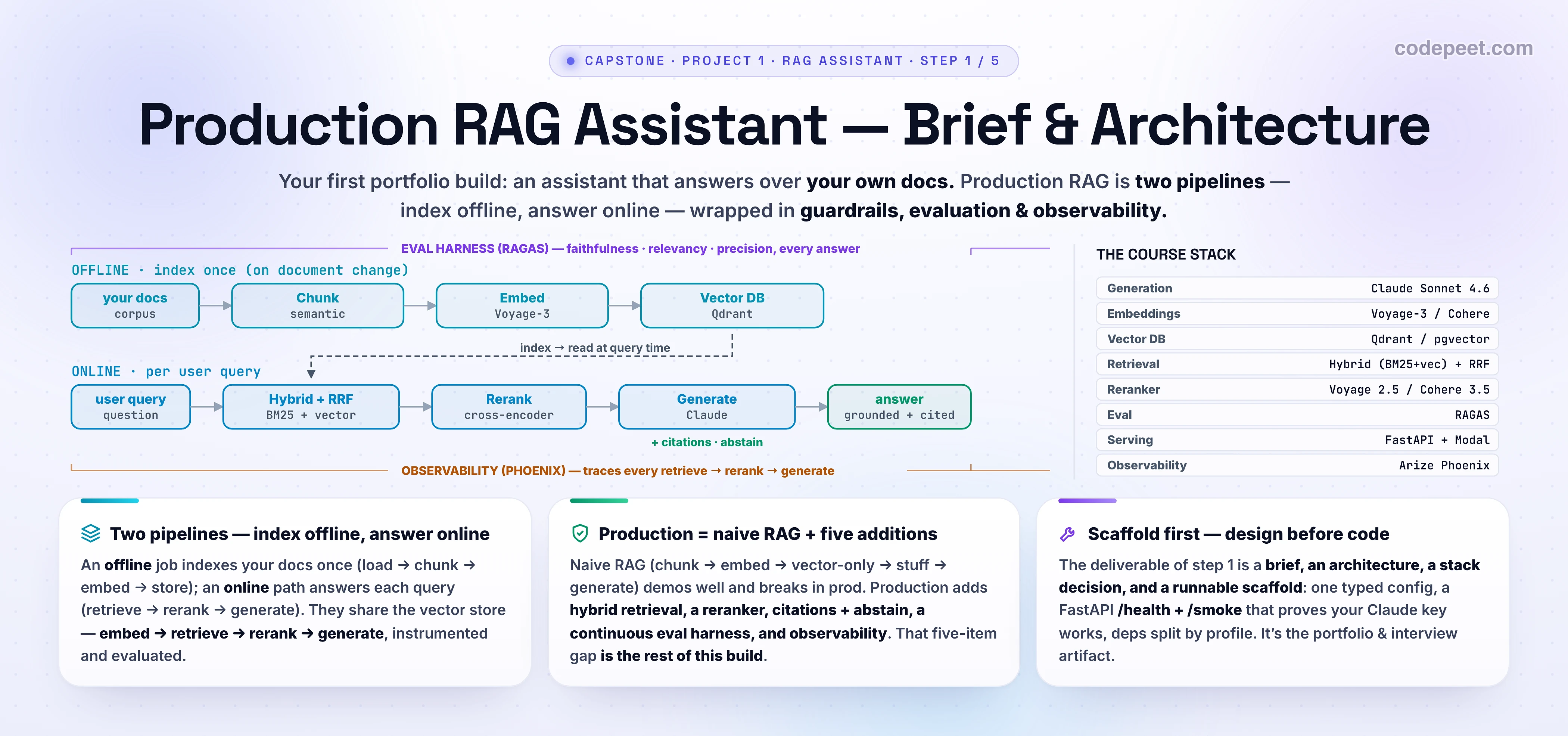
Every production RAG system is two pipelines that share a vector store. Drawing this is the deliverable of this lesson — internalize it and you can whiteboard RAG in any interview.
① The offline indexing pipeline — runs once per document change (a batch job):
- Load — pull documents from the source (files, a wiki API, a repo), extract clean text (PDFs, HTML, code).
- Chunk — split into retrievable units. Semantic or recursive chunking beats fixed-size; preserve metadata (source, title, section) for citations. (Detail → L2.)
- Embed — turn each chunk into a vector with an embedding model (Voyage / Cohere / open BGE).
- Index — store vectors and the raw text and a keyword (BM25/sparse) index in the vector DB (Qdrant supports both in one collection). (Detail → L2.)
② The online query pipeline — runs on every user question (must be fast):
- (Optionally) rewrite the query — expand acronyms, resolve "it"/"that" from chat history (cheap model, e.g. Haiku).
- Hybrid retrieve — run vector and keyword search, fuse with Reciprocal Rank Fusion (RRF) → a candidate set (top-40ish). (→ L2.)
- Rerank — a cross-encoder scores each (query, chunk) pair and keeps the best handful (top-6ish). (→ L2.)
- Assemble + generate — build a grounded prompt (system + the reranked chunks + the question) and call Claude; require citations, and abstain if the top score is below a threshold. (→ L3.)
Wrapped around both are the three cross-cutting concerns that make it production:
- Evaluation (RAGAS) → L4 — a golden Q&A set, scored continuously on faithfulness / relevancy / context-precision, gating every change.
- Observability (Phoenix) → L5 — a trace of every retrieve → rerank → generate, with latency and the exact retrieved chunks, so you can debug.
- Serving (FastAPI on Modal) → L5 —
/ask,/search,/healthendpoints behind an API.
The whole thing is embed → retrieve → rerank → generate, instrumented and evaluated. That sentence is your architecture; everything else is detail.
The Stack — Choosing Your Tools
Use the course's own stack — every tool here was taught in an earlier container, so the capstone is assembly, not new learning. Each choice has a why and an alternative; the right answer is what fits your constraints (self-host vs. managed, cost, scale). This decision table is itself an interview artifact — be ready to defend it.
| Layer | Default (this build) | Why | Alternatives |
|---|---|---|---|
| Generation | Claude Sonnet 4.6 (Haiku 4.5 for cheap subtasks) | best grounded-answer quality per dollar; Haiku for query rewrite | Opus 4.8 for the hardest; GPT-class |
| Embeddings | Voyage-3 (or Cohere Embed v4) | top retrieval quality, managed | open BGE to self-host free |
| Vector DB | Qdrant (or pgvector) | native hybrid + RRF, fast | pgvector to reuse Postgres; Pinecone for zero-ops |
| Retrieval | Hybrid (BM25 + vector) + RRF | catches exact terms and meaning | dense-only (simpler, weaker) |
| Reranker | Voyage rerank-2.5 (or Cohere Rerank 3.5) | biggest single precision win | open cross-encoder to self-host |
| Eval | RAGAS | the standard RAG metrics (L4) | custom LLM-judge evals |
| Serving | FastAPI on Modal | simple API, easy serverless deploy (L5) | any container host |
| Observability | Arize Phoenix (+ OpenTelemetry) | LLM-native tracing of retrieve→generate | Langfuse, LangSmith |
A note on cost. Retrieval is cheap; generation dominates your bill and latency. The blueprint console shows the trade — a reranker adds ~0.3 s but lifts quality more than any other single change, and swapping Sonnet for Opus multiplies cost ~5× for a few quality points. Default to Sonnet + a reranker; reach for Opus only on questions that need it (and route — L216-style).
Pick what you'll actually run. If you have a Postgres already, pgvector is a fine, free start. If you want native hybrid in one box, Qdrant. If you can't pay for a managed reranker, the open cross-encoder is 80% of the win. The architecture doesn't change — only the boxes do.
The Repo Scaffold
Scaffold the project so each later lesson has an obvious home. The structure mirrors the architecture (one module per stage) and follows 12-factor config (everything from env, secrets never in code). Create this skeleton now — empty modules are fine; we fill one per lesson.
rag-assistant/
├── pyproject.toml          # deps split by profile: ingest, retrieve, eval, obs, dev
├── .env.example            # config template (copy to .env; .env is gitignored)
├── docker-compose.yml      # Qdrant + the API for local dev
├── Makefile                # make ingest / make serve / make eval
├── README.md               # your project write-up (start it today!)
├── data/                   # YOUR docs go here (gitignored)
├── src/rag/
│   ├── config.py           # ONE typed Settings object (this lesson)
│   ├── ingest/             # L2: load -> chunk -> embed -> index
│   ├── retrieve/           # L2: hybrid search + RRF + rerank
│   ├── generate/           # L3: prompt assembly, citations, abstain guardrail
│   ├── eval/               # L4: RAGAS harness + golden set
│   ├── observability.py    # L5: Phoenix / OpenTelemetry tracing
│   └── api.py              # FastAPI: /health, /search, /ask (this lesson: /health)
└── tests/
Dependencies, split by profile so each stage installs only what it needs (and your Docker image stays lean) — this is the kind of detail that reads as senior:
# pyproject.toml (excerpt)
[project]
name = "rag-assistant"
requires-python = ">=3.11"
dependencies = ["pydantic-settings", "anthropic", "fastapi", "uvicorn"]

[project.optional-dependencies]
ingest   = ["qdrant-client", "voyageai", "langchain-text-splitters", "pypdf"]
retrieve = ["qdrant-client", "rank-bm25", "cohere"]
eval     = ["ragas", "datasets"]
obs      = ["arize-phoenix", "openinference-instrumentation-anthropic"]
dev      = ["pytest", "ruff"]
Configuration & the Claude Client
Two files turn the skeleton into something you can run today: a typed Settings object (every knob and secret in one place, loaded from env) and a thin api.py with a /health check and a /smoke endpoint that proves your Claude key works end-to-end.
src/rag/config.py — one typed settings object (12-factor):
# src/rag/config.py
from functools import lru_cache
from pydantic_settings import BaseSettings, SettingsConfigDict


class Settings(BaseSettings):
    model_config = SettingsConfigDict(env_file=".env", extra="ignore")

    # --- models (pinned snapshots) ---
    gen_model: str = "claude-sonnet-4-6"     # the workhorse generator (L3)
    cheap_model: str = "claude-haiku-4-5"    # query rewrite / cheap subtasks
    embed_model: str = "voyage-3-large"      # retrieval embeddings (L2)
    rerank_model: str = "rerank-2.5"         # Voyage reranker (or cohere "rerank-v3.5") (L2)

    # --- retrieval knobs ---
    top_k_retrieve: int = 40                  # candidates from hybrid search
    top_k_rerank: int = 6                     # chunks kept after rerank -> context
    min_score: float = 0.30                   # abstain below this (guardrail, L3)

    # --- infra ---
    qdrant_url: str = "http://localhost:6333"
    collection: str = "docs"

    # --- secrets (from env; NEVER hard-coded) ---
    anthropic_api_key: str = ""
    voyage_api_key: str = ""


@lru_cache
def settings() -> Settings:
    return Settings()
.env.example — copy to .env and fill in; never commit the real .env:
# .env.example
ANTHROPIC_API_KEY=sk-ant-...
VOYAGE_API_KEY=pa-...
QDRANT_URL=http://localhost:6333
GEN_MODEL=claude-sonnet-4-6
src/rag/api.py — the thin API. /health proves the wiring; /smoke proves Claude works (the rest of the endpoints arrive in L3/L5):
# src/rag/api.py
from anthropic import Anthropic
from fastapi import FastAPI

from rag.config import settings

app = FastAPI(title="RAG Assistant")
_claude = Anthropic(api_key=settings().anthropic_api_key)


@app.get("/health")
def health() -> dict:
    return {"status": "ok", "gen_model": settings().gen_model}


@app.get("/smoke")
def smoke() -> dict:
    # One cheap call proves the Claude client + API key work end to end.
    resp = _claude.messages.create(
        model=settings().cheap_model,
        max_tokens=16,
        messages=[{"role": "user", "content": "Reply with one word: ready"}],
    )
    return {"reply": resp.content[0].text}
# run it
pip install -e ".[dev]"          # base deps
cp .env.example .env && $EDITOR .env
uvicorn rag.api:app --reload

curl localhost:8000/health        # {"status":"ok","gen_model":"claude-sonnet-4-6"}
curl localhost:8000/smoke         # {"reply":"ready"}  <- your key + Claude work
If /smoke returns ready, your wiring is sound and you can build the real stages on top of it. Commit now — git init, push to a fresh repo. The commit history of this project is part of the portfolio story.
✅ Definition of Done (this step)
A project lesson isn't done when you've read it — it's done when the deliverable exists. Before moving to L2, you should have:
- A one-paragraph brief in your
README+ your corpus chosen (and a sample dropped indata/). - The architecture diagram sketched (the two pipelines + the three cross-cutting concerns) — even a photo of a whiteboard.
- The stack decided, with a one-line why per choice (your decision table).
- The repo scaffolded — the directory tree,
pyproject.tomlwith profiles,config.py,.env(from the example). -
uvicorn rag.api:appruns;/healthreturns ok and/smokereturnsready(Claude key verified). -
git init+ first commit pushed.
That's a real foundation: a runnable service, a clear plan, and a repo an interviewer can read. Next lesson we fill the ingestion + retrieval module and make it actually find things.
See It — The Architecture Blueprint Console
Before you commit to a design, play it out. The console lets you make every decision in the architecture and watch two things respond: the pipeline diagram (it redraws with your choices) and the production-readiness readout (quality, cost/query, latency/query, and a 0–5 essentials score with a 'what's missing' list).
Start by clicking Naive RAG — note it scores 0/5 PROTOTYPE and the readout names exactly what's missing (no hybrid, no reranker, no citations, no eval, no tracing). Now click Production blueprint — 5/5 PRODUCTION-READY. Then tweak: turn the reranker off and watch quality drop and "precision suffers" appear; downgrade Sonnet → Haiku and watch cost and latency fall (and quality with it); switch retrieval to dense-only and see exact-term recall flagged. This is your design space — and every toggle is a lesson you're about to build.
Notice three things. One: the gap between naive and production is five concrete additions, not a vague "make it better." Two: generation dominates cost and latency — retrieval and reranking are cheap relative to the LLM call. Three: the highest-leverage single upgrade is usually the reranker — it lifts quality more than any other one change, for ~0.3 s.
🧪 Try It Yourself
Design decisions — reason them out, then check against the console.
1. Your corpus is API documentation full of exact symbols (getUserById, error code E_4012). Your naive demo keeps missing questions that mention those exact names. Which one architectural change fixes this most directly, and why?
2. You're on a tight budget and latency SLA. You can afford either an Opus generator or Sonnet + a reranker, not both. Which gives more quality per dollar/second, and why?
3. A stakeholder asks, "how do we know it won't make things up?" Name the two parts of the architecture that answer this, and what each one does.
4. Your teammate wants to skip the eval harness — "we'll just try changes and see if they feel better." Give the one-sentence reason that's a trap, in production terms.
5. You must demo to an interviewer in 2 weeks and can only build part of it. Using the readiness score, which essentials would you prioritize to go from PROTOTYPE to a credible, defensible system?
Answers.
1. Hybrid retrieval (BM25 + vector + RRF). Dense vectors match meaning, not exact tokens, so rare symbols and codes slip through; the keyword (BM25) leg catches the exact terms, and RRF fuses both. (A reranker helps too, but the recall problem is fixed at retrieval, not reranking.)
2. Sonnet + a reranker. Generation quality scales sub-linearly with model size for grounded Q&A, while a reranker fixes the input (which chunks the model even sees) — and bad context caps quality no matter how strong the generator. The reranker adds ~0.3 s and a fraction of a cent; Opus multiplies cost ~5×. Better context > bigger model, dollar for dollar.
3. Citations (every claim links to the retrieved chunk it came from — auditable grounding) and the abstain guardrail (if the top retrieval score is below min_score, the system says "I don't have enough information" instead of inventing an answer). Together: grounded and honest.
4. Without a held-out eval set you can't tell improvement from regression — "feels better" is noise, and you'll happily ship a change that quietly hurt faithfulness on cases you didn't re-check. In production, un-measured = unmanaged.
5. Prioritize the essentials that buy the most trust and quality first: hybrid retrieval + a reranker (quality the demo will show), then citations + abstain (trust the interviewer will probe). Stub eval and observability with a small golden set and basic logging, and say so — a defensible 3–4/5 you can explain beats a 5/5 you can't.
Mental-Model Corrections
- "RAG is chunk → embed → retrieve → stuff → generate." → That's the naive demo. Production RAG adds hybrid retrieval, reranking, citations + abstain, evaluation, and observability — that's the whole project.
- "Architecture is the boring part; let's just code." → The architecture is the portfolio piece and the interview. Designing the two pipelines + cross-cutting concerns first is what makes the build go fast and clean.
- "A bigger generation model is the main quality lever." → Retrieval quality caps everything — garbage context, garbage answer. Hybrid + a reranker usually beat a bigger model, cheaper.
- "Vector search is enough." → Dense-only misses exact terms (names, IDs, codes). Hybrid + RRF is the production default.
- "I'll add evaluation later." → Without eval you can't tell if a change helped. The harness isn't a finishing touch; it's how you develop the system. (We build it in L4 — but design it in now.)
- "Citations are a nice-to-have." → Citations + abstention are what make answers trustworthy and auditable — the difference between a toy and something a business will use.
- "Use whatever vector DB / reranker the tutorial used." → Choose for your constraints (self-host vs managed, cost). The architecture is fixed; the boxes are swappable — and being able to explain the trade-off is the skill.
Key Takeaways
- The capstone is where concepts become a portfolio. You're building a production RAG assistant over your own docs — the most common real AI system, and a synthesis of Containers 2 (RAG) and 6 (Production).
- Design before you code. The deliverable of this lesson is a brief, an architecture, a stack decision, and a runnable scaffold — the foundation every later lesson drops into.
- Production RAG = two pipelines. An offline index (load → chunk → embed → store) and an online query (rewrite → hybrid retrieve → rerank → generate with citations + abstain), wrapped in evaluation (RAGAS), observability (Phoenix), and serving (FastAPI on Modal).
- Naive → production is five concrete additions: hybrid retrieval, reranking, citations + abstain, a continuous eval harness, observability. The blueprint console scores these 0–5 — aim for the journey from PROTOTYPE to PRODUCTION-READY.
- Use the course's stack (Claude · Voyage/Cohere · Qdrant/pgvector · hybrid+RRF · Cohere/Voyage rerank · RAGAS · FastAPI/Modal · Phoenix) and choose each box for your constraints — defending those trade-offs is the interview skill.
- Scaffold + verify now: one typed
Settings, a FastAPI/health+/smokethat proves your Claude key works, profiled deps,git init. Hit the Definition of Done before moving on. - Next — L2 (Ingestion & Hybrid Retrieval): fill the
ingest/andretrieve/modules — load your docs, chunk and embed them, and build the hybrid + RRF + rerank retrieval that makes the assistant actually find things.