Serving with vLLM / TGI
Introduction
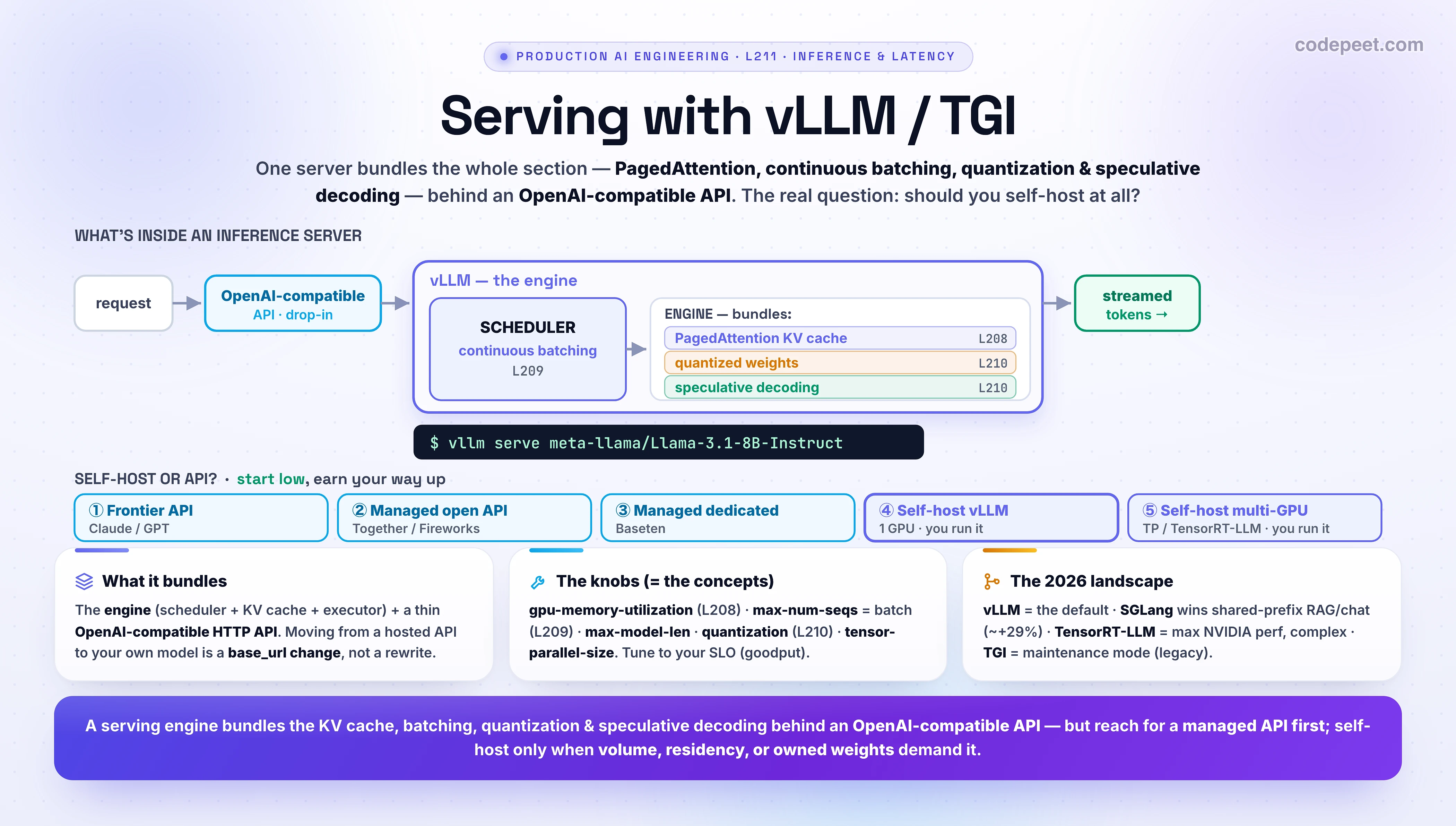
For four lessons we've been collecting optimizations: the metrics to hit (L207), the KV cache + PagedAttention (L208), continuous batching (L209), and speculative decoding + quantization (L210). Nobody implements those by hand. They come bundled in an inference server — and in 2026 the default one is vLLM. This lesson is about the box: what it is, how you run and tune it, the landscape of alternatives, and the decision that matters most for you as an engineer — should you self-host at all?
A serving engine like vLLM is where everything in this section becomes a single command.
vllm serve meta-llama/Llama-3.1-8B-Instructgives you PagedAttention, continuous batching, optional quantization and speculative decoding, and an OpenAI-compatible API — on your own GPU. The hard part isn't running it; it's knowing when you should.
In this lesson:
- What an inference server is — how vLLM bundles L208-L210 behind an OpenAI-compatible API
- Running vLLM —
vllm serve, the OpenAI-compatible client, Docker, and offline batch - The knobs that matter — and how each maps to a concept you already know
- The landscape — vLLM vs TGI vs SGLang vs TensorRT-LLM, honestly, as of 2026
- The real decision — self-host vs a managed API, with the actual cost break-evens
Scope: this is the serving layer. Streaming the response back is L212 (next). Wrapping many models behind a gateway/router is L219; the cost math is L213; observability and autoscaling are later still. We'll point at them, not cover them. And note: you self-host open models (Llama, Qwen, Mistral, DeepSeek) — Claude and GPT are API-only, so for them the "server" is the provider's.
What an Inference Server Is
An inference server (vLLM, SGLang, TensorRT-LLM, the now-legacy TGI) is two things stacked together:
- The engine — the part that actually runs the model: the scheduler (continuous batching, L209), the KV-cache manager (PagedAttention, L208), the executor (optimized GPU kernels, optional quantized weights and speculative decoding, L210). This is where all the section's tricks live.
- The server — a thin HTTP layer in front of the engine that speaks the OpenAI API format.
That second part is quietly the most important for an app engineer. vLLM's API is a drop-in replacement for OpenAI's — same /v1/chat/completions shape, same request/response, same streaming. So you call your self-hosted Llama exactly like you call GPT — point the openai client's base_url at your server and change nothing else:
One mental model: the engine is the F1 car (L208-L210); the OpenAI-compatible API is the standard steering wheel. You don't rebuild the car — you start it (
vllm serve …) and drive it with controls you already know. The whole point is that switching from a hosted API to a self-hosted model is abase_urlchange, not a rewrite.
Running vLLM
Starting a production-grade server is genuinely one command. vllm serve downloads the model (from Hugging Face), profiles your GPU, allocates the KV cache, and exposes the OpenAI-compatible API on port 8000:
# Start an OpenAI-compatible server for an open model on your GPU
vllm serve meta-llama/Llama-3.1-8B-Instruct \
    --gpu-memory-utilization 0.90 \   # fraction of VRAM for weights + KV cache (L208)
    --max-model-len 8192 \            # max context length (caps KV-cache size)
    --max-num-seqs 256 \              # max concurrent sequences = batch size (L209)
    --quantization awq \              # optional: smaller/faster weights (L210)
    --tensor-parallel-size 1          # set to N to shard a big model across N GPUs

# It's now live at http://localhost:8000/v1  — speaking OpenAI's format.
Now call it exactly like the OpenAI API — the only change from your GPT code is the base_url:
from openai import OpenAI

# Point the SAME OpenAI client at your vLLM server — that's the whole migration.
client = OpenAI(base_url="http://localhost:8000/v1", api_key="EMPTY")

stream = client.chat.completions.create(
    model="meta-llama/Llama-3.1-8B-Instruct",
    messages=[{"role": "user", "content": "Explain PagedAttention in one sentence."}],
    stream=True,                       # token-by-token, just like before (streaming → L212)
)
for chunk in stream:
    delta = chunk.choices[0].delta.content
    if delta:
        print(delta, end="", flush=True)
Two more ways you'll see it run:
- Docker (the usual production path — no local CUDA setup):
docker run --runtime nvidia --gpus all -p 8000:8000 --ipc=host -v ~/.cache/huggingface:/root/.cache/huggingface vllm/vllm-openai:latest --model meta-llama/Llama-3.1-8B-Instruct. - Offline / batch (no server — score a big dataset on one machine), via the Python
LLMclass:
from vllm import LLM, SamplingParams

llm = LLM(model="meta-llama/Llama-3.1-8B-Instruct")          # loads once
params = SamplingParams(temperature=0.7, max_tokens=128)
outputs = llm.generate(["Summarize: ...", "Classify: ...", "..."], params)  # continuous-batched for you
for o in outputs:
    print(o.outputs[0].text)
The Knobs That Matter
You rarely write serving code — you choose the flags. And here's the satisfying part: every important knob maps to a concept from this section. Tuning vLLM is applying L207-L210.
| Flag | What it controls | Maps to | Tradeoff |
|---|---|---|---|
--gpu-memory-utilization | fraction of VRAM vLLM may use (rest is for the KV cache) | L208 | higher = bigger batch/context, but OOM risk — start 0.90 |
--max-model-len | max context length per request | L208 (cache grows with length) | longer context = more KV cache = fewer concurrent requests |
--max-num-seqs | max concurrent sequences = batch size | L209 | higher = more throughput, but higher per-user TPOT |
--quantization (awq/fp8/…) | weight precision | L210 | smaller/faster + fits smaller GPUs; small accuracy cost |
--tensor-parallel-size | GPUs to shard one model across | scaling | run models too big for one GPU; needs N GPUs in a node |
--speculative-config | enable speculative decoding | L210 | lower latency at low batch; little help at high batch |
So the workflow is: pick the model and GPU, set gpu-memory-utilization ≈ 0.90, then tune max-model-len and max-num-seqs against your L207 SLOs — raise max-num-seqs for throughput until TPOT/TTFT breach your target (that's goodput), and reach for quantization or tensor parallelism when the model doesn't fit. Tuning a server is just choosing where to sit on the latency-vs-throughput-vs-memory curve — the exact tension from L207-L209.
The Landscape — vLLM, TGI, SGLang, TensorRT-LLM
vLLM isn't the only engine, and the field moved in 2026. The honest current map:
| Engine | Who / what | Use it when | Notes |
|---|---|---|---|
| vLLM | UC Berkeley; PagedAttention + continuous batching | the default — quickest path to prod, model-update flexibility | keeps the GPU ~85-92% busy under load; OpenAI-compatible |
| SGLang | RadixAttention (prefix/KV reuse) | shared-prefix workloads — chat, RAG, agents, multi-turn | ~29% higher throughput than vLLM when requests share context |
| TensorRT-LLM | NVIDIA; deep hardware optimization | one model, long-term, throughput is paramount | best NVIDIA perf, but 1-2 weeks setup + vendor lock-in |
| TGI | Hugging Face Text Generation Inference | legacy — existing deployments | maintenance mode since 2026 — HF now points new users to vLLM / SGLang |
| Ollama / llama.cpp | local, single-user, CPU/GPU | on-device / dev — one user, a laptop | not for high-concurrency serving |
Two things worth knowing. First — the lesson's title says "vLLM / TGI", but TGI entered maintenance mode in 2026; Hugging Face itself now directs new deployments to vLLM and SGLang. Treat TGI as legacy you might inherit, not a new choice. Second — they all expose an OpenAI-compatible API and bundle the same core ideas (paged KV cache + continuous batching), so switching engines is mostly an ops decision, not an app rewrite. Start with vLLM; reach for SGLang if your traffic shares prefixes (it usually does in chat/RAG); reach for TensorRT-LLM only when you've frozen one model and need the last 20% of NVIDIA performance.
The Real Decision — Self-Host or Use an API?
Here's the decision that actually matters, and the one most teams get wrong by reaching for self-hosting too early. Running your own GPU feels cheaper (no per-token markup) but the full cost tells a different story:
- The break-even is high. For most teams, a managed API is cheaper until you're well into the hundreds of millions of tokens per day. Below ~100-500M tokens/day, the per-token savings don't cover the idle GPU time (you pay for the H100 24/7 even at 3am), the 2-4 weeks of setup (deploy, load-test, autoscale, observability), and the 10-20 engineer-hours/month of ongoing care ($750-3000/mo in labor before the GPU bill).
- You self-host an open model. Self-hosting means Llama / Qwen / Mistral / DeepSeek on vLLM — you can't self-host Claude or GPT (they're API-only). So step one is "does an open model clear my quality bar?" — if only a frontier model does, the decision is made for you.
So when should you self-host? When at least one of these is true:
- Volume is genuinely 10M+/day on a workload an open model handles well (the unit economics finally flip).
- Data residency / privacy is a hard requirement no public API can satisfy (this forces self-hosting regardless of volume).
- You need to run your own fine-tuned weights that you own.
And the pattern that actually ships in 2026 is neither pure self-host nor pure API — it's hybrid: self-host the predictable, high-volume bulk on vLLM, call a frontier API (Claude/GPT) for the bursty, high-value, or quality-critical requests, and put one router between them. (That router is the model gateway — L219; the full cost math is L213.) Start on an API, measure, and earn your way down the ladder to self-hosting — don't start there.
See It — Should You Self-Host?
Make the decision concrete. Answer five honest questions about your situation; the ladder lights up where to start — from a frontier API at the bottom (simplest) to self-hosting multi-GPU at the top (most control):
Play with it and watch the levers:
- Low volume + no ops team pins you to the bottom — a managed API. That's the right answer far more often than engineers want it to be.
- A hard on-prem requirement or your own fine-tuned weights pushes you up to self-hosting regardless of volume — those are the forcing functions.
- Picking a frontier model flags that self-hosting isn't even on the table (you can't self-host Claude/GPT) — the only way "up the ladder" is an open model that clears your bar.
🧪 Try It Yourself
Reason through these, then check with the ladder:
- A startup doing ~2M tokens/day of chat on GPT-quality output wants to "save money by self-hosting Llama on an H100." Good idea? Why or why not?
- You self-host vLLM and users complain it OOMs under load. Which one flag do you reach for first, and which concept (L20x) does it touch?
- Your product is a RAG assistant where every request shares a long retrieved context. Which engine might beat vLLM here, and why?
- A hospital needs an LLM feature but patient data can't leave its network. What does that single fact decide?
- You migrate from the OpenAI API to a self-hosted Llama on vLLM. How much of your application code changes?
→ (1) Probably not. At ~2M/day they're far below the ~100-500M/day break-even — the idle H100, 2-4 weeks of setup, and ongoing ops will cost more than the API, and Llama may not match GPT quality. Stay on an API. (2) --gpu-memory-utilization (lower it toward 0.90, leaving headroom) — it governs how much VRAM goes to weights vs the KV cache (L208); too high OOMs on variable batches. (3) SGLang — its RadixAttention reuses the shared-prefix KV cache across requests, giving ~29% more throughput than vLLM on shared-context workloads. (4) It forces self-hosting (or a private/on-prem deployment) — a hard data-residency requirement no public API can satisfy, regardless of volume or cost. (5) Almost none — vLLM is OpenAI-compatible, so it's a base_url change (and the model string). That's the whole point of the standard API.
Mental-Model Corrections
- "Serving an LLM means writing inference code." No — you run an engine (vLLM) that bundles PagedAttention + continuous batching + quantization + speculative decoding, and you tune flags. The hard part is the decision, not the code.
- "Self-hosting is cheaper — no per-token markup." Only at high volume. Below ~100-500M tokens/day the idle GPU + setup + 10-20 hrs/mo of ops make a managed API cheaper. Self-hosting is a scale decision.
- "I'll self-host GPT-4 / Claude to save money." You can't — frontier models are API-only. Self-hosting means an open model (Llama/Qwen/Mistral/DeepSeek) that meets your bar.
- "Switching to a self-hosted model is a big rewrite." It's a
base_urlchange — vLLM (and the others) speak the OpenAI API, so your app code barely moves. - "Use TGI, it's Hugging Face's server." Outdated — TGI went to maintenance mode in 2026; HF now points new users to vLLM / SGLang. Don't start a new deployment on TGI.
- "vLLM is always the fastest." It's the best default, but SGLang beats it on shared-prefix (chat/RAG) traffic, and TensorRT-LLM can win on a single frozen model — at the cost of setup time.
- "It's self-host or API." The shipping pattern is hybrid — self-host the bulk, API for the rest, one router between (L219).
Key Takeaways
- An inference server bundles the whole section. vLLM = PagedAttention KV cache (L208) + continuous batching (L209) + quantization & speculative decoding (L210) + an OpenAI-compatible API — started with
vllm serve <model>. - It's OpenAI-compatible, so moving from a hosted API to a self-hosted open model is a
base_urlchange, not a rewrite. - You tune flags, and they map to concepts:
gpu-memory-utilization(L208),max-model-len(L208),max-num-seqs= batch (L209),quantization(L210),tensor-parallel-size(scaling). Tuning = sitting on the L207 latency-vs-throughput-vs-memory curve to hit your goodput SLO. - Landscape (2026): vLLM = default; SGLang wins on shared-prefix (chat/RAG, ~+29%); TensorRT-LLM = max NVIDIA perf, complex; TGI = maintenance mode, legacy only.
- The decision that matters: don't self-host too early. Managed APIs are cheaper until ~100-500M tokens/day once you count idle GPUs, setup, and ops. Self-host only for high volume on an open model, data residency, or your own fine-tuned weights — and you self-host open models (Claude/GPT are API-only).
- The pattern that ships is hybrid: self-host the bulk, API for the bursty/high-value, one router between (L219).
- Next — L212: Streaming for Perceived Latency — the final piece of the inference section: how streaming the tokens back (the
stream=Trueyou just saw) makes a slow generation feel fast, closing the loop with the TTFT/TPOT metrics from L207.