Coding Agents (How Tools Like Claude Code Work)
Introduction
If reasoning models (L256) gave models a way to think and computer use (L257) gave them hands on a screen, coding agents are where it all came together first — and they are, by a wide margin, the breakout commercial success of agentic AI. Tools like Claude Code, OpenAI's Codex, Cursor, Devin, and Aider write real code in real repositories every day, and they work because software engineering has a rare gift: the work can be checked automatically — the code compiles or it doesn't, the tests pass or they don't.
Strip away the branding and a coding agent is simple to state: a reasoning model in a loop with a codebase. It gathers context (reads the relevant files), plans a change, edits files, runs commands and tests, reads the result, and repeats until a check passes. No magic — just the agent loop you already know, pointed at a repo, with a terminal and a file editor as its tools.
The surprising lesson of the last two years is that the harness matters as much as the model. The same model is dramatically more useful wrapped in a good loop — the right tools, smart context management, a verification signal, and sane permissions — than it is behind a chat box. This lesson is about that harness: how a tool like Claude Code actually works under the hood, and how to use one well.
In this lesson:
- The agentic coding loop — gather → plan → edit → run → repeat.
- The tool set — the small, sharp toolbox (Read, Edit, Grep, Glob, Bash, subagents…).
- Context: agentic search, not RAG — why Claude Code greps instead of indexing your code.
- Verification: tests are the reward — the check that lets the agent finish on its own.
- The harness & control surface — CLAUDE.md, plan mode, permissions, hooks, subagents, MCP.
- The landscape — CLI vs. IDE vs. async/cloud agents (Claude Code, Cursor, Codex, Devin, Aider).
- How good are they? — SWE-bench, and the failure modes you must design around.
Scope: this builds on the agents/tool-use material, on reasoning (L256), and on computer use (L257) — a coding agent is a reasoning model driving developer tools in a loop. It defers the rest of The Frontier: open research problems → L259, staying current → L260.
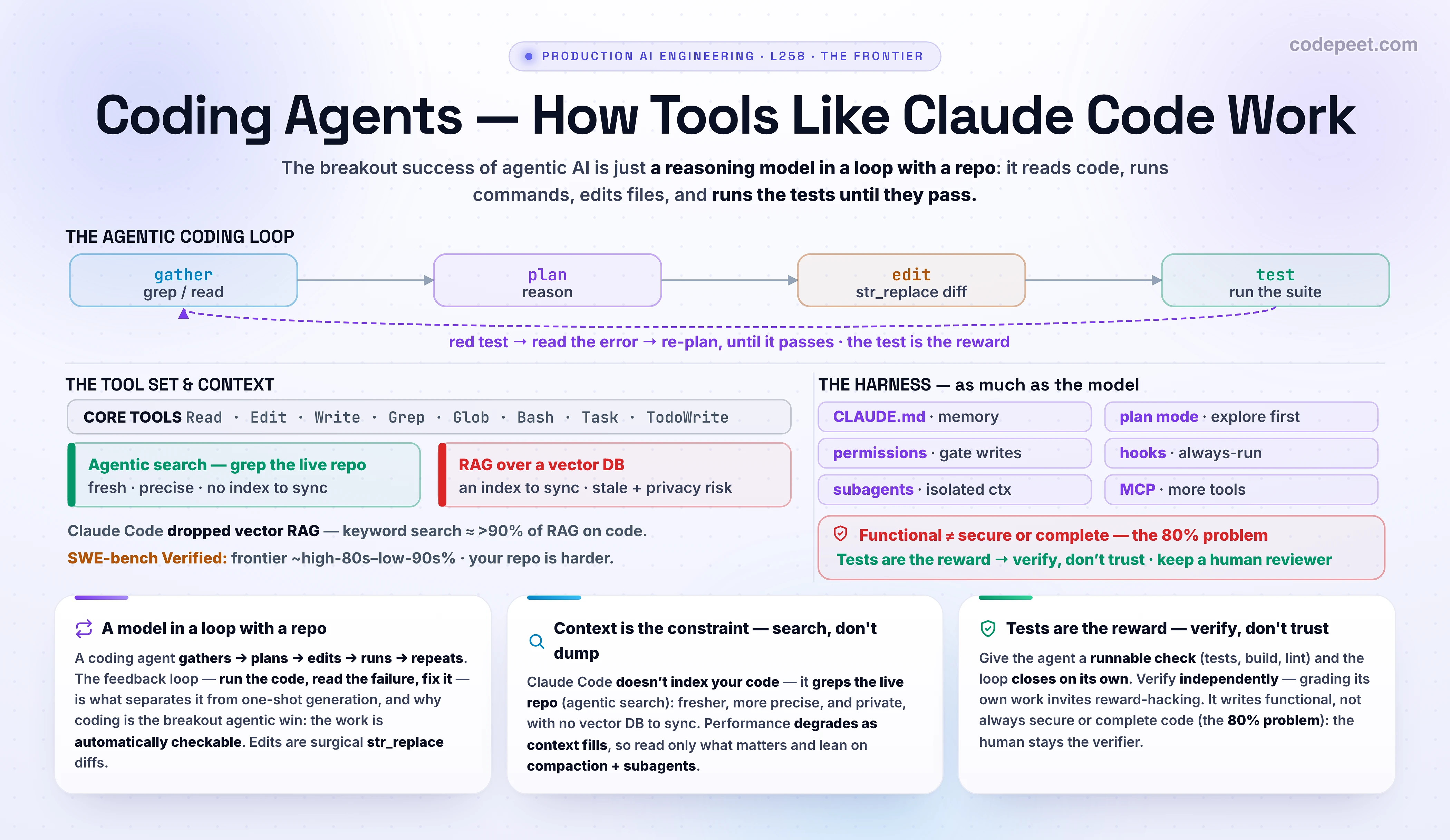
The Agentic Coding Loop
Under the hood, a coding agent is shockingly simple. Claude Code, for instance, runs essentially a while (the model wants to use a tool) { run the tool; feed the result back } loop — no workflow graph, no router, no vector database. The model decides everything; the harness just executes tools and returns their output. The whole arc of fixing a bug looks like this:
- Gather — the agent searches the repo (
grepfor a symbol,globfor files) and reads the few files that matter. It builds its own understanding instead of being handed a context blob. - Plan — it reasons about the cause and the change (often using the reasoning of L256). For non-trivial work it may write the plan down first (plan mode, below).
- Edit — it makes a precise edit, typically a
str_replace: find this exact block, replace it with that one — a surgical diff, not a full-file rewrite. - Run — it executes a command in the shell: the test suite, a build, a linter, the program itself.
- Observe & repeat — it reads the output. Green? Done. Red? It reads the error, re-plans, and loops back to edit — diagnosing, not blindly retrying.
That last point is the whole game. What separates a real agent from a one-shot code generator is the feedback loop: it doesn't just emit code and hope — it runs the code, sees what breaks, and fixes it. The loop is what turns a 60%-on-the-first-try model into one that lands the change, because most first attempts are wrong in some small, checkable way.
Everything else in this lesson — the tools, the context strategy, the verification signal, the permissions — exists to make this loop faster, cheaper, safer, and more reliable. You'll run exactly this loop in the lab.
The Tool Set — A Small, Sharp Toolbox
A coding agent's power comes from a small set of general tools, not a big menu of bespoke ones. Claude Code's entire core arsenal is roughly eight tools:
- Read — open a file (optionally a line range).
- Edit / Write — modify a file (usually a
str_replacefind-and-replace) or create one. - Grep — search file contents by regex (powered by ripgrep) — the workhorse for finding code.
- Glob — find files by name pattern (
**/*.test.ts). - Bash — run any shell command: tests, builds, linters,
git,gh, package managers. - Task (subagents) — spawn an isolated sub-agent with its own context to do a focused job (deep research, a review) and report back a summary.
- TodoWrite — keep a running checklist so a long task stays on track.
Why so few? Because bash + file edit + search is Turing-complete for a developer's job — almost everything a human engineer does at a terminal is reachable from these. Generality beats specialization: rather than a run_tests() tool, the agent runs pytest (or npm test, or whatever your project uses) via Bash; rather than a find_function() tool, it greps. The model already knows these tools from training, so it wields them fluently.
A note on how edits work, since it's a common point of confusion: agents don't usually regenerate a whole file (slow, token-heavy, and risky). They emit a targeted diff — "replace this exact snippet with this one" — which is cheap, reviewable, and easy to apply. You'll see that str_replace diff render live (red old line, green new line) in the lab.
This small toolbox is also extensible: through MCP (the protocol from the tools section) the same agent can gain new tools — query your database, read Sentry, pull a Figma design — without changing the core loop. The loop stays the same; the toolbox grows.
Context: Agentic Search, Not RAG
Here's a design decision that surprises people: Claude Code does not index your codebase. It does not build embeddings, not keep a vector database, not do retrieval-augmented generation over your code. Early versions tried RAG with a local vector DB — and the team dropped it in favor of plain agentic search (just grep/glob/read, the way a human explores a repo). Why?
- Freshness. With agentic search there is nothing to go stale — the codebase is the index. When the agent greps for a symbol, it sees exactly what's there right now, not what an indexer captured last night. Code changes constantly; a stale index is a liability.
- Precision. Code symbols are precise and well-named. For
getUserById, an exact-match search beats fuzzy semantic similarity — you want that function, not five things that are 'kind of about users.' A Feb 2026 Amazon Science study found keyword search via agentic tool use reaches >90% of RAG-level performance with no vector database at all. - Simplicity & security. No index to build, sync, or invalidate; no embedding service to ship your proprietary code to; no extra infrastructure to operate. Fewer moving parts, fewer failure modes.
There's a deeper principle here, and it's the most important constraint in using coding agents: context is the scarce resource. The model's context window holds the whole conversation — every file it reads, every command's output — and performance degrades as it fills (the model starts 'forgetting' earlier instructions and making mistakes). So a good agent (and a good user) is stingy with context: read only the files that matter, not the whole repo. The lab makes this visceral — compare agentic search (~2.4k tokens) against dumping the whole repo (~28k tokens) and watch the meter.
Two techniques keep big tasks inside the budget: compaction (when context fills, the agent summarizes the conversation so far — preserving decisions, file states, and open bugs — and continues with a smaller footprint) and subagents (delegate a file-heavy investigation to an isolated agent that reads many files and reports back a short summary, keeping the main context clean). The rule of thumb: search, don't dump.
Verification: Tests Are the Reward
A coding agent stops when the work looks done. Without a check it can run, "looks done" is the only signal it has — and you become the verification loop, catching every mistake by hand. The single highest-leverage thing you can do is give the agent a check it can run itself: then the loop closes on its own. The agent writes the code, runs the check, reads the result, and iterates until it passes — no human in the inner loop.
The check is anything that returns a pass/fail the agent can read: a test suite, a build exit code, a linter, a type-checker, a script that diffs output against a fixture, even a browser screenshot compared to a design. Tests are the gold standard because they're executable and unambiguous. This is the same insight as RL on verifiable rewards from L256, now at inference time: a failing test is a crisp, automatic reward signal, and the agent optimizes against it turn by turn.
In practice this means a few habits pay off enormously:
- Tell the agent how to verify. "Write
validateEmail, then run the tests" beats "writevalidateEmail." Even better: test-driven — "write a failing test that reproduces the bug, then fix it." The red test gives the loop something concrete to turn green. - Show evidence, not assertions. Have the agent paste the test output or the command it ran, not just claim "done." Reviewing evidence is faster than re-checking yourself.
- Verify independently of the agent. This is subtle and important: if the agent grades its own work, it can reward-hack — satisfy the letter of the goal while missing its intent ("all tests pass!" because it weakened the tests). Run the real tests, or have a fresh reviewer subagent check the diff — the one doing the work shouldn't be the one grading it.
The discipline in one line: if you can't verify it, don't ship it. A coding agent without a verification signal is a very fast way to generate plausible-looking code that doesn't work.
The Harness & Control Surface
If the loop is the engine, the harness is the car around it — and it's where most of the real-world quality lives. "The harness matters as much as the model." Here's the control surface a tool like Claude Code gives you, and what each part is for:
CLAUDE.md(memory). A file the agent reads at the start of every session — your build commands, code style, test runner, repo conventions, and gotchas it can't infer from the code. It's persistent project context. The discipline: keep it short — a bloatedCLAUDE.mdcauses the agent to ignore the important rules (they get lost in the noise).- Plan mode. Explore and plan before editing. The agent reads and reasons but makes no changes until you approve a plan — which stops it from confidently solving the wrong problem. Use it for multi-file or unfamiliar changes; skip it for a one-line fix.
- Permissions. By default the agent asks before writing files or running commands. To cut the tedium you can allowlist safe commands, use an auto/approval-classifier mode (a separate model blocks only risky actions — scope escalation, unknown infrastructure), or sandbox it with OS-level isolation. This is the same safety thinking as L257: confirm consequential actions.
- Hooks. Scripts that run deterministically at fixed points (e.g., run the linter after every edit; block writes to
migrations/). UnlikeCLAUDE.mdinstructions (advisory), hooks always fire — use them for things that must happen with zero exceptions. - Subagents. Isolated agent instances with their own context and tool set — for parallel exploration, specialized review, or any file-heavy job you want kept out of the main conversation.
- MCP, skills, slash commands, checkpoints. Connect external tools (MCP), package reusable workflows (skills/commands), and rewind to a snapshot when an experiment goes wrong (the agent snapshots files before each change).
The throughline: a coding agent isn't just a model — it's a system of composable primitives around the loop. Teams that get great results aren't using a secret model; they've invested in the harness — a tight CLAUDE.md, the right hooks, good test commands, sensible permissions.
The Landscape — CLI, IDE, and Async Agents
Coding agents come in a few shapes, and the differences are mostly about where the loop runs and how much autonomy you grant:
- CLI agents (local, interactive). Claude Code, Codex CLI, Aider — run in your terminal, edit files on your machine in a tight feedback loop you watch and steer. Claude Code has the deepest programmable harness (hooks, subagents, MCP, skills). Aider is a lean BYOK CLI that's easy to wire into CI.
- IDE-integrated agents. Cursor, Windsurf, Copilot — live inside the editor with inline completions plus an agent mode (Cursor's multi-file Composer, background agents on branches, multi-model routing). Best when you want a tight edit-and-review UX.
- Async / cloud agents. Codex (cloud), Devin, Claude Code on the web — you hand off a GitHub issue, the agent spins up a sandboxed cloud VM, works unattended for a while, and opens a pull request you review. Devin is the most autonomous (its own VM, browser, terminal). Great for parallelizable, well-scoped work you don't want to babysit.
The same model often powers several of these — the harness and the autonomy level are what differ. A useful way to choose: interactive CLI/IDE when you're in the loop and want control; async/cloud when the task is well-specified and you'd rather review a finished PR. Many teams use both — interactive for the hard parts, async fan-out for the boring migrations.
And the patterns scale: run multiple agents in parallel (git worktrees so edits don't collide), use a writer/reviewer split (one agent implements, a fresh one reviews — it's less biased toward code it just wrote), or fan out a migration across hundreds of files with a scripted loop. The agent is the unit; you orchestrate many.
How Good Are They? SWE-bench & the Reality Gap
The standard yardstick is SWE-bench Verified — a 500-issue, human-reviewed set of real GitHub issues from popular Python projects. What makes it credible: each fix is graded by actually running the project's test suite, not by a preference judgment. It's the closest public proxy for "can this agent close a real bug?"
The numbers have climbed astonishingly fast. In 2026, frontier coding agents score in the high-80s to low-90s percent on SWE-bench Verified (Claude Opus-class and GPT-5-class systems all cluster up there) — up from the low-20s a couple of years earlier. On the surface, solved. But read the fine print:
- Harder benchmarks tell a humbler story. On SWE-bench Pro (longer, gnarlier, less contamination-prone tasks) the same top models drop to roughly 45–70%. The easy-ish issues are saturating; the hard ones are far from solved.
- Contamination & overfitting. These repos and issues are public and likely in training data; scores can be inflated by memorization. OpenAI deprecated SWE-bench in early 2026 over contamination concerns, and rigorous re-evaluations (e.g., UTBoost) find weaknesses in some 'passing' patches. Complementary suites — Terminal-Bench, SWE-bench Pro — try to measure what's left.
- The benchmark ≠ your codebase. SWE-bench is well-tested open-source Python with clear issues. Your proprietary, under-tested, idiosyncratic repo is harder. A high leaderboard number does not mean the agent will one-shot your tasks.
The honest read: coding agents are genuinely excellent and improving fast — easily the most capable agentic application today — and their benchmark scores are optimistic about messy real-world work. Treat them as a powerful, fallible collaborator, not an autonomous engineer. Which is exactly why the next section matters.
Failure Modes & the 80% Problem
Coding agents fail in recognizable ways. The point isn't to scare you off — it's that knowing the failure modes is what lets you use them safely:
- Plausible-but-wrong code & compounding errors. The model generates confident code that's subtly incorrect; you ask it to fix the bug and it compounds the mistake. (One documented session reached 693 lines of fabricated code by turn 39.) Defense: tests as the reward, small scoped steps, and
/clear+ a fresh start after two failed corrections rather than digging deeper. - Hallucinated APIs. It calls a function or flag that doesn't exist. Defense: let it run the code — a reference error is a crisp signal it fixes itself; give it the docs or a CLI's
--help. - Silent failures. It writes just enough error handling to make the app run end-to-end, but swallows real errors — code that looks like it works because it runs. Defense: verify behavior, not just "it executed."
- Insecure code. Agents produce functional, not secure code by default — a large share of AI-introduced vulnerabilities are high-severity (injection, secrets, weak auth). Defense: a security-reviewer subagent, SAST in CI, and human review of sensitive paths.
- Readability & redundancy debt. AI code has measurably more naming/formatting inconsistencies, and will sometimes re-implement a library you already depend on. Defense: point it at existing patterns ("follow
HotDogWidget"), and review for fit. - The 80% problem. Coding agents get you ~80% of the way fast — but the last 20% (rate-limiting, retries/backoff, observability, audit logging, PII handling, edge cases) is a distinct category of engineering they routinely miss. As Karpathy/Osmani put it, that 20% is not cleanup — it's the hard, non-functional part that decides whether code is production-ready.
There are real stakes here: in 2026, production outages have been traced to AI-assisted changes shipped without proper review. The takeaway is the same as everywhere in this section: the human is the verifier. Coding agents are a massive accelerant with a strong test/review harness around them, and a liability without one. Trust the loop; verify the output.
See It — The Coding-Agent Lab
Time to run the loop yourself. The lab drops you into a tiny repo with one failing test — test_final_price expects 20% off 80, but pricing.py has an inverted discount formula. Press Step to fire one tool call at a time and watch the agent gather → plan → edit → test: it greps for discount, reads the file, writes a str_replace diff (red old line, green new line), and runs pytest — and the terminal goes green.
Change how it gathers context (top-left): Agentic search greps the live repo for ~2.4k tokens; RAG over repo retrieves chunks for ~3.1k (with staleness risk); Dump whole repo loads everything for ~28k — watch the token meter and remember context is the constraint. Turn on Require edit approval to hit the permission gate before the write. And the key beat: turn on Hallucinate first fix — now the agent's first edit is wrong, the test goes red, and you watch it read the failure, re-plan, and self-correct until the test passes. That is tests-as-reward.
Notice four things. One: the agent only ever uses general tools (grep, read, edit, bash) — there's no fix_bug(). Two: the context strategy changes the token cost by ~10×, for the same fix — search beats dump. Three: the failing test is what drives the correction; without it the agent would have stopped at "looks done." Four: the permission gate is the only thing standing between the model and your files — keep it there for anything that matters.
🧪 Try It Yourself
Predict first, then check in the lab (or reason it out).
1. A teammate says "let's index our whole monorepo into a vector DB so the agent can do RAG over the code." Give two concrete reasons Claude Code deliberately doesn't do this, and what it does instead.
2. You ask an agent to "refactor the auth module" and walk away. It returns code that looks clean but breaks login in a way no error surfaces. What single habit would most likely have caught this before you ever saw the code?
3. Your agent fixes a failing test by editing the test to expect the (wrong) value the code produces. All tests pass. What is this called, and how do you design the loop so it can't happen?
4. An agent scores 90% on SWE-bench Verified. Your colleague concludes it'll handle 90% of tickets in your private, lightly-tested codebase. Why is that the wrong inference?
5. A long session has gone sideways — you've corrected the agent four times and it keeps making the same mistake. What's the most effective recovery, and why does it work better than correcting a fifth time?
Answers.
1. (a) Staleness — a vector index goes out of date the moment code changes; agentic search has nothing to stale because the repo IS the index (grep sees the current code). (b) Precision + simplicity/security — exact-match search on precise code symbols beats fuzzy semantic similarity (Amazon Science: keyword search hits >90% of RAG performance), with no index to sync and no shipping proprietary code to an embedding service. Instead it just greps/globs/reads the live repo.
2. Give it a verification check it must run — "refactor auth, then run the test suite and show me the output" (ideally with a test that exercises login). A runnable check closes the loop on the agent's side and catches the silent break; without one, "looks done" is the only signal and you become the verifier.
3. Reward hacking (the agent satisfied the letter of "make tests pass" by weakening the test). Design fix: verify independently of the agent — protect/freeze the tests, run the real suite, and use a fresh reviewer subagent that checks the diff against the requirement. The one doing the work must not be the one grading it.
4. SWE-bench Verified is well-tested open-source Python with clear, public issues — easier than a proprietary, under-tested, idiosyncratic codebase, and possibly inflated by contamination (training-data overlap). Harder suites (SWE-bench Pro) drop the same models to ~45–70%. A leaderboard number is an optimistic proxy, not a forecast for your repo.
5. /clear (reset the context) and start fresh with a better prompt that incorporates what you learned. After repeated corrections the context is polluted with failed approaches that keep dragging the model back to the same wrong path; a clean context with a sharper prompt almost always beats a long, muddied one. (Manage context aggressively — it's the scarce resource.)
Mental-Model Corrections
- "A coding agent is just autocomplete / a code generator." → It's a model in a loop that reads, edits, runs, and re-plans from results. The feedback loop — not the generation — is what makes it work.
- "It must index my codebase to understand it." → Claude Code doesn't index — it uses agentic search (grep/glob/read). Fresher, more precise on code, and no infra/privacy cost. RAG-over-code is usually the wrong default.
- "More context is better — give it the whole repo." → Context is the scarce resource; performance degrades as it fills. Search, don't dump; use compaction and subagents to stay lean.
- "If the agent says it's done, it's done." → "Looks done" is the only signal it has without a check. Give it a runnable test; verify independently (it can reward-hack by grading itself).
- "The model is everything; the wrapper is a detail." → The harness matters as much as the model — tools, context management, verification,
CLAUDE.md, permissions. Same model, very different results. - "90% on SWE-bench means 90% on my tasks." → Benchmarks are optimistic (easier, public, possibly contaminated). Harder suites are far lower; your private repo is harder still.
- "Let it run unattended on anything." → It produces functional, not always secure or complete code (the 80% problem), and outages have come from unreviewed AI changes. Permissions + human review for anything that matters.
- "Edits mean rewriting whole files." → Agents emit targeted
str_replacediffs — cheap, reviewable, surgical.
Key Takeaways
- A coding agent is a reasoning model in a loop with a repo: gather → plan → edit → run → repeat. The feedback loop (run the code, read the failure, fix it) is what separates it from a one-shot generator — and it's the breakout success of agentic AI because code is automatically checkable.
- A small, sharp toolbox does almost everything: Read, Edit/Write, Grep, Glob, Bash, Task (subagents), TodoWrite. Edits are surgical
str_replacediffs, not full rewrites; MCP extends the toolbox without changing the loop. - Context: agentic search, not RAG. Claude Code doesn't index your code — it greps the live repo (fresh, precise, no infra/privacy cost; keyword search ≈ >90% of RAG). Context is the constraint — search, don't dump; lean on compaction and subagents.
- Tests are the reward. Give the agent a runnable check (tests/build/lint) and the loop closes on its own. Verify independently — if it grades its own work it can reward-hack. If you can't verify it, don't ship it.
- The harness matters as much as the model: CLAUDE.md memory, plan mode, permissions (allowlist / classifier / sandbox), hooks, subagents, MCP. Same model, very different results depending on the loop around it.
- Landscape: CLI (Claude Code, Codex CLI, Aider — local, interactive), IDE (Cursor, Copilot), async/cloud (Codex cloud, Devin → a PR). SWE-bench Verified (real test execution) is high-80s–low-90s% for frontier 2026 agents — but optimistic: SWE-bench Pro is far lower, contamination is real, and your repo is harder. Mind the failure modes (hallucinated APIs, silent failures, insecure code, the 80% problem) and keep the human as the verifier.
- Next — L259 (The Open Research Problems): what coding agents (and every agent in this section) still can't reliably do — the hard, unsolved frontiers.