Numerical Precision & Quantization (GGUF/llama.cpp, GPTQ, AWQ)
Introduction
Last lesson — L190 (The Memory Bottleneck & Memory Math) — showed that memory is bytes-per-parameter × parameters. The most direct way to shrink it is to use fewer bytes per parameter. That's quantization — and it's the single most important efficiency lever in modern AI, the thing that lets a 70B model that needs 140 GB at full precision run on a laptop in ~35 GB, and lets QLoRA fine-tune it on a single GPU.
Quantization sounds scary ("won't lower precision break the model?"), but the headline is reassuring: 4-bit quantization keeps ~92–98% of a model's quality at one-quarter the memory. This lesson is how that's possible — the number formats (FP32, FP16, BF16, INT8, INT4, NF4) and the methods (GGUF, GPTQ, AWQ, bitsandbytes) — so you can pick the right one for training, fine-tuning, or serving.
What Quantization Actually Is
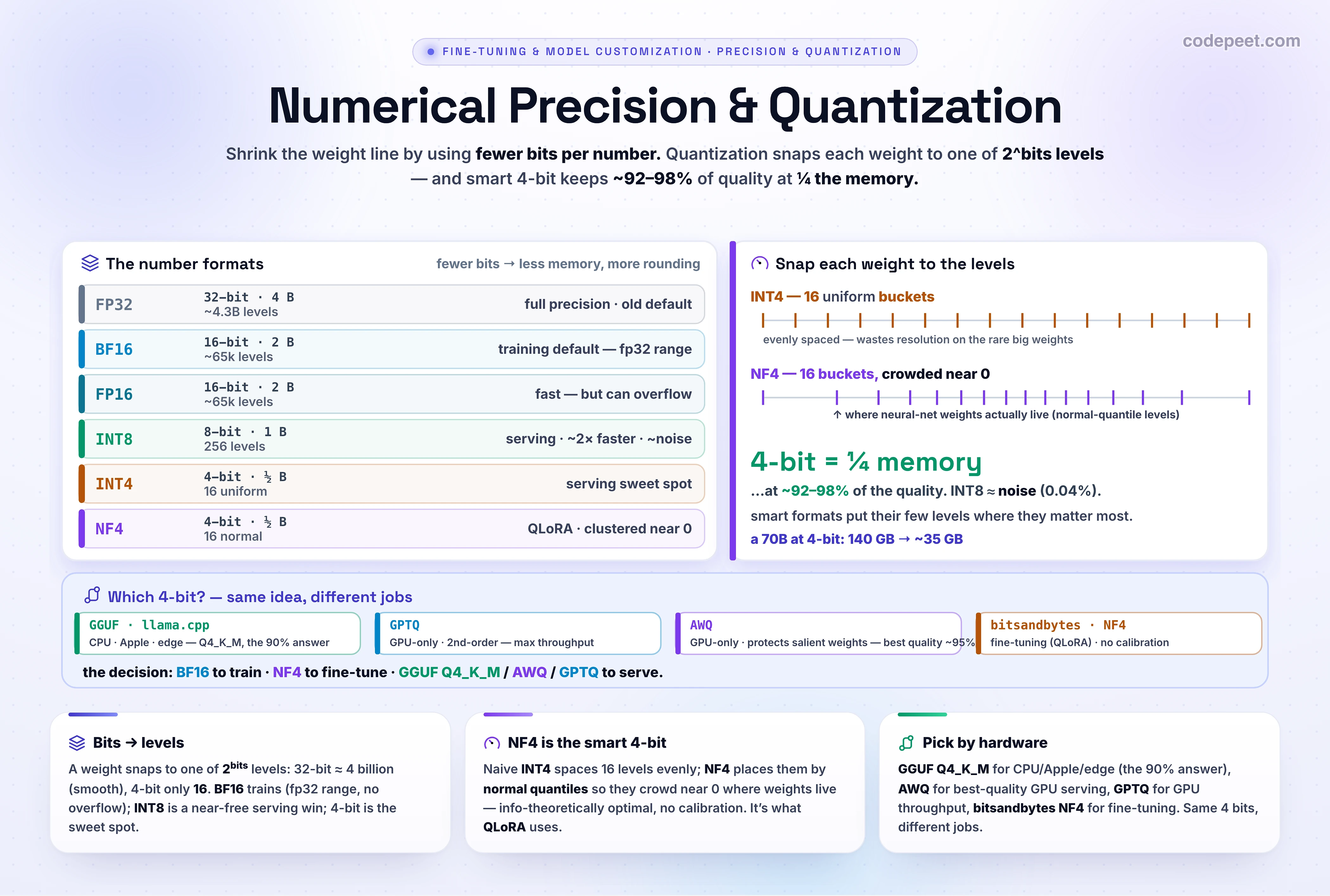
A weight is a number like 0.3719…. To store it you pick a format with a fixed number of bits, and that format can only represent a fixed set of discrete levels — exactly 2^bits of them. Quantization is just snapping each weight to its nearest representable level.
- 32 bits → ~4.3 billion levels — so fine the rounding is invisible.
- 8 bits → 256 levels.
- 4 bits → only 16 levels.
Fewer bits = fewer levels = more rounding error per weight (and less memory). The whole art of quantization is minimizing the quality damage from that rounding — by choosing where to put the levels (NF4) and which weights to protect (AWQ). Drag the weight in the lab below and you'll see a value snap to 16 chunky buckets at INT4.
The Floating-Point Formats: FP32, FP16, BF16, FP8
A floating-point number splits its bits into a sign, an exponent (the range — how big/small it can be), and a mantissa (the precision — how many significant digits). How you split them matters:
| Format | Bits | Exp / Mantissa | Role |
|---|---|---|---|
| FP32 | 32 (4 B) | 8 / 23 | full precision · the old default |
| FP16 | 16 (2 B) | 5 / 10 | fast, but narrow range → can overflow & crash training |
| BF16 | 16 (2 B) | 8 / 7 | FP32's range, less precision → the modern training default |
| FP8 | 8 (1 B) | 4 / 3 | newest · training & inference on H100+ |
The key insight: BF16 beats FP16 for training not because it's more precise (it's less), but because it keeps FP32's wide exponent range — so gradients don't overflow to infinity and crash the run. That's why almost every LLM today trains in BF16.
Integer Quantization: INT8, INT4 & NF4
Below 16 bits we switch to integer quantization — map the float weights onto evenly-spaced integer levels with a scale factor:
- INT8 (1 byte, 256 levels) — halves memory vs FP16, ~2× faster inference, and the quality drop is ~0.04% — literally noise. A near-free win for serving.
- INT4 (½ byte, 16 levels) — quarters memory. Sixteen uniform buckets is coarse, so naive INT4 loses more — yet good 4-bit still keeps ~92% of reasoning.
- NF4 (NormalFloat-4) — the clever one. Neural-net weights are roughly normally distributed (clustered near 0). NF4's 16 levels are non-uniform, placed at the quantiles of a normal distribution — so the buckets crowd near 0 where the weights actually are, wasting none on the rare large values. It's information-theoretically optimal for normal weights, needs no calibration data, and is exactly what QLoRA uses for the frozen base.
In practice you don't hand-roll any of this — you flag it on a model load:
# Quantization in one idea: snap continuous weights to 2^bits discrete LEVELS.
import numpy as np
w = np.array([0.37, -0.81, 0.02, 0.66])         # some fp32 weights
levels_int4 = np.linspace(-1, 1, 16)            # INT4 = 16 uniform buckets in [-1, 1]
q = levels_int4[np.abs(levels_int4[None, :] - w[:, None]).argmin(1)]
print(q)   # each weight SNAPPED to its nearest of 16 buckets -> rounding error

# Real usage: load a model in 4-bit NF4 (this is what QLoRA does to the frozen base).
import torch
from transformers import AutoModelForCausalLM, BitsAndBytesConfig
cfg = BitsAndBytesConfig(
    load_in_4bit=True,
    bnb_4bit_quant_type='nf4',                  # NormalFloat-4 (buckets by normal quantiles)
    bnb_4bit_compute_dtype=torch.bfloat16,      # de-quantize to bf16 for the actual math
    bnb_4bit_use_double_quant=True,             # quantize the quantization constants too
)
model = AutoModelForCausalLM.from_pretrained('meta-llama/Llama-3.1-8B', quantization_config=cfg)
# An 8B at 4-bit is ~4-5 GB of weights instead of ~16 GB - fits a free Colab T4.
The Methods: GGUF, GPTQ, AWQ & bitsandbytes
Those are the formats; the methods are different ways to do the 4-bit quantization well, each built for a different job. Almost all are post-training quantization (PTQ) — quantize an already-trained model (as opposed to the rarer quantization-aware training).
- GGUF (llama.cpp) — the format for CPU, Apple Silicon, consumer GPUs, and edge. Supports 2–8 bit with flexible "k-quants"; Q4_K_M is the reliable default (~92% quality retention). Runs everywhere (Ollama, LM Studio). The 90% answer for running models locally.
- GPTQ — GPU-only PTQ that uses second-order (Hessian) information to minimize the error each rounded weight adds → very accurate weight-for-weight, but expensive to prepare and GPU-only (no CPU/Apple). Quality ≈ GGUF Q4; less maintained now.
- AWQ (Activation-aware Weight Quantization) — keeps a small fraction of "salient" weights (the ones with the biggest impact on outputs) at higher precision and quantizes the rest hard → best quality-per-token (~95%) and 1.2–1.5× faster than GPTQ. The pick for GPU inference servers.
- bitsandbytes (NF4) — the no-calibration 4-bit used for QLoRA fine-tuning. Great for training, but slower at inference than the dedicated serving formats — it was built for training, not throughput.
Which Should I Use?
The decision is just "what am I doing, and on what hardware?":
| Job | Use |
|---|---|
| Training / full fine-tune | BF16 (wide range, no overflow) |
| Fine-tuning on a small GPU | NF4 via bitsandbytes (QLoRA) |
| Serving on CPU / Mac / consumer GPU / edge | GGUF Q4_K_M (llama.cpp / Ollama) |
| Serving on a GPU server — best quality | AWQ 4-bit |
| Serving on a GPU server — max throughput | GPTQ 4-bit |
| A near-free serving win anywhere | INT8 |
And the one rule that covers most people running a model locally: "download the GGUF Q4_K_M of the largest model that fits your VRAM with ~3 GB of headroom." It gets you good quality, fast inference, and compatibility with every tool worth using.
See It: The Quantization Lab
Make the rounding visible. Pick a precision and drag a weight along the number line — watch it snap to the nearest level and read the error. The two moves that make it click: switch to INT4 and see only 16 chunky buckets; then switch to NF4 and watch the buckets crowd near 0 — that's the smarter 4-bit putting its precision exactly where the weights live. Then flip the model size and read the memory.
The whole lesson in one picture: fewer levels, less memory, a little rounding — and the smart formats put their few levels where they matter, so a 4-bit model is ¼ the size at ~95% the quality.
Why This Matters
Quantization is the lever that turns the L190 memory bottleneck from a blocker into a knob. It's why you can fine-tune a 70B on one GPU (QLoRA + NF4), serve a 13B on a gaming laptop (GGUF Q4_K_M), and cut your inference GPU bill in half (AWQ/INT8) — usually for a quality hit you'd struggle to measure. Picking the wrong format wastes money (serving in FP16 when AWQ would do) or breaks compatibility (GPTQ on a Mac). Knowing which 4-bit for which job is one of the highest-leverage facts in applied AI engineering.
🧪 Try It Yourself
Predict the buckets, then check. Before opening the lab: at INT4, how many levels can a weight take, and what's the biggest possible rounding error for a weight near 0.5? Now open the Quantization Lab, set INT4, and drag a weight to ~0.5 to read the real error — then switch to NF4 at the same value: did the error get bigger or smaller, and why (think about where NF4 puts its buckets)? Finally, pick a model you'd serve and decide: GGUF, AWQ, or GPTQ — and justify it in one sentence from your hardware.
Mental-Model Corrections
- "Lower precision means a worse model." Barely — INT8 loses ~0.04% and good 4-bit keeps ~92–98%. The memory/speed win dwarfs the quality cost.
- "FP16 is better than BF16 because it has more mantissa bits." For training, BF16 wins — its wide exponent range stops gradients from overflowing. Precision matters less than range here.
- "INT4 and NF4 are the same thing." Same 4 bits, different level placement: INT4 is uniform; NF4 clusters levels near 0 (normal quantiles), so it loses less on real weights.
- "I'll use GPTQ on my Mac." GPTQ/AWQ are GPU-only. For CPU/Apple Silicon you want GGUF (llama.cpp).
- "bitsandbytes NF4 is the best for serving." It's the best for fine-tuning (QLoRA). For serving throughput, use GGUF / AWQ / GPTQ.
Key Takeaways
- Quantization = snapping weights to 2^bits discrete levels. Fewer bits → less memory, more rounding — and smart schemes keep the quality.
- Floating-point: BF16 is the training default (FP32's range, no overflow); FP16 can overflow; FP8 is the newest.
- Integer: INT8 ≈ free (~0.04% loss, ~2× faster); 4-bit is the sweet spot (~92–98% kept at ¼ memory); NF4 places its 16 levels by normal quantiles (QLoRA's format).
- Methods (same 4-bit, different jobs): GGUF Q4_K_M for CPU/edge (the 90% answer), AWQ for best-quality GPU serving, GPTQ for GPU throughput, bitsandbytes NF4 for fine-tuning.
- Decision: BF16 to train · NF4 to fine-tune · GGUF/AWQ/GPTQ to serve. Quantization is what makes the memory bottleneck a knob.
Next: L192 — Full Fine-Tuning vs PEFT — the other half of the savings: instead of fewer bits per weight, update fewer weights — which leads straight into L193 (LoRA & QLoRA Explained).