VMs vs Containers
The Question the Patterns Postponed
The previous section ended by admitting something. Registries, sidecars, conductors, config stores: every pattern assumed a fleet of services that simply runs, restarts when it dies, and moves between machines when a scheduler says so. None of the patterns said what a running service actually is.
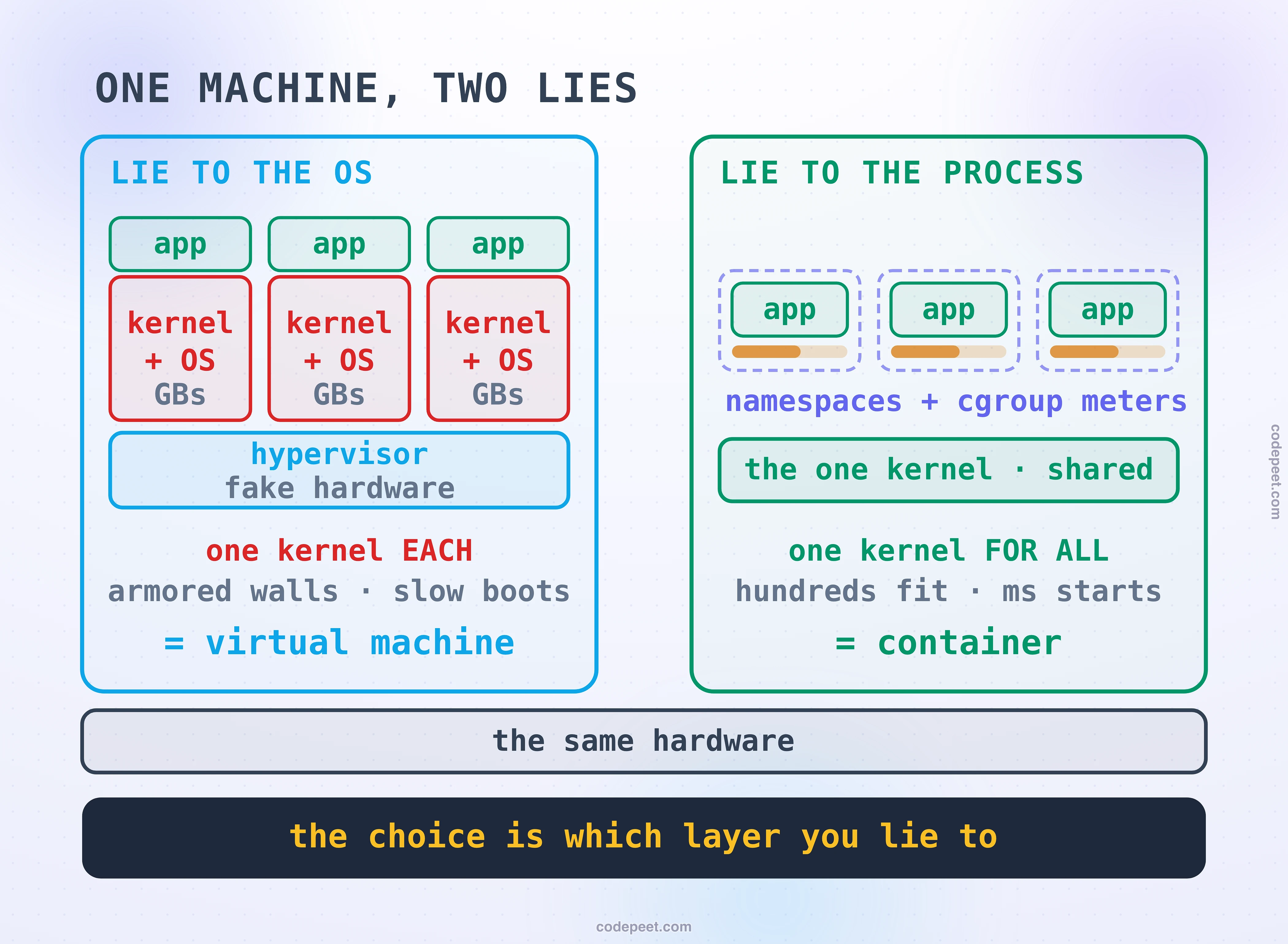
This section answers that, and it starts at the bottom: you have one physical machine and forty workloads that must not trample each other. Every answer to that problem is some form of controlled lying, and there are exactly two places to aim the lie. You can lie to an operating system, handing it fake hardware so it believes it owns a machine: that is a virtual machine. Or you can lie to a process, scoping what it can see and metering what it can use so it believes it owns a machine: that is a container.
The two lies produce wildly different bills. One buys you an armored wall and charges you a whole operating system per tenant. The other buys you hundreds of tenants per host and charges you one shared, load-bearing kernel. Isolation versus density is the whole argument, every cloud you have ever used runs both lies stacked on top of each other, and by the end of this lesson you will know exactly why.
The Machine You Already Have
Before either lie, remember what the operating system already gives you, because Processes vs Threads: Units of Work built this floor: a process already has its own private address space. One process cannot scribble on another's memory; the kernel and the hardware's memory management enforce that without being asked. Isolation did not arrive with containers. It arrived with the process, decades ago.
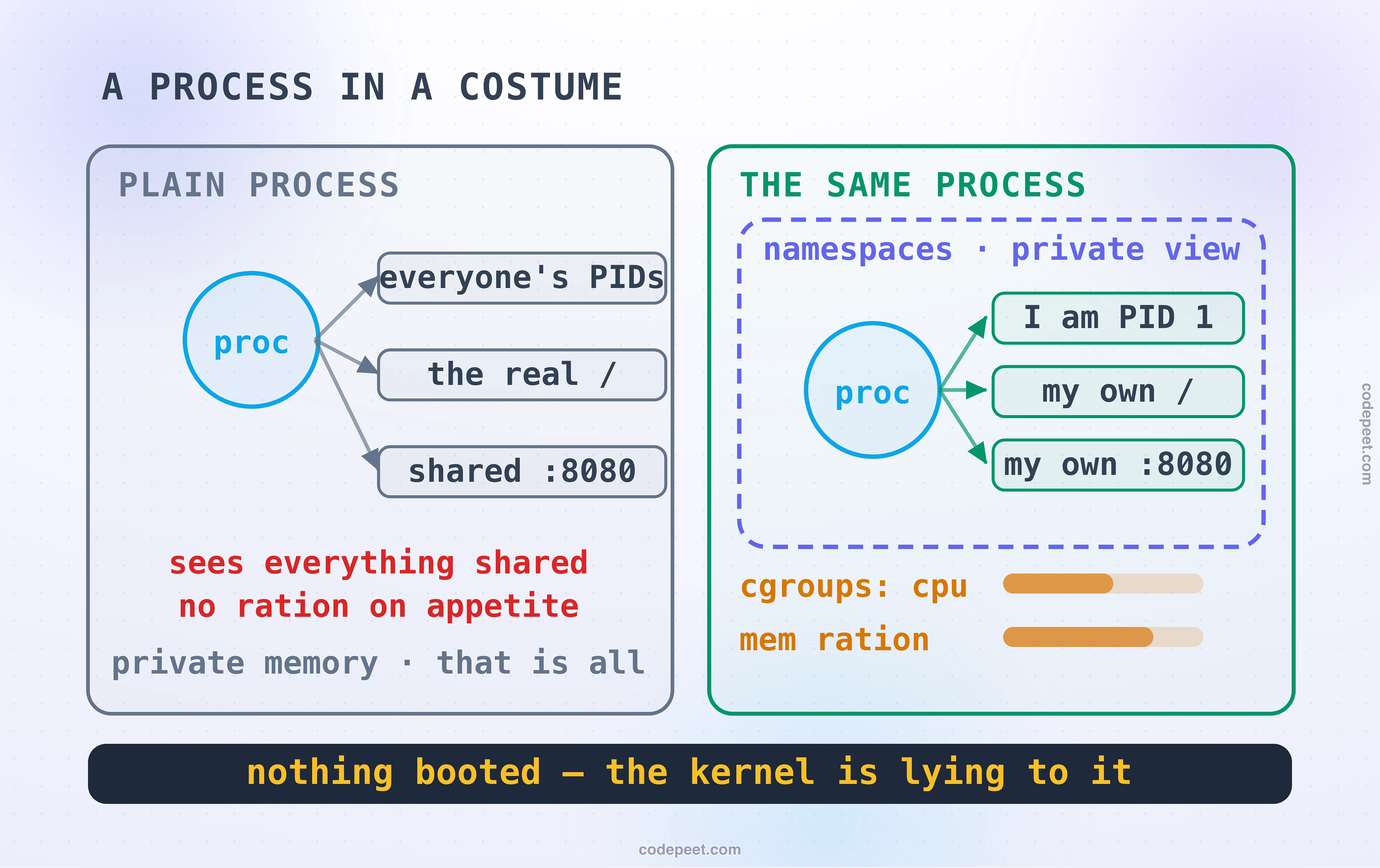
So look precisely at what the process does not isolate, because that short list is this entire lesson. Every process on the machine sees the same filesystem. The same process table, so it can watch its neighbors' PIDs. The same network interfaces and ports, so two processes fight over port 8080. And, critically, nothing rations appetite: any process can eat all the CPU, RAM, disk bandwidth, or network it can grab, the four axes The Four Bottlenecks: CPU, Memory, Disk, Network taught you to watch. One greedy neighbor starves the other thirty-nine.
Add the sharpest edge last: every process talks to one kernel. A kernel panic, a bad kernel module, an exhausted kernel resource, and every process on the machine goes down as one. The process gave you private memory and nothing else. Both lies exist to fill in, or wall off, everything on that list.
Lying to an Operating System
The older answer walls it all off. A hypervisor is a program whose job is impersonating hardware: it presents a fake CPU, fake memory, fake disks and fake network cards, convincingly enough that an unmodified operating system boots on top and never suspects. That guest brings everything it would bring to a real machine: its own kernel, its own init system, its own services, its own view of everything. Do it three times and one physical box holds three complete computers-in-software, each sealed behind hardware the CPU itself helps enforce.
What that buys is the strongest boundary short of separate physical machines. The guest kernels are strangers to each other: a panic in one is a private tragedy, a compromised one still has to break through the hypervisor's narrow hardware interface to reach its neighbors. And because each guest is a whole OS, guests can be different operating systems: Windows beside Linux beside FreeBSD, on one host.
What it costs follows from the same sentence. Run ten VMs and you run ten kernels: each guest OS claims memory before your application sees a byte, gigabytes of the host spent on duplicated plumbing, which The Memory Hierarchy: Disk, RAM, CPU Cache prices as the scarcest resource on the box. And starting one means genuinely booting a computer: firmware, bootloader, kernel initialization, service startup, seconds to minutes. A host that comfortably carries five or ten VMs is not being wasteful; it is paying for ten copies of something the machine only needed once.
Lying to a Process
The newer answer refuses to duplicate the kernel and lies one layer higher. A container is not a small virtual machine. Nothing boots. A container is an ordinary process that the host kernel is systematically deceiving, using two mechanisms that are worth knowing by name.
Namespaces scope what it can see. The kernel hands the process a private view of each thing the plain process shamefully shared: its own process table, where it runs as PID 1 like a little king; its own network stack, with its own interfaces and its own port 8080; its own mount table, so its root filesystem is whatever the image says; its own hostname. The neighbors do not disappear from the machine, only from its view.
Cgroups meter what it can use. The four appetites the plain process could not be trusted with, CPU, memory, disk bandwidth, network, each get a ration: shares and ceilings the kernel enforces. The greedy neighbor problem becomes a throttle instead of a famine.
Because a container is just a process in a costume, its economics are process economics. Starting one is one system call with the right flags plus a filesystem mount: milliseconds, not a boot sequence. Its memory overhead is roughly zero beyond what the application itself uses, because there is no guest kernel to feed. The host that strained at ten VMs runs hundreds of containers, all served by the one kernel that was already there. That is the density side of the trade in one sentence: one kernel for all, instead of one kernel each — and the price of that sentence is the whole second half of this lesson.
The Packaging Revolution
If isolation were the whole story, containers would be a modest optimization. What actually conquered the industry is the image: the container's answer to the question 'what exactly am I running?'
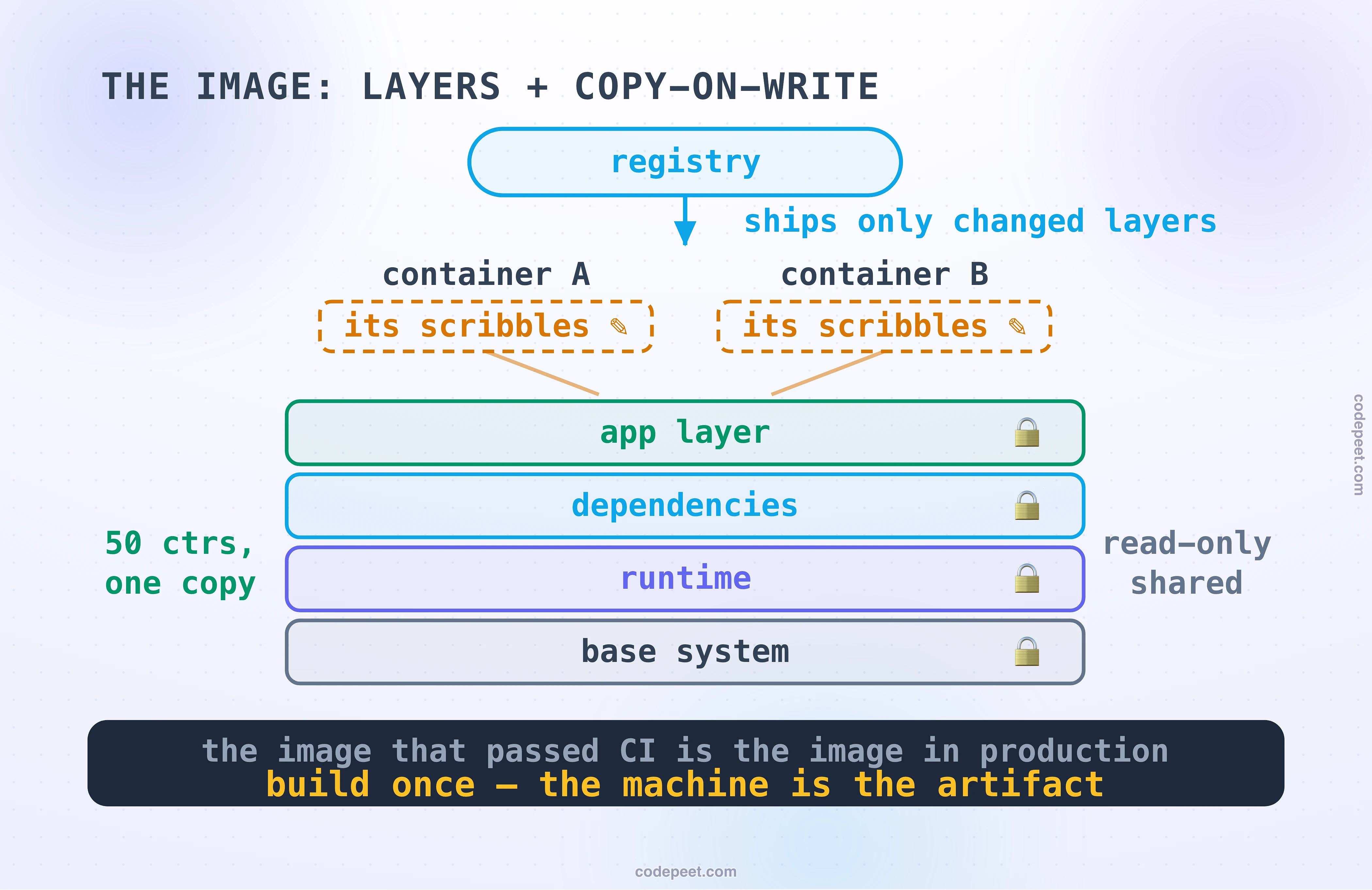
An image is a stack of read-only layers: a base system at the bottom, the runtime above it, your dependencies, your application on top. A union filesystem presents the stack as a single root, and a running container adds a single thin writable layer for its scribbles: copy-on-write, so nothing below is ever modified. Layers are shared ruthlessly: fifty containers from the same base share those bytes once on disk and once in memory, and shipping a new version means shipping only the layers that changed.
This is Externalized Configuration's first law made physical. Build once, promote the same artifact: the image that passed CI is, bit for bit, the image in production, with the environment-specific parts injected from outside at start. 'Works on my machine' stopped being an engineering problem the day the machine itself became the artifact.
Two honest footnotes keep this precise. VMs have images too; the container version won on granularity, layer sharing, and the registry culture that grew around it, not on inventing the idea. And Docker did not invent containers: the kernel mechanisms are older, and the ecosystem is standardized now. What Docker invented was the developer experience — the image format, the registry, the one-line run — which is why the packaging half of this lesson, not the namespace half, is what changed how software ships.
Drive One Host
Here is a machine with 32 GB and your workloads to place on it. Type real memory sizes, choose the lie per workload, VM or container, and watch the ledger: what each choice pays in kernel tax, how many fit, how long the fleet takes to come up. Then do the things slides cannot show you. Panic one workload's kernel and see who else dies, in each world. Let one neighbor turn greedy and watch a cgroup throttle where a VM would have a fence. And when a stranger's code shows up asking to run on your host, see what the machine demands before it will take the tenant.
Carry one number and one sentence out of the drill: the number is how many workloads fit when you stopped paying a kernel each; the sentence is that every container death was shared and every VM death was private.
The Blast-Radius Ledger
Density's bill arrives as blast radius, and it is worth itemizing, because this ledger is what decides real architectures.
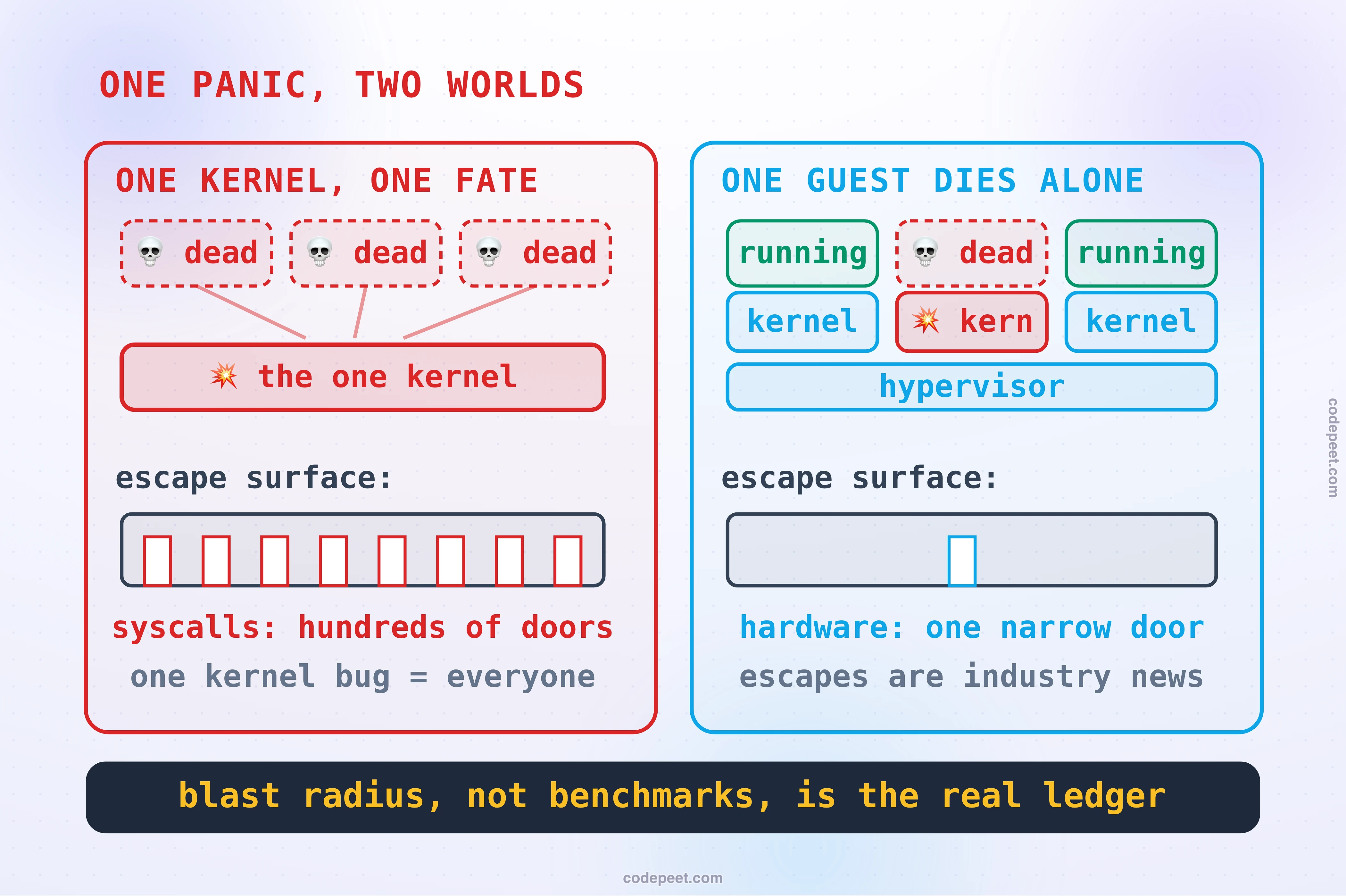
One kernel means one fate. A kernel panic, a bad kernel upgrade, an exhausted kernel table: on a container host, every container dies together, because 'the container's kernel' and 'the neighbor's kernel' are the same kernel. On a VM host the same event is one guest's private tragedy. You met this exact shape at the checkpoint: shared fate is what the shared database did to services, replayed one layer down.
The escape surfaces are not the same size. A malicious container's path to its neighbors is the syscall interface: hundreds of entry points into the one shared kernel, any single bug potentially fatal to everyone's secrets. A malicious VM's path is the hypervisor's hardware interface: narrow, CPU-assisted, with escapes rare enough to be industry news. Neither is zero; they are different orders of magnitude of worry.
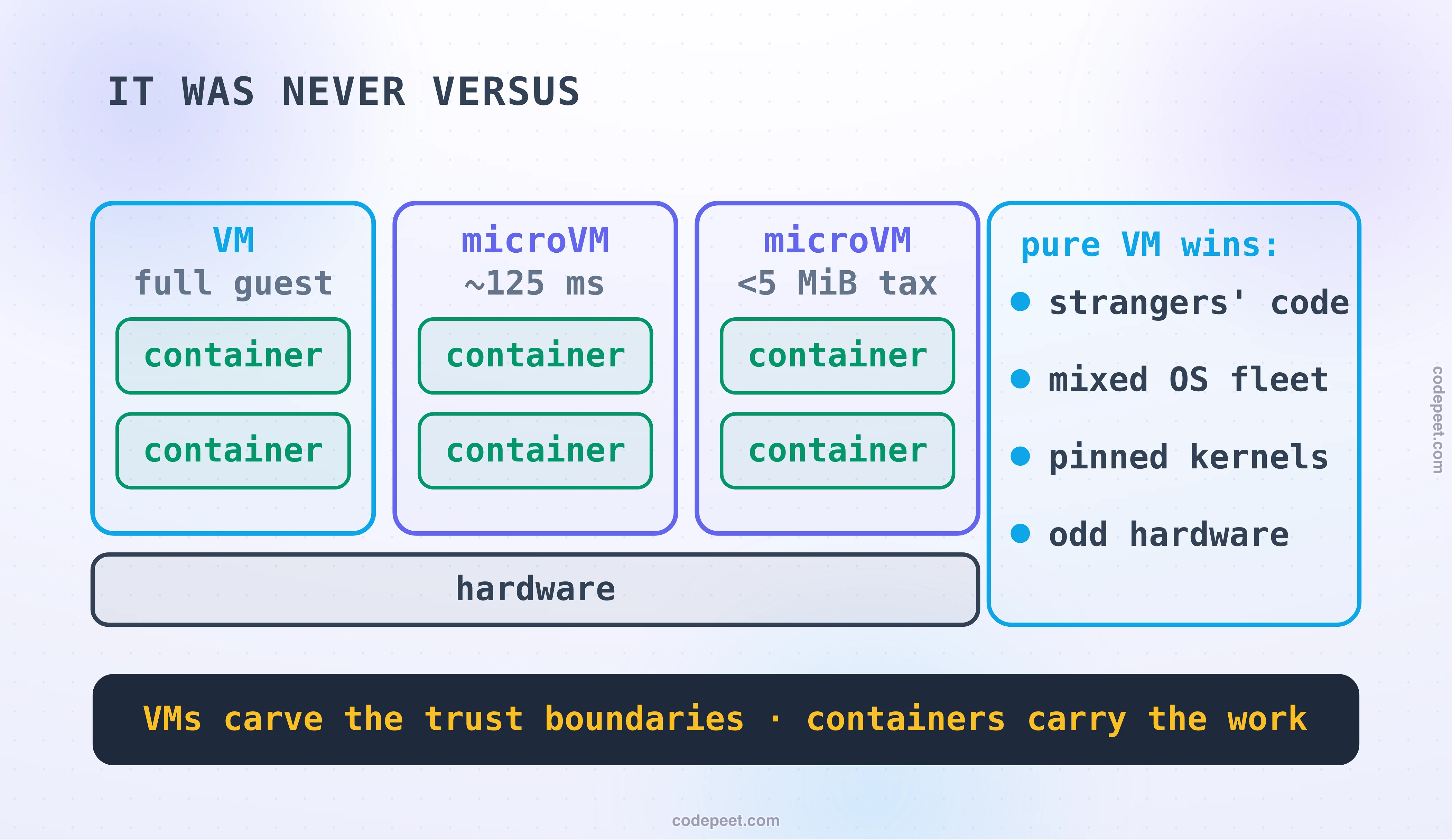
Which is why the clouds refuse to choose. No major provider runs strangers' containers on a shared kernel. When you hand your container to a serverless container service, it runs inside a microVM: a stripped hypervisor guest with a real hardware boundary that boots in about 125 milliseconds with under five mebibytes of overhead. The name behind those numbers is Firecracker, and you have met it before: it is exactly the machinery Serverless showed you at cold-start time. The middle ground has other residents, sandboxes that intercept syscalls in userspace (gVisor) and runtimes that wrap each container in its own tiny hardware-walled guest (Kata), but the microVM is the trade collapsing: VM-grade walls at near-container prices, converged on from both directions.
Noisy neighbors sit in the middle. Cgroups ration the four appetites well, but the kernel's own machinery, page cache, network stack, remains one shared engine; VMs pre-carve more of the machine at the cost of flexibility. For your own workloads that is a tuning question. For hostile tenants it is not a question at all: the trust boundary, not the performance chart, chooses the wall.
Choosing, and the Stacked Truth
The rubric is short because the previous section taught you its shape: find the constraint, and let it name the boundary.
The trust boundary chooses first. Your own team's workloads can share a kernel; strangers' code cannot. Multi-tenant platforms, code-execution products, anything where the workload is the adversary: that is a hardware boundary, a VM or microVM, non-negotiable.
The operating system chooses second. Containers share the host kernel, so they can only ever be the host's OS family. A Windows workload on a Linux fleet, a workload pinned to a specific kernel version, a vendor appliance, kernel-touching drivers: VM territory, permanently.
Everything else chooses containers. Density, millisecond starts, layered images, one artifact from laptop to production, and the entire orchestration world that the next lesson opens. For your own services, the container is simply the right default, and it has been for a decade.
Which resolves into the fact this lesson has been circling: it was never actually a versus. Pull up any real cloud and look at the stack: hardware, then a layer of VMs or microVMs carving the trust boundaries, then containers inside them carrying the workloads. The VM half answers to security and the hardware; the container half answers to developers and the scheduler. Every 'VMs vs containers' debate you will ever sit through is really about which layer of a stack both sides already run is the one that matters for the decision at hand.
Takeaways
-
Two lies, two bills. Lie to an OS with fake hardware and you get a virtual machine: armored walls, any OS, one full kernel of tax per tenant and a real boot. Lie to a process with namespaces and cgroups and you get a container: milliseconds and near-zero overhead, hundreds per host, one shared load-bearing kernel.
-
A container is a process in a costume. Namespaces scope what it sees, its own PIDs, network, and root; cgroups meter what it uses across the four bottleneck axes. Nothing boots, which is the entire economic story.
-
The image is half the revolution. Layered, copy-on-write, registry-shipped: build once and promote the same artifact, made physical. The packaging, as much as the isolation, is why containers won the default.
-
Density's price is shared fate. One kernel panic kills every container on the host; the syscall interface is a wide escape surface where the hypervisor's is a narrow one. Blast radius, not benchmarks, is the real ledger.
-
The trust boundary picks the wall. Your own code shares kernels; strangers' code gets hardware walls, which is why every cloud runs tenant containers inside microVMs — 125-millisecond VM-grade isolation, the trade collapsing into one machine.
-
It was never versus. Real clouds stack the lies: VMs carve the trust boundaries, containers carry the workloads inside them. Argue about layers, not winners.
So one host now carries hundreds of containers. Multiply by a fleet and you have thousands of them: starting, dying, moving, needing addresses the moment they land, exactly the churn the service registry was built to chase. Something has to decide which host each container lands on, restart the ones that die, and roll new versions through the fleet without dropping requests. That something has a famous name and a reputation for being unlearnable, and the next lesson makes the opposite bet: Kubernetes: The 20% That Matters.