unique-id-generators
Introduction
A single database auto-increment sequence works fine on one server. But when Server 1 and Server 2 both generate ID 1 for different users, the system breaks. Every tweet, video, and shortened URL needs a globally unique identifier that can be generated independently on any server without collisions.
Why Auto-Increment Fails
Auto-increment sequences require coordination. Each server must ask a central authority for the next ID. This creates a bottleneck. The central ID generator becomes a single point of failure. Every ID request requires a network call, adding latency to every write operation.
Distributed ID generation needs different properties. IDs must be unique across the entire system. Generation should not fail when individual servers go down. ID creation should be fast, ideally under one millisecond. The system should work with thousands of servers generating millions of IDs. For many applications, newer IDs should be greater than older ones to enable time-based sorting.
Snowflake IDs
Snowflake solves the distributed ID problem by embedding uniqueness into the ID structure itself. Instead of coordinating between servers, each server generates IDs independently using a clever bit allocation strategy. If every server has a unique identifier and includes a timestamp, IDs will be unique across the entire system without coordination.
A Snowflake ID uses 64 bits divided into four parts: 1 sign bit, 41 bits for timestamp, 10 bits for machine ID, and 12 bits for sequence number. The timestamp stores milliseconds since a custom epoch, providing roughly 69 years of timestamps. Different times produce different IDs. This makes IDs sortable by creation time.
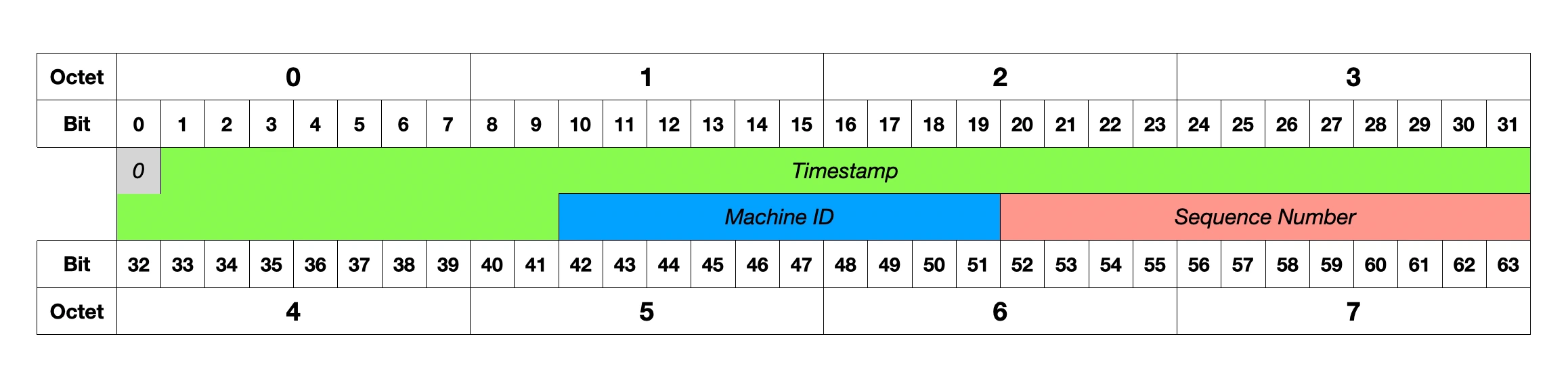
The machine ID is a unique identifier per server. It supports up to 1,024 different servers. Each server gets a unique ID during deployment. Different machines produce different IDs even at the same millisecond. This requires coordination at setup time to ensure no two servers share the same machine ID.
The sequence number is a counter within the same millisecond. It handles multiple ID requests in the same millisecond on the same machine. Each machine can generate up to 4,096 IDs per millisecond. The counter resets to zero each new millisecond.
A concrete example shows how this works. At time 1640995200000, Server 1 with machine ID 001 generates ID ending in 0001. The next request on the same server in the same millisecond gets 0002 by incrementing the sequence. Server 2 with machine ID 002 generates an ID ending in 0001 at the same millisecond because it has a different machine ID. When the next millisecond arrives, the sequence resets to 0001.
Snowflake Implementation Example
Here's an interactive implementation showing the key concepts:
Snowflake ID Generator
import time
import threading
from datetime import datetime

class SnowflakeIDGenerator:
    def __init__(self, machine_id):
        self.machine_id = machine_id & 0x3FF  # 10 bits max (0-1023)
        self.sequence = 0
        self.last_timestamp = -1
        self.lock = threading.Lock()
        self.custom_epoch = 1577836800000  # Jan 1, 2020
        print(f"Initialized Snowflake generator for machine {machine_id}")

    def generate_id(self):
        with self.lock:
            timestamp = int(time.time() * 1000)

            # Same millisecond - increment sequence
            if timestamp == self.last_timestamp:
                self.sequence = (self.sequence + 1) & 0xFFF  # 12 bits max
                print(f"  Same millisecond: sequence incremented to {self.sequence}")
                # Sequence overflow - wait for next millisecond
                if self.sequence == 0:
                    print("  Sequence overflow! Waiting for next millisecond...")
                    timestamp = self._wait_for_next_ms(timestamp)
            else:
                # New millisecond - reset sequence
                old_sequence = self.sequence
                self.sequence = 0
                if old_sequence > 0:
                    print(f"  New millisecond: sequence reset from {old_sequence} to 0")

            self.last_timestamp = timestamp

            # Combine all parts into 64-bit ID
            snowflake_id = (
                ((timestamp - self.custom_epoch) << 22) |  # 41 bits timestamp
                (self.machine_id << 12) |                   # 10 bits machine
                self.sequence                               # 12 bits sequence
            )

            # Show the breakdown
            time_part = (timestamp - self.custom_epoch) << 22
            machine_part = self.machine_id << 12
            sequence_part = self.sequence

            print(f"  Generated ID: {snowflake_id}")
            print(f"    Timestamp part: {time_part}")
            print(f"    Machine part:   {machine_part}")
            print(f"    Sequence part:  {sequence_part}")

            return snowflake_id

    def _wait_for_next_ms(self, last_timestamp):
        timestamp = int(time.time() * 1000)
        while timestamp <= last_timestamp:
            timestamp = int(time.time() * 1000)
        return timestamp

    def decode_id(self, snowflake_id):
        """Decode a Snowflake ID back into its components"""
        sequence = snowflake_id & 0xFFF
        machine_id = (snowflake_id >> 12) & 0x3FF
        timestamp = (snowflake_id >> 22) + self.custom_epoch

        dt = datetime.fromtimestamp(timestamp / 1000)

        print(f"Decoded ID {snowflake_id}:")
        print(f"  Timestamp: {timestamp} ({dt})")
        print(f"  Machine ID: {machine_id}")
        print(f"  Sequence: {sequence}")

        return timestamp, machine_id, sequence

def main():
    """Driver function to demonstrate Snowflake ID generation"""
    print("=== Setting up Twitter-like system with 3 servers ===")
    server_1 = SnowflakeIDGenerator(machine_id=1)
    server_2 = SnowflakeIDGenerator(machine_id=2)
    server_3 = SnowflakeIDGenerator(machine_id=3)

    print("\n=== Generating tweet IDs ===")
    print("Server 1 generates tweet:")
    tweet_1 = server_1.generate_id()

    print("\nServer 2 generates tweet (same time, different machine):")
    tweet_2 = server_2.generate_id()

    print("\nServer 1 generates another tweet (same machine, sequence++):")
    tweet_3 = server_1.generate_id()

    print("\n=== Decoding the first tweet ID ===")
    server_1.decode_id(tweet_1)

    print(f"\n=== Verifying uniqueness ===")
    print(f"Tweet 1: {tweet_1}")
    print(f"Tweet 2: {tweet_2}")
    print(f"Tweet 3: {tweet_3}")
    print(f"All different? {len({tweet_1, tweet_2, tweet_3}) == 3}")

    # Show sorting behavior
    ids = [tweet_1, tweet_2, tweet_3]
    print(f"\nIDs are naturally sorted by time: {sorted(ids) == ids}")

    # Demonstrate sequence behavior with rapid generation
    print(f"\n=== Testing rapid ID generation (same millisecond) ===")
    rapid_ids = []
    for i in range(5):
        rapid_id = server_1.generate_id()
        rapid_ids.append(rapid_id)

    print(f"Generated {len(rapid_ids)} IDs rapidly:")
    for i, rid in enumerate(rapid_ids):
        print(f"  ID {i+1}: {rid}")

    return tweet_1, tweet_2, tweet_3

#Execute the demonstration
if __name__ == "__main__":
    main()
Snowflake Trade-offs
Snowflake excels at independent ID generation. Each server generates IDs without coordination, achieving 2-3 million IDs per second per machine. The IDs are time-sortable, meaning newer tweets have larger IDs. They are roughly sequential, which benefits database B-tree performance during inserts.
The approach has limitations. It depends on synchronized clocks across servers. The system supports only 1,024 machines and 4,096 IDs per millisecond per machine. Clock skew creates problems. If a server clock goes backwards, it can generate duplicate IDs. Machine ID coordination is required at setup to ensure each server has a unique machine ID.
Machine ID Coordination Explained:
The Problem: Every server needs a unique machine ID to prevent collisions.
Bad scenario (no coordination):
Server A starts up → picks machine ID 5
Server B starts up → picks machine ID 5  ← Problem! Same ID!
Both generate IDs at same time → Collision guaranteed
Common coordination strategies:
Configuration Management:
# server-config.yml
server_1: machine_id: 1
server_2: machine_id: 2
server_3: machine_id: 3
Service Discovery + Database:
# Server startup process
def get_machine_id():
    # Try to get existing ID from database
    existing_id = db.get("machine_id", server_hostname)
    if existing_id:
        return existing_id

    # Allocate new ID
    next_id = db.increment("next_available_machine_id")
    db.set("machine_id", server_hostname, next_id)
    return next_id
Container Orchestration:
# Kubernetes assigns unique IDs via environment variables
docker run -e MACHINE_ID=${POD_ID} snowflake-service
Why this is "coordination": Unlike UUID (completely independent), Snowflake requires a setup step where servers agree on who gets which machine ID.
Use Snowflake when you need sortable IDs like Twitter timelines. It works well for high-throughput systems generating millions of IDs per second. The pattern suits distributed systems with a known number of servers under 1,024. It fits applications where the ID structure can be exposed, though this reveals the timestamp.
Alternative Unique ID Strategies
Snowflake isn't the only solution for distributed ID generation. Different approaches have different trade-offs that make them better suited for specific use cases.
UUID
UUID generates 128-bit random or pseudo-random numbers with extremely low collision probability. An example UUID v4 looks like f47ac10b-58cc-4372-a567-0e02b2c3d479. UUIDs are truly distributed with no coordination needed. They have no clock dependency and are standardized across programming languages. You can generate them offline.
The downsides are significant for databases. UUIDs are 16 bytes compared to 8 bytes for Snowflake. They are not sortable by time. They cause poor database performance due to random inserts. They are not human-readable.
Use UUIDs for distributed systems where you cannot coordinate machine IDs, offline applications, or systems that do not need time-based sorting.
UUIDs hurt write performance because they are completely random. Sequential inserts from Snowflake or auto-increment always append to the end of the B-tree. Random UUID inserts scatter across the tree, requiring the database to find the correct position with more disk reads, split pages when inserting in the middle, and create index fragmentation that reduces cache efficiency. Sequential inserts can be 5-10x faster than random UUID inserts in write-heavy systems.
For a deeper understanding of why sequential writes perform better than random writes in databases, see Data Structures Behind Databases.
ULID
ULID generates 128-bit IDs with 48-bit timestamp plus 80-bit randomness, encoded in Base32. An example ULID looks like 01F8VYXK67BGC1XPD2YH1W8HTH. ULIDs are time-sortable like Snowflake. They use case-insensitive, URL-safe encoding. No machine ID coordination is needed. The 48-bit timestamp provides 8,925 years of range.
ULIDs are larger than Snowflake, using 26 characters versus 19 digits. They support less throughput per millisecond than Snowflake. As a newer standard, they have less tooling support.
Use ULIDs when you need time-sortable IDs but cannot manage machine ID coordination, or when you want human-readable IDs.
Partitioned Auto-Increment
Partitioned auto-increment uses database sequences with different starting points and increments. Server 1 generates 1, 4, 7, 10, 13 with start=1 and increment=3. Server 2 generates 2, 5, 8, 11, 14 with start=2 and increment=3. Server 3 generates 3, 6, 9, 12, 15 with start=3 and increment=3.
This approach is simple to implement with guaranteed sequential ordering. IDs are small at 8 bytes with native database support. The database becomes a bottleneck for ID generation. Adding or removing servers is difficult. The ID sequence reveals information about system scale. The database is a single point of failure.
Use partitioned auto-increment for smaller systems when you need guaranteed sequential IDs and prefer simple architectures.
Choosing the Right ID Strategy
| Requirement | Snowflake | UUID v4 | ULID | Auto-Increment |
|---|---|---|---|---|
| Time-sortable | ✅ | ❌ | ✅ | ✅ |
| No coordination | ❌* | ✅ | ✅ | ❌ |
| High throughput | ✅ | ✅ | ✅ | ❌ |
| Small size | ✅ | ❌ | ❌ | ✅ |
| Human-readable | ❌ | ❌ | ✅ | ✅ |
| No clock dependency | ❌ | ✅ | ❌ | ✅ |
*Snowflake needs machine ID coordination at setup, but no runtime coordination between servers
System Design Interview Decision Framework
Ask these questions to choose the right approach:
-
Do you need time-based sorting?
- Yes → Snowflake, ULID, or Auto-increment
- No → UUID v4
-
How many servers will you have?
- < 1,000 servers → Snowflake works well
- > 1,000 servers → Consider ULID or UUID
-
Can you coordinate machine IDs?
- Yes → Snowflake is a good choice
- No → ULID or UUID
-
Do you need IDs to be unguessable?
- Yes → UUID (fully random)
- No → Snowflake or ULID
-
Is this a read-heavy or write-heavy system?
- Write-heavy → Avoid UUID (random inserts cause B-tree page splits, 5-10x slower)
- Read-heavy → UUID is fine (insert performance doesn't matter much)
Twitter uses Snowflake for tweets because it needs time-sorting at high scale. Instagram uses a modified Snowflake with different bit allocation. GitHub uses UUID for some resources and auto-increment for others. Stripe uses custom prefixed IDs like cus_1234567890abcdef, which are not UUIDs but their own format.
Understanding these trade-offs helps you make informed decisions in system design interviews and shows deeper architectural thinking.
When Standard Solutions Don't Fit: Custom ID Systems
Sometimes none of the standard approaches (Snowflake, UUID, ULID, Auto-increment) perfectly match your requirements. Many successful companies create custom ID formats tailored to their specific needs.
Stripe's Approach
Stripe uses prefixed random IDs with the format {prefix}_{random_string}. Examples include cus_1234567890abcdef for customers, ch_3L4E5Y2eZvKYlo2C for charges, sub_1A2B3C4D5E6F7G8H for subscriptions, and inv_1GjJKl2eZvKYlo2C for invoices.
This format is human-readable. You immediately know what type of object it is. The IDs are URL-safe, using only characters that do not need encoding in URLs.
What "URL-safe" means:
✅ Safe characters: a-z, A-Z, 0-9, hyphen (-), underscore (_)
❌ Unsafe characters: +, /, =, spaces, &, ?, #, %Examples:
UUID:     f47ac10b-58cc-4372-a567-0e02b2c3d479  ✅ (hyphens are safe)
Base64:   SGVsbG8gV29ybGQ+              ❌ (+ and / need URL encoding)
Stripe:   cus_1234567890abcdef           ✅ (only letters, numbers, underscore)
Why this matters:
- Can use directly in URLs:
api.stripe.com/customers/cus_123abc- No encoding needed:
fetch('/api/orders/ord_456def')- Avoids bugs from forgotten URL encoding
GitHub's Approach
GitHub uses different ID strategies for different use cases. Repository URLs use human-readable names like github.com/user/repo-name. Issue IDs use auto-increment per repository, showing as issue #1, #2, #3. Commit SHAs use Git hashes as required by distributed version control.
YouTube's Approach
YouTube uses short random IDs like dQw4w9WgXcQ with 11 characters in Base64-like encoding. This creates short URLs like youtube.com/watch?v=dQw4w9WgXcQ. The IDs are non-sequential, preventing users from guessing other videos by incrementing. Eleven characters provide roughly 64 bits of randomness. The IDs are memorable enough to share in text messages.
When to Build Custom IDs
Consider custom IDs when none of the standard approaches fit. User-facing requirements might need human-readable or branded formats. Systems with multiple object types might want to distinguish customers from orders from products. API design might require stable external IDs separate from internal database IDs. Regulatory requirements might demand audit trails or specific ID formats. Migration needs might require changing internal storage without breaking external APIs.
Custom ID Generator
import secrets
import string

class IDGenerator:
    def __init__(self, prefix, length=16, include_uppercase=False):
        self.prefix = prefix
        self.length = length
        # Build alphabet based on options
        self.alphabet = "0123456789abcdefghijklmnopqrstuvwxyz"
        if include_uppercase:
            self.alphabet += "ABCDEFGHIJKLMNOPQRSTUVWXYZ"

    def generate(self, count=1):
        """Generate one or more IDs"""
        ids = []
        for _ in range(count):
            random_part = ''.join(secrets.choice(self.alphabet)
                                for _ in range(self.length))
            ids.append(f"{self.prefix}_{random_part}")
        return ids if count > 1 else ids[0]

    def generate_batch(self, count):
        """Generate a batch of IDs efficiently"""
        return [self.generate() for _ in range(count)]

def demo_stripe_like_system():
    """Demonstrate a Stripe-like ID system"""
    print("=== Stripe-like Custom ID System ===")
    print()

    # Create generators for different resource types
    customer_gen = IDGenerator("cus", length=16)
    charge_gen = IDGenerator("ch", length=18)
    subscription_gen = IDGenerator("sub", length=16)
    invoice_gen = IDGenerator("inv", length=16)
    product_gen = IDGenerator("prod", length=12)

    generators = [
        ("Customer", customer_gen),
        ("Charge", charge_gen),
        ("Subscription", subscription_gen),
        ("Invoice", invoice_gen),
        ("Product", product_gen)
    ]

    print("Generated IDs for different resource types:")
    print("=" * 50)

    for resource_type, gen in generators:
        sample_id = gen.generate()
        print(f"{resource_type:12}: {sample_id}")

    print("\n=== Testing ID Properties ===")

    # Test URL safety
    customer_id = customer_gen.generate()
    print(f"URL-safe test: /api/customers/{customer_id}")
    print(f"Contains only safe chars: {all(c in 'abcdefghijklmnopqrstuvwxyz0123456789_' for c in customer_id)}")

    # Test uniqueness with batch generation
    print(f"\n=== Testing Uniqueness ===")
    batch = customer_gen.generate_batch(100)
    unique_count = len(set(batch))
    print(f"Generated 100 IDs, {unique_count} unique ({unique_count/100*100:.1f}% unique)")

    # Show some examples
    print(f"\nFirst 5 IDs from batch:")
    for i, id_val in enumerate(batch[:5], 1):
        print(f"  {i}. {id_val}")

    return customer_id

def compare_configurations():
    """Compare different ID generator configurations"""
    print("\n" + "=" * 50)
    print("=== Comparing Different Configurations ===")

    configs = [
        ("Standard", IDGenerator("api", 16, False)),
        ("Short", IDGenerator("short", 8, False)),
        ("Long", IDGenerator("long", 24, False)),
        ("Mixed Case", IDGenerator("mix", 16, True)),
    ]

    print(f"{'Config':<12} {'Example ID':<25} {'Entropy (bits)':<15}")
    print("-" * 55)

    for name, gen in configs:
        sample_id = gen.generate()
        # Calculate entropy: log2(alphabet_size^length)
        import math
        entropy = len(gen.alphabet) ** gen.length
        entropy_bits = math.log2(entropy)

        print(f"{name:<12} {sample_id:<25} {entropy_bits:.1f}")

    print(f"\nKey insights:")
    print(f"- Longer IDs = more entropy = lower collision chance")
    print(f"- Mixed case = larger alphabet = more entropy per character")
    print(f"- But longer IDs = longer URLs and harder to read")

def test_custom_generator():
    """Let users test their own generator settings"""
    print("\n" + "=" * 50)
    print("=== Test Your Own Configuration ===")

    # Example of testing different configurations
    test_cases = [
        ("YouTube-style", IDGenerator("vid", 11, True)),
        ("GitHub-style", IDGenerator("repo", 8, False)),
        ("Database-style", IDGenerator("rec", 20, False)),
    ]

    for name, gen in test_cases:
        print(f"\n{name}:")
        examples = gen.generate_batch(3)
        for i, example in enumerate(examples, 1):
            print(f"  {i}. {example}")

#Execute the demonstration
if __name__ == "__main__":
    # Run the main demo
    main_id = demo_stripe_like_system()

    # Compare configurations
    compare_configurations()

    # Test custom generators
    test_custom_generator()

    print(f"\n=== Try Your Own! ===")
    print(f"Modify the code above to test:")
    print(f"- Different prefixes (org, usr, tok, etc.)")
    print(f"- Different lengths (6-32 characters)")
    print(f"- Include uppercase letters")
    print(f"- Generate batches for uniqueness testing")
Interview Application
When discussing custom ID systems in interviews, start with standard options. Mention evaluating Snowflake, UUID, and ULID first. Then explain why they do not fit the requirements. For example, users need to share URLs, so UUID is too long. Show trade-off thinking by noting that custom IDs mean more code to maintain, but better user experience makes it worthwhile. Discuss implementation details like using cryptographically secure randomness to prevent enumeration attacks. Mention maintenance considerations, noting that the team would need to ensure uniqueness and handle edge cases themselves.